The answer to Kadence Blocks free vs Pro is a number, and nobody seems to publish it: Pro adds exactly 12 new blocks you can insert. The free plugin gives you 30. That is the whole difference in the block library.
I did not take that from a marketing page. This site runs both plugins, so I walked both plugin directories and parsed every block.json file, counting a block as insertable unless it declares itself a child of another block. Those are the real numbers as of 28 October 2026, on Kadence Blocks 3.7.11.1 and the Pro Extension 2.8.19.1.
The short answer
- Free: 30 insertable blocks. Plus 33 child blocks that only appear inside a parent.
- Pro adds 12 more. A 13th, Video Popup, already exists in free and is simply replaced by the Pro version.
- You cannot buy Kadence Blocks Pro on its own any more. The product page has no price and no buy button, just a link to the plans.
- The cheapest way to get it is now $350 a year, in a bundle with the Kadence theme, Give, The Events Calendar and LearnDash.
- The free version is not crippled. 600,000 active installs, rated 96 out of 100, and updated the day before I checked.
- Most sites do not need Pro. The 12 extra blocks are mostly dynamic and query driven, which matters for directories and shops, not for a blog.
What Kadence Blocks free gives you
Thirty blocks you can drop straight into a post, and they cover far more than people expect from a free plugin. This is the inserter panel on a real install.
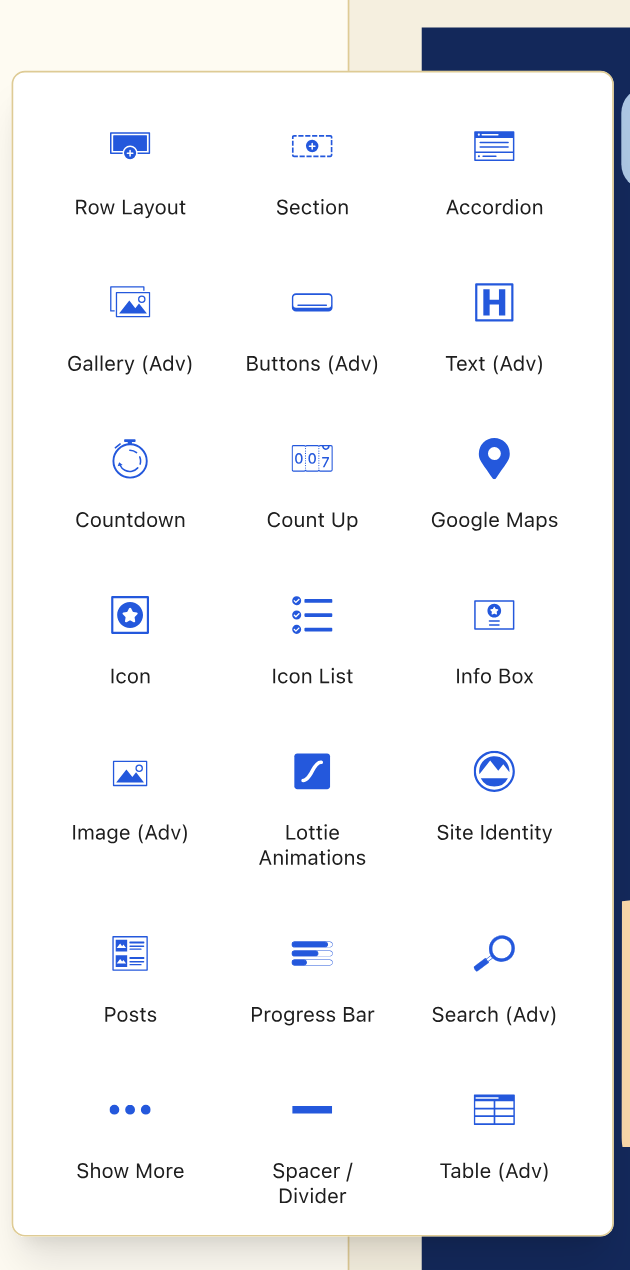
| Layout and structure | Content | Media and interactive |
|---|---|---|
| Row Layout | Advanced Text | Advanced Gallery |
| Section | Advanced Heading | Advanced Image |
| Tabs | Info Box | Lottie Animations |
| Accordion | Icon List | Video Popup |
| Show More | Testimonials | Vector SVG |
| Spacer and Divider | Table of Contents | Google Maps |
| Header (Adv) | Table (Adv) | Countdown |
| Navigation (Adv) | Posts | Count Up |
| Site Identity | Advanced Form | Progress Bar |
| Search (Adv) | Advanced Button | Icon |
The free plugin also ships 33 child blocks, things like an individual tab, a single accordion pane or one testimonial. They do not appear in the inserter because they only exist inside a parent, which is why block counts quoted around the web vary so wildly. Add them together and this site's registry reports 86 Kadence block types once Pro is installed as well.
The free version is actively maintained
- 600,000 active installs on WordPress.org.
- 96 out of 100 from 332 ratings, 307 of them five star and 7 one star.
- Last updated 22 September 2026, which was the day before I checked.
- On WordPress.org since 19 August 2018, so it predates most of its competition.
- Requires WordPress 6.6 and PHP 7.4.
The 12 blocks Kadence Blocks Pro adds
This is the entire Pro block library. If none of these solve a problem you have, Pro will not change how you build pages.
| Pro block | Internal name | What it is for |
|---|---|---|
| Post Grid | kadence/postgrid | Laying out posts in a designed grid |
| Portfolio Grid | kadence/portfoliogrid | The same idea for a portfolio post type |
| Product Carousel | kadence/productcarousel | WooCommerce products in a slider |
| Advanced Slider | kadence/slider | A full slider you build from blocks |
| Modal | kadence/modal | Popups and lightboxes triggered on the page |
| Query | kadence/query | Custom loops over any post type |
| Repeater | kadence/repeater | Repeating a block pattern over a data set |
| Dynamic HTML | kadence/dynamichtml | Output a custom field or dynamic value |
| Dynamic List | kadence/dynamiclist | A list built from dynamic data |
| Split Content | kadence/splitcontent | Two panel layouts that stay aligned |
| Image Overlay | kadence/imageoverlay | Text and effects layered over an image |
| Image Overlay | kadence/userinfo | A second block sharing the same title |
Two counting quirks
Pro ships 13 insertable blocks but only 12 are new. kadence/videopopup exists in the free plugin too, and the Pro extension registers its own version over the top. If you subtract marketing numbers you get 13; if you compare block names you get 12.
Two different Pro blocks are both titled “Image Overlay”. kadence/imageoverlay and kadence/userinfo share a display name, which suggests one is a rename of an older block that was kept for backwards compatibility. A small thing, but it turns the inserter into a guessing game, and you only spot it by reading the plugin, not the sales page.
Look at that list as a group and the pattern is obvious. Almost everything Pro adds is dynamic or query driven: pulling posts, looping over data, outputting custom fields. So Pro is the layer you need when a page has to be generated from content instead of typed out. If you were hoping for prettier design blocks, this is not that.
You can no longer buy Kadence Blocks Pro on its own
This is the part that makes most free versus Pro comparisons out of date, including the version of this page I am replacing, which quoted $59 a year.
The Kadence Blocks Pro product page still exists. It still describes the product, and it still tells you the licence covers up to 5 sites with one year of support and updates and a 30 day satisfaction guarantee. What it no longer carries is a price or an add to cart button. The only action on the page is a See Plans link.
Kadence's own pricing page now redirects to Liquid Web, which acquired the company. Blocks Pro is sold only as part of a bundle, and since 23 October 2026 there is just one: Kadence packaged with Give, The Events Calendar and LearnDash, priced by the number of sites.
What Kadence Blocks Pro costs in 2026
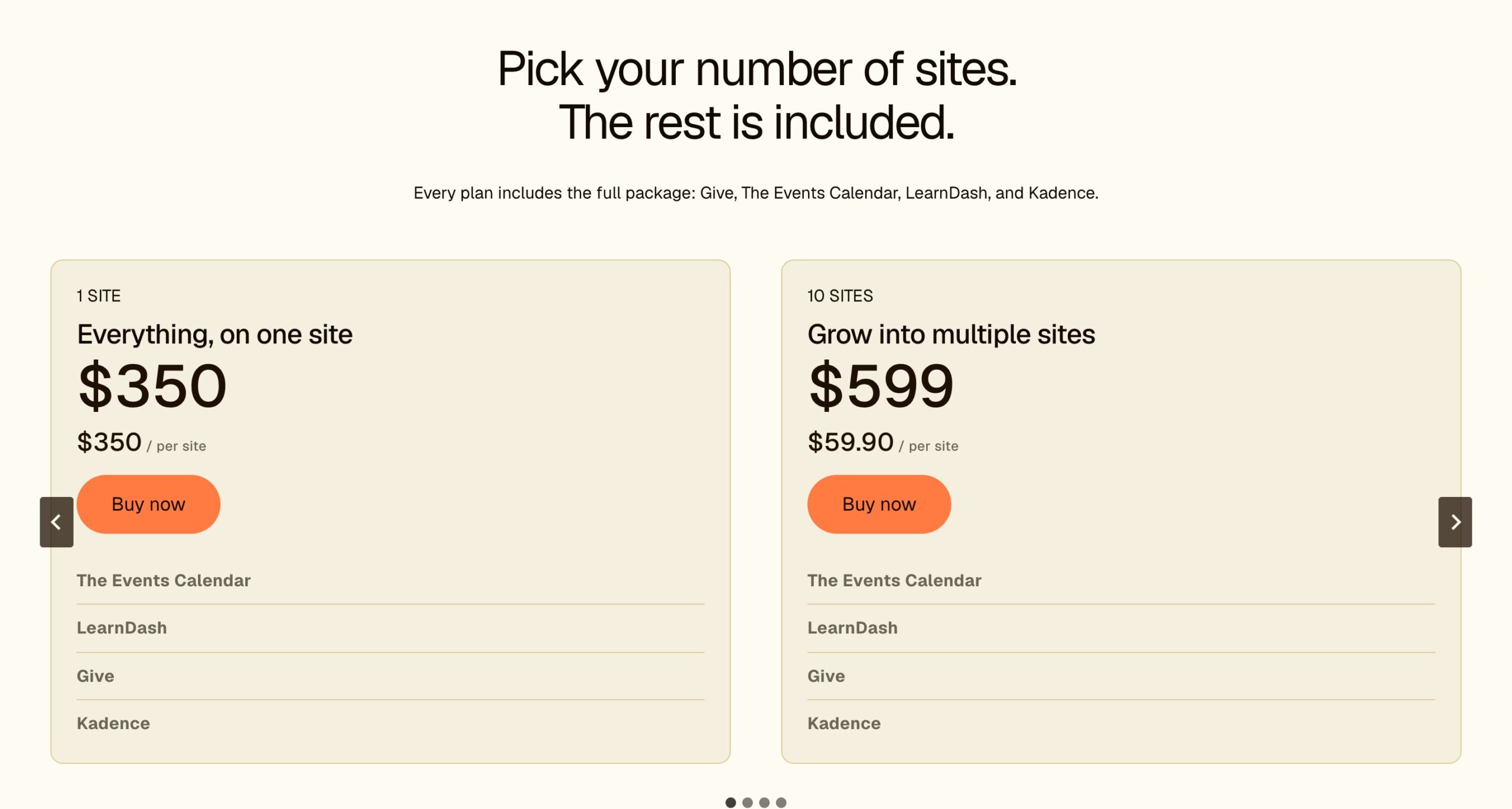
| Plan | Price | Per site | What you get |
|---|---|---|---|
| 1 site | $350/yr | $350 | Kadence theme and Blocks Pro, premium starter templates, mega menus, plus Give, The Events Calendar and LearnDash |
| 10 sites | $599/yr | $59.90 | The same bundle |
| 25 sites | $799/yr | $31.96 | The same bundle |
| 50 sites | $899/yr | $17.98 | The same bundle |
| 100 sites | $999/yr | $9.99 | The same bundle |
What changed in October
In September Kadence sold three bundles, Essentials at $99, Pro at $299 and Elite at $499, and Blocks Pro was in all three. In October the tiers were cut to Pro and Elite, and by 23 October the pricing section listed a single bundle that adds Give, The Events Calendar and LearnDash to Kadence and is priced only by the number of sites.
The practical effect: Blocks Pro now costs at least $350 a year, more than three times the old Essentials price. Even the Kadence Blocks page shows the same bundle, so there is no cheaper route in.
Two things are clearer now than in September: every plan states its site limit, from 1 to 100 sites, and there is still no lifetime option. The old lifetime membership is gone, and the checkout shows a 7 day guarantee.
The cheapest route to Blocks Pro
The single site bundle at $350 a year. You cannot get Blocks Pro for less, and you cannot get it without also getting the Kadence theme, the starter template library, Give, The Events Calendar and LearnDash. Whether that is good value depends entirely on whether you were going to use the theme anyway.
Do you need Kadence Blocks Pro?
Stay on free if this is you
- You run a blog, a brochure site or a portfolio you update by hand.
- You lay pages out yourself rather than generating them from post data.
- You want the design controls, the row layouts, the accordions and the table of contents. All of that is free.
- You are already using the free Kadence theme and it does what you need.
Pro earns its money if this is you
- You need a Post Grid or Query block to build archive style pages from your own content.
- You use custom fields and need Dynamic HTML or Dynamic List to output them.
- You run WooCommerce and want the Product Carousel.
- You need modals or popups triggered inside a page.
- You were going to buy the Kadence theme Pro anyway, in which case the $350 bundle covers both and Blocks Pro is effectively along for the ride.
My own position, for what it is worth: this site runs both, and the blocks I reach for daily are almost all in the free plugin. Row Layout, Advanced Text, Accordion, Table of Contents and Advanced Image do most of the work on every post I publish. Pro earns its place on the pages that are generated rather than written.
How Kadence Blocks compares with the alternatives
If you are weighing the free plugin against other block libraries rather than against its own Pro version, I have counted those properly too.
- Kadence Blocks versus Spectra, all blocks compared and counted
- Kadence Blocks versus Elementor, which one to use
- Kadence Blocks versus Ultimate Blocks
- Spectra Blocks review, every block tested
- Gutenberg versus page builders, and what I actually use
My verdict on Kadence Blocks
4.5 out of 5 ★★★★☆
Free is the version most sites should run. It is not a trial, and the 30 insertable blocks cover everything I build on this site. Pro is worth it only once you are generating pages from data rather than writing them, and the annoyance is that you can no longer buy it on its own.
What works
- Free version ships 30 insertable blocks, not a limited trial
- 96 out of 100 from 332 ratings across 600,000 active installs
- Pro adds 12 genuinely new blocks aimed at dynamic and query work
- Native Gutenberg blocks, no separate editor and no shortcode lock in
- Still actively maintained, last updated 22 September 2026
- Row Layout, Advanced Text and Table of Contents cover most posts on free
What does not
- Blocks Pro can no longer be bought on its own, only inside a bundle
- Cheapest route to Pro is now 350 dollars a year, bundled with plugins you may not need
- No lifetime licence, yearly plans only
- Two Pro blocks both appear named Image Overlay in the inserter
- The dynamic and query blocks carry a real learning curve
Kadence Blocks free vs Pro FAQs
How many blocks does Kadence Blocks free have?
Thirty insertable blocks in version 3.7.11.1, plus 33 child blocks that only appear inside a parent such as a single tab or one accordion pane. Counted from the plugin's own block.json files rather than from marketing material.
How many blocks does Kadence Blocks Pro add?
Twelve new insertable blocks. The Pro extension ships 13, but one of them, Video Popup, already exists in the free plugin and is simply overridden by the Pro version. Pro also adds 16 child blocks.
What are the Kadence Blocks Pro blocks?
Post Grid, Portfolio Grid, Product Carousel, Advanced Slider, Modal, Query, Repeater, Dynamic HTML, Dynamic List, Split Content and two blocks both titled Image Overlay. Almost all of them are dynamic or query driven rather than design blocks.
Can I buy Kadence Blocks Pro separately?
No, not any more. Even the Kadence Blocks page now shows the bundle pricing. Blocks Pro is sold only inside a bundle with the Kadence theme, Give, The Events Calendar and LearnDash, starting at $350 a year for one site.
How much is Kadence Blocks Pro in 2026?
There is no standalone price. The cheapest plan that includes it is $350 a year for one site, which also includes the Kadence theme, the starter templates, Give, The Events Calendar and LearnDash. Ten sites cost $599 and 100 sites $999.
Is Kadence Blocks Pro included in every Kadence plan?
Yes. Kadence now sells one bundle, priced only by the number of sites, and every tier includes the full Kadence package with Blocks Pro. The old Essentials, Pro and Elite tiers, which all included it too, have been withdrawn.
Is the free version of Kadence Blocks good enough?
For most sites, yes. It covers row layouts, accordions, tabs, galleries, forms, a table of contents, countdowns and the full design control set. It has 600,000 active installs and a 96 out of 100 rating. You only need Pro when you want pages generated from your content rather than laid out by hand.
Does Kadence Blocks slow down my site?
Kadence loads a separate stylesheet only for the block types actually present on a page, so the CSS cost scales with what you use rather than with what is installed. On a heavy page of mine it emitted six block stylesheets totalling a small fraction of the page weight, far less than the advertising scripts on the same page.
How many sites does a Kadence licence cover?
Each plan now states its limit: 1 site for $350 a year, 10 for $599, 25 for $799, 50 for $899 and 100 for $999.
Is there a Kadence lifetime deal?
Not any more. The lifetime membership Kadence used to sell has been removed from the pricing page, which now offers annual plans only. If you already hold a lifetime licence, keep it.
Do I need the Kadence theme to use Kadence Blocks?
No. The blocks plugin works with any WordPress theme. They are designed together and share a design system, so they are smoother as a pair, but the plugin is not dependent on the theme.
What happened to Kadence, is it still independent?
It was acquired. kadencewp.com now redirects its pricing to liquidweb.com, the plugin lists Nexcess as the author, and the standalone product licences have been folded into Liquid Web's bundles. The plugins themselves are still actively developed, with the free version updated on 22 September 2026.
Related reading
- Kadence deal status and price tracker
- Kadence versus Astra, which theme is better
- Kadence versus Blocksy
- Kadence Pro theme, full review and setup
- Kadence Cloud review and pricing
- WordPress theme deals, verified prices and renewals
- How I test, verify and update everything on this site
Disclosure: some links on this page are affiliate links and I earn a commission if you buy through them, at no extra cost to you. The block counts here were produced by parsing every block.json file in both plugins as installed on this site, Kadence Blocks 3.7.11.1 and Pro Extension 2.8.19.1, on 23 September 2026. The install and rating figures come from the WordPress.org API on the same day, and the pricing was read off the rendered plan comparison rather than a text copy, because that page marks inclusion with images. You can read exactly how I test, verify and update everything on this site.