Kadence Blocks is the better choice for most WordPress sites in 2026, and Elementor is the better choice when you need a specific feature Kadence does not have. Kadence Blocks extends the editor WordPress already ships with, so your pages stay as normal HTML if you ever switch it off. Elementor runs its own editor on top of WordPress, which gives you more widgets and more design freedom, and means your content is tied to the plugin.
I build on Kadence Blocks on this site, and I have built client work in Elementor. So you know where I start from, and I have kept every claim below to something you can check yourself: current pricing from both companies, install counts and star ratings from the WordPress.org API, all read on 22 September 2026. Kadence changed its pricing again after that, so I rechecked it on 23 October 2026.
Most Comparisons You Will Read Are Answering the Wrong Question
Search this and you will find page after page comparing the Kadence theme to Elementor. One of the top results opens with “Kadence is a theme designed for performance, while Elementor is a plugin”. Another is titled “Theme vs Page Builder”.
That is not this question. Kadence Blocks is a plugin, not a theme. It works on any WordPress theme, including no Kadence theme at all, and it competes directly with Elementor for the same job: building page layouts visually. Comparing a theme to a page builder tells you nothing useful, because you need both a theme and a builder either way.
| What it is | What it replaces | |
|---|---|---|
| Kadence Blocks | A plugin that adds 30+ blocks to the WordPress editor | Elementor, Divi, Bricks, other page builders |
| Kadence Theme | A WordPress theme | Astra, GeneratePress, Blocksy, Hello Elementor |
| Elementor | A plugin with its own editor and rendering layer | Kadence Blocks, the WordPress editor itself |
The Architectural Difference That Decides Everything
Strip away the widget counts and there is one structural difference between these two, and almost every practical consequence follows from it.
Kadence Blocks extends the block editor WordPress already ships with. Its blocks are real Gutenberg blocks. The markup is saved as HTML in your post content, and the editor you work in is the one WordPress gives you. Elementor replaces that editor entirely. You leave the WordPress screen, work in Elementor's canvas, and the layout is saved as Elementor's own data structure, then rendered back out by Elementor's runtime on every page load.
| Kadence Blocks | Elementor | |
|---|---|---|
| Editor | The WordPress block editor | Elementor's own canvas |
| How pages are stored | Standard block HTML in post content | Elementor's own data, rendered at runtime |
| If you deactivate it | Pages keep their content and most of their structure | Pages break down into shortcodes and raw markup |
| Front end payload | CSS for the blocks you actually used | Elementor's CSS and JS framework on every page |
| Learning curve | Familiar if you know the WordPress editor | A separate interface to learn, but a friendlier one for non technical users |
| Ceiling on design control | Lower, and rising fast | Higher |
This Is the Lock In Question, and It Is Not Theoretical
Turn Kadence Blocks off and your posts still read as posts. The advanced styling goes, the headings and paragraphs and images stay, because they were always HTML in your database. Turn Elementor off and a page built in it becomes unusable until you rebuild it by hand.
Neither company is doing anything wrong here, it is simply what each architecture implies. But if you are choosing something you will still be running in five years, ask yourself how expensive it would be to leave before you ask which one has more widgets.
The Free Versions, Compared Properly
This is where most people decide, because both are free to start and most sites never leave the free tier.
| Kadence Blocks free | Elementor free | |
|---|---|---|
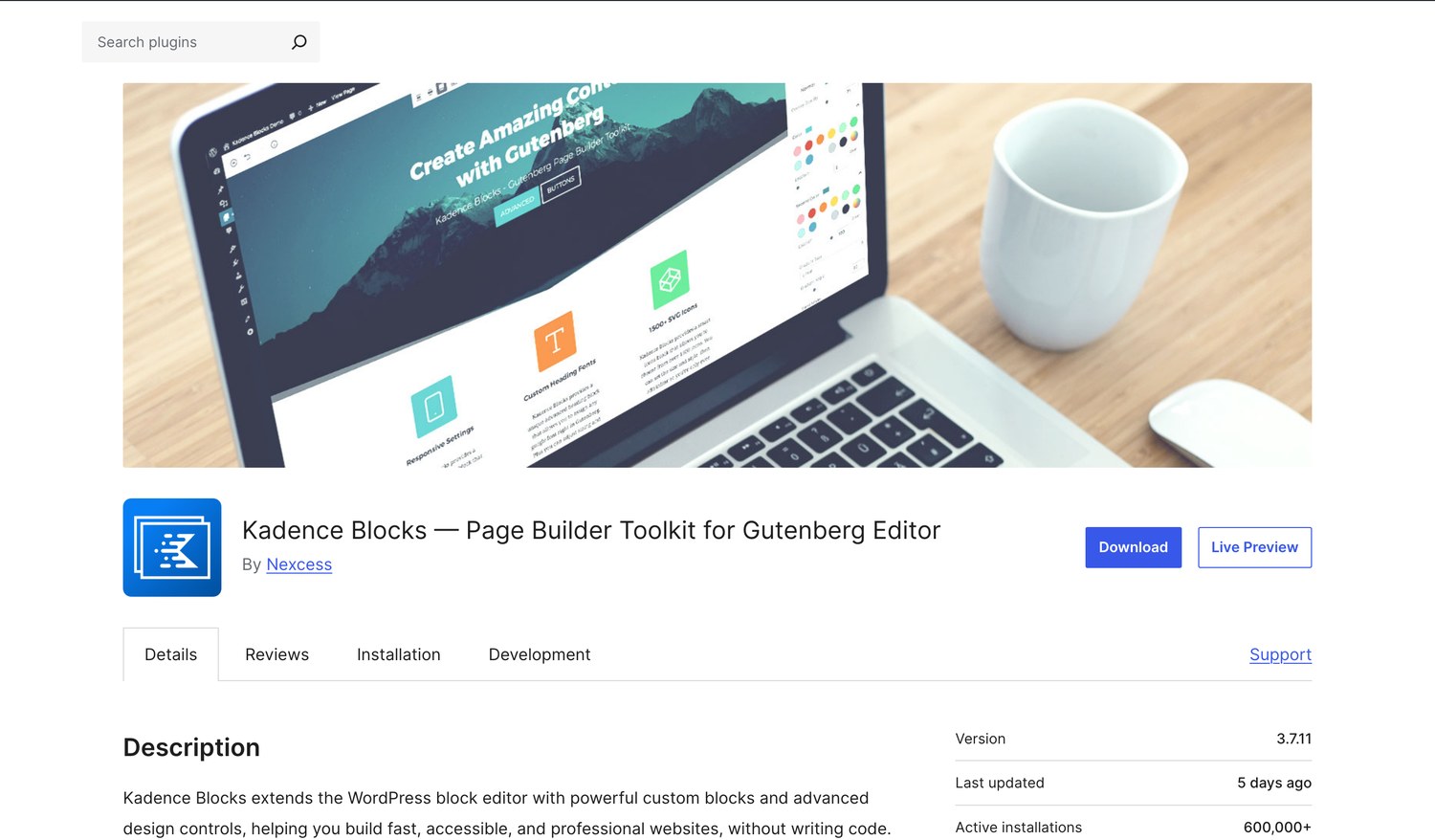
| Active installs | 600,000 | 10,000,000 |
| WordPress.org rating | 96 out of 100 from 332 ratings | 90 out of 100 from 7,300 ratings |
| Five star share | 92% (307 of 332) | 84% (6,145 of 7,300) |
| One star share | 2.1% (7 ratings) | 9.4% (684 ratings) |
| Current version | 3.7.11, updated 16 September 2026 | 4.2.4, updated 31 August 2026 |
| On WordPress.org since | August 2018 | May 2016 |
| Row and column layouts | Yes | Yes |
| Forms | Yes, in the free version | No, Pro only |
| Tabs, accordions, testimonials | Yes | Limited, most are Pro |
| Popup builder | No | No, Pro only |
| Total widgets or blocks | 30+ blocks | 40+ free widgets |
Two numbers there deserve a second look. Elementor has 16 times the installs, which counts in its favour: more tutorials, more compatible plugins, more developers who already know it. But its one star share is 9.4% against Kadence Blocks' 2.1%, and on 7,300 ratings that is roughly 684 people who took the time to leave the lowest possible score.
The single sharpest free tier difference is forms. Kadence Blocks includes a form builder for free. Elementor's form widget is Pro only, so a free Elementor site needs a separate forms plugin, which is another plugin, another set of assets and another thing to update.
Pricing in 2026, and What Changed
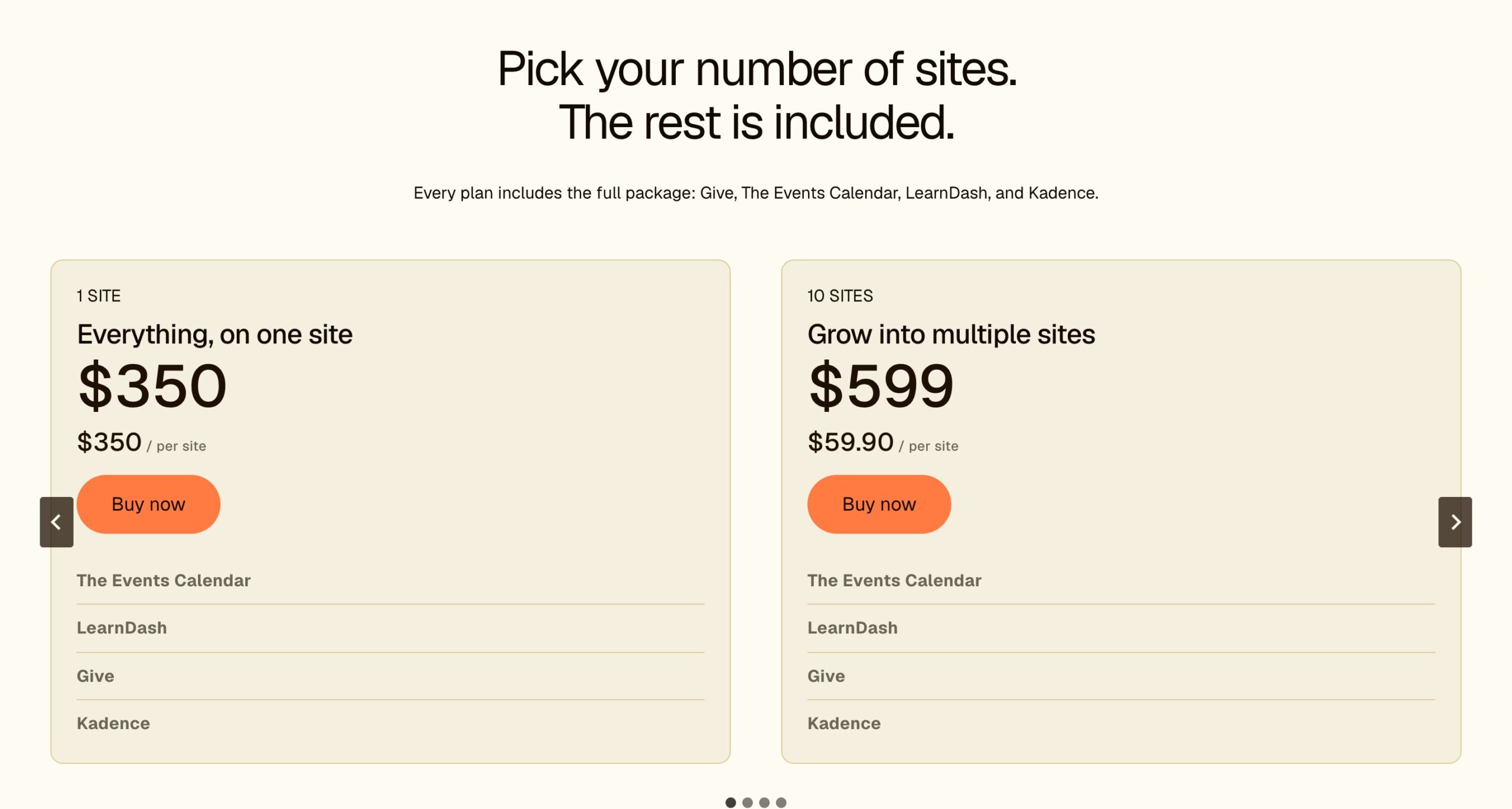
If you are working from an older comparison, throw the prices out. Kadence was acquired and restructured. kadencewp.com now redirects to Liquid Web, the plugin lists Nexcess as its author on WordPress.org, and the old standalone Kadence Blocks Pro licence is gone. Kadence is now sold as one bundle with Give, The Events Calendar and LearnDash, priced by the number of sites.
Kadence
| Sites | Price | Per site |
|---|---|---|
| 1 | $350 a year | $350 |
| 10 | $599 a year | $59.90 |
| 25 | $799 a year | $31.96 |
| 50 | $899 a year | $17.98 |
| 100 | $999 a year | $9.99 |
One Bundle, Priced by Site Count
Kadence no longer splits features across Essentials, Pro and Elite. Every plan is the same bundle, and the only thing you choose is how many sites it covers. The per site cost falls fast: $350 for one site, $59.90 a site at 10, and $9.99 a site at 100.
The problem is the entry price. For a single site, $350 a year is a lot to pay for a block plugin if you never open the other three. If you are buying for one specific feature, such as WooCommerce tooling or managing client sites, check the bundle page before you pay, because the old tier lists no longer apply.
Elementor
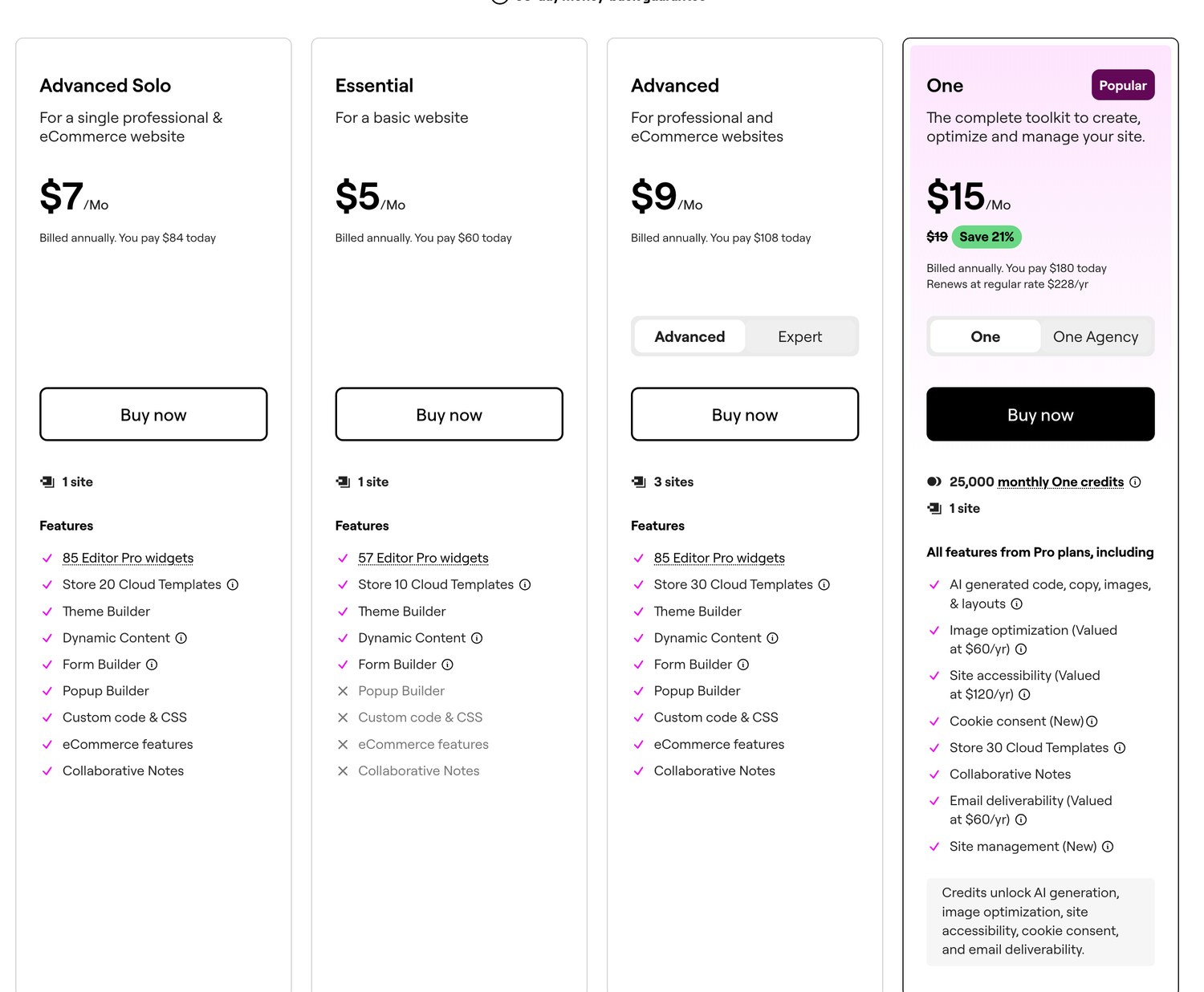
| Plan | Price | Sites | Pro widgets | Notable limits |
|---|---|---|---|---|
| Essential | $60 a year | 1 | 57 | No popup builder, no custom code or CSS, no ecommerce features |
| Advanced Solo | $84 a year | 1 | 85 | Everything unlocked, single site |
| Advanced | $108 a year | 3 | 85 | Everything unlocked |
| Expert | $204 a year | 25 | 85 | Everything unlocked |
| One | $180 first year, renews at $228 | 1 | 85 | Adds AI credits, image optimisation, accessibility tools, cookie consent and email deliverability |
Credit where it is due: Elementor's four core plans renew at the same price you paid in year one, which is rarer in WordPress than it should be. The exception is the One plan, which is discounted to $180 for the first year and then renews at $228, and their page states that plainly under the price. There is a 30 day money back guarantee on annual plans.
The trap in Elementor's range is the Essential plan at $60. It looks like the obvious cheap entry point, and it excludes the popup builder, custom code and CSS, and all ecommerce features. Those three are exactly what most people upgrade for. If you are buying Elementor Pro, the plan you want is Advanced Solo at $84, and the $24 difference will save you an upgrade six weeks later.
So Which Is Cheaper?
Elementor, at every site count in the table below. Both companies now charge by site count, but Elementor gets you everything unlocked on one site for $84, and Kadence starts at $350. Elementor sells you a widget set. Kadence sells you a bundle of four products whether you want them or not.
| Situation | Kadence | Elementor | Cheaper |
|---|---|---|---|
| One site, free tier only | $0 | $0 | Tie, though Kadence includes forms |
| One site, want the premium features | $350, 1 site bundle | $84 Advanced Solo | Elementor |
| Three sites, premium features | $599, 10 site bundle | $108 Advanced | Elementor |
| A WooCommerce store needing checkout tools | $350 bundle, check the bundle page for store features | $84 plus a separate commerce stack | Elementor, unless your commerce stack costs more than $266 a year |
| Agency running 25 client sites | $799, 25 site bundle | $204 Expert | Elementor |
Performance, Without the Fake Precision
You will find pages quoting exact scores, one of the results on this search reports 100 for Kadence against 89 for Elementor. Treat numbers like that as a direction, not a measurement. They were produced on one test site, on one host, on one day, with one theme, and yours is none of those things.
What is structurally true, and will stay true regardless of who runs the next test:
- Elementor ships a rendering framework to the browser. Its CSS and JavaScript load on pages that use it, because the page cannot render without them. Kadence Blocks outputs block markup and loads CSS for the blocks you used.
- Elementor adds DOM depth. Its section, column and widget wrappers nest deeper than native blocks do, and deeper DOM costs render time on slow devices.
- Both can be made fast, and both can be made slow. A well built Elementor site on good hosting with a caching plugin will beat a badly built Kadence site every time. Architecture sets your starting point, it does not set your score.
- The variable that beats both is how many plugins you stack on top, how heavy your images are, and whether your host is any good.
The Only Speed Advice Worth Acting On
Do not switch builders to gain a few Lighthouse points. Rebuilding a site is days of unpaid work and the gain is usually smaller than what you would get from compressing your images properly and moving to a host that is not oversold.
Choose on architecture and workflow for a new project. Leave a working site alone.
Who Should Pick Which
Pick Kadence Blocks If
- You are starting something new and you want it to still be portable in five years.
- You are happy in the WordPress editor and do not want a second interface.
- You want forms without paying, which the free version covers.
- You run a lot of sites and want one licence covering up to 100 of them, which works out at $9.99 a site.
- You want the lightest front end you can get without writing code.
- You already use the Kadence theme, where the theme and blocks share settings.
Pick Elementor If
- You want the highest ceiling on visual control and you will use it.
- You are handing the site to a non technical client. Elementor's canvas is easier for someone who has never seen WordPress.
- You need a specific widget, a popup builder, or one of the add ons in the huge third party ecosystem that exists only for Elementor.
- You want the biggest community. 10 million installs means every problem you hit has already been solved in public.
- You need one of the bundled extras in the One plan, such as accessibility tooling or cookie consent, and would otherwise buy them separately.
- You are managing 25 sites, where Expert at $204 is hard to beat.
Use Both, Which Almost Nobody Mentions
They do not conflict. Kadence Blocks adds blocks to the WordPress editor and Elementor runs on its own pages, so you can build your blog posts natively with Kadence Blocks and reserve Elementor for the handful of landing pages that need it. It is a sensible setup, and it means the content you publish most often stays portable while the pages that need heavy design get the tool built for it.
The cost is two plugins to maintain, so only do it if you will use both. Two builders you half use are just two update notices.
The Conclusion, In Full
I run Kadence Blocks on this site, and I would choose it again for anything I own. Speed scores and price have little to do with it. My content is stored as ordinary WordPress blocks. If Kadence disappeared tomorrow, or got acquired again and went in a direction I did not like, my posts would still be posts. That is worth more to me than any widget I am missing.
That said, the case against Elementor is routinely overstated by people selling alternatives. Ten million sites run it. It renews at the price you paid on four of its five plans, which most of this industry cannot claim. Its editor is the easier one to hand to a client. And if you need a popup builder, a specific widget or one of the thousands of third party add ons built for it, nothing else in WordPress comes close.
So the split is clean. Building something you will own for years, on a stack you control, pick Kadence Blocks, and start on the free version, because the paid bundle now begins at $350 a year. Building for a client who will edit it themselves, or you need a capability Kadence does not have, pick Elementor, buy Advanced Solo at $84 rather than Essential at $60, and do not let the missing popup builder catch you out.
If you are undecided, the cheap answer is to install both free versions on a staging site and spend an hour in each. They cost nothing, an hour of your own hands on either one will tell you more than this article can, and whichever one stops annoying you first is your answer.
Kadence Blocks vs Elementor, Frequently Asked Questions
Is Kadence better than Elementor?
For most WordPress sites, yes, because Kadence Blocks extends the native editor so your content stays as standard HTML and your pages survive if you ever remove the plugin. Elementor is better when you need its higher ceiling on design control, its popup builder, its huge add on ecosystem, or an editor a non technical client can use. Kadence Blocks also rates higher on WordPress.org, 96 out of 100 against 90.
Is Elementor still worth it in 2026?
Yes, for the right project. Ten million sites run it, four of its five plans renew at the price you paid, and it has the largest third party ecosystem in WordPress. It is worth it if you need design control beyond what native blocks give you, or you are handing the site to someone non technical. It is not worth it if you are building something simple that you want to keep portable.
Which is better, the block editor or Elementor?
The block editor with a good block plugin is better for content you publish regularly, because the output is standard WordPress markup that survives any plugin change. Elementor is better for individual designed pages where you need precise control. The gap has narrowed a lot since 2021, as the block editor gained proper layout tools and Kadence Blocks filled in most of what was missing.
What is the best alternative to Elementor?
Kadence Blocks is the closest like for like alternative if you want to stay inside the WordPress editor. Other serious options are Spectra, Bricks Builder and Breakdance. If you are leaving Elementor specifically because of page weight, moving to any block based solution will help more than swapping one page builder for another.
Is Kadence Blocks free?
Yes, and unusually generously. The free version includes 30+ blocks, row and column layouts, tabs, accordions, testimonials and a full form builder, which is the sharpest difference against Elementor free, where forms are a Pro feature. Most small sites never need to pay, which is lucky, because the paid bundle now starts at $350 a year for one site. It bundles Kadence with Give, The Events Calendar and LearnDash.
How much does Kadence cost now?
Kadence is now sold as one bundle of Kadence, Give, The Events Calendar and LearnDash, priced by the number of sites: $350 a year for 1 site, $599 for 10, $799 for 25, $899 for 50 and $999 for 100. The old Essentials, Pro and Elite tiers are gone, so check the bundle page if you need one specific feature. Kadence Blocks free is still on WordPress.org.
How much does Elementor Pro cost?
Essential is $60 a year for 1 site but excludes the popup builder, custom code and ecommerce features. Advanced Solo is $84 for 1 site with everything unlocked, Advanced is $108 for 3 sites, and Expert is $204 for 25 sites. The One plan is $180 for the first year and renews at $228. All are billed annually with a 30 day money back guarantee.
Does Kadence Blocks work with Elementor?
Yes, they coexist without conflict. Kadence Blocks adds blocks to the WordPress editor while Elementor takes over individual pages you choose to build with it. A lot of people run both deliberately, using blocks for posts and Elementor for landing pages. The only cost is maintaining two plugins, so only do it if you will use both.
What happens if I deactivate Elementor?
Pages built with Elementor break. The layout data is stored in Elementor's own format and rendered by Elementor at page load, so without the plugin you are left with shortcodes and unformatted markup that has to be rebuilt by hand. This is the main practical argument for block based builders, where the content is saved as HTML in the first place.
Does Kadence Blocks work with any theme?
Yes. Kadence Blocks is a plugin and works on any WordPress theme, including Astra, GeneratePress, Blocksy or a default theme. You get some extra integration if you also run the Kadence theme, since they share colour and typography settings, but it is not required. This is the most common misunderstanding about the product.
Is Elementor bad for site speed?
It is heavier than native blocks by design, because it loads its own CSS and JavaScript framework and nests markup more deeply. That is a structural cost, not a bug. In practice a well built Elementor site on good hosting with caching will outperform a badly built site on any builder. Do not migrate an existing site for speed alone, the gain is usually smaller than fixing your images and your host.
Which one is easier for beginners?
Elementor, if you have never used WordPress. Its drag and drop canvas is more forgiving and more visual than the block editor. Kadence Blocks is easier if you already know the WordPress editor, because there is no second interface to learn. For handing a site to a client who will maintain it themselves, Elementor is usually the kinder choice.
More WordPress Builder Guides on Blogger Tutor
- Kadence Blocks vs Ultimate Blocks, which Gutenberg add on wins
- Spectra Blocks review, every block tested
- Kadence vs Blocksy, choosing the theme underneath
- Kadence vs Astra, the two most common theme picks
- Why I moved to the block editor from page builders
- How to actually speed up a WordPress site
Disclosure: some links on this page are affiliate links and I earn a commission if you buy through them, at no extra cost to you. I earn on both Kadence and Elementor, so there is no financial reason for me to favour either one. Pricing, install counts and ratings were verified against Liquid Web, elementor.com and the WordPress.org plugin API on 22 September 2026, with Kadence's pricing rechecked on 23 October 2026. You can read exactly how I test, verify and update everything on this site.