Kadence vs Blocksy 2026: I Tested Both on Three Sites

Tutorials & Insights
Blocksy is the better theme for most people in 2026, and Kadence is the better ecosystem. Blocksy is rated 100 out of 100 on WordPress.org from 873 ratings against Kadence's 98 from 455, it ships updates far more often, and its Agency licence covers unlimited sites for $149 a year. Kadence wins if you want Kadence Blocks plus Give, The Events Calendar and LearnDash on one bill, and you are fine paying $350 a year for a single site.
This site runs on Blocksy, with Kadence Blocks doing the page layouts, and I have built more than 100 websites on that same combination, so I live with both every day. Everything below is checkable: pricing straight off both companies' pages, install counts and star distributions from the WordPress.org API, and release dates out of the WordPress theme repository, all read on 22 September 2026. I rechecked Kadence's pricing on 23 October 2026, because it changed in between.
Then on 29 October 2026 I stopped reading spec sheets and built the same three sites on both themes: a blog, a small business site and a WooCommerce store. Blocksy won the blog and the store, Kadence won the business site, and the reason for that one turned out to be the starter template, not the theme. The full test results are below.
| Kadence | Blocksy | |
|---|---|---|
| WordPress.org rating | 98 out of 100 (455 ratings) | 100 out of 100 (873 ratings) |
| Active installs | 500,000 | 300,000 |
| Five star share | 95% (432 of 455) | 99% (863 of 873) |
| One star share | 2.0% (9 ratings) | 0.5% (4 ratings) |
| Current version | 1.5.2 | 2.1.60 |
| Last updated | 24 July 2026 | 15 October 2026 |
| Releases on WordPress.org | 129 | 447 |
| Free starter templates | 52 | 32 |
| Blog post weight in my test | 227 KB | 108 KB |
| Product page weight in my test | 434 KB | 236 KB |
| First release | August 2020 | February 2019 |
| Cheapest paid tier | $350 a year (1 site) | $69 a year |
| Unlimited sites | No, the top plan is 100 sites at $999 a year | $149 a year, or $499 once |
| Lifetime option | No | Yes, $199 to $499 |
| Owned by | Nexcess, part of Liquid Web | Creative Themes, independent |
| Best for | One bundle: Kadence, Give, The Events Calendar and LearnDash | A fast, deeply customisable theme at a lower price |
This comes up constantly, there is a whole article ranking for it, and an older version of this page repeated the accusation. So I went to the evidence and pulled the release history straight out of the WordPress theme repository, where every published version of every theme is date stamped and public.
| Product | First published version | Date |
|---|---|---|
| Kadence Blocks, the plugin | On WordPress.org since | August 2018 |
| Blocksy, the theme | 1.0.4 | 21 February 2019 |
| Kadence, the theme | 0.8.4 | 19 August 2020 |
The answer has two halves. Blocksy's theme was on WordPress.org roughly eighteen months before Kadence's theme was. If you are comparing themes only, Blocksy got there first, and nobody can argue with a date stamp.
But Kadence WP was not a newcomer in 2020. Kadence Blocks had been on WordPress.org since August 2018, before Blocksy's theme existed, and the Kadence theme was built to pair with a block plugin the same company had already been shipping for two years.
Both themes solved the same problem at roughly the same moment in WordPress history. Gutenberg shipped in December 2018, every serious theme shop needed a header and footer builder and a block friendly layout system, and the good solutions converged because the problem constrained them. That is why they feel similar.
Convergent design is not theft, and treating it as a scandal makes for a fun headline and a useless buying decision. Pick on what each one does today.
Both free themes are good enough to finish a real site on, which most free WordPress themes are not. Both give you a header and footer builder, global colour and typography controls, and proper block editor support.
The ratings gap is small in absolute terms and interesting in its shape. Blocksy holds a perfect 100 out of 100 across 872 ratings. Kadence holds 98 across 455. Blocksy has nearly double the ratings on roughly half the installs, which means a noticeably larger share of its users felt strongly enough to go and rate it.
| Kadence | Blocksy | |
|---|---|---|
| Rating | 98 / 100 | 100 / 100 |
| Number of ratings | 455 | 873 |
| Five star | 432 | 863 |
| Two star and below | 12 | 6 |
| Active installs | 500,000 | 300,000 |
| Total downloads | 6.09 million | 8.04 million |
| Minimum WordPress | 6.3 | 6.7 |
| Minimum PHP | 7.4 | 7.0 |
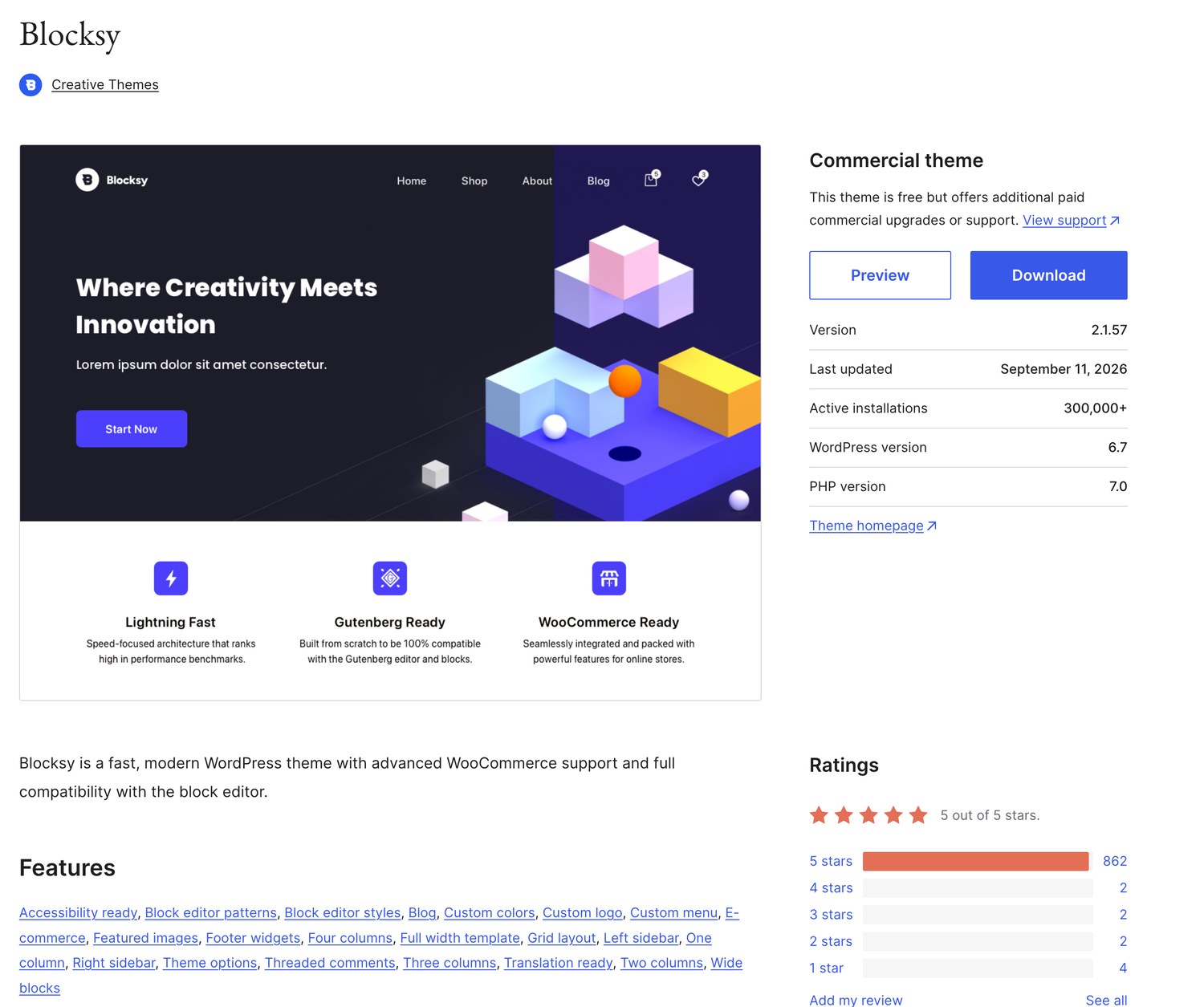
One practical note buried in that table: Blocksy requires WordPress 6.7 or newer, Kadence only needs 6.3. If you are working on a site somebody has left un-updated for two years, Kadence will install and Blocksy may not until you update WordPress first.
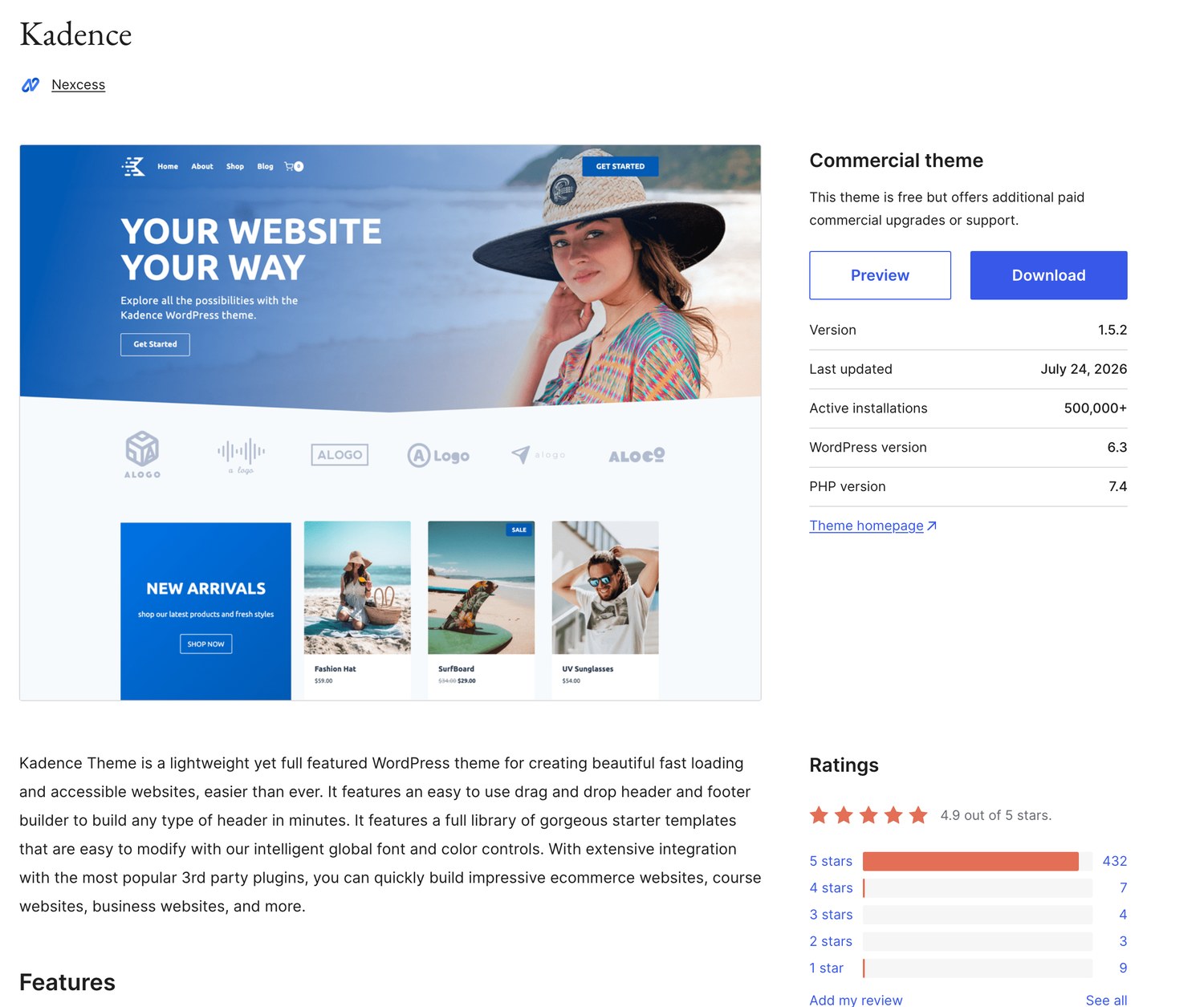
Blocksy has published 447 releases to Kadence's 129. When I rechecked on 29 October 2026, Blocksy was on 2.1.60 and last shipped on 15 October. Kadence was still on 1.5.2 from 24 July 2026, so the gap is now more than three months.
That is not a crisis. Kadence is stable, actively supported, and a slower cadence on a mature theme can simply mean fewer things need fixing. But it is a real difference in how the two teams work, and it has a practical consequence: when WordPress ships a change that breaks something, Blocksy has historically responded in days.
It is also worth knowing who you are buying from now. Kadence was acquired. kadencewp.com redirects to Liquid Web, and the theme lists Nexcess as its author on WordPress.org. Blocksy is still Creative Themes, independent. Acquisitions cut both ways: more resources behind the product, and a roadmap that now answers to a hosting company.
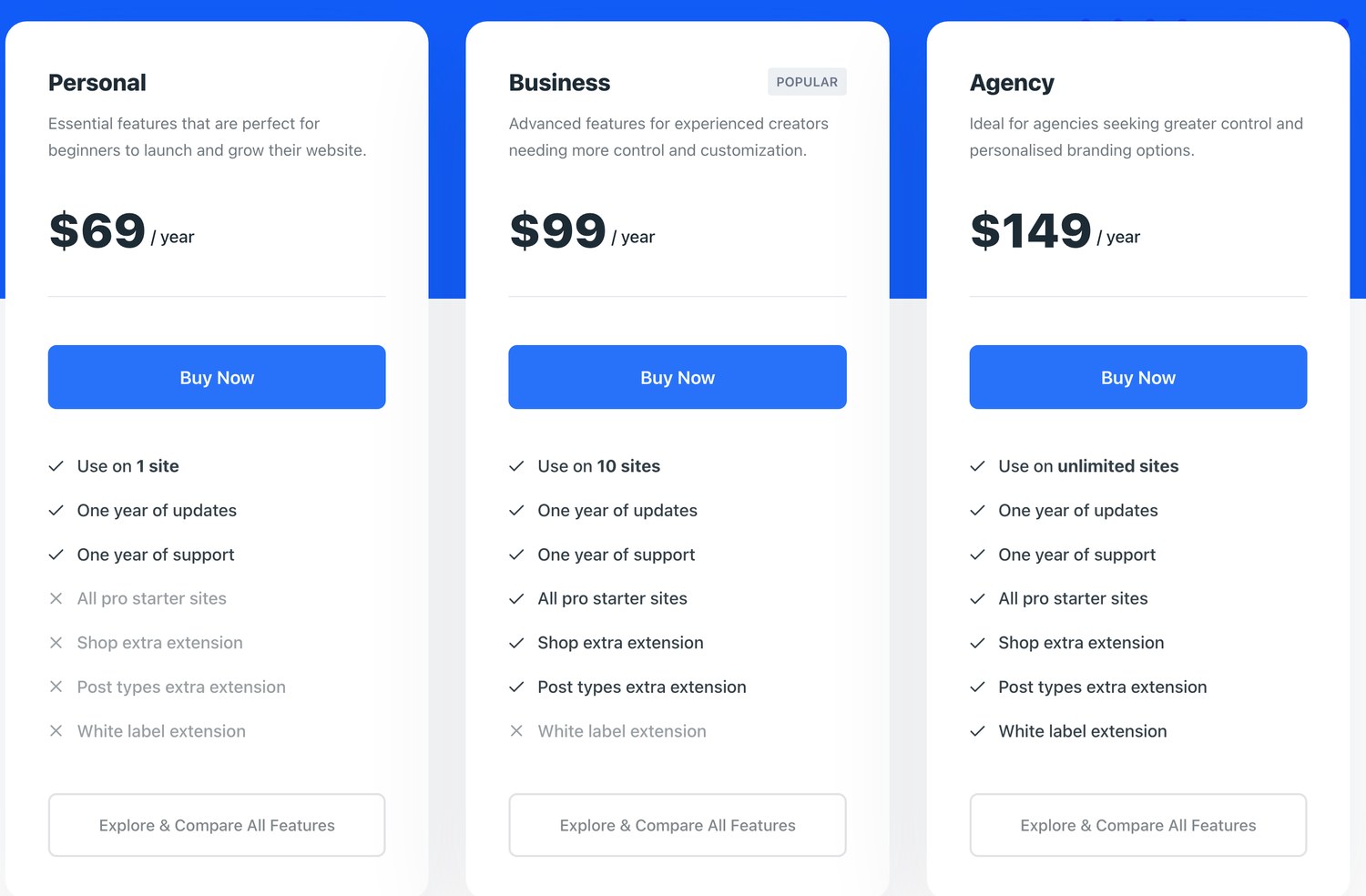
| Plan | Yearly | Lifetime | Sites | Starter sites, Shop and Post Types | White label |
|---|---|---|---|---|---|
| Personal | $69 | $199 | 1 | 3 of 13 pro starters only | No |
| Business | $99 | $299 | 10 | Yes | No |
| Agency | $149 | $499 | Unlimited | Yes | Yes |
Read the last three columns carefully, because the entry plan is thinner than the price suggests. Personal at $69 includes only 3 of the 13 pro starter sites, and none of the Shop extension, the Post Types extension or white labelling. The plan most people want is Business at $99, which covers 10 sites and unlocks everything except white label.
| Sites | Yearly | Per site |
|---|---|---|
| 1 | $350 | $350 |
| 10 | $599 | $59.90 |
| 25 | $799 | $31.96 |
| 50 | $899 | $17.98 |
| 100 | $999 | $9.99 |
Blocksy Agency is $499 once, for unlimited sites, with white labelling included. Kadence's 10 site plan is $599 every year, and its biggest plan stops at 100 sites for $999 a year.
If you build client sites, that is not a close call on cost. Buy Blocksy Agency once and you have paid for it forever. Buy Kadence for ten sites and you pay $599 again next year, and the year after. By the end of year one you have already spent $100 more than the Blocksy licence that never renews.
Kadence does give you more product for that money: every plan carries Give, The Events Calendar and LearnDash alongside Kadence itself. If you are buying it for one specific Kadence feature, check the bundle page first, because the old tier lists no longer apply. The question is whether you want all of that from your theme vendor.
| What you need | Blocksy | Kadence | Cheaper |
|---|---|---|---|
| One site, free only | $0 | $0 | Tie |
| One site, premium features | $69 Personal, limited | $350 bundle | Blocksy |
| One site, everything unlocked | $99 Business | $350 bundle | Blocksy |
| Ten client sites | $99 Business | $599 bundle | Blocksy |
| Unlimited sites with white label | $149 a year or $499 once | No unlimited plan, 100 sites is $999 a year | Blocksy |
| WooCommerce store with checkout tools | $99 Business plus your own stack | $350 bundle, check the bundle page for store features | Blocksy, unless your own stack costs more than $251 a year |
| Memberships and content restriction | Separate plugin | $350 bundle, check the bundle page for membership tools | Depends on the plugin you pick |
Strip out price and ratings and the day to day difference is narrower than either side's fans will tell you. Both are fast, both use the Customizer rather than a bespoke dashboard, both have header and footer builders with conditional display, and both output clean markup.
On 29 October 2026 I built the same three sites on both themes: a blog with 20 posts, a small business site from each theme's own free starter template, and a WooCommerce store with the 16 WooCommerce sample products. Same WordPress install, same content, same plugins, one theme switched on at a time. For every page I measured the weight, the number of requests, how many elements the browser had to build, and a mobile Lighthouse score over three runs, keeping the middle one.
Blocksy won the blog and the store. Kadence won the business site. None of the gaps will make or break a site on decent hosting, but they all point the same way: Blocksy ships less code, Kadence ships more features switched on.
|
What I tested |
Blocksy |
Kadence |
Winner |
|---|---|---|---|
|
Blog home page, mobile Lighthouse |
100 |
100 |
Tie |
|
Blog post, same things on screen |
108 KB, 13 requests |
227 KB, 20 requests |
Blocksy |
|
Blog post, elements the browser builds |
328 |
645 |
Blocksy |
|
Business starter site, mobile Lighthouse (median of 5) |
89 |
93 |
Kadence |
|
Plugins the free business starter installed |
Stackable, WPForms Lite |
Kadence Blocks only |
Kadence |
|
Free starter templates |
32 |
52 |
Kadence |
|
Shop page, mobile Lighthouse |
99 |
98 |
Blocksy |
|
Product page, mobile Lighthouse |
98 |
94 |
Blocksy |
|
Product page weight |
236 KB |
434 KB |
Blocksy |
|
Slide out cart in the free version |
No |
Yes |
Kadence |
|
Quick view and wishlist |
$99 Business plan |
$350 bundle |
Blocksy |
Tested on a local copy of WordPress 7.1.2 with no caching, Blocksy 2.1.60 and Kadence 1.5.2, free versions, 29 October 2026. Lighthouse mobile, median of three runs unless noted.
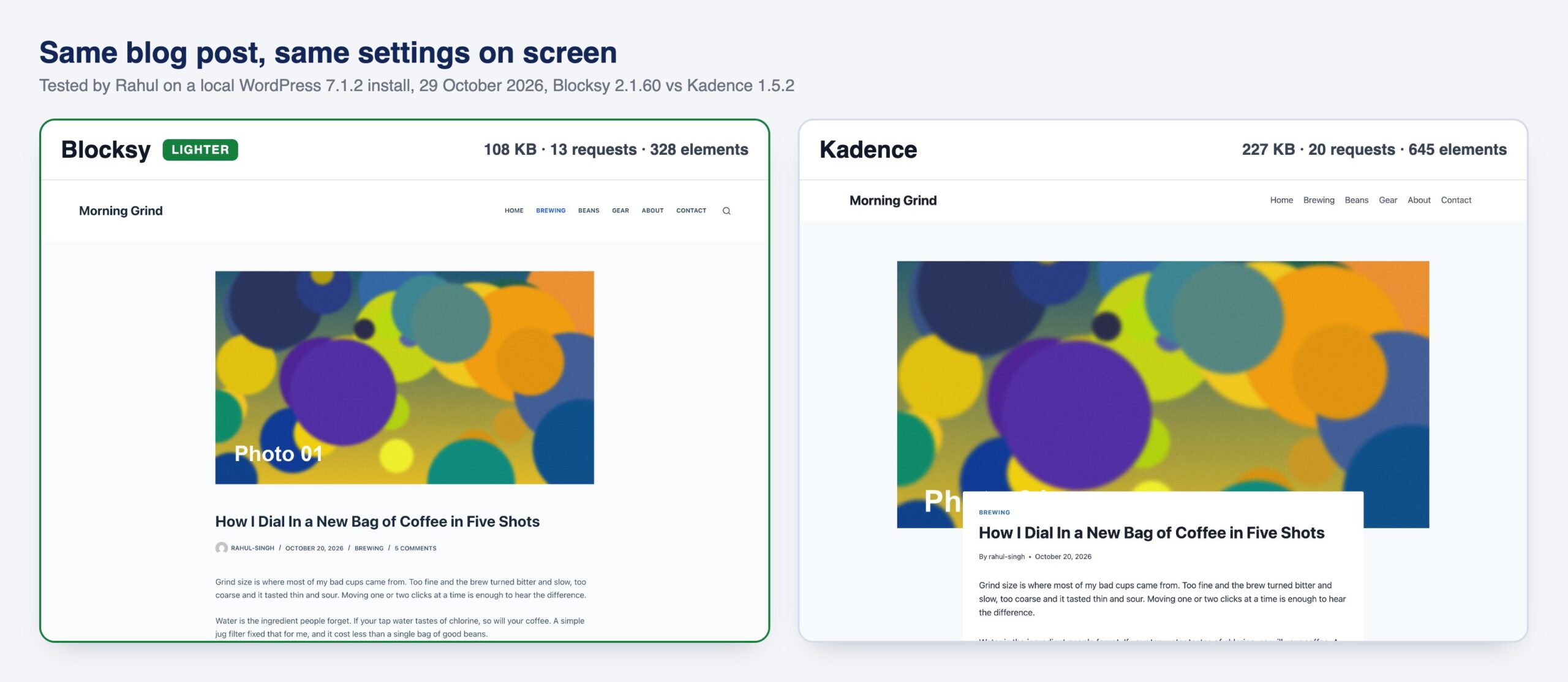
With the featured image, tags, post navigation and related posts showing on both, my test post weighed 108 KB on Blocksy and 227 KB on Kadence, with half as many elements for the browser to build. Both still scored 99 on Lighthouse, so a reader on a fast phone will not feel it. Most of Kadence's extra weight is its related posts slider. Switch that off and the two end up level.
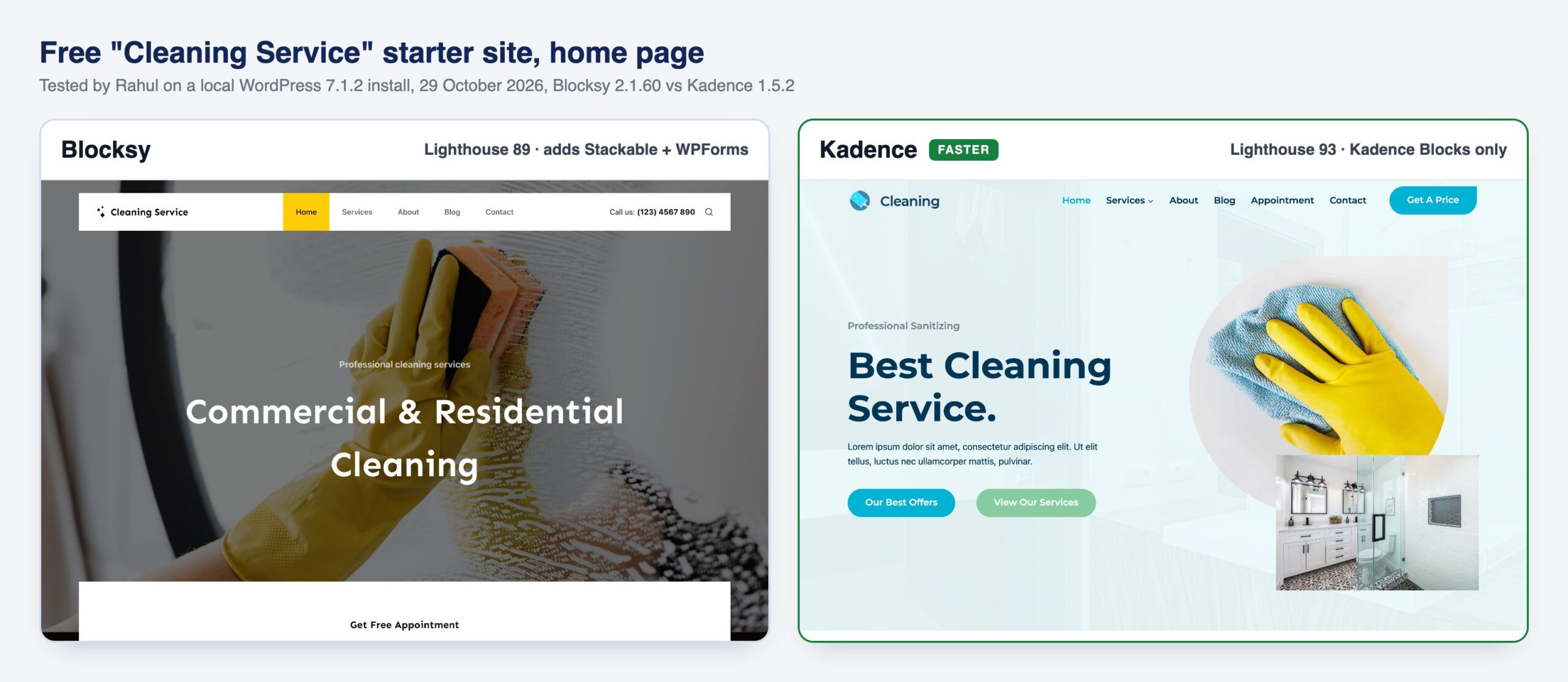
I imported each theme's free “Cleaning Service” starter. Kadence's home page scored 93 to Blocksy's 89 and painted its main image in 3.16 seconds against 3.76. Kadence's starter only needs Kadence Blocks. Blocksy's installed Stackable and WPForms Lite too, and loads jQuery for its booking form.
Then I loaded Kadence's template into Blocksy, and it scored exactly the same, 93 both times. The template and its plugins decide your speed here, not the theme. Kadence simply has the better free templates.
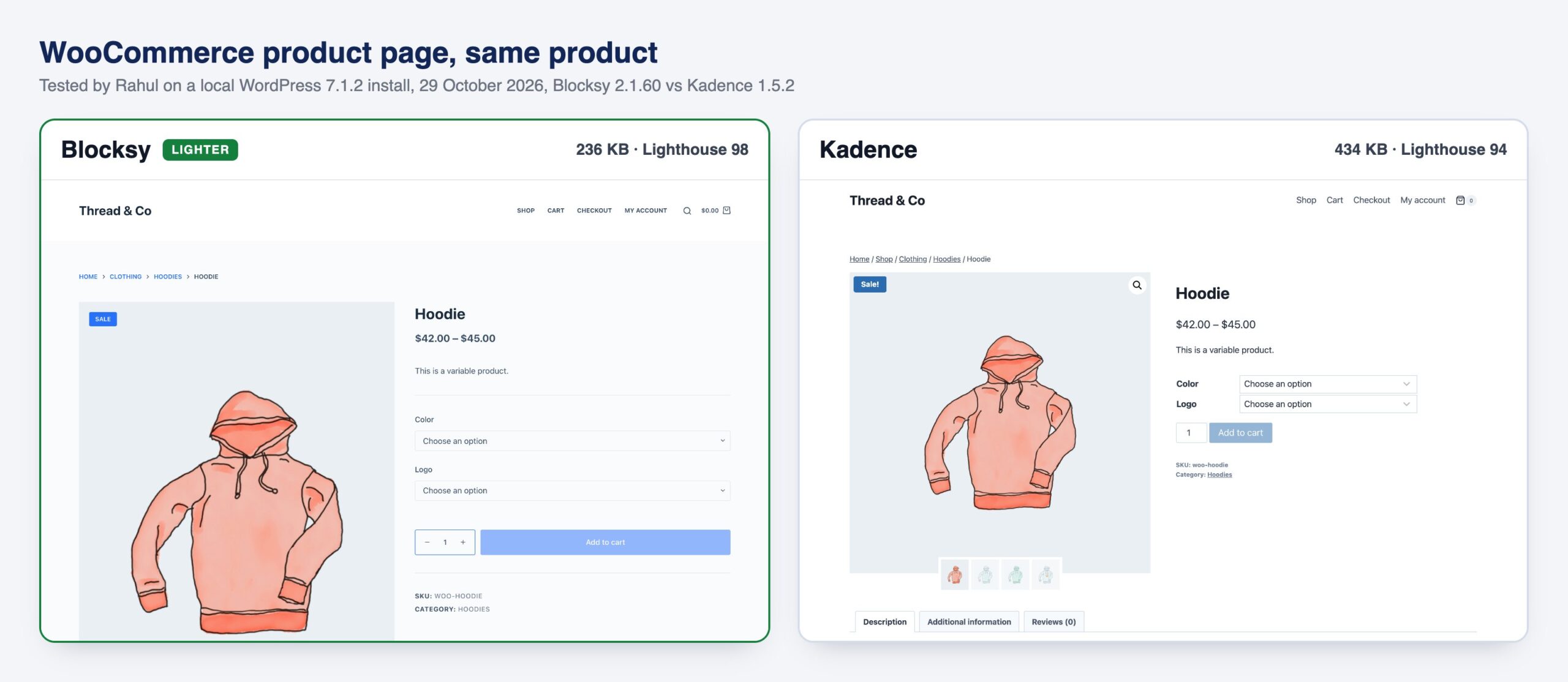
Product pages are where the two really differ. Kadence adds a lightbox, a related products slider and more gallery images by default, so the same hoodie page weighed 434 KB on Kadence and 236 KB on Blocksy, and scored 94 against 98.
But on the free versions Kadence gives you more. Its slide out cart is free, while Blocksy free only has a dropdown cart. Quick view, wishlist, swatches and the floating cart need Blocksy Pro Business at $99 a year, or the $350 Kadence bundle.
One warning for both: the business starters load Google Fonts from Google's servers, and that alone moved my scores by up to 14 points between runs. Host your fonts locally, whichever theme you pick, and your page speed will still come down mostly to your host, your images and your plugins.
This site runs Blocksy as the theme and Kadence Blocks for the layouts, and that split is what I would recommend to most people: the better theme from one company, the better block library from the other. It works very well together. The one rough edge lately is Kadence Blocks' newer Style Library, which does not always pick up Blocksy's colours and fonts, so check those blocks after you add them. If you already have a working Kadence site, though, migrating it just to save money is unpaid work with a small payoff, and I would give anyone the same advice.
But if you asked me what to install on a new project tomorrow, I would say Blocksy, and I would say it without much hesitation. It is rated higher by more people, it ships roughly three times as often, it needs fewer clicks to do the same work, and its licensing is dramatically friendlier to anyone running more than one site. A $499 lifetime Agency licence against $599 every year for ten Kadence sites is a different business model.
The case for Kadence is the ecosystem, and it is still a real one. If you want your theme and block library together with Give, The Events Calendar and LearnDash from one company on one renewal date, Kadence is the only one of the two that offers it. But at $350 a year for a single site, it only pays off if you will use those plugins too. Buying it just for the theme is like hiring a removals lorry to move a lamp. Just go in knowing you are buying a bundle, not a theme.
Both are free to try properly, and neither free version is crippled. Install both on a staging site and spend an evening in each Customizer. Whichever one stops making you hunt for settings is the one you should buy, and that is a better test than anything either of us can write down.
On the theme alone, mostly yes. Blocksy is rated 100 out of 100 on WordPress.org from 873 ratings against Kadence's 98 from 455, it has shipped 447 releases to Kadence's 129, and its Customizer is faster to work in. Kadence wins on ecosystem, because Kadence Blocks, Give, The Events Calendar and LearnDash all come in one bundle from one vendor.
The WordPress theme repository shows Blocksy's first published version, 1.0.4, dated 21 February 2019, and Kadence's first, 0.8.4, dated 19 August 2020. So the Blocksy theme came roughly 18 months earlier. But Kadence Blocks had been on WordPress.org since August 2018, before Blocksy's theme existed. Both were solving the same post-Gutenberg problem at the same time, which is why they converged.
For one site, Business at $99 a year is the tier worth buying, because Personal at $69 includes only 3 of the 13 pro starter sites and none of the shop features, the Post Types extension or white labelling. For anyone running client sites, Agency is exceptional value at $149 a year or $499 as a one time lifetime purchase covering unlimited sites. There is a 14 day refund window.
Yes. 500,000 active installs, 98 out of 100 on WordPress.org, and Kadence Blocks separately holds 96 out of 100 across 600,000 installs. It is a good theme with an unusually complete ecosystem around it. Its weaknesses against Blocksy are release cadence, a slower Customizer, and licensing that starts at $350 a year for a single site.
No. Kadence sells one yearly bundle, priced by the number of sites: $350 for 1 site, $599 for 10, $799 for 25, $899 for 50 and $999 for 100, all per year. Blocksy does offer lifetime licences, at $199 for 1 site, $299 for 10 sites and $499 for unlimited sites. If you specifically want to stop paying renewals, that is a decisive difference between the two.
Blocksy, by a small margin. In my tests on 29 October 2026 Blocksy's pages were lighter on a blog and on a WooCommerce store, with product pages at 236 KB against 434 KB. Kadence's free business template was faster than Blocksy's, but when I put the same content on both themes they scored the same. Your template, plugins, fonts and hosting matter more than the theme.
Yes, and it is the combination I recommend. Kadence Blocks is a plugin that works with any theme, and I have built more than 100 websites on Blocksy with Kadence Blocks, this one included. It works very well. The one thing to watch is Kadence Blocks' recent Style Library, which has caused some compatibility issues with blocks inheriting Blocksy's theme colours and fonts. Check any block you add from it and set its colours and fonts on the block if they come through wrong.
Nexcess, which is part of Liquid Web. kadencewp.com now redirects to Liquid Web's site and the theme lists Nexcess as its author on WordPress.org. Blocksy is still made by Creative Themes and remains independent. Whether that matters to you depends on how you feel about hosting companies owning the software you build on.
Blocksy. For a store I would pick it blindly and pair it with any block plugin you like, Kadence Blocks, Spectra or GenerateBlocks. Its product pages were the lighter of the two in my test, and Pro Business at $99 a year adds quick view, wishlist, swatches and a floating cart. The one thing Kadence's free theme has that Blocksy free does not is a slide out cart.
Often no. Both free themes include a header and footer builder, global colours and typography and full block editor support, which is enough for a complete site. You pay when you need conditional headers, deeper WooCommerce control, starter template libraries or white labelling for clients. Start free on both and upgrade only when something blocks you.
There is no single answer, but the serious shortlist is short: Blocksy, Kadence, GeneratePress and Astra. Astra has the largest install base at 1 million, GeneratePress and Kadence sit at 500,000 and Blocksy at 300,000, and all four rate 98 or higher on WordPress.org. Blocksy is the one I would start with today for its licensing and update pace.
Yes, but budget real time for it. Your posts and pages carry over because the content lives in WordPress, not the theme. What does not carry over is everything configured in the Customizer: headers, footers, colours, typography and layout settings all have to be rebuilt. Any Kadence Blocks content keeps working, since that is a separate plugin.
Disclosure: some links on this page are affiliate links and I earn a commission if you buy through them, at no extra cost to you. I earn on both Kadence and Blocksy, so there is no financial reason for me to favour either. Ratings, install counts, version numbers and first release dates come from the WordPress.org theme and plugin repositories, and pricing from each vendor's own page, all checked on 10 November 2026. You can read exactly how I test, verify and update everything on this site.