The Short Answer
Blocksy free is enough for most blogs. It already includes the drag and drop header and footer builder, sticky and transparent headers, a global colour palette, breadcrumbs, schema, related posts and a newsletter box. Buy Pro when you need Content Blocks (hooks), a mega menu, custom fonts or different headers on different pages.
Which plan: Personal at $69 a year, or $199 once, for one site. Business at $99 if you run a WooCommerce shop or want the reading time and post filter extras, because those are not in Personal.
This site runs on Blocksy. Over the years bloggertutor.com has also run on Kadence and on GeneratePress, and my team builds 10 to 12 client sites a month, so this review is not based on a demo install. I own lifetime licences for both Blocksy and Kadence, which means I have no reason to push you towards either.
Below: what you get for free, what each Pro plan adds, and which plan to buy. Every feature claim below comes from Blocksy's own plan comparison, and every price from its pricing page.
Blocksy at a Glance
| Blocksy | |
|---|---|
| Developer | Creative Themes |
| Latest version | 2.1.60, updated 15 October 2026 |
| Active installs | 300,000+ |
| WordPress.org rating | 100 out of 100 from 873 reviews |
| Requires | WordPress 6.7 and PHP 7.0 |
| Works with | Block editor, Elementor, Brizy and Beaver Builder |
| Pro price | $69, $99 or $149 a year, or $199, $299 or $499 once |
A perfect 100 from 873 reviews is rare at this size. Astra sits at 98 from 6,546 and Kadence at 98 from 455, both very good, but Blocksy is the only one of the big three with no low reviews dragging it down. See Blocksy on WordPress.org.
What Blocksy Free Gives You
The free theme works together with the free Blocksy Companion plugin. Between them you get far more than most free themes offer:
- Header and footer builder with drag and drop elements: logo, menu, button, HTML, cart, account, search icon, social icons and widget areas, plus sticky and transparent headers.
- Design controls: a global colour palette, custom colours, advanced typography and Google Fonts.
- SEO basics built in: schema markup, Open Graph tags, a breadcrumbs module and Google Analytics support.
- Blog modules: related posts, trending posts, a newsletter subscribe box and a cookie notice, so you need fewer plugins.
- Theme blocks for the block editor, including Advanced Posts, Dynamic Data, About Me, Share Box, Breadcrumbs and Advanced Search.
- WooCommerce support with archive and single product options, AJAX add to cart, payment icons and a product variation gallery.
- Custom post type support and import or export of all your Customizer settings.
Blocksy Free vs Pro, Plan by Plan
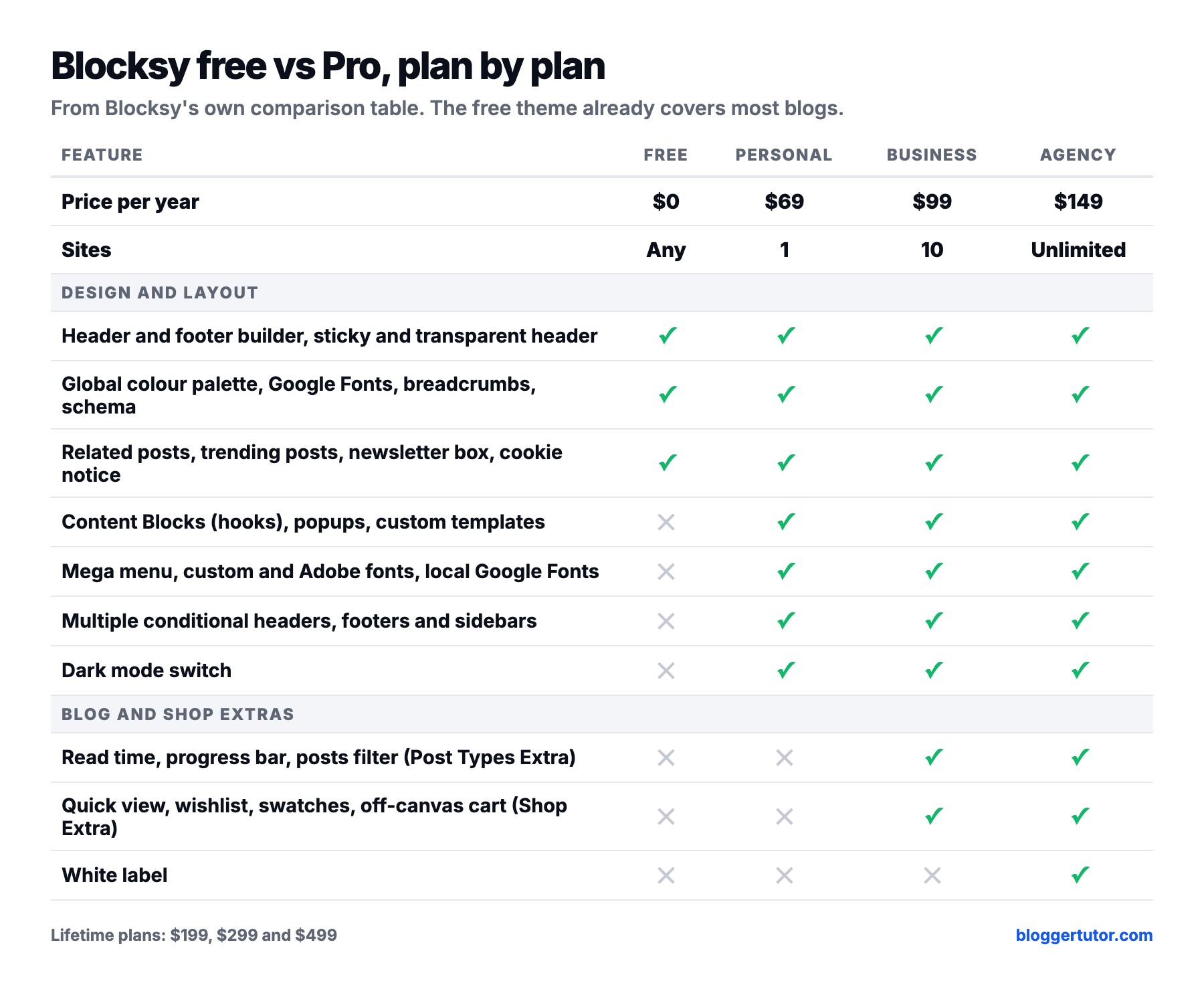
Most reviews treat Blocksy Pro as one bundle. It is three plans, and some features only start at Business:
What Personal adds ($69 a year)
- Content Blocks: hooks, popups, and your own header, footer, archive, single, 404 and maintenance templates built with blocks.
- Advanced menu with mega menus.
- Custom fonts with variable font support, Adobe Fonts and locally hosted Google Fonts.
- Multiple conditional headers, footers and sidebars, for example a different header on your shop or landing pages.
- Dark mode switch, custom code snippets, an off-canvas desktop drawer and extra header elements such as contacts, language switcher and search box.
- All Pro starter sites.
What Business adds ($99 a year)
- Post Types Extra: read time indicator, reading progress bar, posts filter, taxonomy customisations and a related posts slider.
- Shop Extra for WooCommerce: quick view, wishlist, compare, variation swatches, floating and off-canvas cart, off-canvas filters, size guides, free shipping bar, advanced reviews and more.
- 10 sites instead of one.
What Agency adds ($149 a year)
Unlimited sites and white label, so you can rebrand the theme for clients. If you do not build sites for other people, you do not need it.
Blocksy Pro Pricing
| Plan | Sites | Yearly | Lifetime | Best for |
|---|---|---|---|---|
| Personal | 1 | $69 | $199 once | One blog or business site |
| Business | 10 | $99 | $299 once | Shops and blogs that want the extras |
| Agency | Unlimited | $149 | $499 once | Client work, white label |
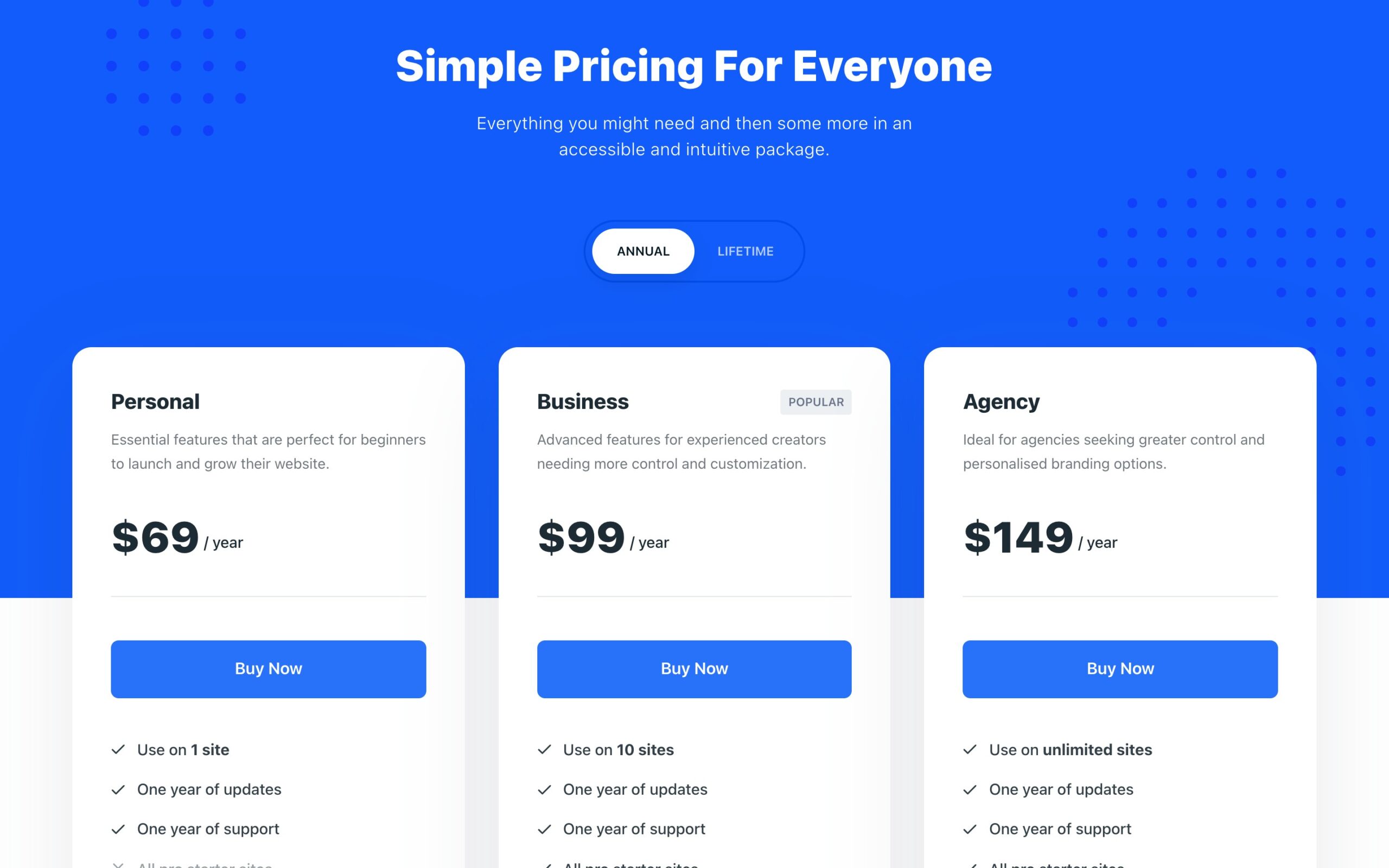
There is no cheap first year that doubles on renewal, so $69 is what you pay every year. The lifetime plan pays for itself in about three years, which is the rare case where the maths favours the buyer. For one site I would buy Personal lifetime at $199, and for a WooCommerce store, Business lifetime at $299.
Starter Sites
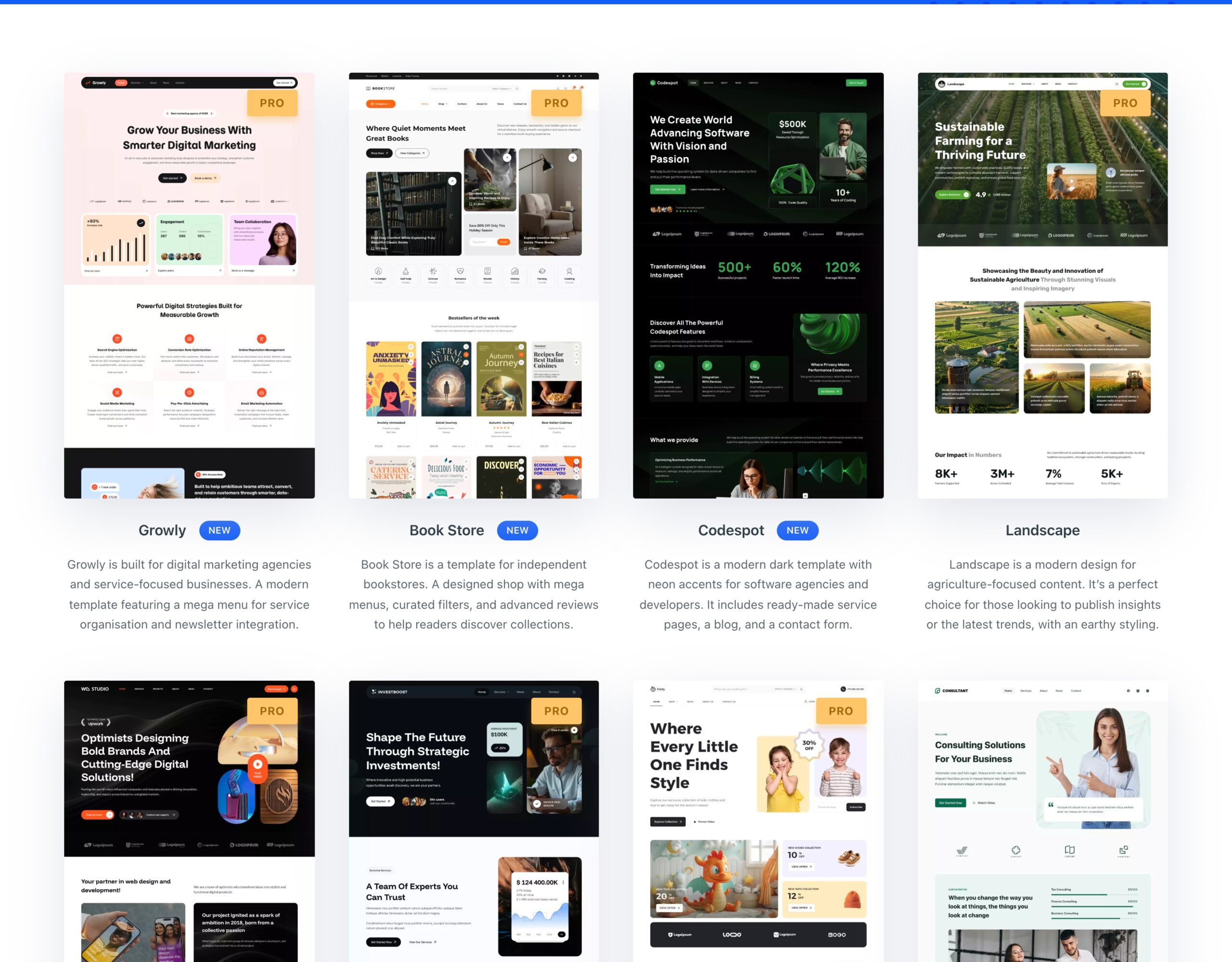
Blocksy's starter sites import a complete design, with pages, colours and fonts, in a few clicks through Blocksy Companion. Templates marked Pro need a Pro licence; the rest are free. They are built for the block editor.
Blocksy vs Kadence vs Astra on Price
| Theme | Cheapest Pro | Sites | Lifetime | WordPress.org rating |
|---|---|---|---|---|
| Blocksy | $69/yr | 1 | From $199 | 100/100 (873) |
| Astra | $69/yr | 3 | $249 for 3 sites | 98/100 (6,546) |
| Kadence | $350/yr bundle | 1 | Not sold | 98/100 (455) |
Astra gives you more sites for the same $69, so it can be better value if you run three small sites. Kadence is now sold only as a bundle with Give, The Events Calendar and LearnDash, which makes it the most expensive of the three by far. I compare them properly in Kadence vs Blocksy and in my Astra alternatives guide.
Where Blocksy Falls Short
- Personal covers one site. Astra Pro covers three for the same yearly price.
- The best blog and shop extras start at Business. Reading time, the progress bar, quick view and wishlist are not in Personal.
- It is still a Customizer theme. If you want to design everything in the WordPress Site Editor, a block theme is the better long term choice.
- Smaller community than Astra. You will find fewer third party tutorials, although the official documentation is good.
My verdict on Blocksy
4.7 out of 5 ★★★★★
The free version is the most complete free theme I have used, and Pro is fairly priced, with a lifetime option. Buy Personal for Content Blocks and the mega menu, Business for a shop.
What works
- Header and footer builder, schema and breadcrumbs in the free theme
- Rated 100 out of 100 from 873 reviews on WordPress.org
- No first year discount trick, and lifetime plans from $199
- Works with the block editor, Elementor, Brizy and Beaver Builder
What does not
- Personal covers only 1 site
- Blog and WooCommerce extras need the Business plan
- A Customizer theme, not a Site Editor theme
Blocksy Review FAQ
Is Blocksy free?
Yes. The Blocksy theme and the Blocksy Companion plugin are free on WordPress.org and include the header and footer builder, global colours, schema, breadcrumbs, related posts and WooCommerce support. Blocksy Pro is an optional paid upgrade.
What is the difference between Blocksy free and Pro?
Pro adds Content Blocks (hooks, popups and custom templates), mega menus, custom and Adobe fonts, multiple conditional headers, footers and sidebars, and a dark mode switch. The Business plan also adds Post Types Extra and Shop Extra for WooCommerce, and Agency adds white label.
How much is Blocksy Pro?
Personal is $69 a year for 1 site, Business $99 for 10 sites and Agency $149 for unlimited sites. Lifetime plans cost $199, $299 and $499. There is a 14 day refund.
Is Blocksy Pro worth it?
If you need hooks, a mega menu or custom fonts, yes, especially as a $199 lifetime licence. If you run a simple blog, the free version is usually enough.
Does Blocksy have a lifetime deal?
Yes. Blocksy sells lifetime licences at $199 for 1 site, $299 for 10 sites and $499 for unlimited sites.
Does Blocksy work with Elementor?
Yes. Blocksy is built for the block editor and also supports Elementor, Brizy and Beaver Builder.
Is Blocksy good for WooCommerce?
Yes. The free theme handles shop and product page layouts and AJAX add to cart, and the Business plan adds quick view, wishlist, variation swatches, off-canvas cart and filters.
Is Blocksy better than Kadence?
For most people today, yes on value. Blocksy Pro starts at $69 a year with a lifetime option, while Kadence is now only sold as a $350 a year bundle. Kadence Blocks is still an excellent free block plugin.
More Theme Guides
- Best Astra theme alternative, Blocksy and block themes
- Kadence vs Blocksy, which theme wins
- Is the Astra theme really worth it?
- Kadence pricing and the lifetime deal question
- WordPress theme deals with verified prices
Disclosure: I earn a commission if you buy Blocksy through links on this page, at no extra cost to you. I also earn on Kadence and Astra. Features come from Blocksy's own plan comparison and prices from its pricing page, checked on 27 October 2026, and ratings from WordPress.org. You can read exactly how I test, verify and update everything on this site.