WPvivid is the better backup plugin for most WordPress sites in 2026, and Duplicator is the better migration tool. WPvivid's free version already does scheduled backups to Google Drive, Dropbox and OneDrive, plus a staging site, and its Pro version is the only one of the two you can buy once with a lifetime licence. Duplicator earns its place if you move sites between hosts every week or run an agency, because nothing I have used rebuilds a site on a new server more cleanly.
WPvivid: 20% OFF Every Plan, Lifetime Included
My reader code BLOGGERTUTOR20 takes 20% off every WPvivid plan, yearly and Lifetime, 365 days a year, and it works on top of any sale price WPvivid is running. Ultimate Lifetime at $239.20 once is the one I would buy: unlimited domains, for less than two years of the $149 yearly plan.
| Blogger, 2 domains, yearly | |
| Blogger, 2 domains, Lifetime | |
| Freelancer, 10 domains, Lifetime | |
| Small Business, 50 domains, Lifetime | |
| Ultimate, unlimited, Lifetime |
BLOGGERTUTOR20 is my reader code, so it has no end date. It stacks on top of WPvivid sale prices, and I will show the Black Friday price with the code here the day it opens.
I run both. WPvivid Pro backs up this blog every night, and Duplicator has been my go to for client migrations for years. For this comparison I ran a fresh full backup with each plugin, went through every pricing page again on 23 October 2026, and worked out what each one really costs over three years, because that is where the gap between them gets wide.
My Verdict: WPvivid Wins for Most Sites
1. WPvivid Backup Pro: 4.7 out of 5 ★★★★★
The best value backup plugin you can buy, with the strongest free version and a lifetime licence that pays for itself in under two years.
What works
- The free version already schedules backups to Google Drive, Dropbox, OneDrive, Amazon S3 and SFTP
- Free subdirectory staging, which Duplicator keeps for its $199.50 Pro plan
- Lifetime licence from $79.20 once during the current sale, so no renewals at all
- Incremental backups and one click rollback of plugins, themes and core in Pro
- White label, multisite and 24/7 ticket support on every Pro plan, plus a 30 day refund
What does not
- Its migration wizard needs WordPress installed on the destination first
- A smaller user base than Duplicator, and support is ticket only
- Very large sites should test a full restore before relying on it
2. Duplicator Pro: 4.4 out of 5 ★★★★☆
The migration specialist. Worth the yearly fee if moving and cloning sites is a regular part of your work.
What works
- The best migration tool I have used: an installer that rebuilds a site on an empty server
- Clear pre backup scan that flags hosting limits before anything breaks
- Free version includes 1-click restore and AES-256 archive encryption
- Pro adds hourly backups, several storage destinations at once and WP-CLI commands
- Elite bundles Media Cleanup, DB Optimizer and Activity Log for 100 sites
What does not
- The free version has no scheduled backups and no Google Drive or Dropbox
- No lifetime licence, and every plan renews at full price after the first year
- Staging and multisite only start on the $199.50 Pro plan
- Only a 14 day refund window
WPvivid vs Duplicator at a Glance
| WPvivid | Duplicator | |
|---|---|---|
| Best for | Backups, staging and value | Migrations and agencies |
| Free scheduled backups | Yes, as often as every 12 hours | No, Pro only |
| Free cloud storage | Google Drive, Dropbox, OneDrive, S3, DigitalOcean, FTP, SFTP | Local folders and paid Duplicator Cloud |
| Free staging site | Yes, in a subdirectory | No, Pro plan and above |
| Migration | Auto migration with a site key, or upload | Installer that works on an empty server |
| Incremental backups | Yes, Pro | Not offered |
| Paid from | $39.20 first year, then $49 | $69.30 first year, then $99 |
| Lifetime licence | Yes, from $79.20 once on sale | No |
| Refund window | 30 days | 14 days |
| WordPress.org rating | 98/100 from 1,564 ratings | 98/100 from 4,940 ratings |
| Active installs | 900,000+ | 1,000,000+ |
Why I Am Comparing These Two Now
For years the default answer to any backup question was UpdraftPlus. That changed in October 2026, when the company behind it was breached and stolen UpdraftCentral keys were used to push backdoor plugins onto connected sites. I explain the incident and what to do about it in my WPvivid vs UpdraftPlus comparison, and I have rebuilt my best WordPress backup plugins list around it.
That leaves WPvivid and Duplicator as the two plugins most readers ask me to choose between. Both rate 98 out of 100 on WordPress.org, both back up and migrate, and both have a free version, so on paper they look interchangeable. In practice they are built for different jobs, and picking the wrong one costs you either features or a few hundred dollars.
The Free Versions, Where the Gap Is Biggest
If you are not planning to pay at all, this section decides it. WPvivid's free plugin is a complete backup system. Duplicator's free plugin, which it calls Duplicator Lite, is a migration tool that can also make backups when you remember to click the button.
| Free feature | WPvivid | Duplicator Lite |
|---|---|---|
| Manual full backups | Yes | Yes |
| Scheduled backups | Every 12 hours, daily, weekly, fortnightly or monthly | No |
| Google Drive, Dropbox, OneDrive | Yes | No |
| Amazon S3, DigitalOcean Spaces, FTP, SFTP | Yes | No |
| Own cloud storage | No | Duplicator Cloud, paid from $29 a year for 2 GB |
| One click restore | Yes | Yes |
| Archive encryption | Pro only (database encryption) | Yes, AES-256 with a password |
| Staging site | Yes, in a subdirectory | No |
| Migration to a new host | Yes | Yes, and it works on an empty server |
The scheduling line is the one that matters. A backup you have to remember to run is a backup you will not have on the day you need it. With WPvivid free, I can set a daily backup to Google Drive and forget about it. With Duplicator Lite, there is no schedule at all, and the only off-site option is Duplicator's own cloud storage, which is a separate yearly subscription from $29 for 2 GB up to $199 for 150 GB.
Duplicator Lite does win on encryption. It can lock the whole archive with AES-256 and a password for free, which matters if backups ever leave your server by email or a shared drive.
Making a Backup With Each Plugin
WPvivid: One Click, Then It Runs Itself
WPvivid opens on a dashboard that shows the site size, the last backup and shortcuts to staging and migration. A manual backup is one button: choose database and files, choose local or remote storage, and click Backup Now.
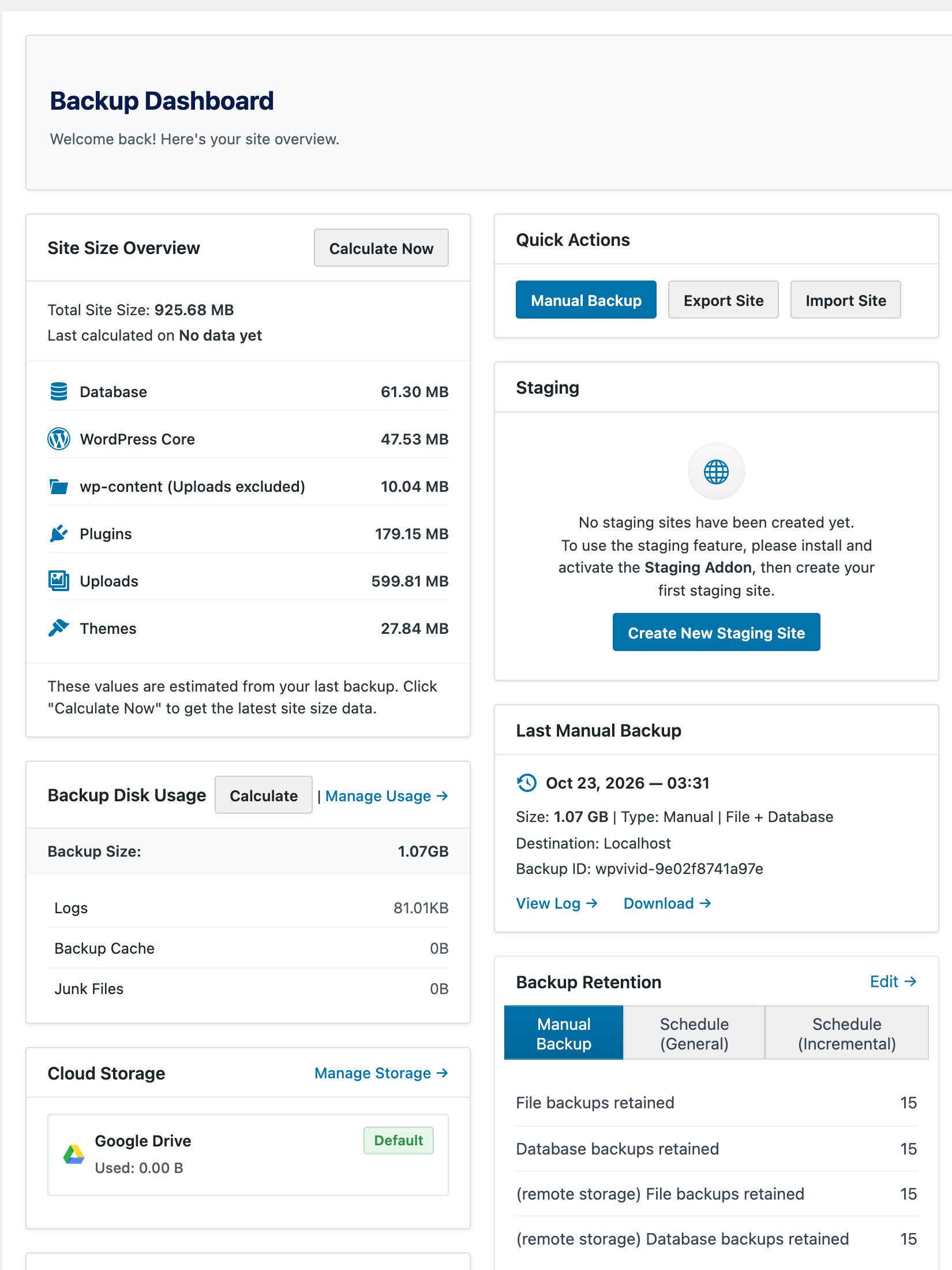
On this blog, a full WPvivid Pro backup of files and database came to 1.07 GB and finished without me touching anything. The Backup Manager then lists every copy with restore, download and delete options, whether the file sits on the server or in the cloud.
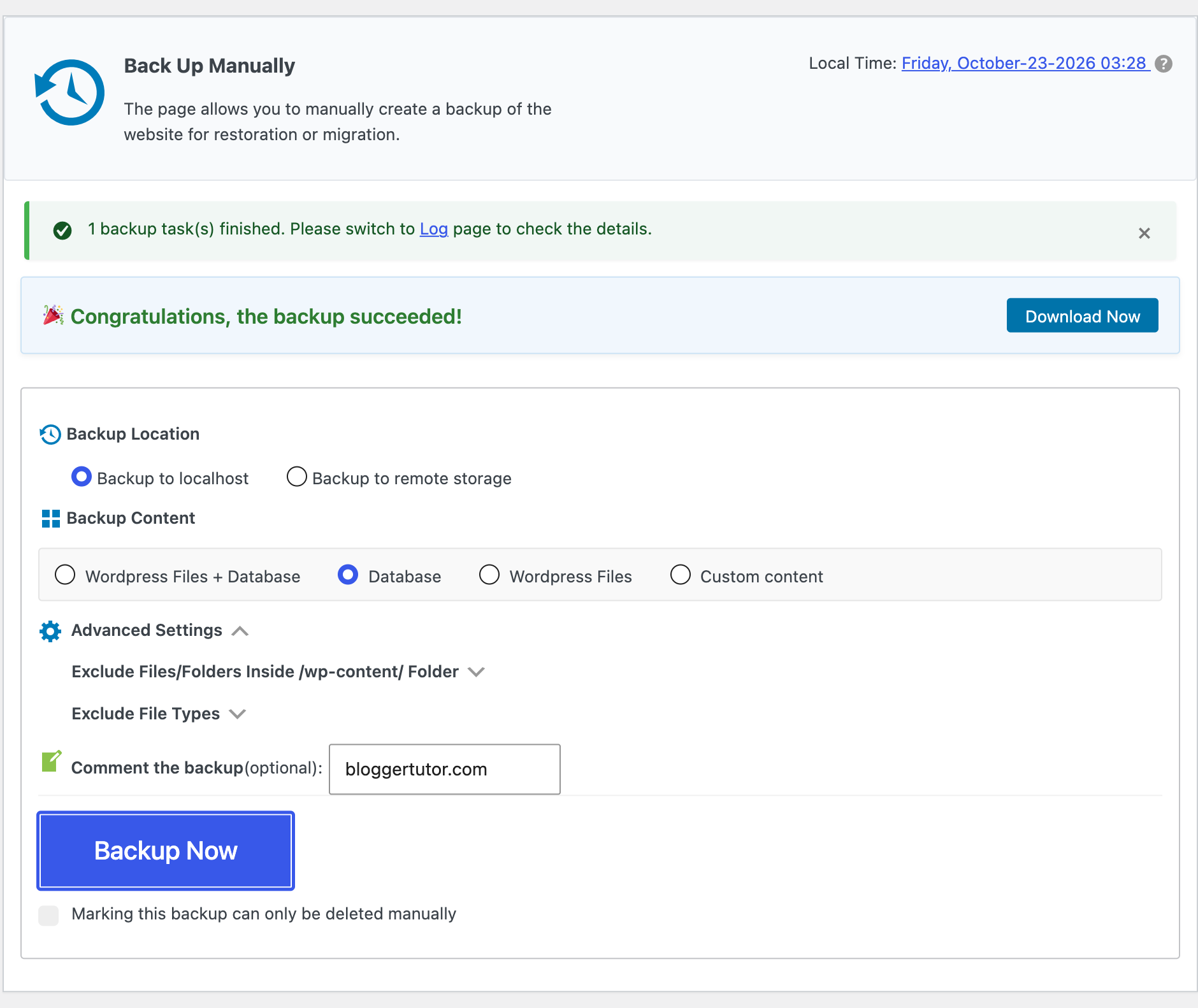
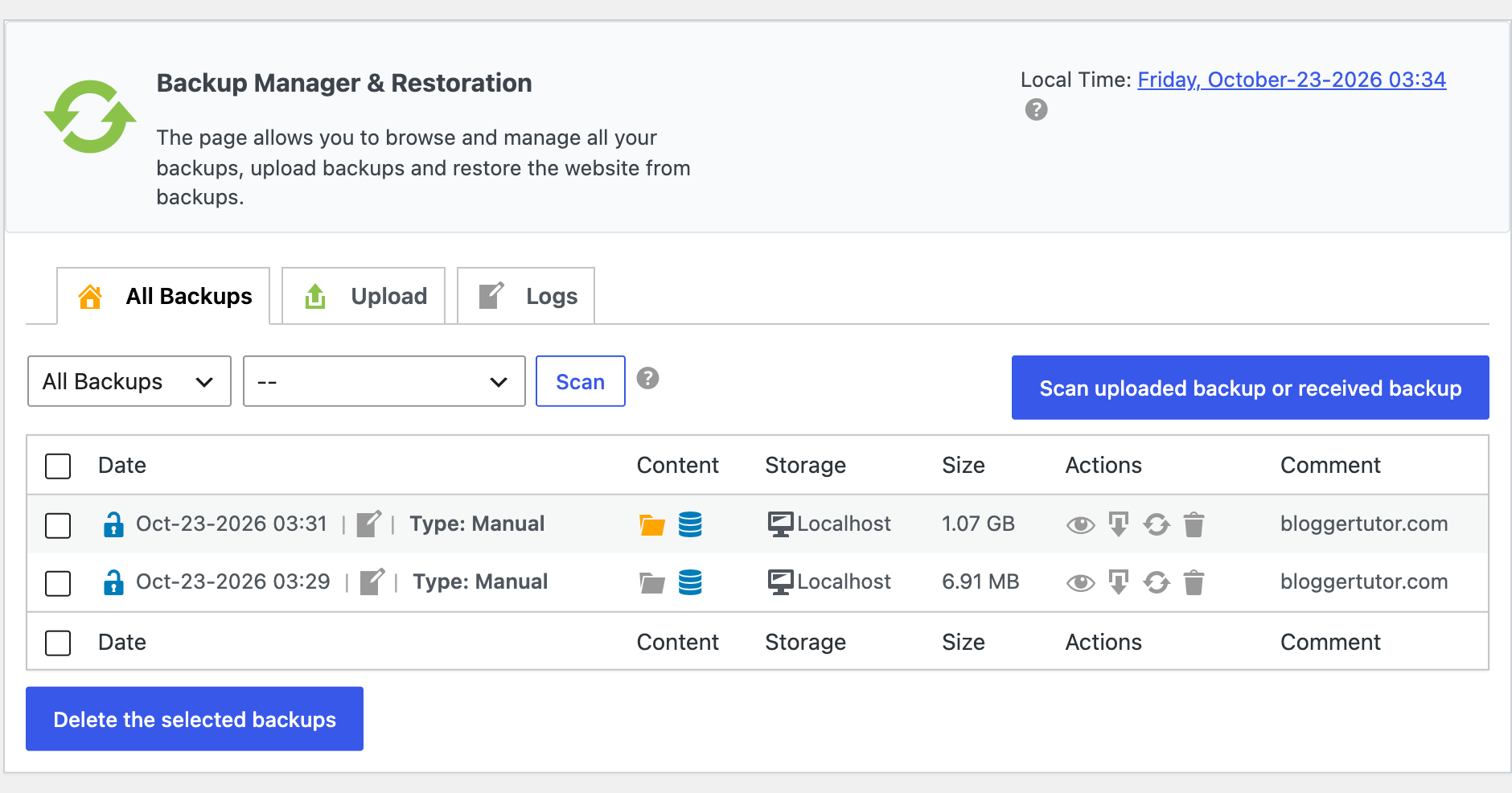
Pro adds the things I actually use daily: incremental backups, so only changed files go up after the first full copy, several schedules running side by side, and an automatic backup before every plugin, theme or core update. More on that in my full WPvivid review.
Duplicator: A Scan First, Then a Build
Duplicator works in two steps. Add New starts a scan that checks memory, execution time, file and database size and anything that could break the archive, then grades each item Good, Notice or Warning. It also asks whether you want no protection, an installer password or full archive encryption. I like this screen: it tells you about a hosting limit before a backup fails, not after.
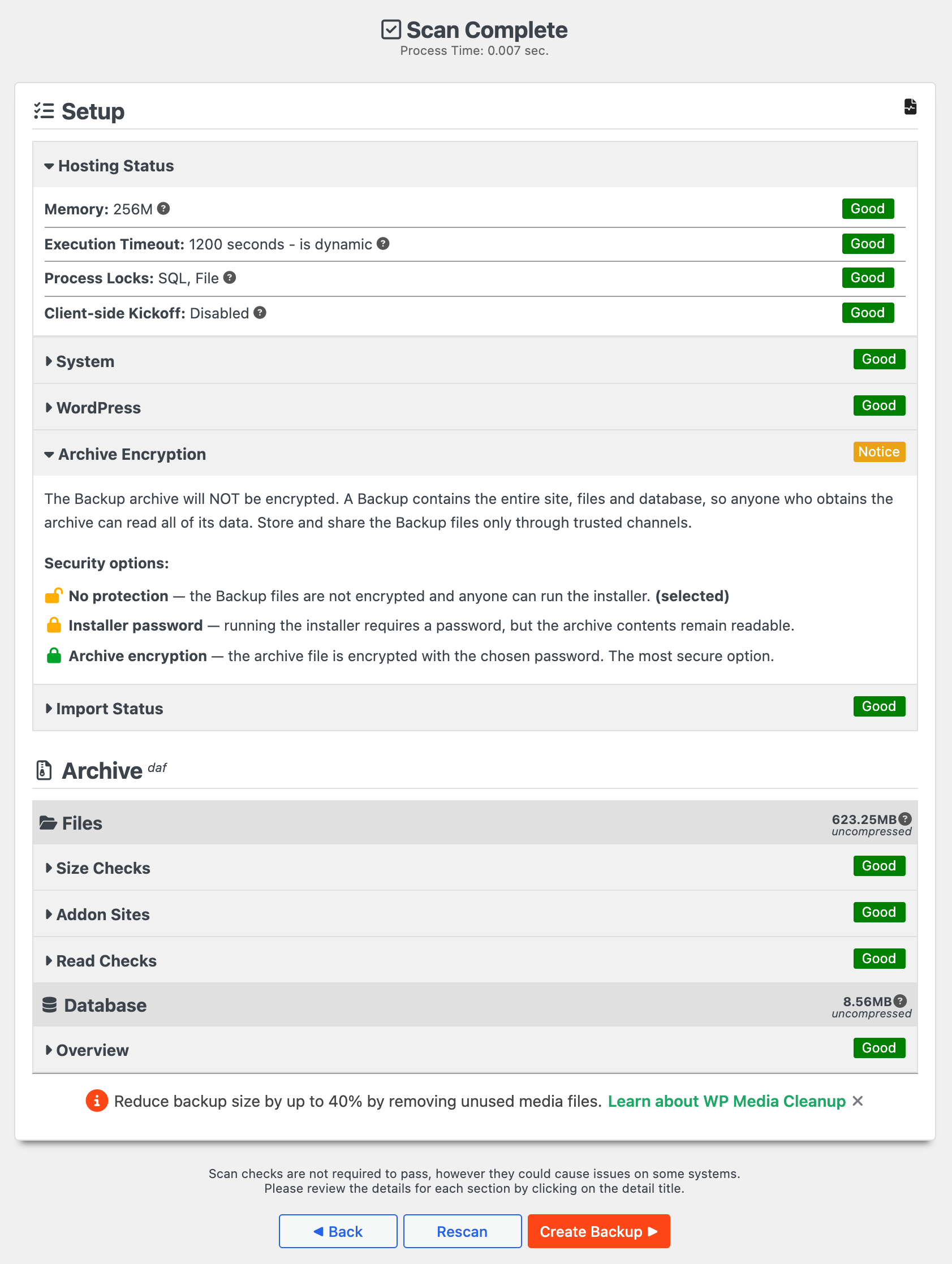
On a test site with 623 MB of files and an 8.56 MB database, Duplicator Lite 5.0.6 built a 225.69 MB archive. It then sits in the Backups list with Download and Restore buttons. Download gives you the archive plus an installer file, which is the heart of Duplicator's migration method.
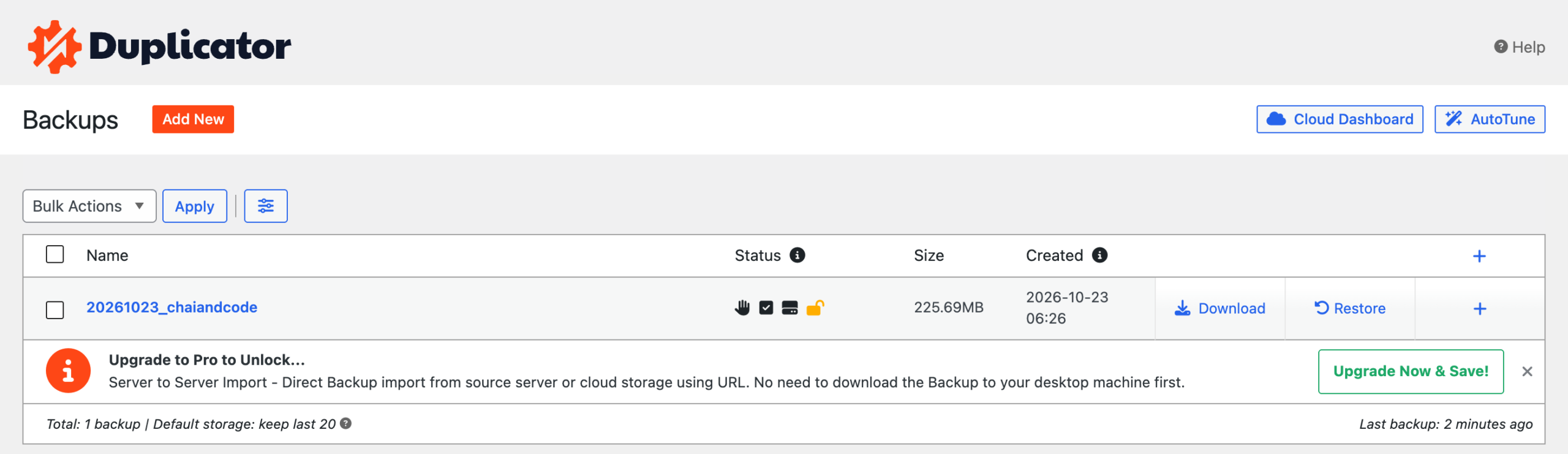
What the free version will not do is run that build on a schedule or send it to Google Drive. For that you need Pro, and the Basic plan only allows one cloud destination; Plus and above remove the limit and add hourly backups.
Migration: Duplicator's Home Ground
This is the one area where I would pick Duplicator without hesitation. Its installer runs on a completely empty server: you upload the archive and installer.php, open the installer in a browser, give it a database, and it rebuilds the whole site, rewriting URLs as it goes. There is no need to install WordPress on the new host first, which matters when you are moving to a bare VPS or handing a site to a client.
Pro adds drag and drop imports onto an existing site, server to server imports straight from a URL or cloud storage, custom search and replace rules, and installer branding from the Plus plan up so clients see your logo instead of Duplicator's. Duplicator also says it runs on managed hosts like WordPress.com and GoDaddy Managed, which are exactly the locked down hosts that break other migration plugins.
WPvivid migrates well too, just differently. Its auto migration generates a key on the destination site, you paste it into the source site, and WPvivid pushes the backup across and restores it. You can also upload a backup file and import it. Both methods need WordPress and WPvivid already installed on the new host, which is a minute's work on most hosting panels.
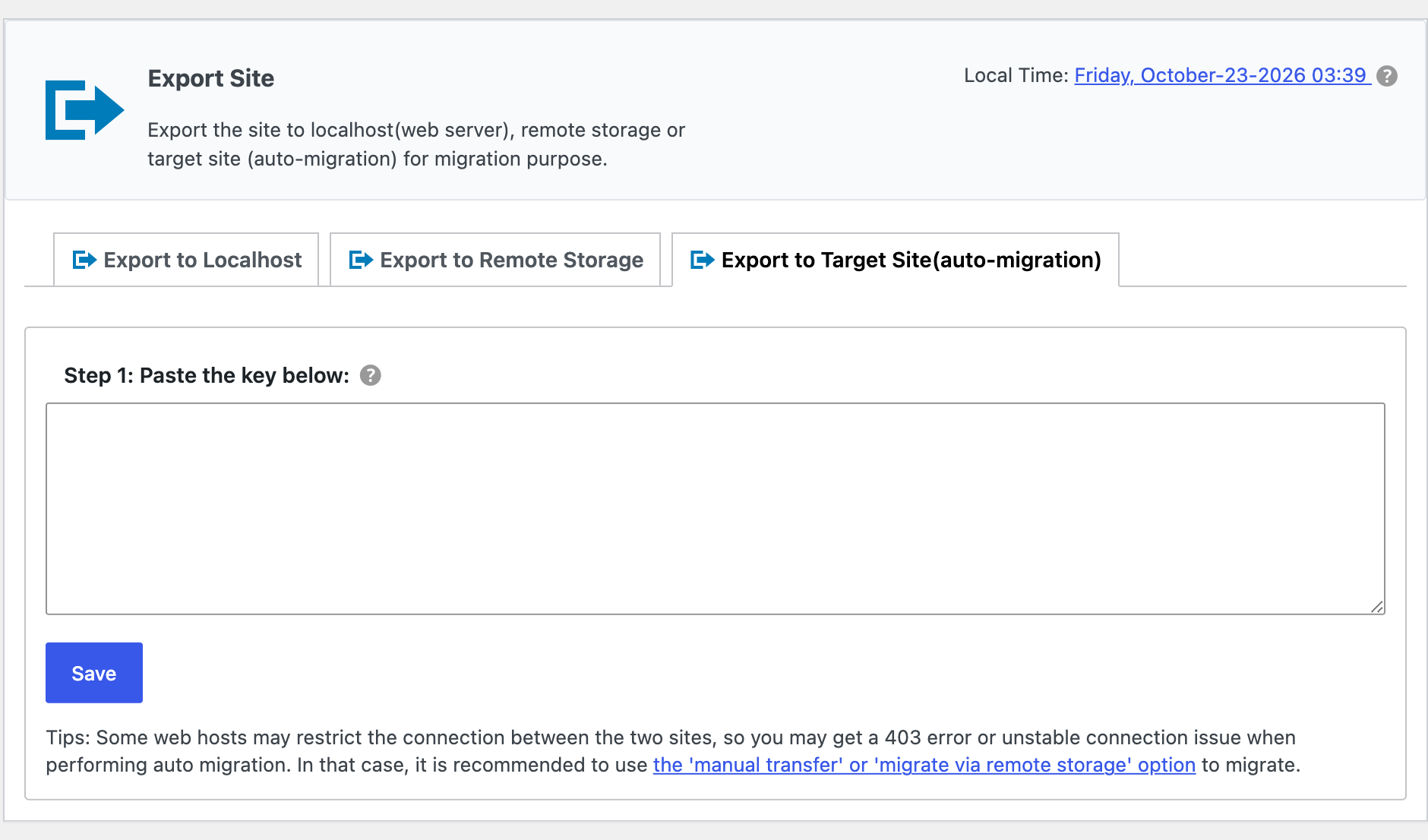
For one or two moves a year, WPvivid's method is perfectly fine. If you migrate constantly, Duplicator saves real time. My guide to moving WordPress to any host walks through a full move step by step.
Staging: WPvivid Gives It Away
A staging site is a private copy of your site where you test updates before they touch the live version. WPvivid includes one in the free plugin, created in a subdirectory with your choice of database and files to copy. Pro lets you run several staging sites, put one on a subdomain, update it from live, and push the tested changes back to live.
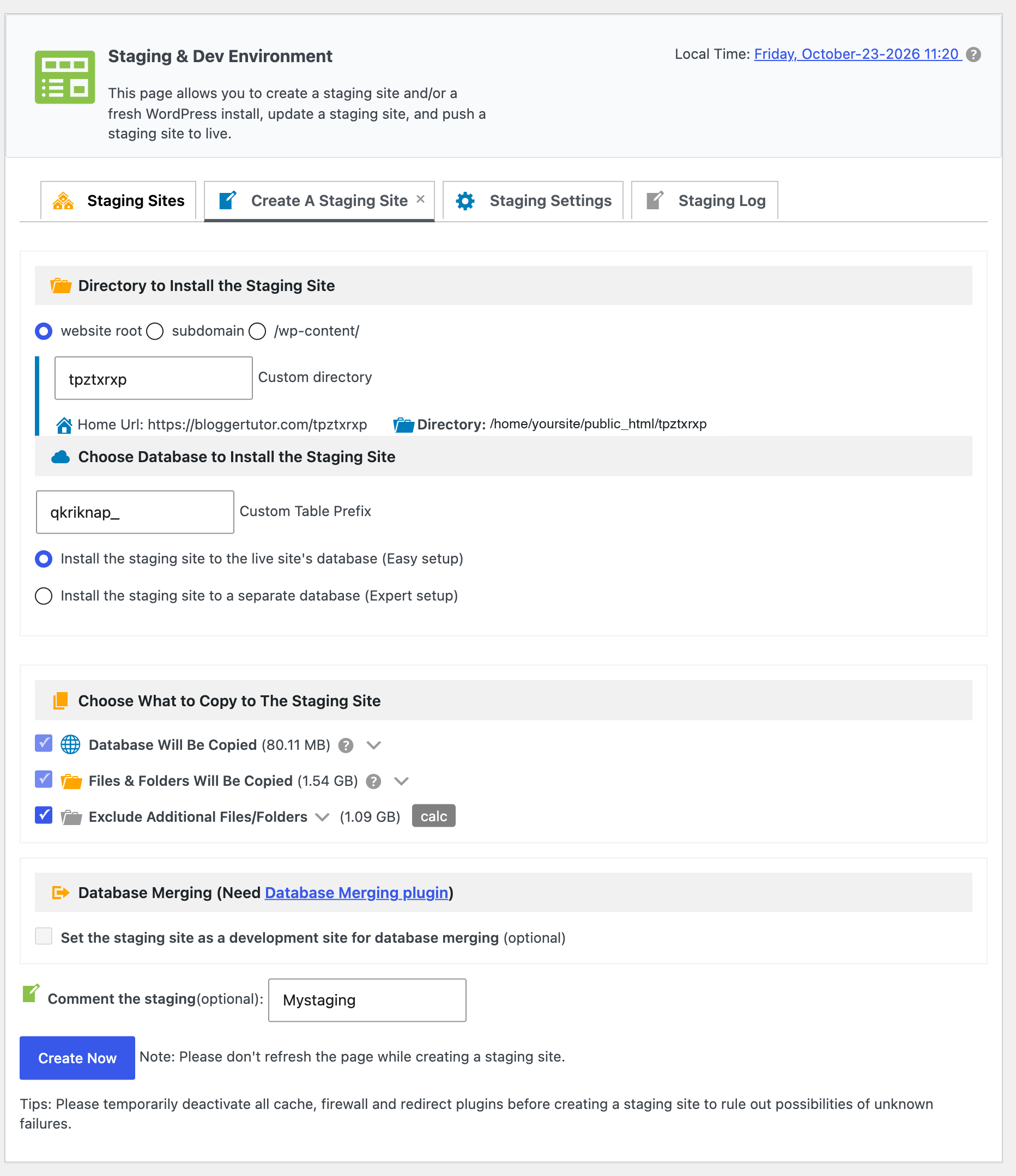
Duplicator only offers staging on its Pro plan, which is $199.50 for the first year and $399 after that, covering 20 sites. If you want staging on a single blog, WPvivid gets you there for nothing.
Restores, Rollbacks and Recovery Points
Both plugins restore a full backup in one click from the dashboard. The difference is what happens when only one thing breaks.
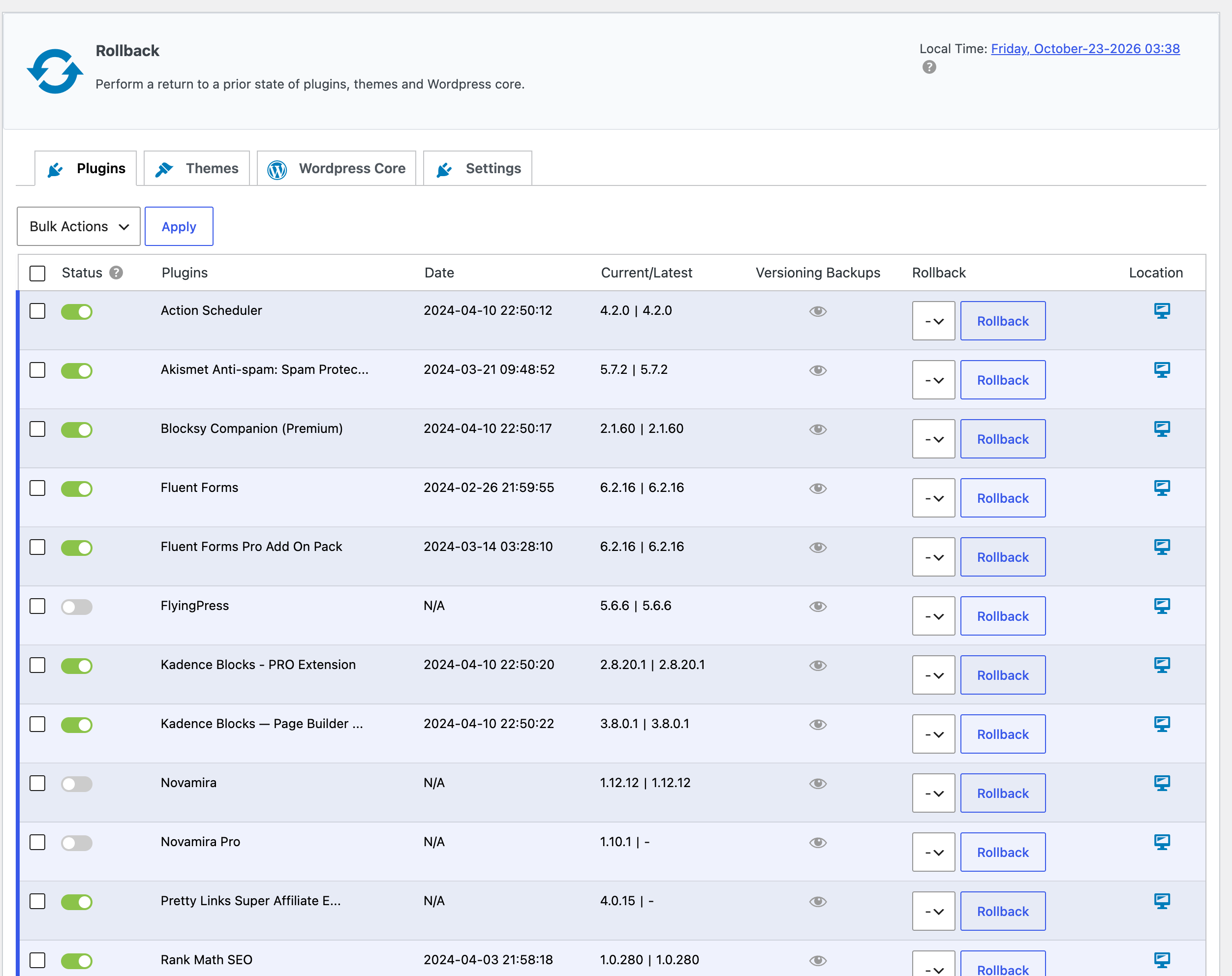
WPvivid Pro keeps versioned copies of your plugins and themes and can roll back a single plugin, a theme or WordPress core to the previous version without restoring the whole site. After a bad update, that is the fastest fix there is.
Duplicator Pro answers with Recovery Points: a backup you mark as a known good state, with a recovery URL you can open even when the dashboard is down. It is a smart idea for a site that breaks badly. For the everyday case of one plugin update going wrong, I find WPvivid's rollback quicker.
Cloud Storage Support
| Destination | WPvivid free | WPvivid Pro | Duplicator Lite | Duplicator Pro |
|---|---|---|---|---|
| Google Drive | Yes | Yes | No | Yes |
| Dropbox | Yes | Yes | No | Yes |
| Microsoft OneDrive | Yes | Yes, plus shared drives | No | Yes |
| Amazon S3 and S3 compatible | Amazon S3, DigitalOcean Spaces | Plus Wasabi and any S3 compatible | No | Yes, incl. Wasabi, Backblaze B2, Cloudflare R2 |
| FTP and SFTP | Yes | Yes | No | Yes |
| pCloud, WebDAV | No | Yes | No | No |
| Own cloud service | No | No | Duplicator Cloud (paid) | Duplicator Cloud (paid) |
| Several destinations per backup | No | Not advertised | No | Plus plan and above |
Pricing in 2026
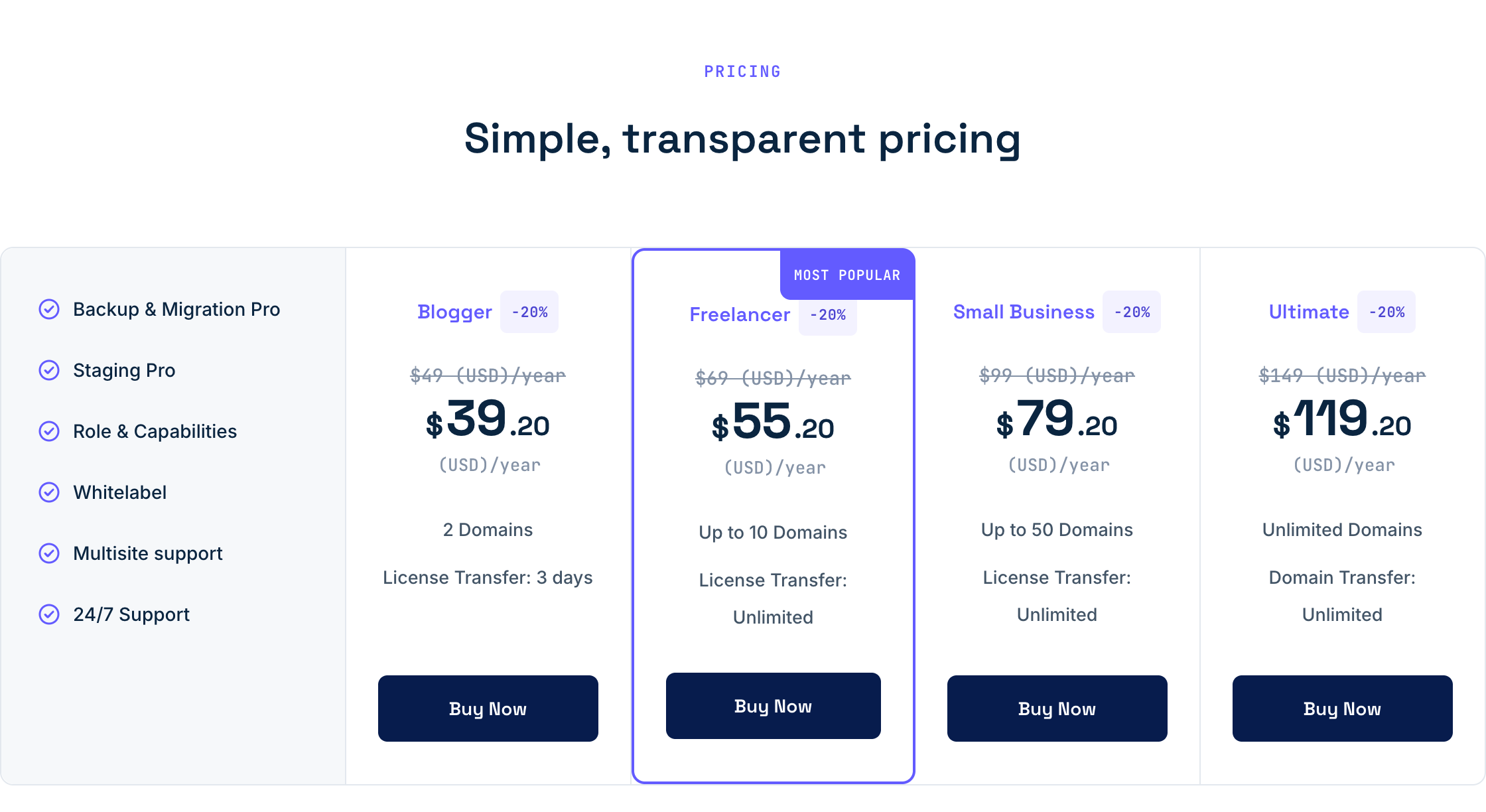
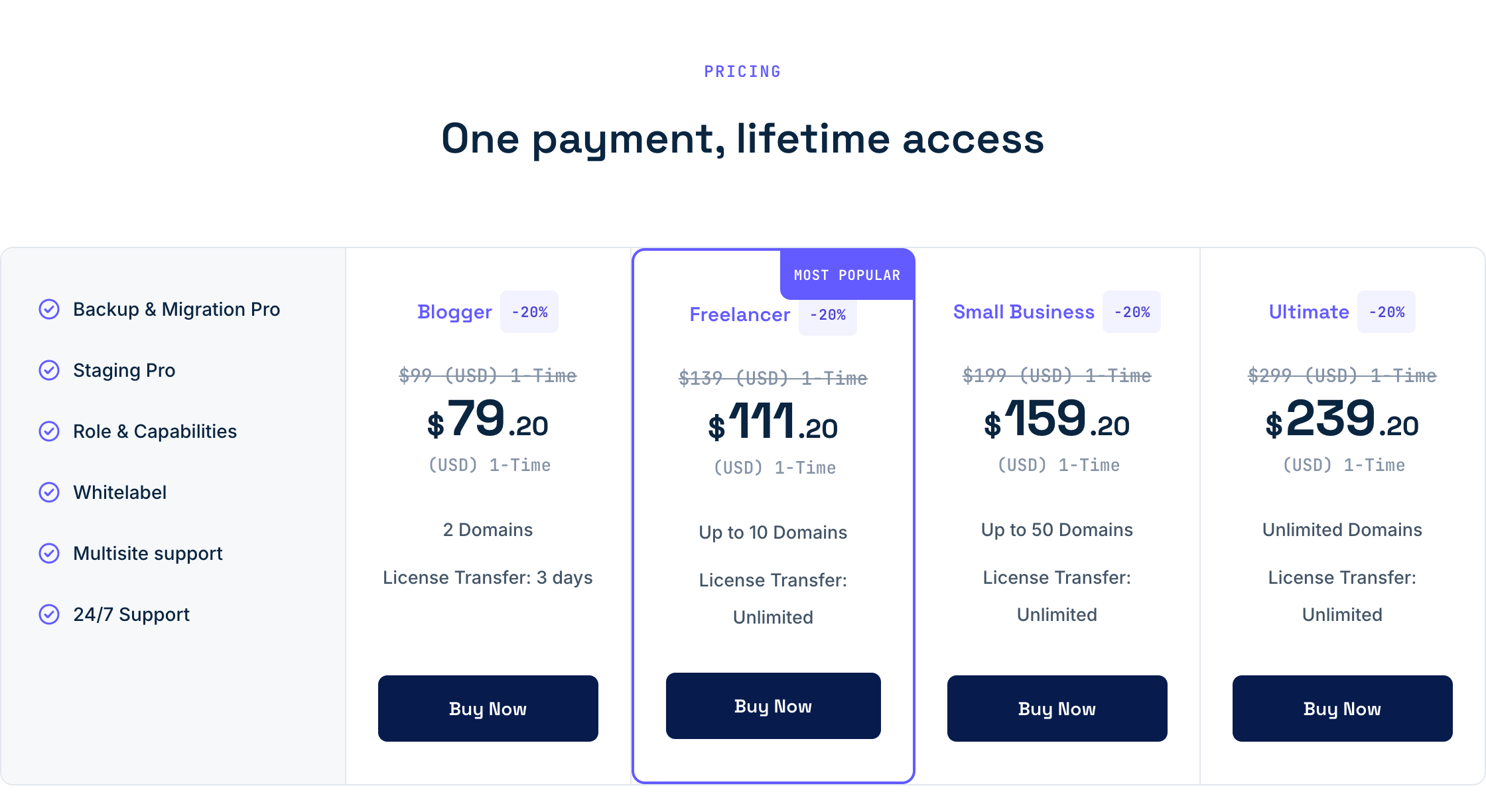
This is where WPvivid pulls clearly ahead, for two reasons: a lifetime option, and renewals. WPvivid is running a flash sale right now with 20% off every yearly and lifetime plan.
| WPvivid plan | Domains | Yearly | Sale price | Lifetime | Lifetime on sale |
|---|---|---|---|---|---|
| Blogger | 2 | $49 | $39.20 | $99 | $79.20 |
| Freelancer | 10 | $69 | $55.20 | $139 | $111.20 |
| Small Business | 50 | $99 | $79.20 | $199 | $159.20 |
| Ultimate | Unlimited | $149 | $119.20 | $299 | $239.20 |
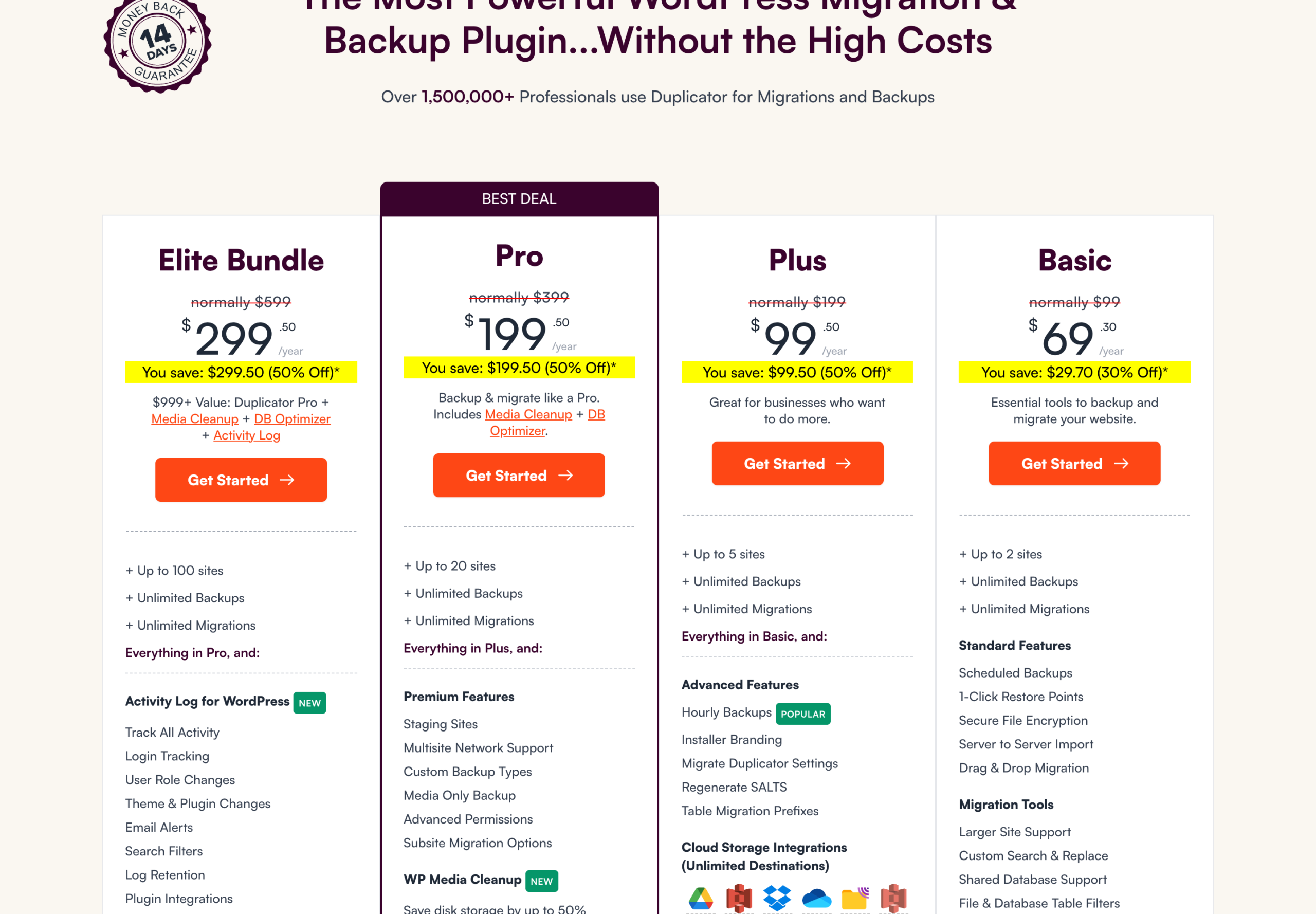
Duplicator discounts the first year heavily, then says plainly on its pricing page that all renewals are at full price. There is no lifetime plan.
| Duplicator plan | Sites | First year | Renews at | Key extras |
|---|---|---|---|---|
| Basic | 2 | $69.30 | $99/yr | Scheduled backups, one cloud destination |
| Plus | 5 | $99.50 | $199/yr | Hourly backups, unlimited destinations, installer branding |
| Pro | 20 | $199.50 | $399/yr | Staging, multisite, Media Cleanup, DB Optimizer |
| Elite | 100 | $299.50 | $599/yr | Everything in Pro plus Activity Log |
What Each One Costs Over Three Years
First year prices are marketing. Here is what you pay over three years for the same number of sites, using WPvivid's sale price for year one and list price after, against Duplicator's intro price followed by its full renewal price:
| Sites you run | WPvivid yearly, 3 years | WPvivid lifetime | Duplicator, 3 years |
|---|---|---|---|
| 2 | $137.20 (Blogger) | $79.20 once | $267.30 (Basic) |
| 10 | $193.20 (Freelancer) | $111.20 once | $997.50 (Pro, as Plus stops at 5) |
| 50 | $277.20 (Small Business) | $159.20 once | $1,497.50 (Elite) |
| 100 or more | $417.20 (Ultimate, unlimited) | $239.20 once | $1,497.50 (Elite, capped at 100) |
On two sites, WPvivid lifetime costs less than a single Duplicator renewal. On ten sites, Duplicator costs about $800 more over three years than WPvivid yearly, and almost $890 more than WPvivid lifetime. Duplicator's Elite plan does bundle Media Cleanup, DB Optimizer and Activity Log, which have value of their own, but if you are buying a backup plugin, WPvivid is simply the cheaper way to get there.
Where Duplicator Is Genuinely Better
- Migrations onto a bare server. The installer needs no WordPress on the destination, which no other tool I use matches.
- Agency workflows. Installer branding, advanced user permissions and 100 sites on Elite make it easy to standardise client handovers.
- Hourly backups and several destinations at once from the Plus plan, useful for busy stores and membership sites.
- WP-CLI commands in Pro, if you script deployments.
- Free archive encryption with AES-256 and a password.
- A pre build scan that explains hosting problems in plain language, plus AutoTune, which runs test backups to find settings that work on your server.
- A bigger user base: 4,940 ratings on WordPress.org against WPvivid's 1,564.
Where WPvivid Is Genuinely Better
- The free version. Scheduled cloud backups and staging at no cost.
- The lifetime licence, from $79.20 once on sale, with no renewal ever.
- Price at every site count, including unlimited sites on the top plan.
- Incremental backups, which keep nightly backups small on big sites.
- Rollback of a single plugin, theme or core version.
- Staging that pushes to live on every Pro plan, not just the expensive one.
- A 30 day refund, double Duplicator's 14 days.
Ratings, Support and Trust
Both plugins hold 98 out of 100 on WordPress.org. WPvivid has 1,564 ratings across more than 900,000 active installs; Duplicator has 4,940 ratings across more than a million. WPvivid offers 24/7 ticket support on every Pro plan. Duplicator tiers its support, standard on Basic and Plus, priority on Pro and premium on Elite.
Neither company has had a security incident like the one that hit UpdraftPlus, and neither plugin needs an external management dashboard to run, which is exactly the kind of connection that was abused in that breach. Duplicator does offer an optional cloud dashboard for its own storage, and WPvivid has an optional MainWP extension for people who already manage sites that way.
Which One Should You Choose?
| If you | Choose | Why |
|---|---|---|
| Run one or two blogs and pay nothing | WPvivid free | Scheduled cloud backups and staging for free |
| Want to pay once and be done | WPvivid lifetime | From $79.20 once on sale, no renewals |
| Manage up to 50 client sites on a budget | WPvivid Small Business | $159.20 once for 50 domains |
| Need staging that pushes to live | WPvivid Pro | Included on every plan |
| Move sites to new hosts every week | Duplicator Pro | The cleanest migration installer there is |
| Run an agency with branded handovers | Duplicator Plus or Elite | Installer branding and permissions |
| Want both | WPvivid for backups, Duplicator Lite for moves | They run side by side without conflict |
That last row is what I actually do. WPvivid handles the nightly backups and staging, and when a site has to move to a bare server, I install the free Duplicator plugin for that one job.
My Recommendation
Buy WPvivid. It is the stronger backup plugin, its free version beats Duplicator Lite outright, and the lifetime licence at 20% off is the best deal in WordPress backups right now. Choose Duplicator Pro instead only if migrations are the main thing you do.
WPvivid vs Duplicator FAQ
Is WPvivid better than Duplicator?
For backups, yes. WPvivid's free version includes scheduled backups to Google Drive, Dropbox and OneDrive plus a staging site, and Pro is cheaper with a lifetime option. Duplicator is better for migrations, especially onto an empty server.
Is Duplicator free?
Duplicator Lite is free and handles manual backups, one click restores, encryption and migrations. Scheduled backups, Google Drive, Dropbox and other cloud storage, staging and multisite need Duplicator Pro, from $69.30 for the first year.
Does Duplicator have a lifetime licence?
No. Duplicator sells yearly plans only, and its pricing page says renewals are at full price. WPvivid sells lifetime licences from $99, or $79.20 during the current sale.
Which is better for migrating a WordPress site?
Duplicator. Its installer rebuilds a site on a server with no WordPress installed, and Pro adds server to server and drag and drop imports. WPvivid migrates well too, but needs WordPress and WPvivid installed on the new host first.
Can I use WPvivid and Duplicator together?
Yes. They do not conflict. Many people, including me, use WPvivid for scheduled backups and staging and keep the free Duplicator plugin for occasional migrations.
Does WPvivid free include staging?
Yes. WPvivid's free plugin creates a staging site in a subdirectory. Pro adds multiple staging sites, subdomain staging and pushing changes back to live. Duplicator only offers staging on its Pro plan and above.
Which plugin has better cloud storage support?
WPvivid free supports Google Drive, Dropbox, OneDrive, Amazon S3, DigitalOcean Spaces, FTP and SFTP. Duplicator Lite only stores locally or on its paid Duplicator Cloud; Duplicator Pro adds the major clouds and any S3 compatible storage.
What is the refund policy for each?
WPvivid refunds within 30 days of purchase. Duplicator refunds within 14 days.
More Backup and Migration Guides
- Best WordPress backup plugins, five I trust in 2026
- WPvivid review, features and honest verdict
- WPvivid vs UpdraftPlus, which backup plugin wins
- WPvivid Black Friday, dates and best price
- Duplicator Black Friday deal
- How to move WordPress to any host
Disclosure: I earn a commission if you buy WPvivid or Duplicator through the links on this page, at no extra cost to you. Prices, features and ratings were checked on wpvivid.com, duplicator.com and WordPress.org on 23 October 2026, and both backups shown were run by me. You can read exactly how I test, verify and update everything on this site.