I build on the block editor every day, and this site runs Kadence Blocks 3.7.11 with the Pro extension, so I have a long standing bias I want to declare before anything else. What changed my mind about writing this comparison at all is that Spectra is not one plugin any more. In July 2026 Brainstorm Force split it in two, and almost every Kadence versus Spectra article you will find is quietly comparing Kadence against the half that no longer gets new features.
So this is not a feature checklist copied off two marketing pages. I read the shipped code of both plugins, counted the blocks each one actually registers, and checked both pricing pages properly. Everything below was verified on 22 September 2026.
The short answer
Pick Kadence Blocks if you want the deeper design toolkit. It gives you 30 insertable blocks free against Spectra Blocks' 15, it runs on PHP 7.4 so it installs anywhere, and the paid tier is a bundle that includes the theme.
Pick Spectra Blocks if you want AI drafting and a smaller, more native toolkit. It is a genuine rebuild on modern core block APIs, it is free with no account required, and Spectra Pro sells a lifetime licence at $319 where Kadence has no lifetime option at all.
The trap: if you read a comparison that credits Spectra with dozens of blocks, a Post Grid, a Testimonial block and an FAQ block, it is describing Spectra Legacy. That plugin still has a million installs and still works, but Brainstorm Force have confirmed it gets no new features.
There are two Spectras now, and that changes the whole comparison
On 8 July 2026 a brand new plugin called Spectra Blocks appeared on WordPress.org. On 14 July the original plugin, listed under the slug ultimate-addons-for-gutenberg, was renamed Spectra Legacy. Same vendor, two separate listings, two separate codebases.
Brainstorm Force are not being coy about what that means. This is their own wording in the Spectra Legacy readme:
Brainstorm Force, Spectra Legacy readme, WordPress.org
Read that again with a million active installs in mind. A million sites are running a block plugin that is now in maintenance mode by its publisher's own description. Nothing breaks, support continues, security patches continue. But the roadmap moved.
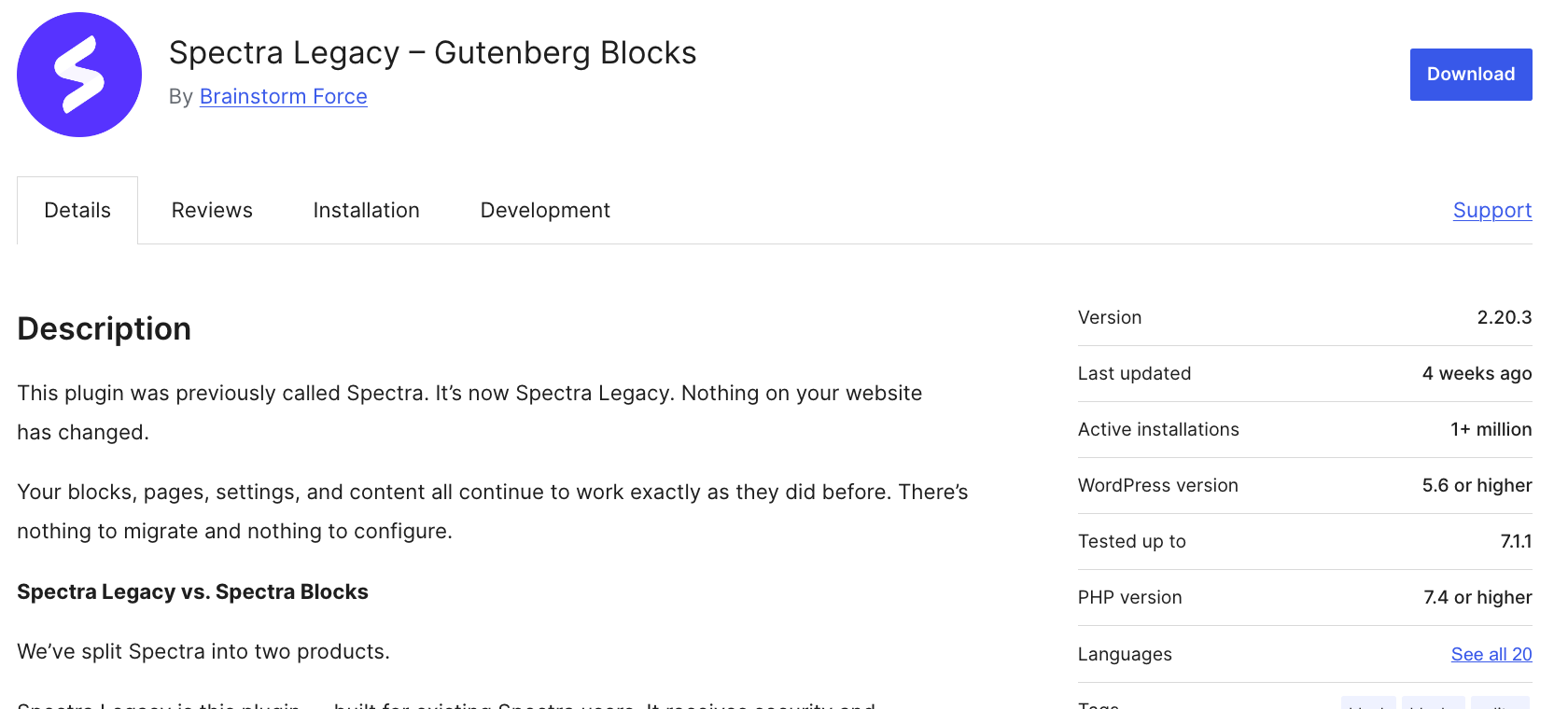
| Spectra Legacy | Spectra Blocks | |
|---|---|---|
| WordPress.org slug | ultimate-addons-for-gutenberg | spectra-blocks |
| On WordPress.org since | 13 June 2018 | 8 July 2026 |
| Current version | 2.20.3 | 1.0.9 |
| Active installs | 1,000,000+ | 40,000+ |
| Rating | 94 from 1,870 ratings | 92 from 39 ratings |
| New features | No. Maintenance only | Yes, this is where development happens |
| Requires PHP | 7.4 | 8.1 |
| Insertable blocks | The full original catalogue | 15 |
| Built on | Pre-dates many modern block APIs | Modern core block APIs |
There is no deadline and no forced migration, and Brainstorm Force are clear that running both side by side during a transition is normal. Their own recommendation is to start new projects on Spectra Blocks unless your project depends on a specific block that only exists in Legacy, which is a surprisingly honest thing for a vendor to put in writing.
Where each plugin stands on WordPress.org today
Install counts and ratings are the least spinnable numbers in this comparison, because neither vendor controls them. Here is the state of play on 22 September 2026.
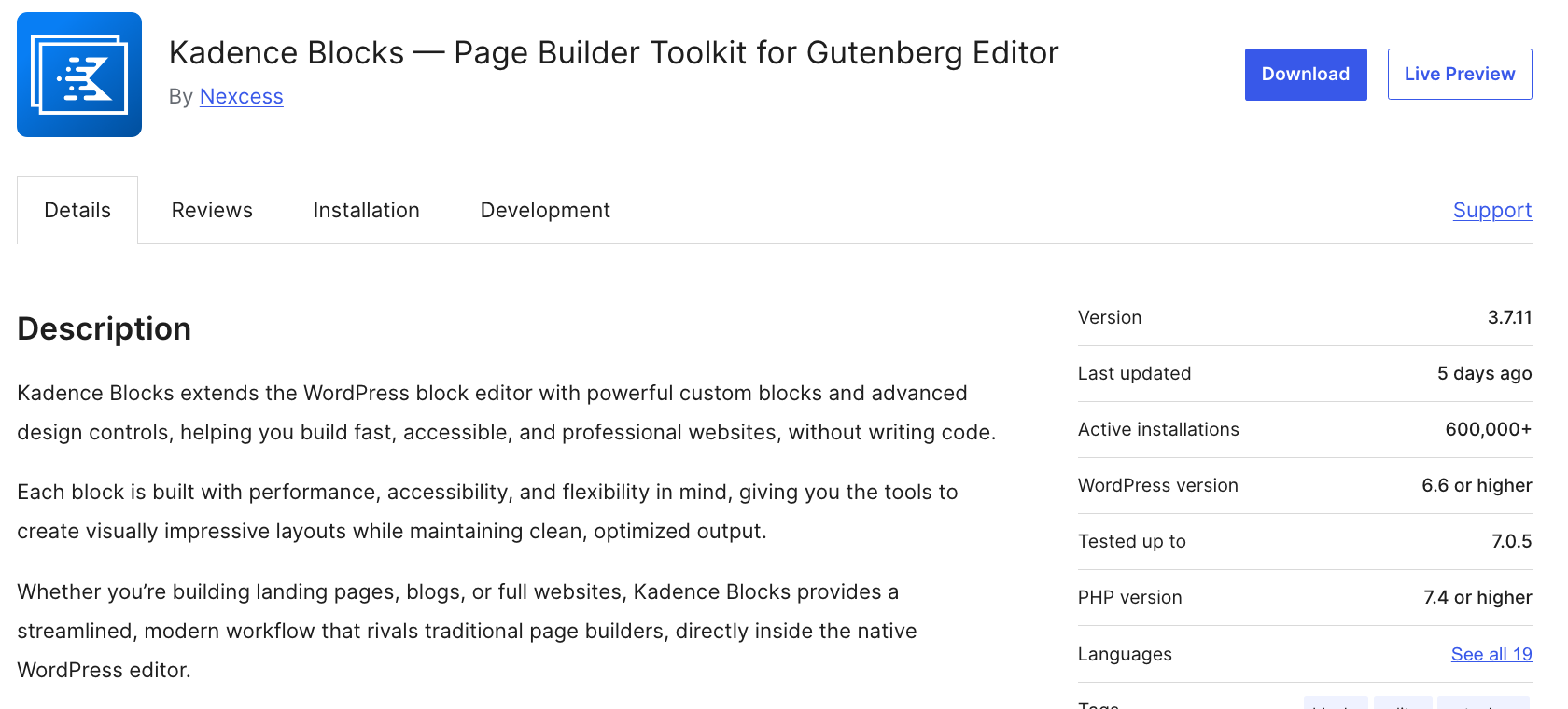
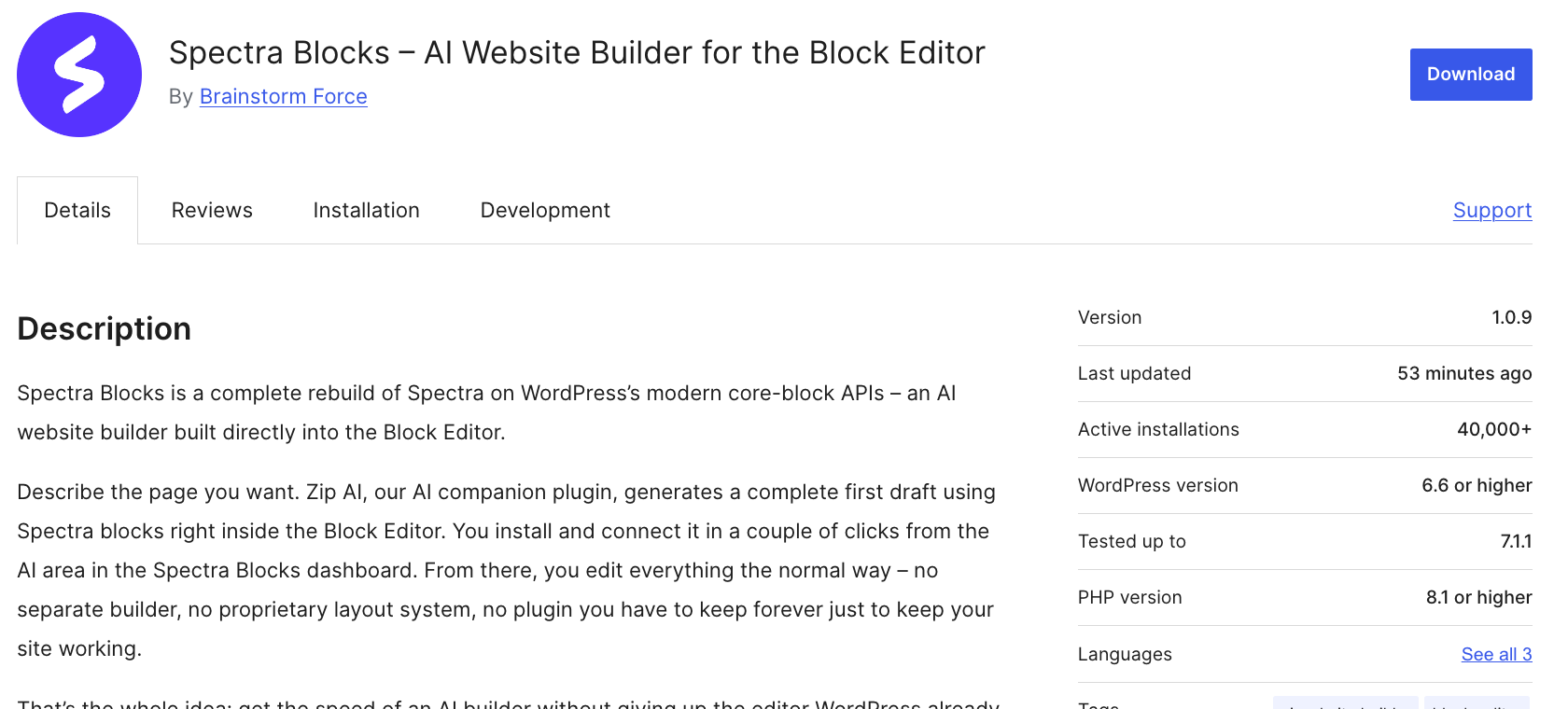
| Kadence Blocks | Spectra Blocks | Spectra Legacy | |
|---|---|---|---|
| Author | Nexcess | Brainstorm Force | Brainstorm Force |
| Version | 3.7.11 | 1.0.9 | 2.20.3 |
| Active installs | 600,000+ | 40,000+ | 1,000,000+ |
| Rating | 96 from 332 | 92 from 39 | 94 from 1,870 |
| Five star reviews | 307 of 332 | 34 of 39 | 1,656 of 1,870 |
| One star reviews | 7, or 2.1% | 2, or 5.1% | 100, or 5.3% |
| On WordPress.org since | 19 August 2018 | 8 July 2026 | 13 June 2018 |
| Last updated | 16 September 2026 | 22 September 2026 | 26 August 2026 |
| Requires WordPress | 6.6 | 6.6 | 5.6 |
| Tested up to | 7.0.5 | 7.1.1 | 7.1.1 |
| Requires PHP | 7.4 | 8.1 | 7.4 |
Two things worth pulling out. Kadence Blocks has the cleanest rating profile of the three, with a one star share of just 2.1% across 332 ratings. And Spectra Blocks' 92 rating rests on 39 ratings, which is not enough to mean much yet. Two one star reviews out of 39 is a rounding error, not a verdict.
The PHP 8.1 requirement is a real constraint
Spectra Blocks requires PHP 8.1 or higher. Kadence Blocks and Spectra Legacy both run on PHP 7.4. If you are on cheap shared hosting that is still serving 7.4, or you are maintaining an older client site that has not been through a PHP audit, Spectra Blocks will not install at all. That is a hard gate, not a preference, and it is the single most common reason I would tell someone to stay on Kadence for a specific project.
Block count, counted properly instead of quoted
Every comparison quotes a block count and none of them say how they got it, which is why the numbers never agree. Kadence's own readme says 20+. Liquid Web's pricing page says 30+. Some articles claim 50 or more by counting every child block.
So I counted them from the code. Every block.json in each plugin, split into two groups: top level blocks that appear in the inserter, and child or hidden blocks that are only valid inside a parent. A form field is not a block you choose, it is a part of the form block. Counting those inflates the total without adding anything you can actually place on a page.
| Insertable blocks | Child or hidden blocks | |
|---|---|---|
| Kadence Blocks, free | 30 | 33 |
| Kadence Blocks Pro adds | 12 more | 16 |
| Kadence total with Pro | 42 | 49 |
| Spectra Blocks, free | 15 | 33 |
| Spectra Blocks Pro adds | Design controls and Extensions, not new blocks | n/a |
I cross checked the Kadence figure against the live block registry on this site, which runs the free plugin and the Pro extension together. WordPress reports 86 registered kadence/ blocks at runtime, which is the 42 insertable ones plus their children. The arithmetic holds.
The 30 Kadence blocks you get without paying
- Layout: Row Layout, Section, Spacer and Divider, Show More, Table
- Content: Advanced Text, Advanced Button, Info Box, Icon, Icon List, Table of Contents, Tabs, Accordion, Testimonials, Image, Advanced Gallery
- Dynamic and interactive: Posts, Countdown, Count Up, Progress Bar, Lottie Animation, Video Popup, Google Maps, Search
- Site building: Header, Navigation, Site Identity, Advanced Form, Form, Off Canvas, Vector
The Advanced Form block alone carries 15 field types as child blocks, which is why the hidden count is so high. Over 1,500 SVG icons and 900+ Google fonts ship with the free plugin, and Kadence's Intelligent Load only outputs CSS and JavaScript for blocks that are actually on the page.
The 15 Spectra Blocks you get without paying
- Foundation: Container, Text, Buttons, Separator, List, Icons
- Layout and content: Accordion, Tabs, Slider, Google Map
- Dynamic and engagement: Post, Countdown, Counter, Modal, Popup Builder
That is the whole catalogue, and it is deliberate. Brainstorm Force describe the design as composable, not bloated: a smaller set of flexible blocks plus Extensions that add advanced spacing, border, shadow and responsive controls to WordPress's own core blocks. The single Text block covers H1 through H6 and paragraphs, where Kadence has a separate Advanced Text block doing the same job.
This is the part buyers misread
Spectra Blocks has no Testimonial block, no Info Box block, no FAQ block, no Team block, no Post Grid as a distinct block and no Table of Contents. In the composable model a testimonial is a Container with an Image, Text and Buttons inside it, and the Design Library ships that pattern ready made.
That is a legitimate architecture and it produces leaner markup. It is also more clicks and more decisions per section. If you build the same three layouts on repeat for clients, a dedicated Info Box block genuinely saves you time. If you build bespoke layouts, the Container approach gets out of your way.
What paying actually unlocks on each side
This is where the two products stop being comparable, because they sell completely different things behind the paywall.
Kadence Pro adds 12 more blocks
- Advanced Query Loop with a full filter suite: search, checkbox, buttons, date, range, rating, sort, pagination, result count and WooCommerce attribute filters
- Post Grid and Portfolio Grid
- Advanced Slider and Product Carousel
- Repeater and Dynamic List for repeating content
- Modal, Split Content, Image Overlay, User Info and Dynamic HTML
The Advanced Query Loop is the one that earns its money. Ten filter child blocks means you can build a faceted archive, a filterable portfolio or a WooCommerce attribute filter without a single extra plugin.
Spectra Pro adds controls, patterns and a bundle
Spectra Blocks Pro is not a block pack. The core plugin, every block and every Extension are free and need no account. What the paid tiers sell is premium patterns and kits, priority support, and on the higher tiers a bundle of other Brainstorm Force products: Astra Pro, Ultimate Addons for Elementor and SureForms Agency.
The AI question, and the part the pricing page buries
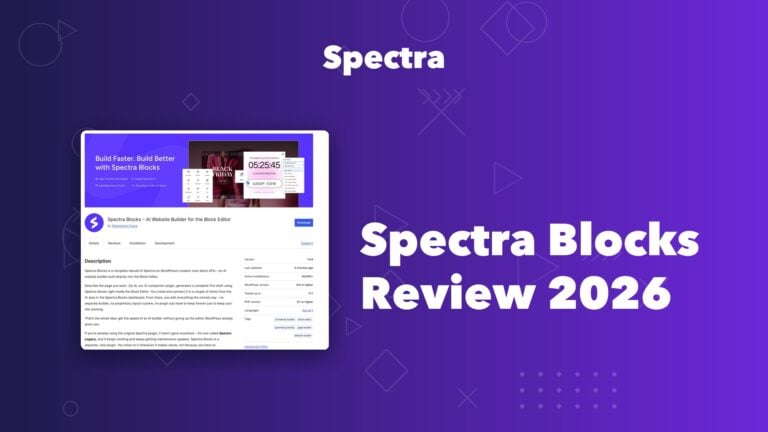
Spectra Blocks leads with AI. Its WordPress.org title is literally AI Website Builder for the Block Editor. You describe a page, Zip AI drafts it in native Spectra blocks, and you edit it normally afterwards. It also generates individual sections, rewrites existing copy, and converts an HTML page into blocks. Kadence has nothing equivalent; its AI is an inline writing assistant inside the Advanced Text block.
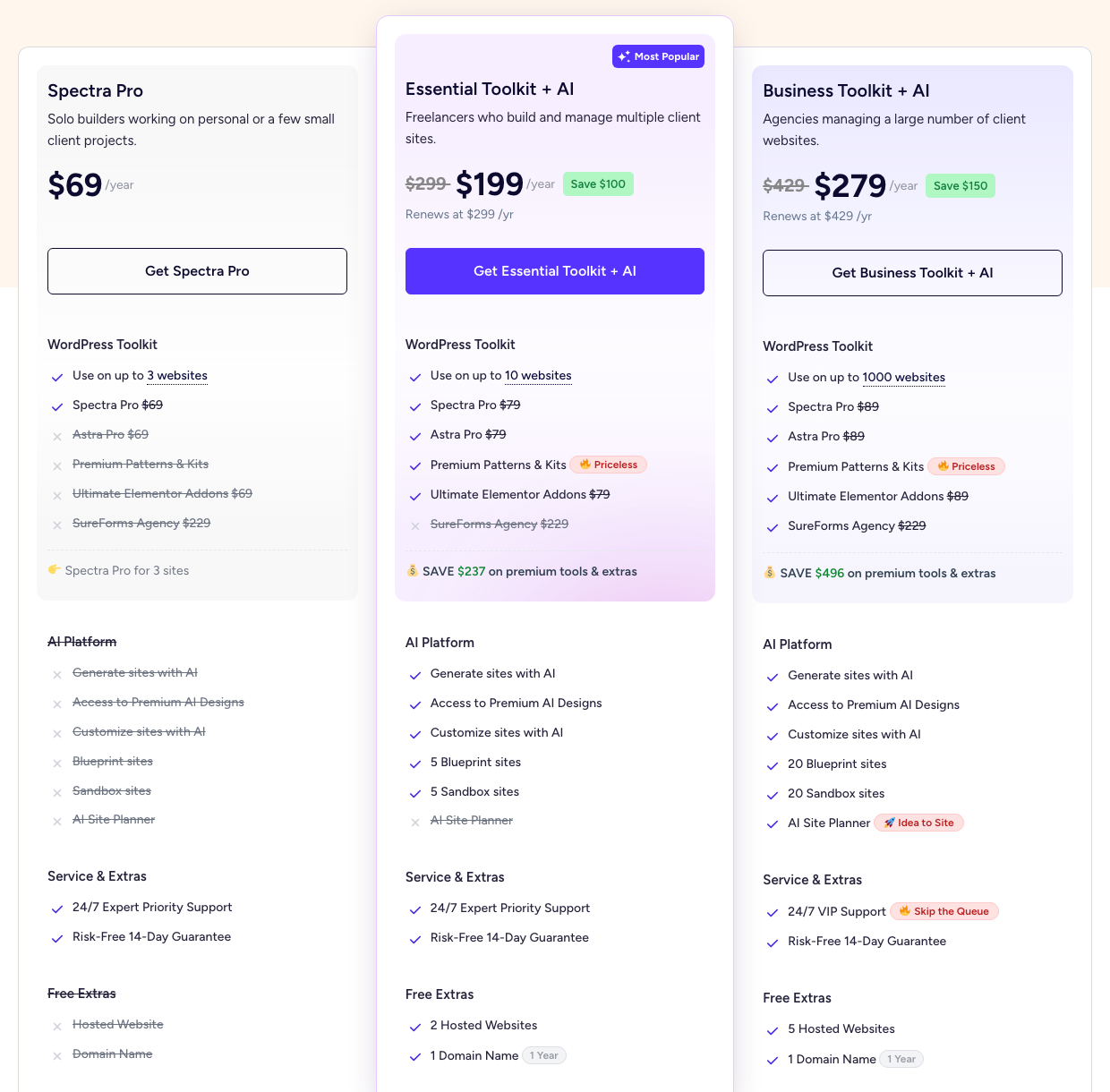
AI is not included in Spectra Pro at $69
On the Spectra pricing page, the entire AI Platform section of the $69 Spectra Pro tier is struck through. Generate sites with AI, access to premium AI designs, customise sites with AI, Blueprint sites, Sandbox sites and the AI Site Planner are all excluded. The AI starts at the Essential Toolkit tier.
There is a second layer to this. Brainstorm Force state in the plugin readme that AI features come from Zip AI, require a ZipWP account, and run on credits, including for Spectra Blocks Pro users. Buying a Toolkit tier does not buy unmetered AI. AI requests are processed by the ZipWP service, not on your own server.
Pricing, side by side and honestly labelled
Kadence
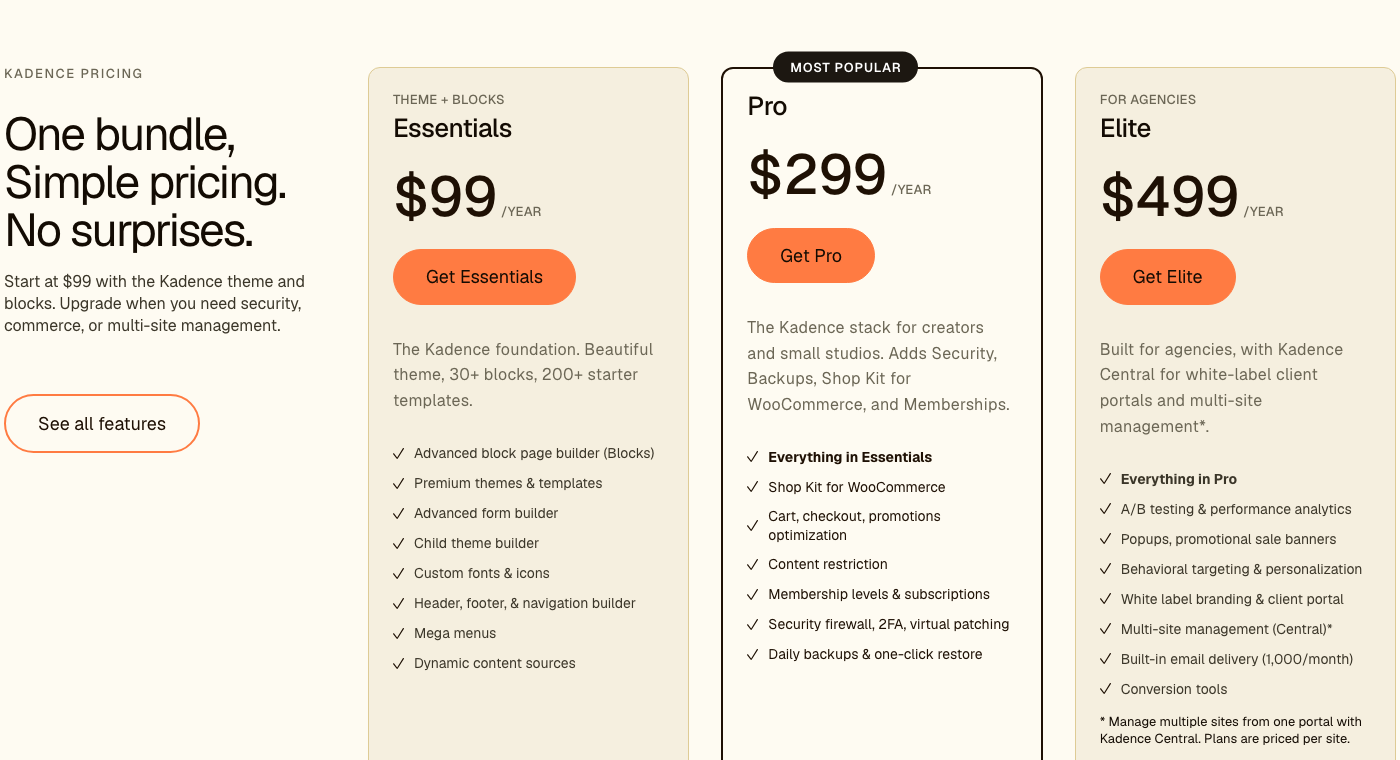
Kadence no longer sells the Blocks Pro extension on its own. The standalone product page still exists but carries no price at all, just a See Plans button. Everything is bought as a bundle that includes the theme.
| Plan | Price | What it covers |
|---|---|---|
| Essentials | $99/year | Theme and Blocks, 200+ starter templates, advanced form builder, child theme builder, header, footer and navigation builder, mega menus, dynamic content sources |
| Pro | $299/year | Everything in Essentials plus Shop Kit for WooCommerce, cart and checkout optimisation, content restriction, memberships, security firewall with 2FA and virtual patching, daily backups |
| Elite | $499/year | Everything in Pro plus A/B testing, popups and promotional banners, behavioural targeting, white label and client portal, multi-site management, 1,000 emails a month |
Spectra
| Plan | First year | Renews at | Sites | AI included |
|---|---|---|---|---|
| Spectra Pro | $69 | $69 | 3 | No |
| Essential Toolkit + AI | $199 | $299 | 10 | Yes, without the AI Site Planner |
| Business Toolkit + AI | $279 | $429 | 1,000 | Yes, everything |
| Plan | Lifetime price | Was |
|---|---|---|
| Spectra Pro | $319 once | $349 |
| Essential Toolkit + AI | $549 once | $899 |
| Business Toolkit + AI | $799 once | $1,299 |
The renewal gap is the number to watch
Essential Toolkit is advertised at $199 and renews at $299. Business Toolkit is advertised at $279 and renews at $429. That is a 50% jump in year two on both. Spectra Pro at $69 is the only annual tier that renews at the price you first paid, and it is also the tier with no AI.
Kadence has no introductory pricing and no renewal step up, but it also has no lifetime option. Over five years, Spectra Pro at $319 once costs less than Kadence Essentials at $99 a year does in four. Whether that matters depends entirely on whether you need the theme, and Kadence Essentials includes one.
Performance, and why most of the benchmarks you will read are stale
You will find comparisons measuring DOM size and page weight and concluding that Spectra produces leaner markup than Kadence. Check the date on any of them. If it predates July 2026, it measured Spectra Legacy, a plugin built before many of today's block APIs existed. The new Spectra Blocks is a different codebase with a different output.
Both vendors make the same core claim and both implement it. Kadence calls it Intelligent Load and only outputs CSS and JavaScript for blocks present on the page. Brainstorm Force say Spectra Blocks only loads the CSS a given page needs, and add that running Legacy and Blocks together is not a heavy tax because each plugin only loads assets for its own blocks on a given page.
What I would actually pay attention to is structural, not benchmarked. Spectra Blocks is built directly on core block APIs, which means it inherits core's own output rather than wrapping it. Kadence carries more of its own machinery because it does more. That difference shows up as a handful of kilobytes, and it will be swamped by your hosting, your images and your third party scripts. I would not pick a block plugin on it.
Which one should you actually install
| Your situation | What I would do |
|---|---|
| You already run Spectra Legacy on a live site | Change nothing today. It is supported and patched. Start new pages on Spectra Blocks when you are ready, keep Legacy active while any page still uses its blocks |
| You are starting a brand new site and want AI drafting | Spectra Blocks. It is free, it is where development is happening, and Zip AI genuinely removes the blank page problem |
| You want the deepest free block library | Kadence Blocks. 30 insertable blocks against 15, and the free tier includes a real form builder |
| Your host is still on PHP 7.4 | Kadence Blocks. Spectra Blocks requires PHP 8.1 and will not install |
| You need filterable archives or a faceted portfolio | Kadence Pro. The Advanced Query Loop with ten filter blocks has no equivalent on the Spectra side |
| You want to pay once and never again | Spectra Pro at $319 lifetime. Kadence sells no lifetime licence |
| You need a theme and blocks from one vendor | Kadence Essentials at $99. The theme is in the bundle; Spectra's theme pairing is Astra Pro and only from the $199 tier up |
| You build the same layouts repeatedly for clients | Kadence Blocks. Dedicated Info Box, Testimonial and Tabs blocks with configurable defaults beat assembling containers every time |
| You want the leanest, most native markup | Spectra Blocks. Composable containers on core APIs, and no proprietary layout format to unwind later |
What actually breaks if you switch
The honest answer for any block plugin is the same, and it is worth saying plainly because vendors rarely do. A block needs its plugin active to render and stay editable. Your content is safe in the database either way, but deactivate the plugin and every page built with its blocks breaks in the editor.
- Global styles do not transfer. Brainstorm Force confirm that global colours, typography and default block settings are not shared between Spectra Legacy and Spectra Blocks. You set them up fresh. The same is true moving between Kadence and either Spectra
- Custom CSS breaks on rebuilt sections. Anything you wrote against Legacy block classes needs updating for sections you rebuild. Untouched Legacy pages are fine as long as Legacy stays active
- URLs and SEO are unaffected. Rebuilding a page does not change its address, so links and rankings carry over
- Running two block plugins is fine temporarily. Each only loads assets for the blocks a given page uses. It is not meant to be permanent
My practical advice, and the way I would do it on a client site: pick the newest, lowest traffic page, rebuild that one page in the new plugin, and only then decide. Do not migrate a site on the strength of a comparison article, including this one.
Kadence Blocks vs Spectra, frequently asked questions
Is Kadence Blocks better than Spectra?
For raw design capability, yes. Kadence Blocks gives you 30 insertable blocks free against Spectra Blocks' 15, adds 12 more with Pro including an Advanced Query Loop with ten filter blocks, and runs on PHP 7.4 so it installs anywhere. Spectra Blocks wins on AI drafting, on how native and lean its output is, and on having a lifetime licence at $319 when Kadence sells none. Neither is better in the abstract.
What is the difference between Spectra and Spectra Legacy?
They are two separate plugins from the same vendor. Spectra Legacy is the original, listed on WordPress.org as ultimate-addons-for-gutenberg, with a million installs and the full original block catalogue. Brainstorm Force renamed it in July 2026 and state it receives security and compatibility updates and full support but no new features. Spectra Blocks is a new plugin added on 8 July 2026, rebuilt on modern core block APIs, and it is where all new development happens.
How many blocks does Spectra Blocks have?
Fifteen insertable blocks: Container, Text, Buttons, Separator, List, Icons, Accordion, Tabs, Slider, Google Map, Post, Countdown, Counter, Modal and Popup Builder. Plus 33 child blocks that only work inside a parent. The smaller catalogue is intentional. Brainstorm Force describe the design as composable rather than one block per use case.
How many blocks does Kadence Blocks have?
Thirty insertable blocks in the free plugin and 12 more with the Pro extension, so 42 in total, alongside 49 child blocks that live inside parents such as the Advanced Form. I counted these from every block.json in Kadence Blocks 3.7.11 and Pro 2.8.19, and cross checked against the live block registry on this site, which reports 86 registered kadence blocks at runtime.
Does Spectra Blocks work without an account?
Yes. The core plugin, every block and every Extension are free and need no account at all. Only the AI features require one. Those come from Zip AI, a separate free companion plugin, and they need a ZipWP account and run on credits, including for people who have paid for Spectra Blocks Pro.
Is AI included in Spectra Pro at $69?
No. On the Spectra pricing page every row in the AI Platform section of the $69 Spectra Pro tier is struck through: generating sites with AI, premium AI designs, customising with AI, Blueprint sites, Sandbox sites and the AI Site Planner. AI starts at the Essential Toolkit tier, which is $199 in year one and renews at $299.
Does Kadence have a lifetime licence?
Not any more. Kadence sells three annual bundles, Essentials at $99, Pro at $299 and Elite at $499, with a 30 day satisfaction guarantee and no lifetime option. Spectra sells lifetime licences at $319 for Spectra Pro, $549 for Essential Toolkit and $799 for Business Toolkit.
Can I buy Kadence Blocks Pro on its own?
No. The standalone Kadence Blocks Pro product page still exists and still says it covers up to 5 sites with a year of support and updates, but it carries no price and the only button on it sends you to the bundle plans. Since the Nexcess acquisition everything is sold as a bundle that includes the theme, starting at $99 a year.
Can I use Kadence Blocks and Spectra together?
Technically yes, and nothing will break. Both plugins only load assets for the blocks actually present on a page, so the overhead is limited to the pages that use both. I would still not do it on purpose. Two block libraries doubles the inserter clutter and means you are tied to two plugins for the lifetime of the site.
Why does Spectra Blocks need PHP 8.1?
Because it is a fresh codebase rather than an update to an existing one, so Brainstorm Force were free to set a modern floor. Kadence Blocks and Spectra Legacy both still support PHP 7.4. If your host has not moved past 7.4, Spectra Blocks will not install, and that alone settles the choice for a lot of older client sites.
Does Spectra Blocks have a Testimonial or FAQ block?
No, and that is by design. Those dedicated blocks exist in Spectra Legacy but not in Spectra Blocks. In the new model a testimonial is a Container holding an Image, Text and Buttons, and the Design Library ships that arrangement as a ready made pattern. Kadence keeps dedicated Testimonials, Info Box, Accordion and Table of Contents blocks.
Which one is faster?
The difference is small enough that I would not choose on it. Both load CSS and JavaScript only for the blocks on the page. Spectra Blocks is built directly on core block APIs so it inherits more of core's own output, and Kadence carries more of its own machinery because it does more. Be careful with older benchmarks: anything published before July 2026 measured Spectra Legacy, which is a different codebase.
Should I migrate my site from Spectra Legacy to Spectra Blocks?
Not urgently. Brainstorm Force set no deadline and Legacy keeps getting security and compatibility patches. Bear in mind that global colours, typography and block defaults do not transfer between the two, and custom CSS written against Legacy classes needs rewriting for anything you rebuild. Rebuild one low traffic page first and judge from there.
More block editor guides on Blogger Tutor
- Spectra Blocks review, every block tested one by one
- Kadence Blocks vs Elementor, block plugin against page builder
- Kadence Blocks free vs Pro, what the 12 extra blocks actually do
- Kadence Blocks vs Ultimate Blocks
- Kadence vs Blocksy, which WordPress theme wins
- Why I use the block editor instead of a page builder
- Kadence Black Friday deal status and price tracker
Disclosure: some links on this page are affiliate links and I earn a commission if you buy through them, at no extra cost to you. I earn on both Kadence and Spectra, so there is no financial reason for me to favour either one. Install counts, ratings, version numbers and release dates come from the WordPress.org plugin repository, block counts from the shipped code of each plugin, and pricing from each vendor's own page, all checked on 22 September 2026. You can read exactly how I test, verify and update everything on this site.