Gutenberg vs Page Builders 2026, What I Actually Use

Tutorials & Insights
Gutenberg vs page builders is the question I get asked most, and I first answered it here in 2021, when the fair answer was still it depends and Gutenberg is not quite there yet. That answer has expired. WordPress is on 7.1 now, this site runs entirely on the block editor, and I have done the thing most articles on this topic only talk about: I moved this site off Elementor.
So instead of five reasons blocks are nice, I measured what that move cost, what the block editor loads on a real page, and what the install numbers say about how people are choosing. Everything below was checked on 2 November 2026.
Use the block editor for content. Posts, articles, documentation, anything you write regularly. It is in core, it costs nothing, the markup survives you removing every plugin you own, and a block library like Kadence closes most of the design gap for free.
Use a page builder when the layout is the product and a deadline is real. Client landing pages, one off marketing sites, anything where a designer needs pixel control today and nobody will touch the markup again for two years.
What decided it for me was portability. When I removed Elementor from this site the pages kept working, but it left 2.44 MB of dead data across 353 database rows that is still sitting there. Block content does not do that, because it is plain HTML in the post.
The Gutenberg versus page builder argument was framed in 2018 and most articles still argue it on 2018 terms. Here is what moved.
| Then | Now |
|---|---|
| Gutenberg was a new editor bolted onto WordPress 5.0 | It is simply the WordPress editor. Core is on 7.1 and full site editing covers headers, footers and templates, not just post content |
| Blocks could not do columns, tabs, accordions or sliders | Free block libraries cover all of it. Kadence Blocks ships 30 insertable blocks free and holds 96 out of 100 from 332 ratings |
| A page builder was the only way to lay out a landing page | Still the fastest way for pixel work, but no longer the only way |
| Everyone assumed Classic Editor would be switched off | 8 million sites still run it and WordPress is still patching it |
| “Gutenberg is slow” was a reasonable complaint | The editor is not what makes pages slow. On this page, third party ad and analytics scripts are 76% of the JavaScript |
Install counts are the least spinnable numbers available, because neither side controls them. Straight from the WordPress.org plugin API.
| Plugin | Active installs | Rating | One star share | Last updated |
|---|---|---|---|---|
| Elementor | 10,000,000 | 90 from 7,300 | 9.4% (684) | 31 August 2026 |
| Classic Editor | 8,000,000 | 98 from 1,247 | 1.3% (16) | 28 May 2026 |
| Kadence Blocks | 600,000 | 96 from 332 | 2.1% (7) | 16 September 2026 |
| SiteOrigin Page Builder | 400,000 | 96 from 1,005 | 2.3% (23) | 4 August 2026 |
| Gutenberg feature plugin | 400,000 | 42 from 3,885 | 64.1% (2,491) | 16 September 2026 |
| Beaver Builder Lite | 100,000 | 94 from 394 | 4.3% (17) | 11 September 2026 |
Two of those rows need explaining, because they cut against the easy story.
A 42 out of 100 looks damning until you know what that listing is. The Gutenberg plugin is the bleeding edge feature plugin, shipping experimental work months ahead of core. Most people never install it. Its review history is also a record of the 2018 rollout, when thousands of one star reviews landed in protest, and those never expire.
I am not going to hide it either. 2,491 of its 3,885 ratings are one star. A lot of people were furious in 2018, and some of them still read blogs like this one.
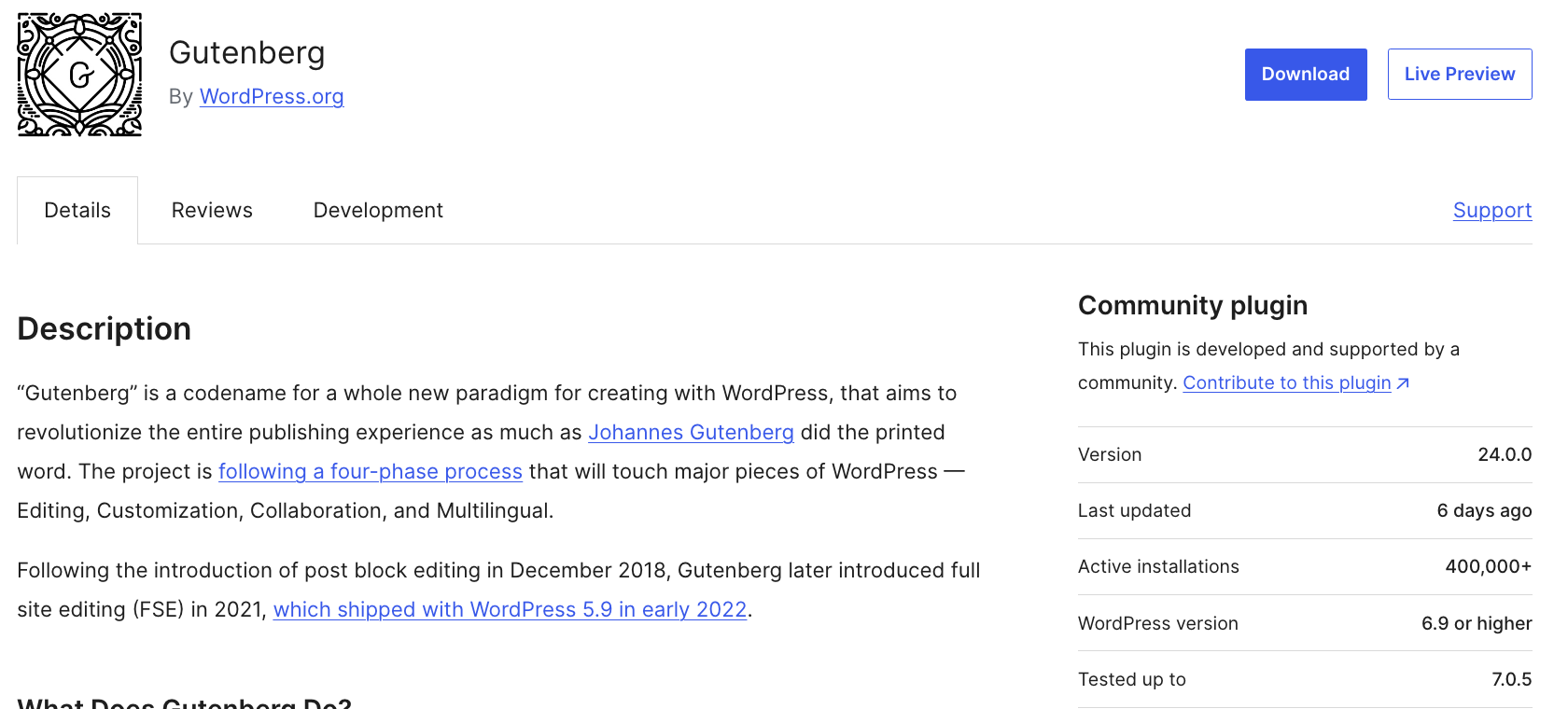
This is the number that should end any claim that the argument is settled. Classic Editor has 8 million active installs and a 98 out of 100 rating with a one star share of 1.3%, which is a better satisfaction profile than almost anything else in the repository.
And WordPress keeps supporting it. The plugin's own description still carries the line it has carried for years:
Classic Editor readme, WordPress.org, still current in 2026
That deadline passed two years ago. Version 1.7.0 shipped in May 2026 with a fix for a WordPress 7.0 layout bug. So the promise held, quietly, and “or as long as is necessary” turned out to be the operative half of the sentence. If you are on Classic Editor today, nothing is about to be taken away from you.
Every article on this topic says page builders create lock in. Almost none of them put a number on it. I can, because this site used to run on Elementor and now does not.
Elementor is no longer installed here. The site went over to the block editor with Kadence Blocks and the Blocksy theme, and the visible pages came through fine. Here is what stayed behind in the database anyway.
| What is left over | Rows | Size |
|---|---|---|
_elementor_data, the stored layout for each page | 48 | 2,233,847 bytes (2.13 MB) |
_elementor_controls_usage | 78 | 316,016 bytes |
_elementor_page_settings | 8 | 10,687 bytes |
Everything else _elementor% in postmeta | 219 | 3,189 bytes |
| Total orphaned postmeta | 353 | 2,563,739 bytes (2.44 MB) |
Orphaned rows in wp_options | 41 | 570,348 bytes |
| Posts in builder only post types | 64 | 38 kits, 21 funnel steps, 5 templates |
| Orphaned taxonomies | 4 |
None of it renders. None of it is reachable. It loads on every backup, every migration, every database query that touches postmeta, and it will still be there in five years unless somebody deletes it by hand.
The homepage alone still carries 38 KB of Elementor layout JSON for a layout nothing can read. Eight published pages, the homepage and the About and Contact pages among them, are still flagged as builder pages in the database while rendering perfectly well from ordinary markup.
That is what lock in looks like in practice. Nothing broke. It is just that leaving is a one way door you pay for quietly, forever, whereas block content is HTML sitting in post_content that survives you deleting every plugin you own.
“Page builders are bloated, Gutenberg is lightweight” is the most repeated claim in this argument and the least often tested. So I measured what a real, heavy article on this site pulls down. The page I used is a 3,572 word comparison with seven tables, five images and a 13 question FAQ, which is about as demanding as my content gets.
| Asset | Requests | Transferred |
|---|---|---|
| HTML document | 1 | 217 KB uncompressed |
| Inline critical CSS | 0 extra requests | 86 KB |
| External stylesheets | 19 | 32.4 KB |
| External scripts | 5 | 479.8 KB |
Thirty two kilobytes of stylesheets for a page that heavy is conditional loading working exactly as advertised. Kadence emitted six block stylesheets and only six, one for each block type actually on the page: row layout, column, image, advanced button, table of contents and Lottie. Nothing for the thirty odd block types the plugin supports but that page does not use.
364 of the 480 kilobytes of JavaScript, 76% of it, is advertising and analytics. The entire WordPress side of the page, theme and block plugin together, is 115 KB, and most of that is one animation library serving a sidebar promo rather than the article.
I am not going to pretend this makes page builders fast. Elementor loads more than a block library does. But if you are choosing an editor to fix your Core Web Vitals, you are polishing the hubcaps while the engine smokes. Remove one ad script and you save more than switching editors ever will.
I earn commission on both Kadence and Elementor, so I have no reason to talk you out of either. These are the cases where I would still reach for a builder.
What I would not do is start a new content site on a builder in 2026. Articles are the one thing blocks are unambiguously better at, and articles are where lock in hurts most because you accumulate hundreds of them.
| Your situation | What I would do |
|---|---|
| Blog, publication or documentation site | Block editor. Add a free block library for layout. This is not a close call |
| You are on Classic Editor and it works | Stay, with no anxiety. 8 million sites are with you and WordPress is still shipping patches. Move when you want a feature, not because of a deadline |
| Client landing pages, fast turnaround, they will not maintain it | Page builder. Speed of build wins and the lock in is someone else's problem in two years |
| WooCommerce store | Blocks plus a commerce focused block plugin. Checkout performance matters more here than anywhere else |
| You want to leave your builder | Rebuild page by page, newest and lowest traffic first. Do not deactivate the plugin until nothing uses it |
| You are chasing Core Web Vitals | Audit your third party scripts first. On my own page they were 76% of the JavaScript. The editor is not your problem |
| You are picking a free block library | Kadence Blocks or Spectra Blocks. I use Kadence here; the comparison is linked below |
This is the order I used, and the one thing I would do differently.
Not in the traditional sense, and treating it as one is where most disappointment comes from. It is a content editor with a block model, and it edits inside WordPress rather than replacing the editing screen. With a free block library on top it does most of what people use a page builder for, but it does not try to give you absolute positioning and canvas style drag and drop.
On like for like pages, yes, a block library loads less than Elementor does. But the difference is smaller than the argument suggests. I measured a heavy article on this site at 32.4 KB of stylesheets and 479.8 KB of scripts, and 364 KB of those scripts were AdSense and Google Tag Manager. Your ad stack almost certainly costs more than your editor does.
If it is working for you, yes, with no urgency to move. 8 million sites run it, it rates 98 out of 100, and WordPress shipped version 1.7.0 in May 2026 with a fix for a WordPress 7.0 bug. The plugin's own description promises support until 2024 “or as long as is necessary”, and the second half of that sentence has done all the work since. Move when you want something it cannot do.
There is no announced end date. The original 2024 target passed and support simply continued, with updates through 2026. That said, it is a compatibility layer, not a direction of travel, and new features are all being built in the block editor. Plan to move eventually, just not in a panic.
Because that listing is the experimental feature plugin, not the editor in core, and its review history includes the 2018 rollout when thousands of one star protest reviews landed and never expired. 2,491 of its 3,885 ratings are one star. Most people use the block editor through WordPress core and never install that plugin at all.
The pages stop rendering correctly if you deactivate the plugin while they still use its markup. A block or widget needs its plugin active to render. Rebuild each page first, confirm nothing references the builder, and only then deactivate. When I did this here, nothing visible broke.
It usually stays. On this site Elementor is not installed and the database still holds 353 orphaned postmeta rows totalling 2.44 MB, 41 option rows at 570 KB, and 64 posts in builder only post types. It does nothing except make every backup and migration bigger. Clean it manually, with a backup taken first.
For most landing pages, yes, with a free block library handling columns, tabs, accordions, sliders and forms. Where it still costs more time is pixel exact design: overlapping elements, absolute positioning and very fine responsive control. If that is the whole point of the page and it is due tomorrow, a builder is still the faster tool.
Kadence Blocks or Spectra Blocks. I run Kadence Blocks on this site, which gives 30 insertable blocks free and rates 96 out of 100 from 332 ratings. Spectra Blocks is the newer, leaner, AI first option with 15 blocks. There is a full comparison of the two linked at the end of this article.
There are converters, and I would not rely on them for anything you care about. What they produce is valid block markup that is painful to edit afterwards, because it mirrors the builder's nesting rather than a sensible block structure. For a page worth keeping, rebuilding it by hand takes about twenty minutes and leaves you with markup you can actually maintain.
Indirectly and modestly. Conditional loading means you ship only the CSS for blocks actually on the page, which on my measurement was six stylesheets totalling 32.4 KB. That helps. It will not rescue a page carrying 364 KB of advertising and analytics JavaScript, which is where I would look first.
Not directly. Google renders the page and does not care which tool produced the markup. The indirect costs are real though: heavier pages, slower Core Web Vitals on cheap hosting, and content that is difficult to migrate later. Those affect SEO over years rather than immediately.
It depends how much you customise. Full site editing now covers headers, footers and templates in core, which removes one of the strongest reasons to buy a builder's theme builder. If you lean hard on conditional templates and dynamic content, a mature theme builder is still ahead. For a straightforward content site, core handles it.
Disclosure: some links on this page are affiliate links and I earn a commission if you buy through them, at no extra cost to you. I earn on both Kadence and Elementor, and the option I recommend to most readers, the block editor in core with a free block library, earns me nothing. Install counts, ratings and version numbers come from the WordPress.org plugin repository; the database and asset figures were measured on this site; all checked on 27 October 2026. You can read exactly how I test, verify and update everything on this site.