WPvivid is a WordPress backup, migration and staging plugin used on more than 900,000 sites, rated 4.9 out of 5 on WordPress.org. The free version covers scheduled backups, one click restore, migration and subdirectory staging. Pro starts at $49 a year, or $99 once for a lifetime licence, which is the main reason to choose it over UpdraftPlus or Duplicator.
I have run it since 2022. This review covers what it does well, the rating contradiction nobody else explains, and who should not buy it.
Verdict in Ten Seconds
| Best for | Multi site owners and anyone who dislikes renewals |
| Free version | Genuinely usable, includes staging |
| Starting price | $49 a year, or $99 once for lifetime |
| Biggest strength | Lifetime licence and bundled staging |
| Biggest weakness | Smaller community than UpdraftPlus |
| Rating | 4.6 out of 5 from me |
The Rating Contradiction Worth Understanding
If you research WPvivid you will hit two very different scores, and most reviews quote whichever one suits their argument.
| Source | Score | Reviews | What it measures |
|---|---|---|---|
| WordPress.org | 4.9 out of 5 | 1,549 | People who installed and used the plugin |
| Trustpilot | 2.5 out of 5, Poor | 5 | Mostly billing and support complaints |
The Trustpilot score sits on a handful of reviews, which is far too small a sample to mean much, and Trustpilot attracts complaints rather than routine satisfaction. The WordPress.org score comes from more than 1,500 people who actually ran the plugin. I would weight the WordPress.org figure heavily and the Trustpilot one barely at all, but you should know both exist rather than find the bad one later and wonder what was hidden from you.
The consistent complaint that does appear in both places is worth taking seriously: backups can fail on very large sites. If your site is tens of gigabytes, test a full backup and restore before you pay for anything.
What WPvivid Actually Does
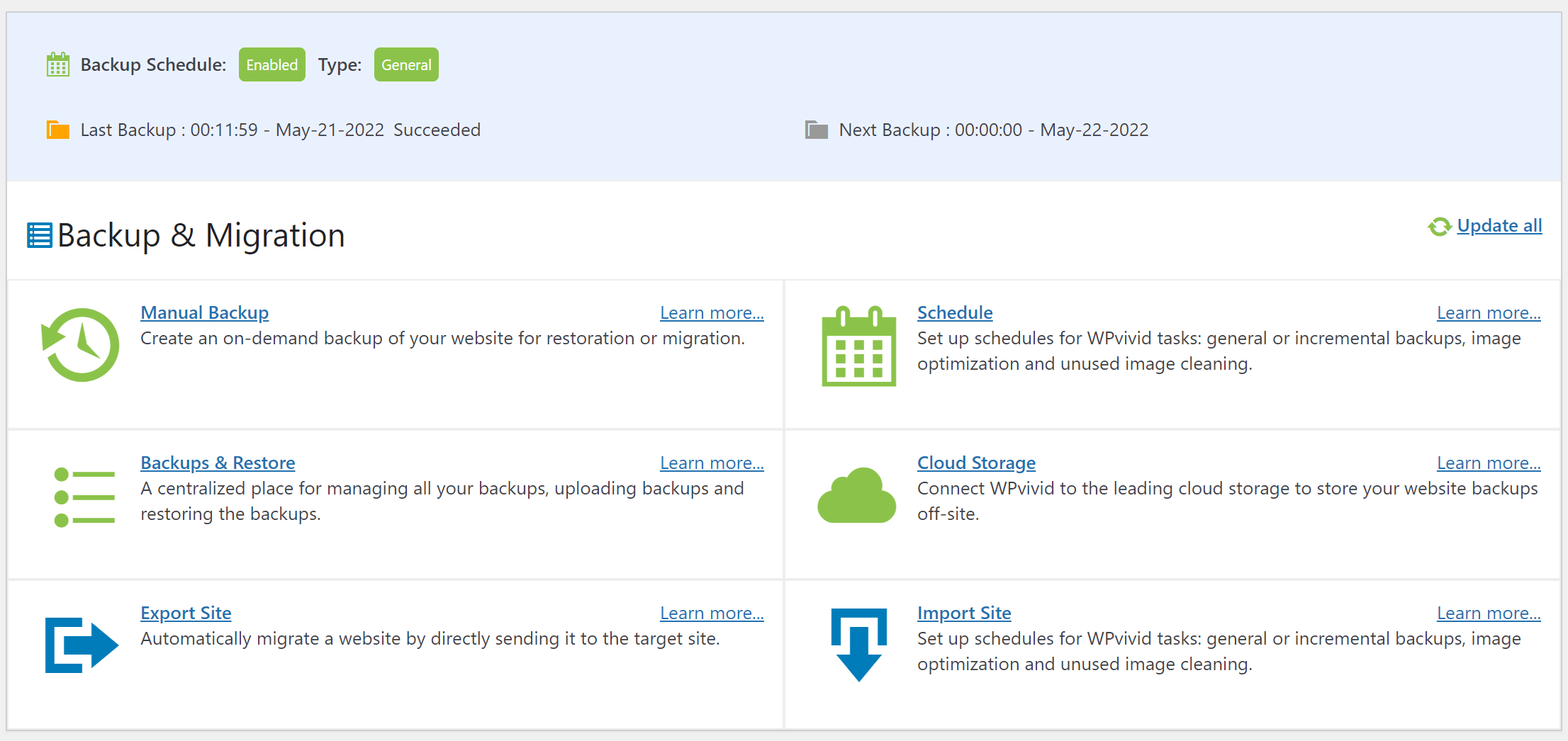
Four jobs, under one plugin, with a tabbed interface rather than one long settings page.
- Backup. Manual or scheduled, full site or database only, with retention rules and optional incremental backups on Pro.
- Restore. One click, from local storage, an uploaded file or your cloud destination.
- Migrate. Move a site to a new host or domain, with auto migration in the free version.
- Stage. Spin up a copy of the site in a subdirectory to test updates, then push it live on Pro.
Backups and Scheduling
The scheduler covers the usual intervals and lets you set how many backups to keep, which stops your storage filling silently. Pro adds advanced retention, multiple schedules and incremental backups so only changed files transfer after the first run.
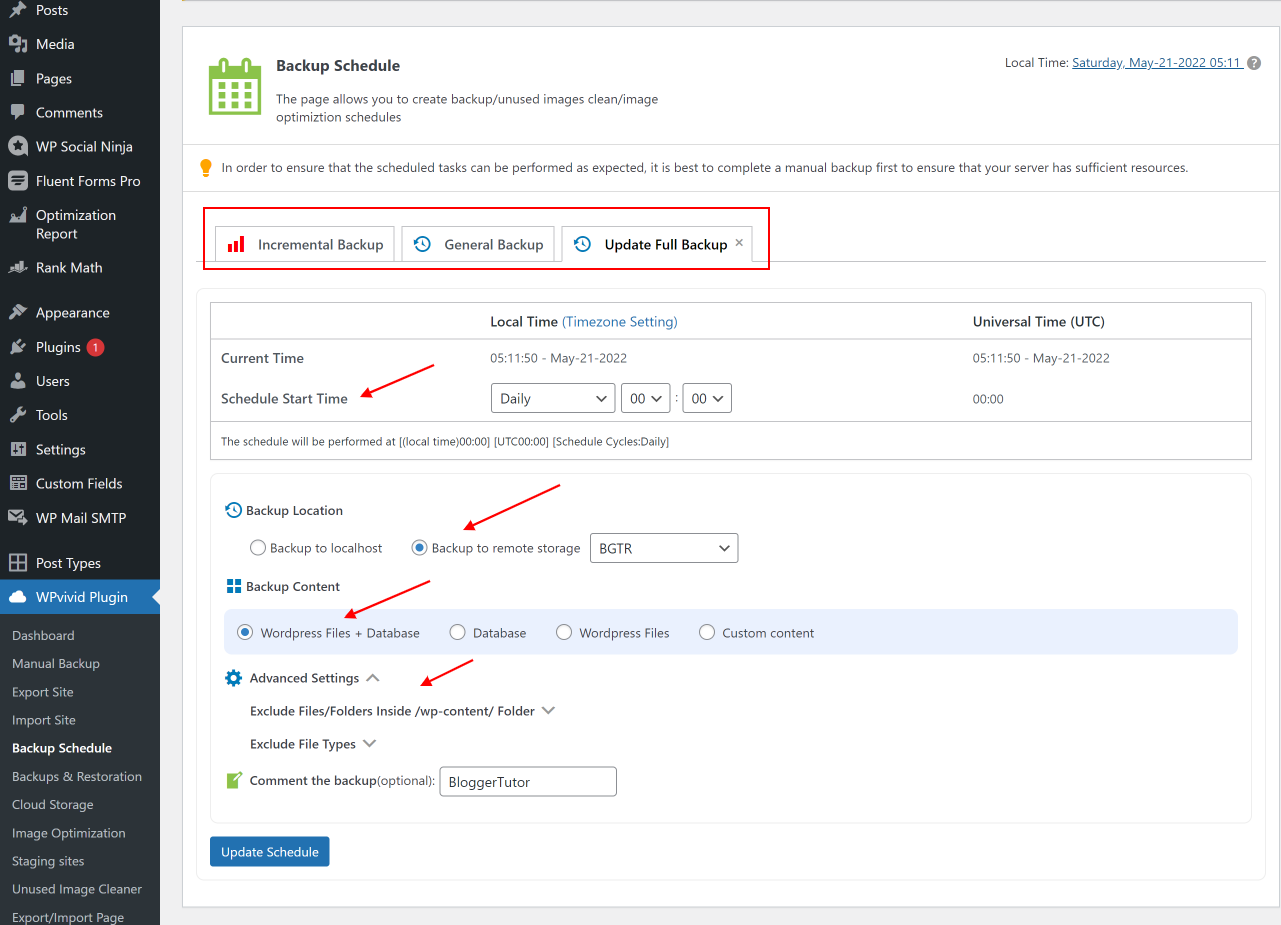
Incremental backups are the feature most people upgrade for. On a site with a large media library, a nightly full backup is slow and expensive; incremental turns that into a few megabytes a night.
Restoring, the Part That Actually Matters
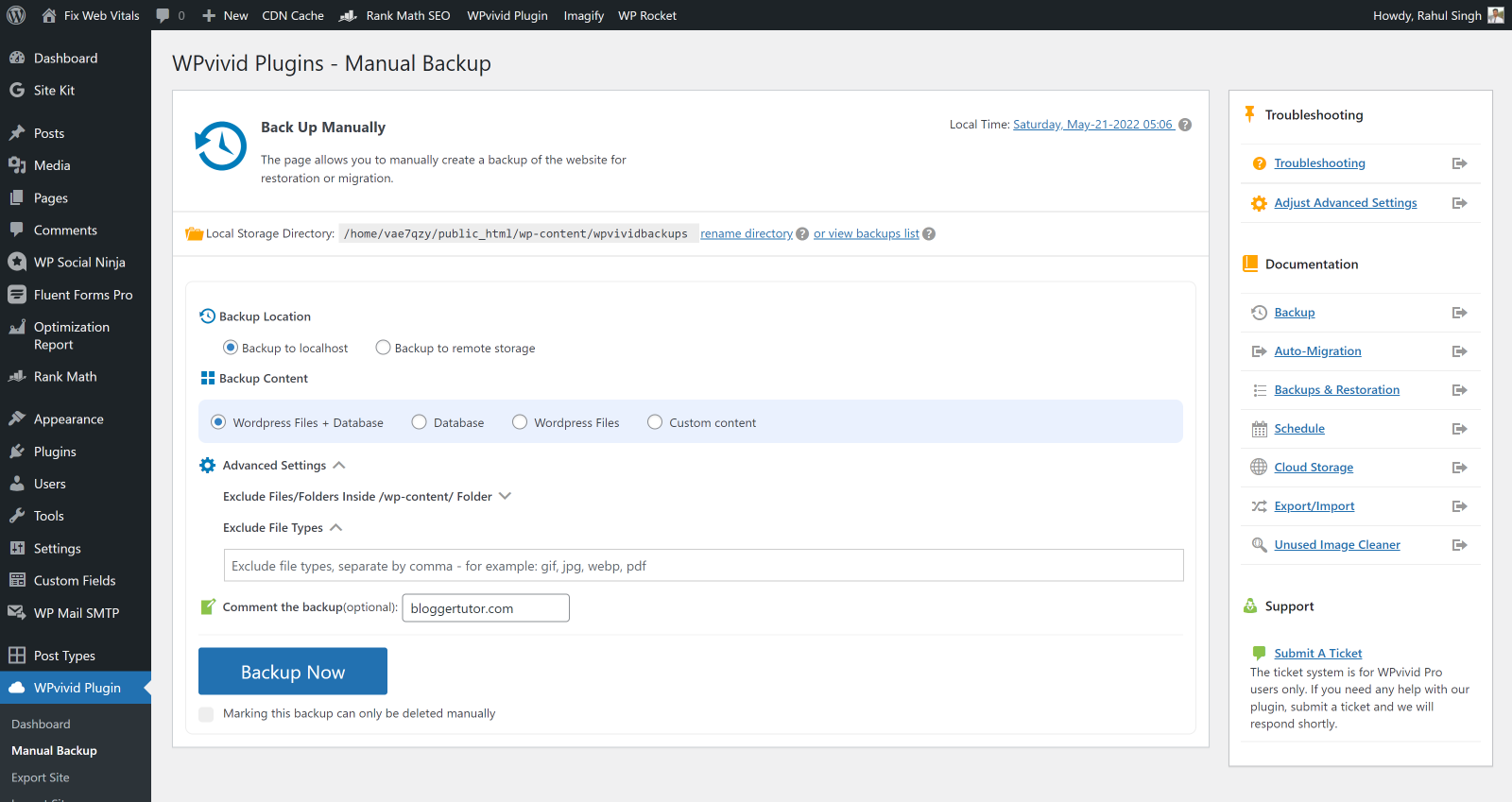
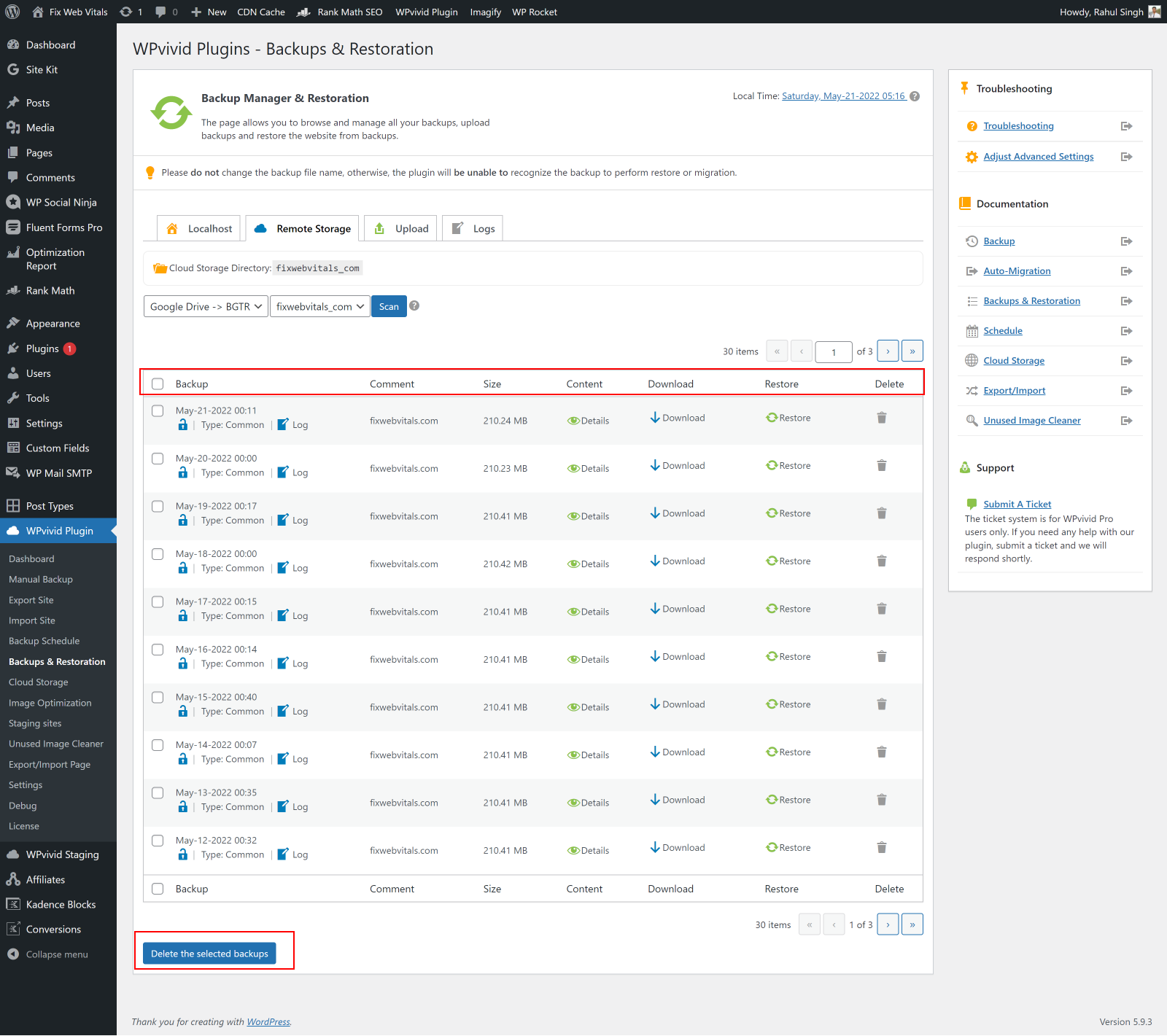
A backup plugin is only as good as its restore. WPvivid lists every backup with its size and date, and restores in one click from local storage or from the cloud. Pro adds selective restore, so you can pull back just the database or just the uploads folder rather than rolling the whole site back.
Test Your Restore Before You Need It
This applies to any backup plugin, not just this one. An untested backup is a guess. Make a staging site, restore a backup onto it, and confirm the result actually loads. Doing that once is worth more than any feature comparison.
Cloud Storage Options
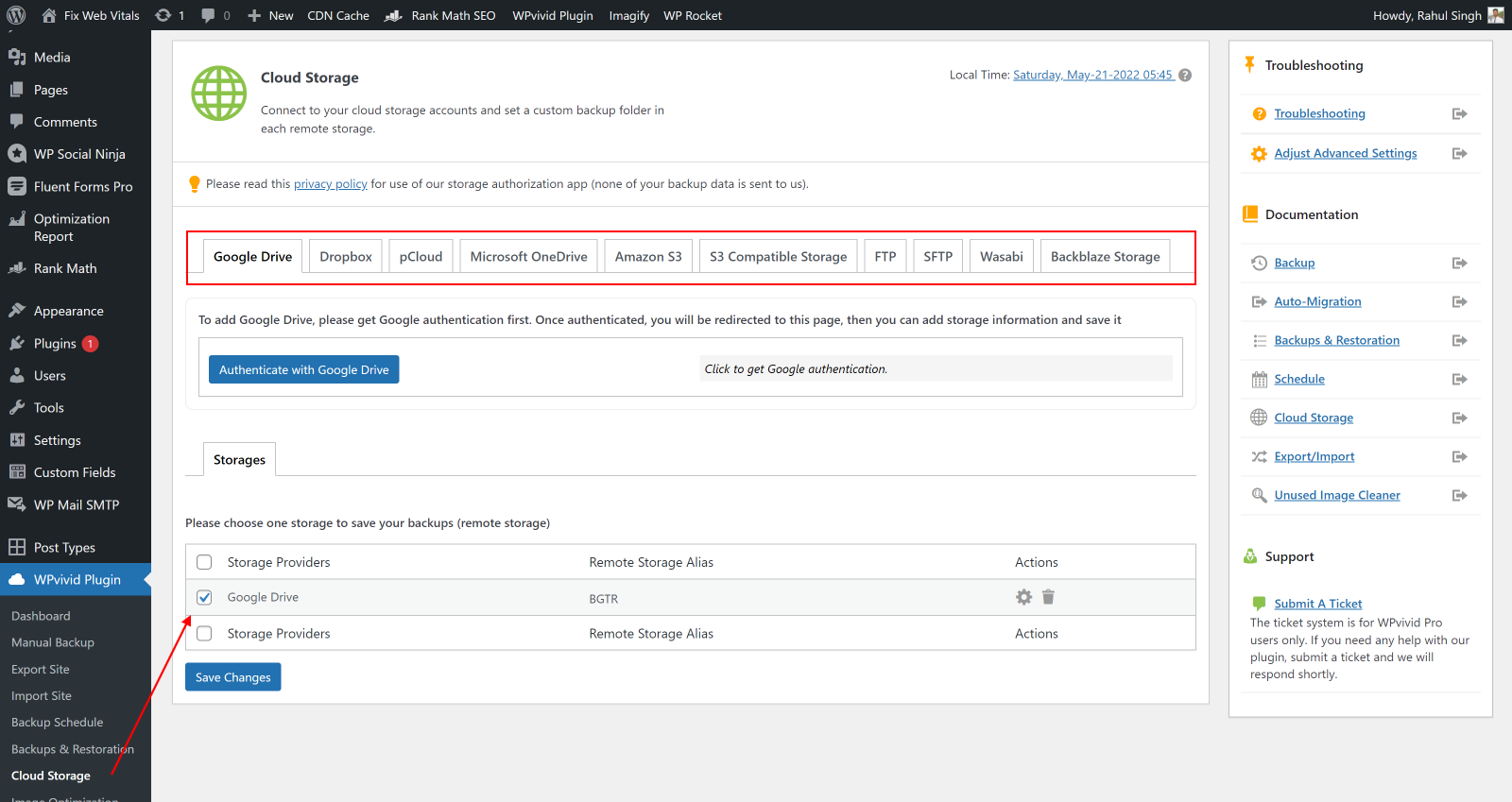
The free version connects to Dropbox, Google Drive, Amazon S3, Microsoft OneDrive, DigitalOcean Spaces, FTP and SFTP. That list is unusually generous, OneDrive and SFTP are both paid features on UpdraftPlus. Pro adds WebDav, S3 compatible storage, Wasabi, pCloud, Backblaze and OneDrive shared drives.
Staging, the Feature That Sets It Apart
WPvivid will build a working copy of your site in a subdirectory, free. Test a plugin update, a theme change or a PHP version bump there instead of on the live site. Pro adds multiple staging sites, subdomain staging, updating an existing staging copy, and pushing staging back to live.
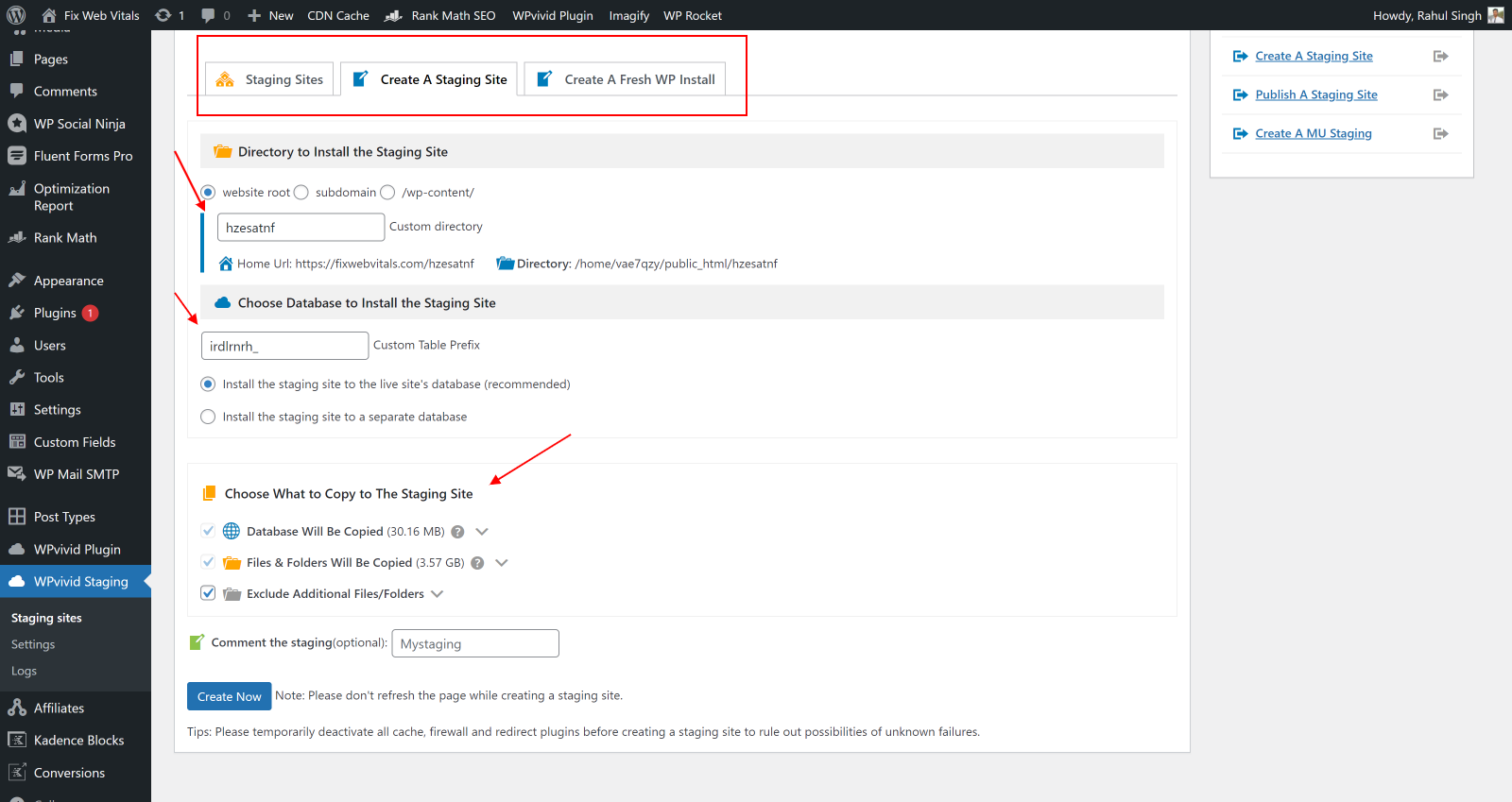
UpdraftPlus has no staging in its free version at all. For a blogger who has broken a live site with an update, this is the single most useful thing in the plugin.
Image Optimisation Addon
Bundled with the paid plans rather than sold separately. It compresses existing media in bulk and converts to WebP and AVIF, keeping originals so you can roll back. It is not a replacement for a dedicated image CDN, but it is a reasonable extra at no additional cost.


WPvivid Pricing 2026
Every tier includes the full feature set, Backup and Migration Pro, Staging Pro, roles and capabilities, whitelabel, multisite and 24/7 ticket support. Tiers differ only by domain count.
| Plan | Domains | Yearly | Lifetime | Lifetime breaks even |
|---|---|---|---|---|
| Blogger | 2 | $49 | $99 once | Year 3 |
| Freelancer | Up to 10 | $69 | $139 once | Year 3 |
| Small Business | Up to 50 | $99 | $199 once | Year 3 |
| Ultimate | Unlimited | $149 | $299 once | Year 3 |
Every lifetime tier costs about two years of the equivalent subscription, so from year three onward it is free. That is the clearest argument for WPvivid over UpdraftPlus and Duplicator, neither of which sells a lifetime licence at any price.
Current discounts, past sales and what Black Friday has actually been worth are tracked on my WPvivid Black Friday and coupon page.
WPvivid Pros and Cons
- Lifetime licences from $99, which UpdraftPlus and Duplicator do not offer.
- Staging in the free plugin, and multiple staging sites on Pro.
- Seven cloud destinations free, including OneDrive and SFTP.
- Cheaper than both main rivals at every tier.
- Image optimisation bundled rather than a separate purchase.
- Clean tabbed interface that keeps restore one click away.
- 30 day refund, no questions asked.
- Smaller community. 900,000 installs against 3 million for UpdraftPlus, so fewer tutorials and forum answers when something breaks.
- Reports of failed backups on very large sites. Test before you rely on it.
- No CLI support, where UpdraftPlus Premium runs from WP-CLI.
- No central multi site dashboard like UpdraftCentral.
- Blogger tier caps licence transfers at 3 days, awkward for client work.
- Support is ticket only, no live chat on any plan.
- Lifetime is the product's lifetime, not a guarantee the company outlives it.
WPvivid vs the Alternatives
| WPvivid | UpdraftPlus | Duplicator | |
|---|---|---|---|
| Entry price | $49 / year | $70 / year | $99 list, $69.30 today |
| Unlimited sites | $149 / year | $195 / year | Not offered |
| Lifetime licence | Yes, from $99 | No | No |
| Free staging | Yes | No | No |
| Installs | 900,000 plus | 3 million plus | 1 million plus |
| Rating | 98 out of 100 | 96 out of 100 | 98 out of 100 |
| Best at | Value and staging | Proven scheduled backups | Migration and cloning |
The full head to head is in WPvivid vs UpdraftPlus, and the Duplicator side is covered on the Duplicator and UpdraftPlus deals page.
Who Should Buy WPvivid, and Who Should Not
| If you are | Verdict | Why |
|---|---|---|
| Running one small blog | Use the free version | Backups, restore, migration and staging without paying |
| Running several personal sites | Buy it | Cheapest unlimited tier, or pay once |
| Tired of yearly renewals | Buy lifetime | Breaks even in year three |
| Testing updates before going live | Buy it | Staging is bundled, rivals charge extra |
| Running a very large site | Test first | The recurring complaint is backup failures at scale |
| Managing many client sites centrally | Consider UpdraftPlus | UpdraftCentral has no WPvivid equivalent |
| Needing WP-CLI | Pick UpdraftPlus | WPvivid has no CLI support |
My Rating, 4.6 out of 5
WPvivid does everything a backup plugin needs to do, adds staging most rivals charge for, and is the only serious option still selling a lifetime licence. It loses half a point for the smaller support community and the large site reports, neither of which has bitten me but both of which are real.
WPvivid Review, Frequently Asked Questions
Is WPvivid any good?
Yes. It is rated 4.9 out of 5 from more than 1,500 reviews on WordPress.org and runs on over 900,000 sites. It handles backups, restores, migration and staging competently, and its free version is more capable than most paid competitors. My rating is 4.6 out of 5.
Is WPvivid free?
Yes, and the free plugin is unusually complete. It covers manual and scheduled backups, one click restore, migration, subdirectory staging and seven cloud destinations including OneDrive and SFTP. Pro adds incremental backups, selective restore, multiple staging sites, multisite and 24/7 support.
How much does WPvivid cost?
Yearly plans are $49 for 2 domains, $69 for 10, $99 for 50 and $149 for unlimited. Lifetime licences are $99, $139, $199 and $299, paid once. Every plan includes the full feature set, the tiers differ only by how many domains you can license.
Is the WPvivid lifetime plan worth it?
If you will keep the site more than two years, yes. Each lifetime tier costs about two years of the equivalent subscription, so year three onward is free. The caveat is that lifetime means the lifetime of the product, so you are betting on the company continuing.
Why does WPvivid have a bad Trustpilot score?
Its Trustpilot rating is 2.5 out of 5, but that sits on a handful of reviews and Trustpilot collects complaints far more than routine satisfaction. The WordPress.org rating of 4.9 from over 1,500 reviews reflects people who actually used the plugin, and is the more meaningful number.
Does WPvivid work on large websites?
Usually, but this is the one recurring complaint. Some users report backups failing on very large sites. Test a full backup and restore on a staging copy before you rely on it, and use incremental backups on Pro if your media library is big.
Is WPvivid better than UpdraftPlus?
On value, clearly. It is cheaper at every tier, includes staging free where UpdraftPlus has none, and offers a lifetime licence UpdraftPlus does not. UpdraftPlus wins on ecosystem with 3 million installs, on UpdraftCentral for managing many sites, and on WP-CLI support.
Does WPvivid include staging?
Yes. The free plugin creates a subdirectory staging site. Pro adds multiple staging sites, staging on a subdomain, updating an existing staging copy and pushing staging back to live. Staging Pro is included in every paid tier rather than sold separately.
Can WPvivid migrate my site to a new host?
Yes, and auto migration is in the free version. Install WPvivid on both sites, generate a key on the destination, paste it into the source and transfer. For very large sites, migrate through cloud storage instead, which is a Pro feature.
Does WPvivid slow down my website?
No, backups run on WordPress cron rather than on page loads. What can cause problems is scheduling full backups too frequently on a big site. Switch to incremental backups on Pro if you notice server load during backup windows.
Can I get a refund on WPvivid?
Yes, 30 days, no questions asked. That is longer than Duplicator's 14 days and clearly stated on their site, which makes testing on your own site a low risk exercise.
What happens when my WPvivid licence expires?
The plugin keeps working and your existing backups stay intact, but you stop receiving updates and support. This is the usual argument for choosing the lifetime licence if you plan to keep the site long term.
More Backup Plugin Guides on Blogger Tutor
- WPvivid vs UpdraftPlus, Detailed Feature Comparison
- WPvivid Black Friday, Dates, Discount and Best Price
- Duplicator and UpdraftPlus Black Friday Deals
- Every WordPress Plugin Black Friday Deal
Disclosure: I earn a commission if you buy WPvivid through the links on this page, at no extra cost to you. The free version costs nothing and covers most blogs, and I have listed the reasons not to buy it above. Pricing verified against wpvivid.com on 22 September 2026. You can read exactly how I test, verify and update everything on this site.
WPvivid Backup and Migration
After using it for more than 6 months and comparing all its features with other Backup Plugins, I found WP Vivid to be More Feature-Rich with Better UI and Affordable Prices. It saves your extra cost for the Image Optimization and Staging Plugins. From my overall experience, I will recommend and rate it 5 out of 5 for a backup plugin as it does not have any Cons.
Product Brand: WP Vivid
Product Currency: USD
Product Price: 49
Price Valid Until: 2027-09-22
Product In-Stock: InStock
4.6
Pros
- Lifetime licences from $99, rivals are subscription only
- Staging included in the free plugin
- Seven cloud destinations free including OneDrive and SFTP
- Cheaper than UpdraftPlus and Duplicator at every tier
- Image optimisation bundled rather than sold separately
- 30 day money back guarantee
Cons
- Smaller community than UpdraftPlus, 900k installs against 3 million
- Reports of backup failures on very large sites
- No WP-CLI support
- No central multi site dashboard like UpdraftCentral
- Blogger tier caps licence transfers at 3 days
- Support is ticket only, no live chat