In July 2026 a security researcher pointed an AI model at WordPress core, the bare software with no plugins installed, and asked it to find a way in. Just over ten hours and about $25 later, he had a working attack that let anyone take over a stock WordPress site without logging in. Exploit brokers pay six figures for bugs like that. When the fix shipped, the first real attacks arrived about 90 minutes after the update, more than 65,000 of them from over 1,500 IP addresses.
That is the world your site lives in now. Finding a hole used to take a skilled person weeks. Today an AI model does the reading, a bot does the scanning, and the gap between “a bug is announced” and “your site is hacked” is measured in hours. So this guide covers both halves of the problem: how AI changed WordPress attacks in 2026, and how to remove malware from WordPress fast when one gets through. I recommend MalCare for the cleanup, and I will show you exactly why, what it costs and where it falls short.
Disclosure: I earn a commission if you buy MalCare through my links, at no extra cost to you. Every statistic below links to the report it came from, and MalCare's prices were checked on its own pricing page on 27 October 2026.
The short answer
To remove malware from WordPress, back up the infected site, scan every file and database table, remove the malicious code and any backdoors, reinstall core, plugins and themes from clean copies, delete unknown admin users, change every password, update everything, then ask Google to review the site. Doing that by hand takes an afternoon to several days. A tool like MalCare does the scan, backup, removal and rescan for you, and by MalCare's own published figures the one click cleanup itself takes about a minute.
Because AI has cut the time from a bug going public to the first attack down to hours, the bigger win is never needing the cleanup: a firewall with virtual patching that blocks the exploit before you have even read the update notice.
WordPress security in 2026, in numbers
Before the how-to, here is the scale of what changed. These are the figures I built the rest of this guide around, each from the organisation that measured it.
| What was measured | The number | Source |
|---|---|---|
| New WordPress vulnerabilities found in 2025 | 11,334, up 42% on 2024 | Patchstack 2026 report |
| Share of those in plugins | 91% (themes 9%, core just 6 bugs) | Patchstack |
| Median time from disclosure to first exploit | 5 hours | Patchstack |
| Vulnerabilities with no fix on disclosure day | 46% | Patchstack |
| Attacks stopped by typical hosting defences | Only 12% to 26% | Patchstack |
| Sites Wordfence found infected, Q2 2026 | 573,000, up 21% | Wordfence Q2 2026 |
| Password guessing attacks blocked, Q2 2026 | 18.2 billion | Wordfence Q2 2026 |
| Critical plugin zero-days one AI pipeline found | 300+ in 72 hours, about $20 each | Help Net Security |
| Share of web traffic that is automated | More than 53% | Imperva 2026 |
How AI changed WordPress attacks
AI changed WordPress attacks in three ways: it finds vulnerabilities faster and cheaper, it turns a published fix into a working exploit within hours, and it lets one attacker run campaigns that used to need a team. None of this is a prediction. Each of the examples below happened between late 2025 and September 2026.
1. AI finds the holes, at a price anyone can pay
The wp2shell bug from my opening is the cleanest example. Adam Kues at Searchlight Cyber ran GPT-5.6 Sol Ultra against WordPress core with four agents and wrote up the result: a SQL injection that needed no login, escalated into full remote code execution on a stock install. WordPress fixed it in version 7.0.2. Core bugs this serious are rare, which is exactly why it made headlines.
Plugins are where the volume is. In May 2026 a research pipeline from TrendAI and CHT Security found more than 300 critical zero-day vulnerabilities across WordPress plugins in 72 hours, at roughly $20 per bug. A Sucuri guest post from August 2026 describes one researcher using Claude Code to review dozens of plugins and finding the same mistakes again and again: sanitising functions that return input unchanged, ownership never checked, security nonces printed in public HTML.
The defenders use the same tools. Wordfence now runs an AI research agent called Argus, Anthropic's Project Glasswing partners found more than 10,000 high or critical flaws and WordPress itself launched a Core Security Initiative that applies AI-assisted scanning to core. The WordPress security team put it plainly: it has never been easier to analyse code for vulnerabilities, and reports have risen to match. More bugs found means more patches, and every patch is a map for attackers.
2. AI turns a patch into an exploit within hours
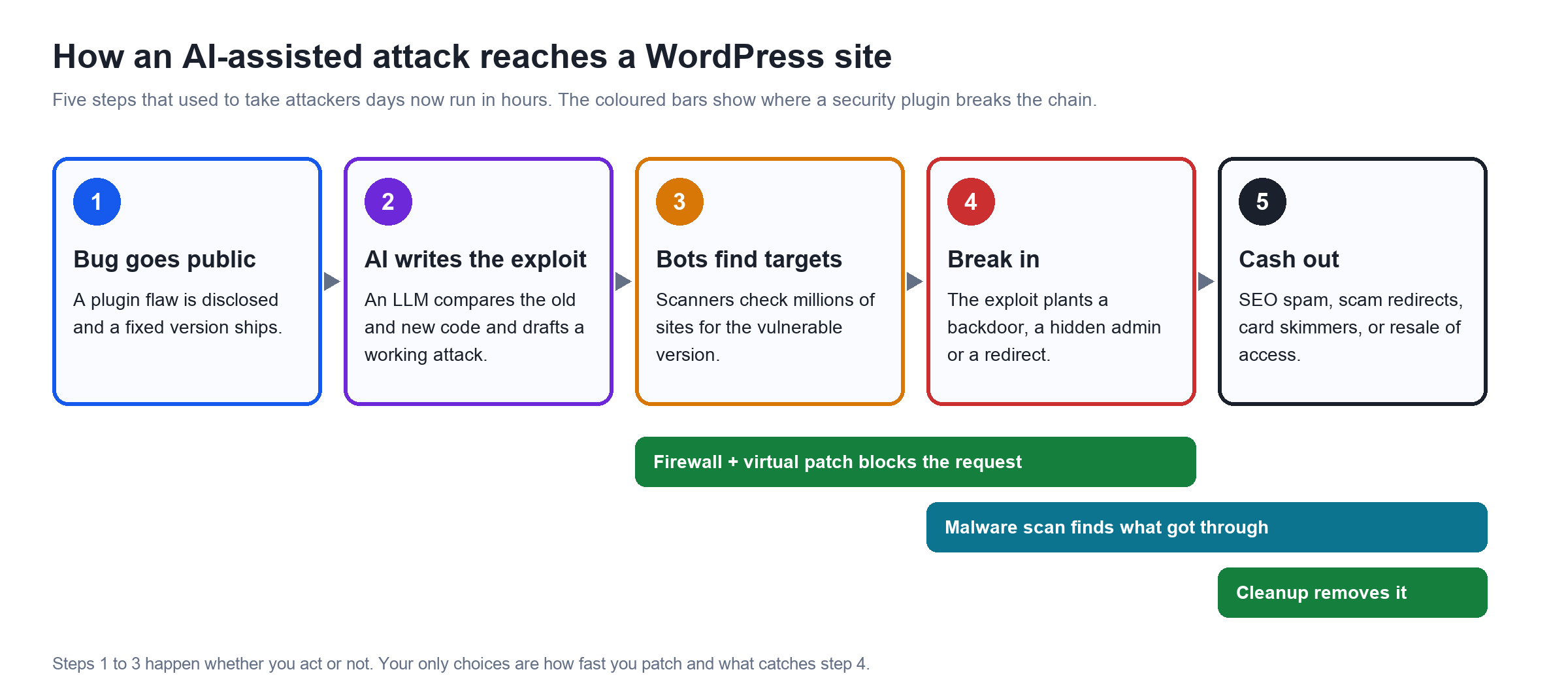
When a plugin or core update fixes a security bug, the fix itself shows where the bug was. Comparing the old and new code, the “diff”, used to be slow, skilled work. Large language models read diffs very well. Two 2026 cases show what that means in practice:
- wp2shell, July 2026. First exploitation attempts landed roughly 90 minutes after WordPress 7.0.2 was released. Within a day, Wiz saw attackers dropping a 150 KB webshell disguised as a plugin, hidden behind hex strings and gzip plus base64 encoding.
- CVE-2026-87902, September 2026. A path traversal bug fixed in WordPress 7.1.2 was being probed at 11:49 UTC on the same day the patch shipped, with the attack built straight from the diff.
- Elementor Pro, August 2026. A file upload flaw in a plugin on more than 6 million sites was exploited on the day version 4.2.2 shipped the fix, with Wordfence blocking more than 190,000 attempts in the first five days.
The long-term trend is just as stark. Google's Mandiant team measured the average time to exploit across all software falling from 63 days in 2018 and 2019 to 5 days in 2023. For WordPress specifically, Patchstack now puts the weighted median at 5 hours.
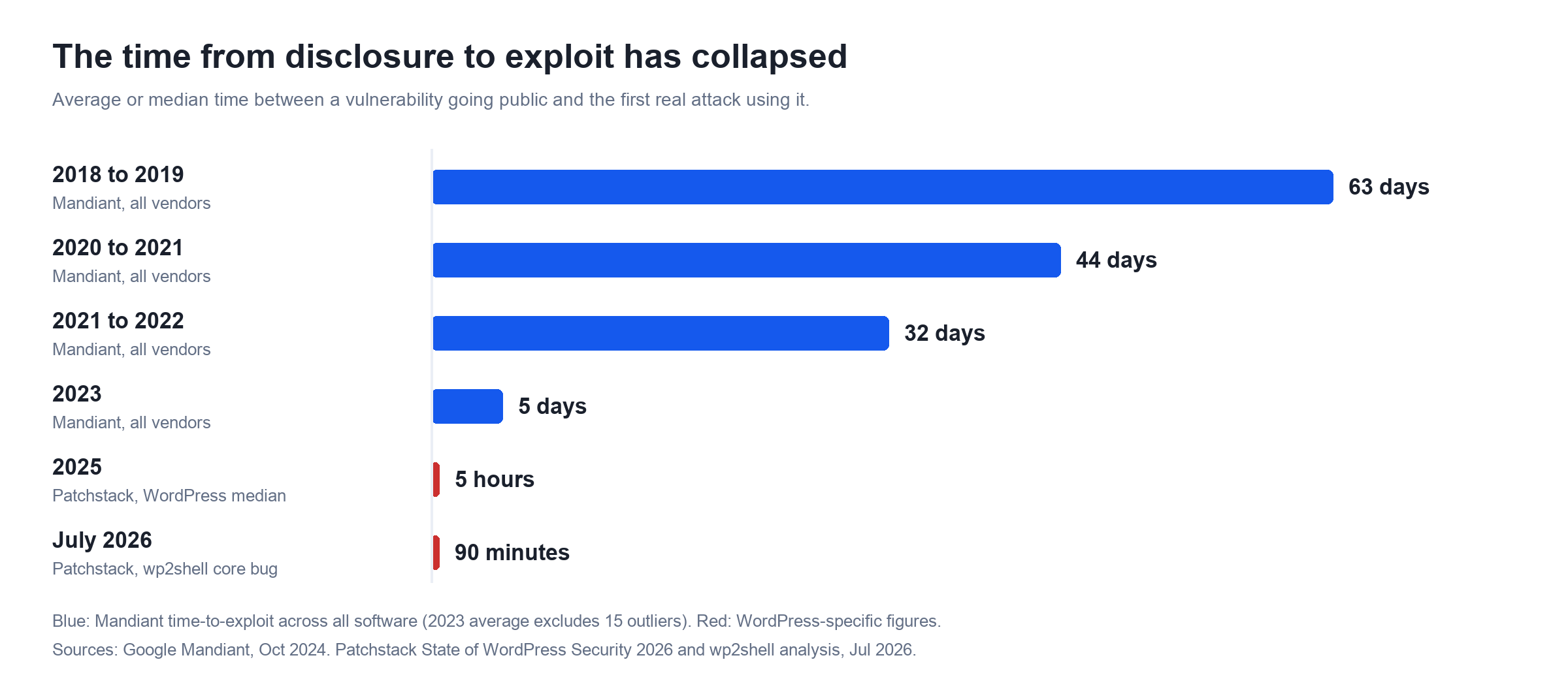
The windows below are the part that should change how you run your site. Of the WordPress vulnerabilities attacked hardest in 2025, a fifth were hit within six hours of going public and almost half within a day. If your plan is “I will update when I log in at the weekend”, you are running days behind attacks measured in hours.
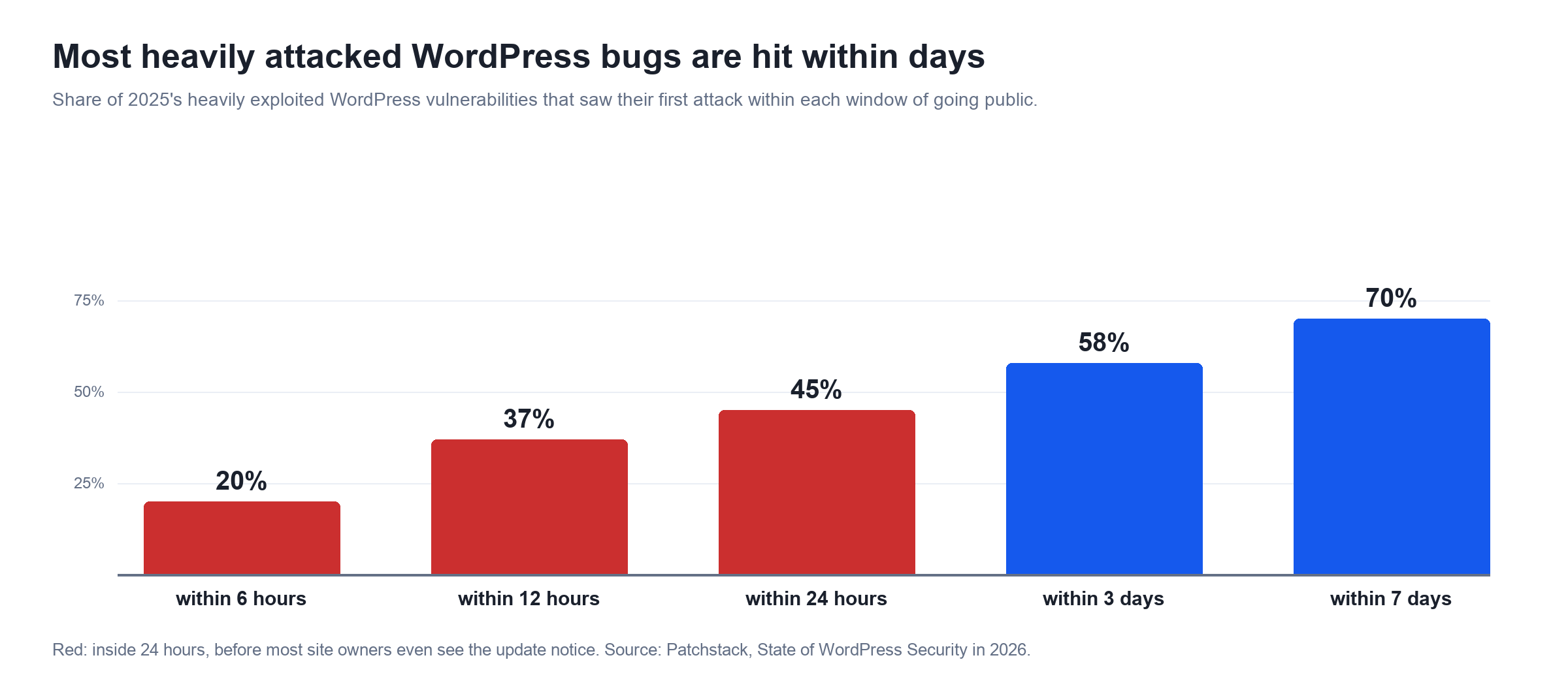
And updating is not always possible: Patchstack found 46% of vulnerabilities had no fix available when they were disclosed. Your host will not save you either. In Patchstack's tests, typical hosting firewalls blocked only 12% of WordPress-specific attacks on known exploited bugs, and 26% in a broader test. That gap is exactly what a WordPress-aware firewall with virtual patching fills, which I cover in the MalCare section.
3. AI runs the attack itself
The third shift is autonomy. In November 2025 Anthropic disclosed the first reported AI-orchestrated cyber espionage campaign, in which a state-sponsored group used Claude Code to perform 80 to 90% of the hands-on hacking work, firing thousands of requests, often several per second, with a human stepping in at only four to six decision points.
Google's threat team has documented the malware side. In November 2025 it reported PROMPTFLUX, malware that asks Gemini to rewrite its own code every hour to dodge antivirus signatures. In May 2026 it saw the first zero-day exploit it believes was built with AI, given away partly by a made-up severity score the AI had written into the script. By September, attackers were planning and running an agent-driven credential harvesting campaign in under six hours.
For a WordPress site owner the practical effect is simple. Signature-only malware scanners struggle when the malware can rewrite itself, and fixed brute force rules struggle when bots rotate identities: Wordfence logged 106.2 million unique IPs in brute force attacks in Q2 2026, up 55.9%, and unique user agents up 263.7%. Detection has to look at what code does and where it changed, not only at what it looks like.
What the AI hype gets wrong
Security marketing loves a scary chart, so here are three things that temper the picture:
- Most AI-found bugs are never exploited. VulnCheck tracked 1,061 vulnerabilities attributed to AI-assisted discovery in the first half of 2026 and found only 14, or 1.3%, exploited in the wild. AI raises the volume of bugs and the speed of attacks, not how dangerous each bug is.
- Old bugs still do most of the damage. The most attacked WordPress vulnerability of 2025 and of Q2 2026 was the same 2024 LiteSpeed Cache flaw. Only 4 of Patchstack's top 10 most attacked bugs in 2025 were published that year. Sites get hacked through plugins their owners stopped updating years ago.
- AI makes mistakes too. Anthropic noted its own model overstated findings and sometimes invented data during that espionage campaign, and the Sucuri researcher found Claude describing security checks that were not there. Attackers waste effort on false leads, which is small comfort but real.
So the lesson is simple: speed now matters more than anything else: how fast a patch reaches your site, how fast malware is noticed, and how fast it is removed.
What WordPress malware looks like in 2026
WordPress malware is any code an attacker adds to your files, database or scheduled tasks to make money from your site or keep access to it. Wordfence found malware on 573,000 sites and 31.6 million unique malware files in Q2 2026 alone. These are the types you are most likely to meet:
| Malware type | What it does | Where it usually hides |
|---|---|---|
| Backdoor or webshell | Lets the attacker back in after you clean up, often with full control | Fake plugins, PHP files in uploads, renamed core files |
| SEO spam (Japanese keyword or pharma hack) | Creates thousands of spam pages that Google indexes under your domain | Database, injected PHP that only shows to Googlebot |
| Malicious redirects | Sends mobile or search visitors to scam, casino or fake update pages | .htaccess, header scripts, the wp_options table |
| Rogue admin users | A hidden administrator account kept for later | wp_users, often with a support or temp style name |
| Self-rebuilding cron jobs | Reinstalls the malware after you delete it | WordPress cron or the server crontab |
| Card skimmers | Steal payment details on WooCommerce checkout pages | Injected JavaScript, theme files |
| Cloaked content | Shows clean pages to scanners and AI crawlers, malware to people | Traffic direction scripts such as Parrot TDS |
That last row is new. Patchstack reports the Parrot traffic direction system now detects AI training crawlers such as ChatGPT and Gemini and serves them clean content, so the malware stays hidden from the very tools people increasingly use to check a site.
How to check if your WordPress site is hacked
To check if a WordPress site is hacked, look for a Google warning, unexpected redirects, spam pages in search results and admin users you did not create, then run a full malware scan of files and database. Any single sign is enough to scan today.
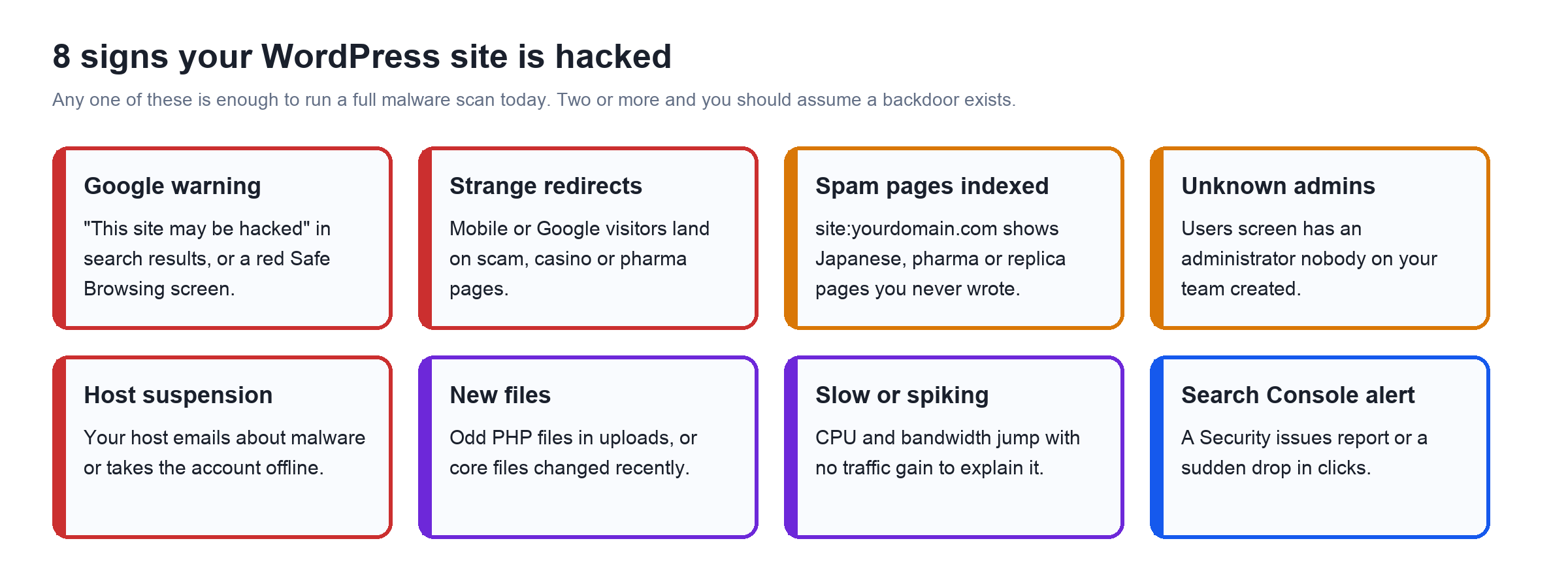
- Search Google for
site:yourdomain.com. Pages in Japanese, pharma keywords or product listings you never wrote mean an SEO spam hack. - Open Search Console, then Security and Manual Actions, then Security issues. Google lists hacked URLs and the malware it found there.
- Check your domain in Google's Safe Browsing site status tool. It tells you whether Chrome is showing visitors a red warning.
- Visit your site on a phone over mobile data, from a Google search result. Many redirects only fire for first-time mobile visitors arriving from search, so you never see them logged in on your laptop.
- Go to Users and filter by Administrator. Any account you cannot account for is a red flag.
- Run a malware scan that checks the database too. The free MalCare plan scans files and database on MalCare's servers and points at the exact file and line.
How to remove malware from WordPress, step by step
Here is the complete process I follow. It works whether you clean by hand or use a tool, because the tool runs the same steps for you. Do them in order: skipping the backup or the password changes is how sites get reinfected the same week.
Ten steps to remove malware from a hacked WordPress site and stop it coming back.
Back up the infected site first
Take a full copy of files and database before you change anything. It is evidence, and your safety net if a cleanup step breaks something.
Scan everything
Scan every file, database table, cron job and user account. A scan that only checks files misses database spam and rogue admins.
Contain the damage
If the site is redirecting visitors or serving a card skimmer, put it in maintenance mode while you work.
Remove the malware
Delete injected code, fake plugins and PHP files in uploads, or run a one click cleanup that removes only the malicious lines.
Reinstall from clean copies
Replace WordPress core, plugins and themes with fresh copies from WordPress.org or the vendor. Delete anything abandoned or nulled.
Remove rogue users and scheduled tasks
Delete unknown administrators and any cron job you did not create, or the malware will rebuild itself.
Change every password and the security keys
Reset WordPress, hosting, FTP and database passwords, and regenerate the salts in wp-config.php to log everyone out.
Update everything
Update core, every plugin and every theme, and turn on automatic updates for plugins you trust.
Get off Google's blacklist
Once clean, request a review in Search Console under Security issues, and tell your host if they suspended the account.
Harden and monitor
Add a firewall with virtual patching, two factor login and scheduled scans so you hear about the next attempt in minutes, not months.
Manual cleanup: the commands I use
If you are comfortable with SSH and WP-CLI, these commands find most of what a hack leaves behind. Run them from your WordPress folder after taking that backup.
Compare core and plugin files against the official copies:
wp core verify-checksums
wp plugin verify-checksums --all
Find PHP files hiding in uploads, which should only ever contain media:
find wp-content/uploads -name "*.php"List administrators and scheduled tasks:
wp user list --role=administrator
wp cron event list
Spot files changed in the last week:
find . -name "*.php" -mtime -7Then reinstall core with wp core download --force --skip-content, reinstall plugins the same way, and read .htaccess and wp-config.php line by line. The weak spot is the database: spam posts, injected options and obfuscated JavaScript inside widgets do not show up in a file checksum. That is where most DIY cleanups miss something, and one missed backdoor means doing it all again.
How fast MalCare cleans a hacked WordPress site
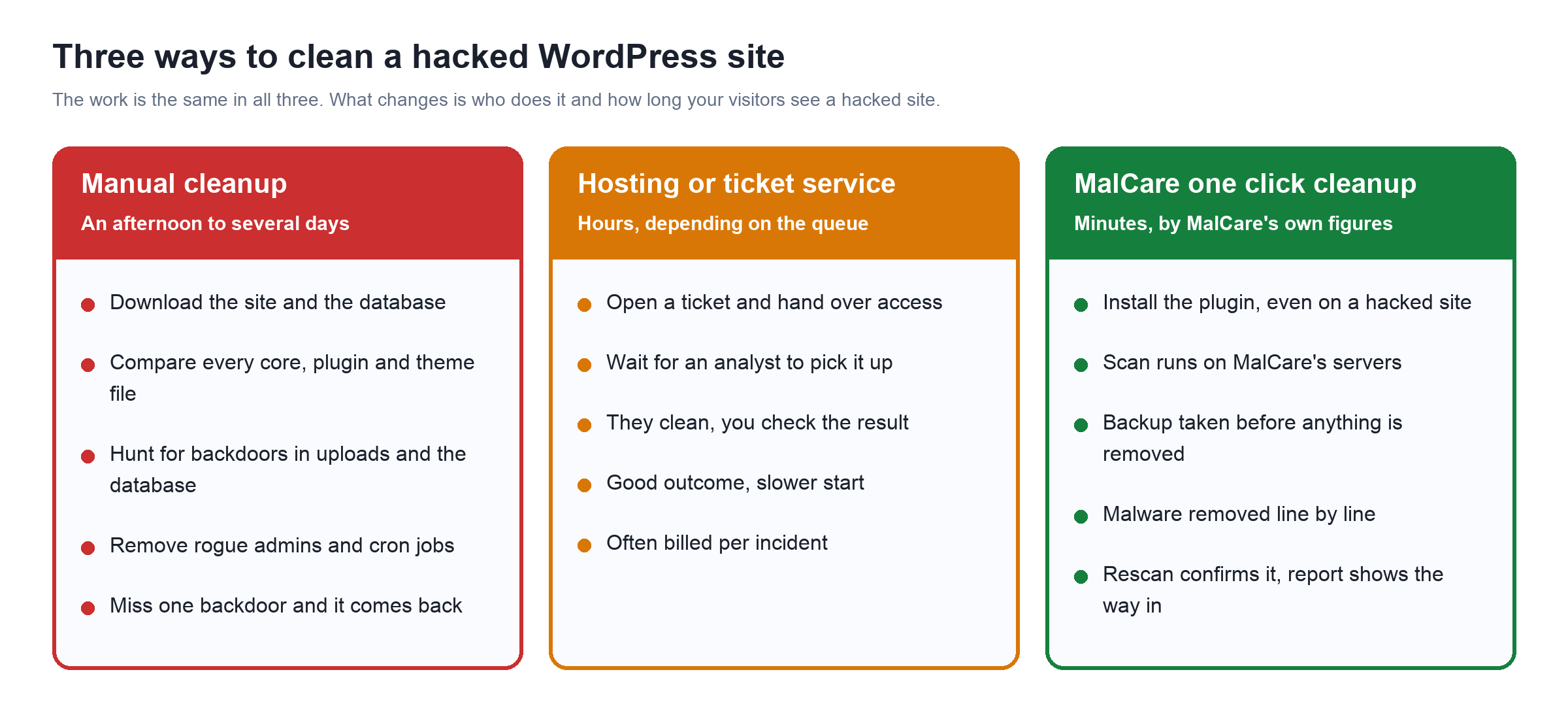
According to MalCare's own published figures, its scan pinpoints every infection in under 3 minutes and the one click cleanup itself takes about 60 seconds, with a backup taken first and a full rescan afterwards. On its malware removal page it walks through a sample site with 22,667 items, where the whole job, from click to verified clean, took 4 minutes and 11 seconds.
In that example the cleanup removed exactly 12 things and left the other 22,655 untouched: 7 infected files, 3 database rows, 1 self-rebuilding cron job and 1 rogue admin called support_tmp. Those last two are the ones to watch. Most reinfections come from the cron job or the hidden admin that a quick cleanup misses, not from the malware you can see.
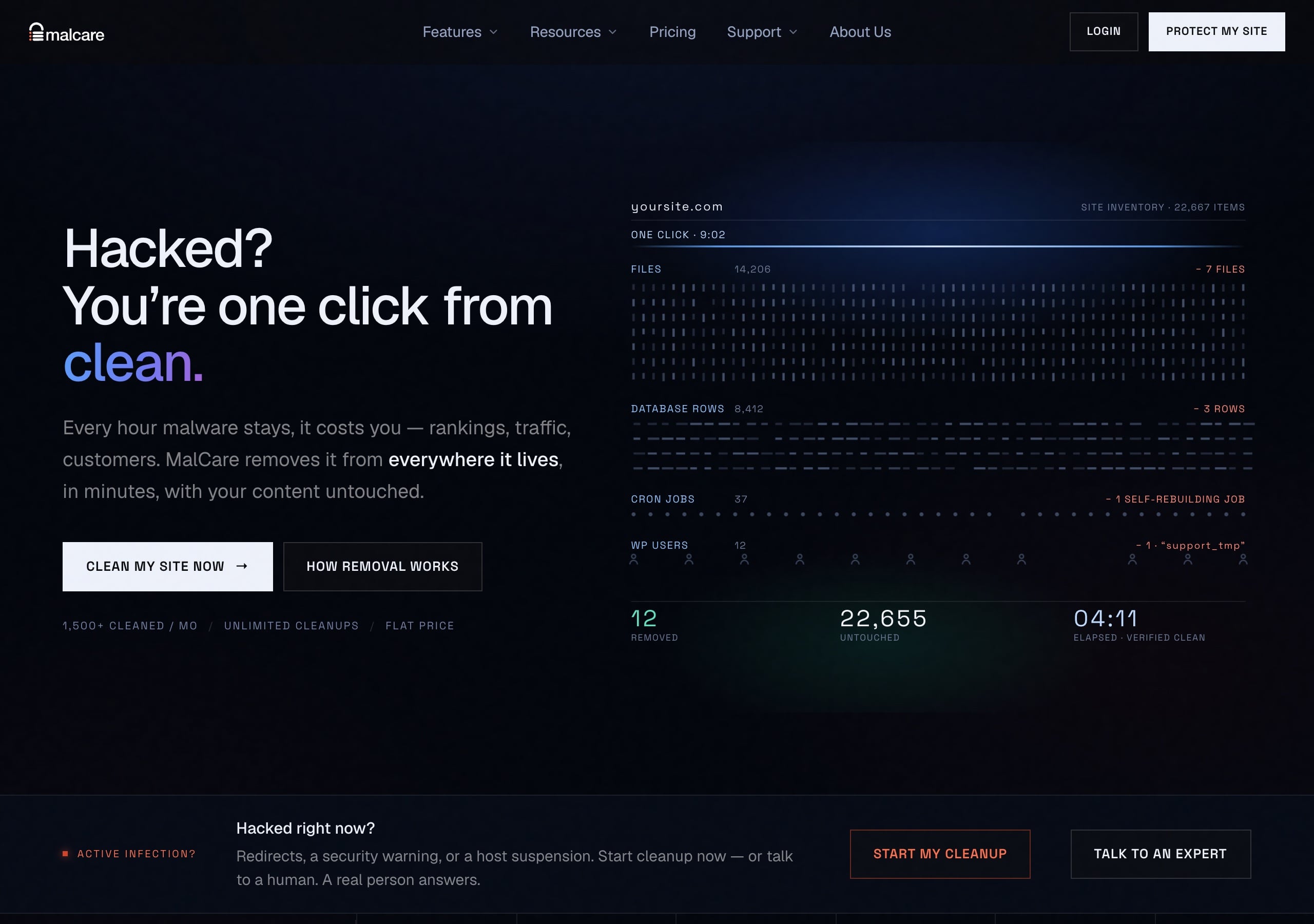
Behind the button, MalCare runs four steps, the same ones from my manual list:
| Step | What MalCare does | MalCare's stated time |
|---|---|---|
| 1. Pinpoint scan | Finds infections down to the exact file, line, table and row, on MalCare's servers so your site does not slow down | Under 3 minutes |
| 2. Safety backup | Copies everything it is about to touch before changing it | Part of the cleanup |
| 3. Remove everywhere | Removes malicious code from files, database, .htaccess, cron jobs and admin accounts in one pass | About 60 seconds |
| 4. Validate | Rescans the whole site and only marks it clean when nothing is found | Part of the cleanup |
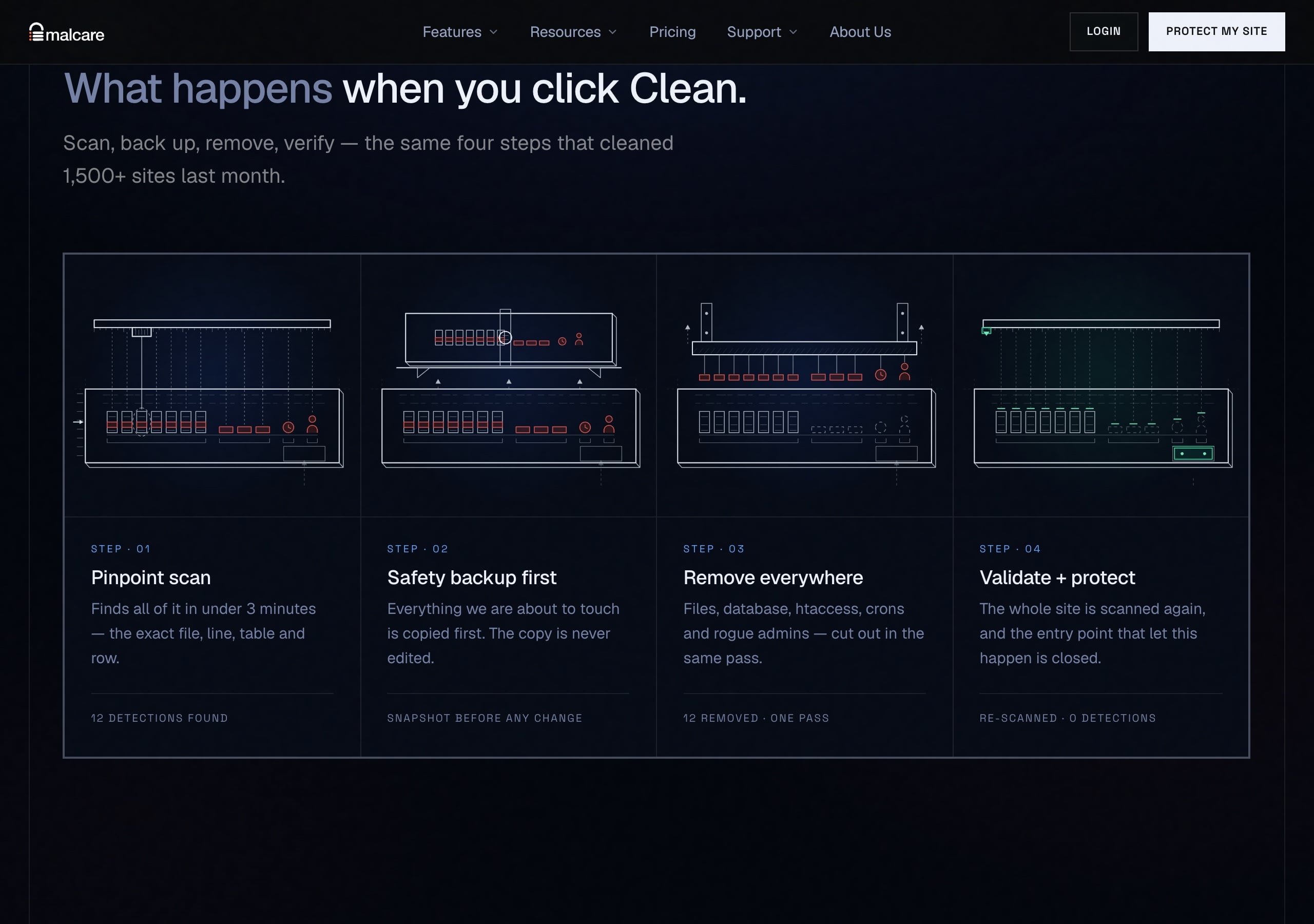
There is also an auto-clean mode that starts removal the moment malware is detected, and an expert emergency cleanup for when you are locked out of your own dashboard. MalCare says it cleaned more than 1,500 sites a month as of July 2026.
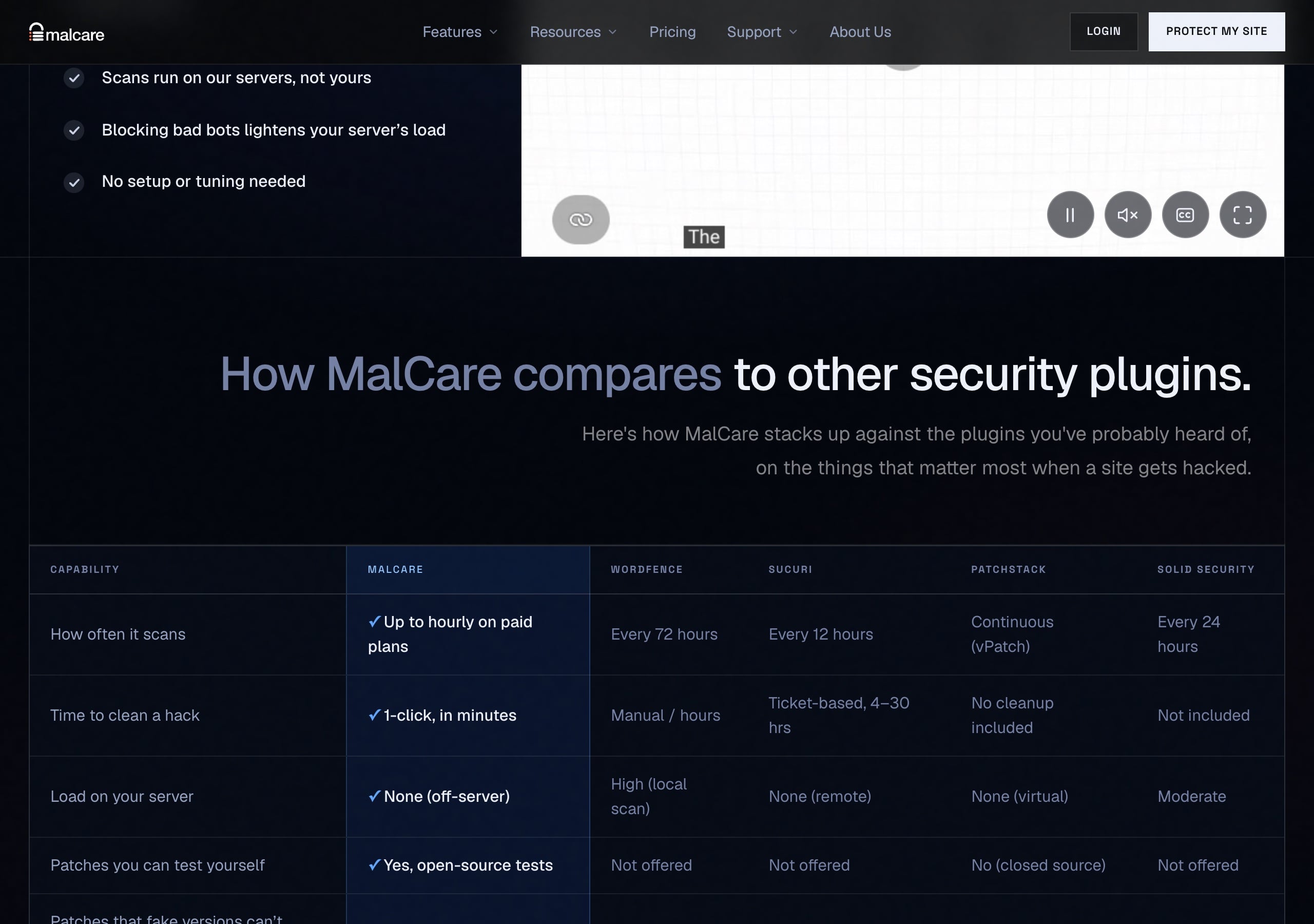
Why does a minute versus a day matter so much now? Go back to the Patchstack numbers. If attacks start within 5 hours of a disclosure, a cleanup service with a ticket queue of “4 to 30 hours”, which is how MalCare describes one competitor's service in its own comparison, means your visitors are served malware for most of a day. Every hour on Google's blacklist costs traffic you then spend weeks earning back.
What the clock does not include
Removing the malware is fast. Getting your reputation back is not. Google takes time to review a site and lift a warning, a suspended host has to reinstate the account, and rankings recover on Google's schedule, not yours. MalCare's paid plans help file the Google review and contact your host, but nobody can make that part take minutes. Treat the 60 second figure as the end of the infection, not the end of the incident.
One more note on these numbers: they are MalCare's, not mine, and real-world times depend on the size of your site and how deep the infection goes. The reviews MalCare highlights from WordPress.org users mention cleanups in 5 minutes and, at the slow end, a client site back up within 2 hours. Either way it is a different league from the days a manual cleanup can take.
MalCare review: what you get
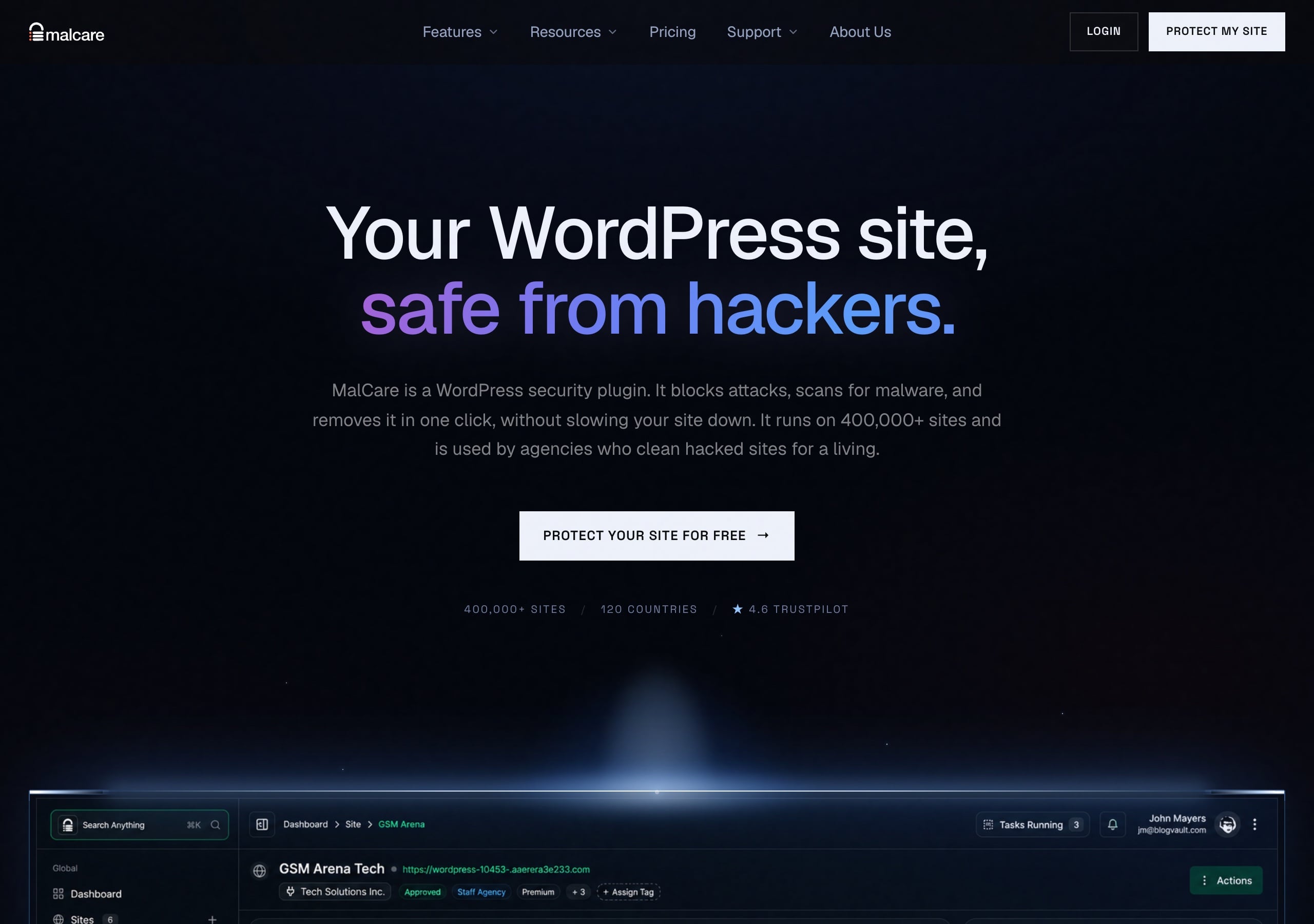
MalCare is a WordPress security plugin that combines a malware scanner, one click malware removal, a firewall with virtual patching, bot and login protection, and an activity log, with the heavy scanning done on MalCare's servers instead of yours. It comes from the team behind BlogVault backups and the free Migrate Guru migration plugin, the same technology I used in my WordPress migration guide.
On its About page MalCare says it launched in 2016, protects more than 400,000 sites in 120 countries and is still bootstrapped and run by founder Akshat Choudhary. Its homepage lists more than 2 billion attacks blocked a month as of July 2026. On WordPress.org the free plugin has 100,000+ active installations, is on version 6.76 and is tested up to WordPress 7.1.3.
Features that matter against AI-speed attacks
| Feature | What it does | Why it matters in 2026 |
|---|---|---|
| Virtual patching | Blocks the exploit for a known plugin, theme or core bug at the firewall, within hours of it going public, even before you update | Closes the 5 hour window and covers bugs that never get an official fix |
| Off-server malware scanner | Checks every file, database table and cron job, looking at behaviour and changes, not only known signatures | Catches malware that rewrites itself to dodge signature lists |
| One click cleanup | Backs up, removes only the malicious lines, then rescans | Minutes instead of days, with backdoors and rogue admins removed in the same pass |
| Network intelligence | An attack seen on any of 400,000+ sites is blocked on all of them | Bots that rotate IPs still hit a list built from everyone's traffic |
| Bot and login protection | Limits login attempts, adds CAPTCHA and two factor login | Billions of password guessing attempts a quarter, from millions of IPs |
| Activity log | Timestamped record of logins, file edits and plugin changes | Shows exactly when and how an attacker got in |
Virtual patching is the feature I care about most here. MalCare says it tracks more than 39,000 known vulnerabilities and, on paid plans, puts a virtual patch in place within hours of disclosure, while it puts the average official fix at around 12 days and notes about a third of known vulnerabilities never get one. Compare that with the free version of Wordfence, whose firewall rules and malware signatures arrive 30 days later than its paid customers get them. Against an attack that lands in 90 minutes, a 30 day delay is the same as no rule at all.
Setting MalCare up takes about two minutes
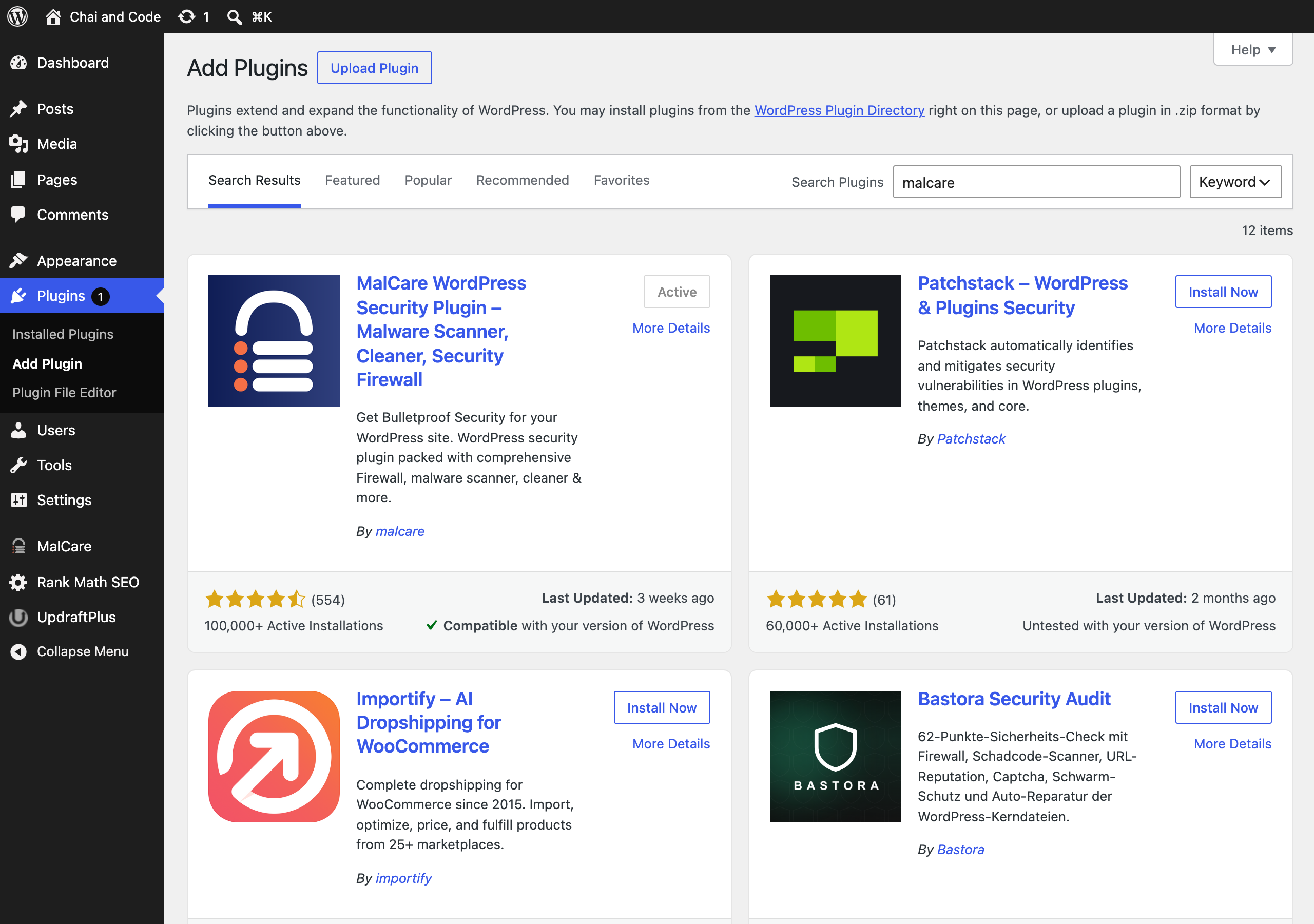
I installed MalCare on my staging site for this guide. Go to Plugins, Add Plugin, search for MalCare, install and activate it. It works even on a site that is already hacked.
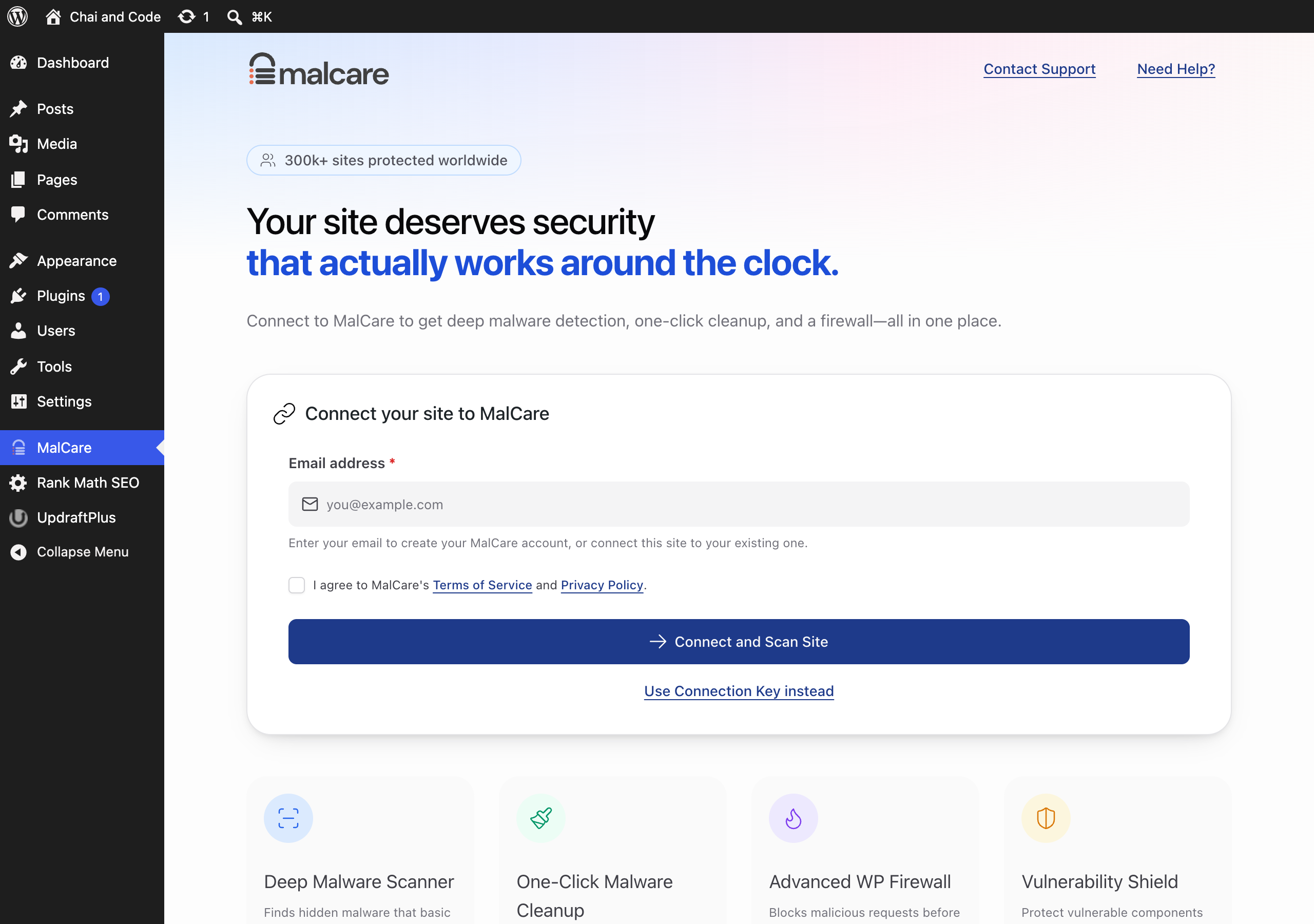
Activation opens the connect screen. Enter your email, accept the terms and click Connect and Scan Site. That creates your MalCare account and starts the first scan on MalCare's servers. From then on you manage everything, including multiple sites, from the MalCare dashboard rather than inside WordPress.
The complaint you will see in its reviews
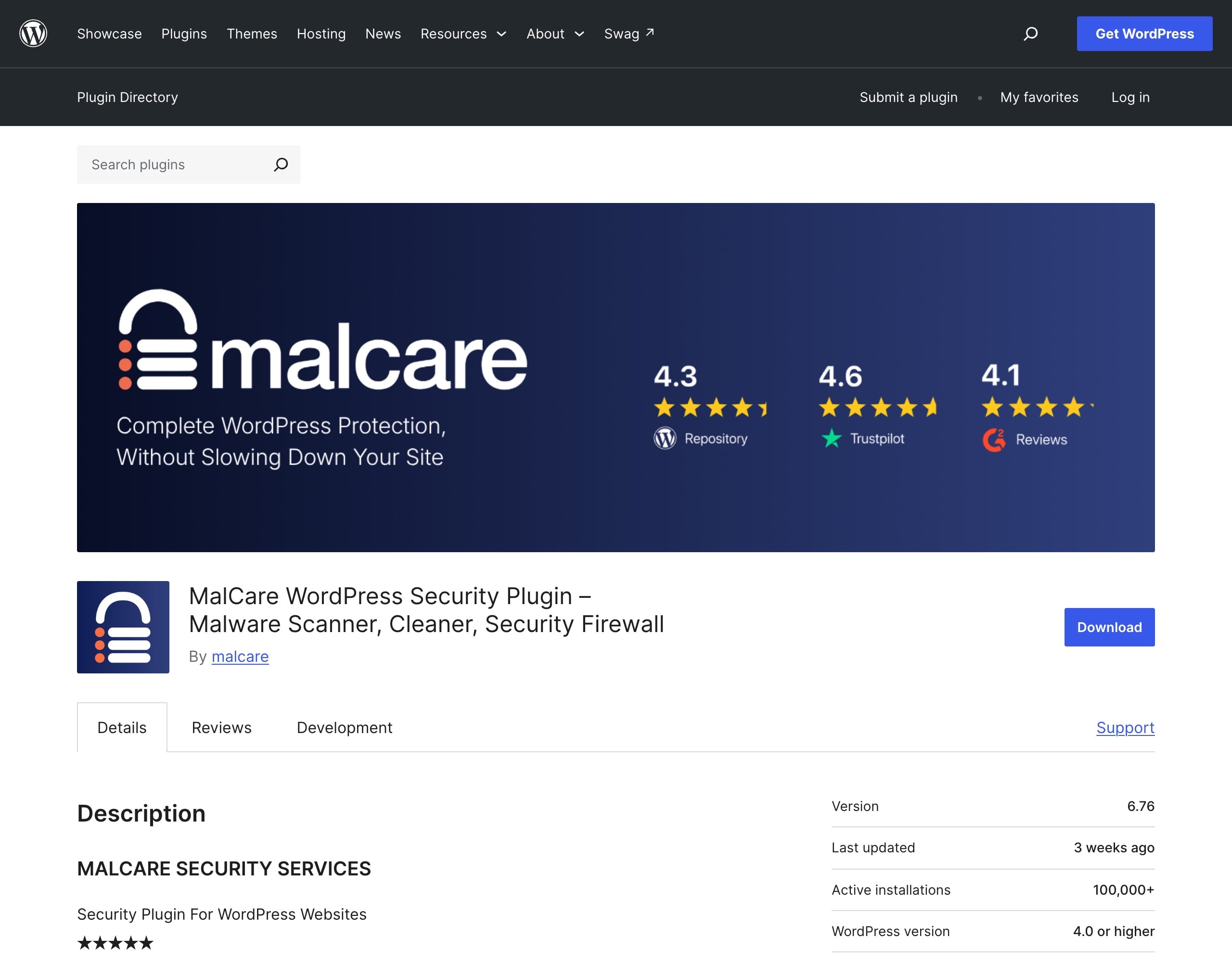
MalCare holds 88 out of 100 on WordPress.org from 554 ratings: 452 five star reviews and 74 one star. I read through the one star reviews and most say the same thing: people installed the free plugin, it found malware, and removing it needed a paid plan. Some call that bait and switch.
I understand the frustration, but it is clearly stated on the pricing page: the free plan finds malware, it does not remove it. Cleanup starts on the Repair plan. Go in knowing that and you will not feel tricked. Free scanning that tells you exactly what is wrong is still useful, even if you then clean it yourself with the commands above. A smoke alarm is worth having even if you put the fire out yourself.
MalCare pricing in 2026
MalCare has a free plan and three paid plans billed yearly. Only Repair and Fortify include malware cleanup. MalCare shows prices in your local currency, so these are the Indian rupee prices from its pricing page on 27 October 2026, with the 80% discount it was applying automatically. Readers in other countries will see their own currency; open the page next to this one rather than trusting any figure a review site quotes, including mine.
| Plan | Price per year (1 site) | Scans | Malware cleanup | Expert response | Best for |
|---|---|---|---|---|---|
| Free | ₹0 | Weekly | No, detects only | 72 hours | Checking a site, small hobby blogs |
| Protect | ₹1,980 (list ₹9,900) | Every 24 hours | No | 48 hours | Blogs that want the firewall and virtual patching |
| Repair | ₹5,980 (list ₹29,900) | Every 12 hours | Yes, unlimited, plus report | 24 hours | Most business sites, and anyone hacked right now |
| Fortify | ₹9,980 (list ₹49,900) | Every hour | Yes, plus unlimited manual fixes | 6 hours | WooCommerce stores and sites where downtime costs money |
Five site bundles cost ₹5,980 for Protect, ₹17,980 for Repair and ₹29,980 for Fortify. Every paid plan carries a 14 day refund window, with one sensible exception: if MalCare has already cleaned malware off your site in that time, the cleanup is not refundable.
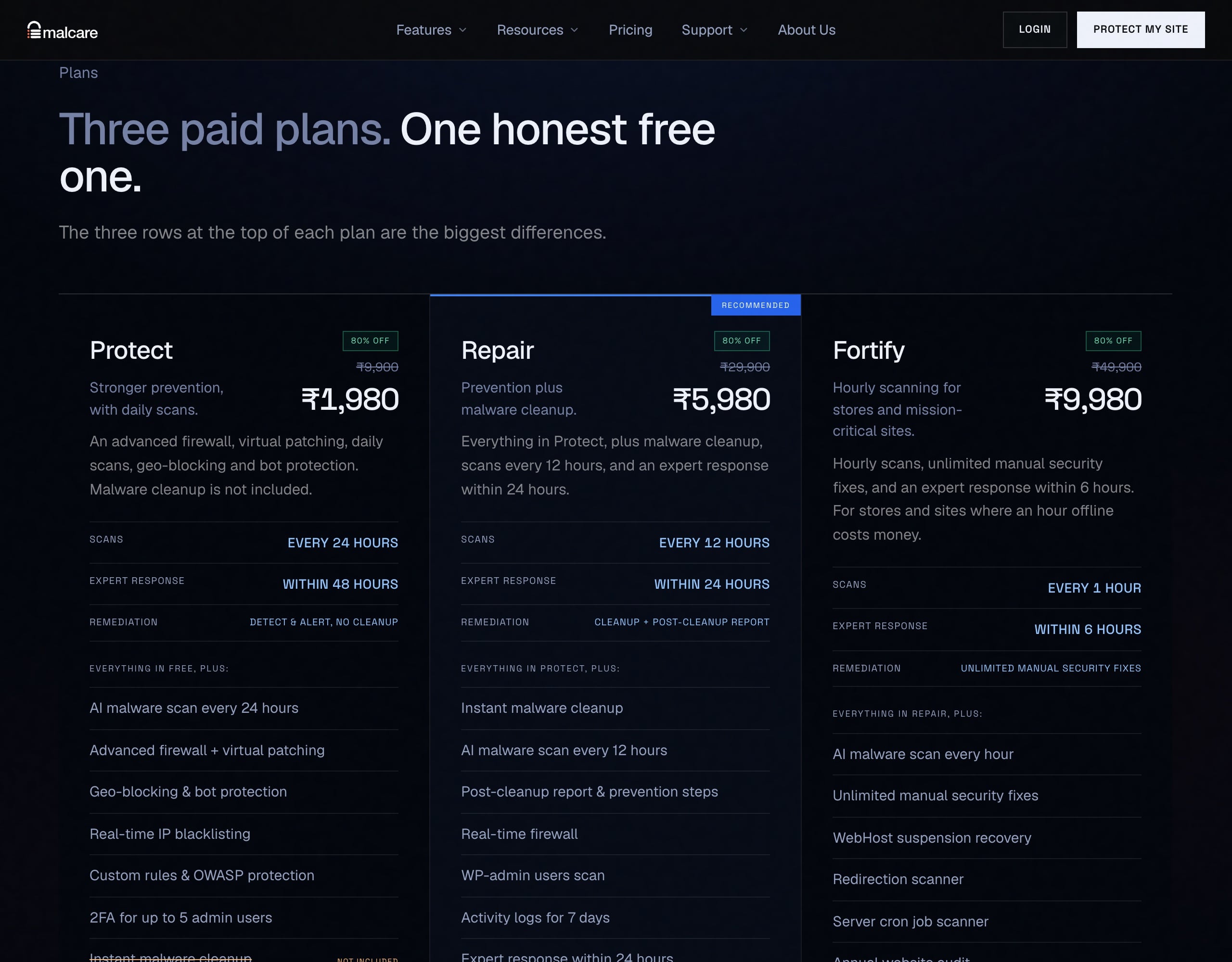
Which plan I would pick. If your site is hacked today, Repair, because it is the cheapest plan that removes malware and cleanups are unlimited. For a blog that is clean and just wants protection, Protect gets you the virtual patching that matters most against fast exploits. For a store taking payments, Fortify, because hourly scans and a 6 hour expert response are worth it when a card skimmer costs you customers.
MalCare vs Wordfence vs Sucuri
MalCare is the easiest of the three to recover a hacked site with, because cleanup is a button rather than a manual job or a support ticket, and its scanning runs off your server. Wordfence has by far the biggest install base and a strong free firewall, but its free rules arrive 30 days late. Here are the numbers from WordPress.org on 7 October 2026:
| Plugin | Active installs | Rating | Ratings | Free plan cleans malware? |
|---|---|---|---|---|
| MalCare | 100,000+ | 88 out of 100 | 554 | No, scan only |
| Wordfence | 5,000,000+ | 94 out of 100 | 5,020 | No, it flags files to fix |
| Sucuri Security | 600,000+ | 84 out of 100 | 384 | No, cleanup is a paid service |
| Solid Security | 700,000+ | 92 out of 100 | 3,992 | No |
MalCare publishes its own head to head comparison, below. Read it the way you would read any vendor's table: the rows are chosen to suit MalCare. The two claims that hold up independently are the off-server scanning and the 30 day delay on free Wordfence rules, which Wordfence confirms on its own pricing page.
How to protect WordPress from AI-powered attacks
To protect a WordPress site from AI-speed attacks, close the time gap: patch automatically, put a virtual patching firewall in front of the site, remove plugins you do not need, lock down logins, and keep tested offsite backups. This is the checklist I apply to every site I run:
| Do this | Why | How |
|---|---|---|
| Turn on automatic updates | Exploits arrive in hours, you log in weekly | Plugins screen, Enable auto-updates |
| Add a virtual patching firewall | 46% of bugs have no fix on disclosure day | MalCare Protect or higher |
| Delete unused and abandoned plugins | 91% of vulnerabilities are in plugins | Deactivate, then delete. Inactive plugins can still be exploited |
| Never install nulled themes or plugins | Pirated copies often ship with backdoors | Buy from the vendor or use the free version |
| Be careful with AI-built plugins | Patchstack warns vibe-coded plugins are spreading | Get a developer to review any custom plugin before it goes live |
| Use two factor login and unique passwords | Billions of password attacks a quarter | MalCare or any 2FA plugin, plus a password manager |
| Give each person the lowest role they need | A hacked Editor account does less damage | User roles in my WordPress tutorial |
| Keep offsite backups and test a restore | A backup you never restored is a guess | WPvivid or Duplicator to cloud storage |
| Put Cloudflare in front | Filters bad bots before they reach your server | My free Cloudflare setup |
| Watch Search Console | Google often spots a hack before you do | Security issues report |
WordPress's own hardening guide covers file permissions and wp-config.php settings if you want to go further. And if you are choosing hosting, a good managed host helps, but remember Patchstack's finding that typical hosting defences blocked only 12% to 26% of WordPress-specific attacks. I compare hosts on real numbers in Kinsta vs Rocket.net and my HostArmada review, but a security plugin is still your job, not theirs.
Backups deserve their own warning. Restoring a backup removes the malware, but it also restores the hole the attacker used and rolls back everything since, so it is a recovery tool, not a fix. My WPvivid vs UpdraftPlus comparison covers how to set backups up so they actually restore.
Case study: the October 2026 UpdraftCentral backdoors
This year's sharpest reminder that the backup tool needs the same scrutiny as everything else came from UpdraftPlus. On 17 and 18 October 2026 an attacker got into TeamUpdraft's website and took the connection keys for UpdraftCentral, the dashboard that manages UpdraftPlus across many sites. Because the keys were genuine, the attacker's commands passed every check in the plugin, and Patchstack counted 99 different backdoor plugins installed on connected sites from 18 October. No password was guessed and no plugin bug was exploited. TeamUpdraft's notice covers its side.
Two lessons carry over to any site. First, a trusted connection is an attack surface: every dashboard, management tool or plugin that can install code on your site from outside is a key someone else holds. Second, order matters in the clean up. If you delete the backdoor plugin but leave the old UpdraftCentral key in place, the attacker can simply install it again, and Nethemba found the first emergency update, 1.26.12, did not remove those keys. Update to 1.26.13 or 2.26.13, delete the old keys, then remove unknown plugins and scan. If you are shopping for a backup plugin now, I recommend WPvivid or Duplicator until TeamUpdraft publishes a full report, and I explain why on my Duplicator and UpdraftPlus page.
My verdict on MalCare
4.5 out of 5 ★★★★☆
MalCare is the security plugin I recommend for most WordPress site owners in 2026. AI has made attacks faster, and MalCare is built around speed: virtual patches within hours, off-server scans, and a cleanup that takes minutes instead of days. Start with the free scan, move to Protect for prevention, or Repair if you are hacked right now.
What works
- One click cleanup in minutes that also removes backdoors, cron jobs and rogue admins
- Virtual patching within hours, which is what counts when exploits land in 5 hours
- Scanning runs on MalCare's servers, so your site does not slow down
- Backup before cleanup and a full rescan after, so cleanups can be undone
- Unlimited cleanups at a flat yearly price on Repair and Fortify
What does not
- The free plan only detects malware, removal needs the Repair plan or higher
- Smaller install base than Wordfence, 100,000+ against 5,000,000+
- Cleanup speed figures are MalCare's own, real jobs vary with the infection
- Managing sites happens in MalCare's dashboard, not inside WordPress
Key takeaways
- AI made WordPress attacks faster: the median time to first exploit is now 5 hours, and wp2shell was attacked 90 minutes after its patch.
- AI finds bugs cheaply, about $20 per plugin zero-day in one 2026 study, but most AI-found bugs are never exploited. Speed, not panic, is the lesson.
- To remove malware from WordPress: back up, scan files and database, remove the malware and backdoors, reinstall from clean copies, kill rogue users and cron jobs, change passwords, update, then request a Google review.
- MalCare does the scan, backup, removal and rescan in minutes by its own figures, and its free plan detects but does not clean.
- Prevention beats cleanup: automatic updates plus a virtual patching firewall close the hours long window attackers rely on.
WordPress malware removal FAQs
What to do if your website has malware?
Back up the site as it is, then run a full scan of files and database to find every infection. Remove the malware and any backdoors, reinstall WordPress, plugins and themes from clean copies, delete unknown admin users, change all passwords, update everything and ask Google to review the site in Search Console. MalCare's Repair plan does the scan, removal and rescan for you in minutes.
How to check if a WordPress site is hacked?
Search Google for site:yourdomain.com and look for spam pages, check Search Console's Security issues report, test your domain in Google's Safe Browsing tool, open your site on a phone from a search result to catch redirects, and look for unknown administrators under Users. Then run a malware scan that covers the database as well as files.
Has my WordPress site been hacked?
It probably has if Google shows a “This site may be hacked” warning, visitors get redirected to scam pages, spam pages appear in search results, or there is an administrator you did not create. A free MalCare scan will confirm it and point at the exact infected files.
How can I check my WordPress site for malware?
Use a scanner that checks both files and database, such as the free MalCare plan, which runs the scan on its own servers. If you use WP-CLI, wp core verify-checksums and wp plugin verify-checksums compare your files with the official copies, and searching wp-content/uploads for PHP files finds a common hiding place.
How to fix a hacked WordPress site?
Back up, scan, remove the malware, reinstall core, plugins and themes from clean copies, remove rogue users and cron jobs, change every password and the security keys, update everything, then request a Google review. Fixing it also means closing the hole: update or delete the vulnerable plugin, and add a firewall with virtual patching.
How to recover a hacked WordPress website?
Clean the site first, then recover its reputation: request a review in Search Console so Google lifts any warning, ask your host to reinstate a suspended account, and submit your sitemap again so spam URLs drop out. The malware can be gone in minutes, but warnings take days to clear and rankings can take weeks.
How to remove malware from a site?
Find every infected file and database entry with a full scan, take a backup, remove only the malicious code, replace core files with clean copies, delete backdoors and unknown users, then rescan to confirm. On WordPress, MalCare automates this with a one click cleanup that takes about a minute by its own figures.
How to prevent malware attacks on WordPress websites?
Turn on automatic updates, use a firewall with virtual patching, delete unused plugins, never install nulled themes or plugins, use two factor login with unique passwords, give users the lowest role they need, and keep tested offsite backups.
How to protect a WordPress website from hackers?
Keep everything updated automatically, put a WordPress-aware firewall such as MalCare in front of the site, lock down logins with two factor authentication, remove anything you do not use, and monitor Search Console. With exploits now arriving within hours of a bug going public, virtual patching matters more than ever.
What is the best WordPress malware removal tool?
For most site owners I recommend MalCare, because cleanup is one click, it removes backdoors, cron jobs and rogue admins in the same pass, and cleanups are unlimited on the Repair plan. Wordfence is a strong free scanner if you are happy to clean the flagged files yourself.
What is the best website malware scanner?
For WordPress, a scanner that checks files, the database and scheduled tasks and looks at behaviour rather than only known signatures. MalCare's free scanner does this on its own servers so it does not slow your site down. Google Search Console and Safe Browsing are useful free second opinions.
How much does MalCare cost?
MalCare has a free plan. On 7 October 2026 its pricing page showed Protect at ₹1,980, Repair at ₹5,980 and Fortify at ₹9,980 per year for one site in India, after an 80% discount. Prices are shown in your local currency and billed yearly, with a 14 day refund window.
Is the MalCare plugin free?
Yes, MalCare has a free plan with weekly malware scans, vulnerability alerts, a basic firewall, login protection and two factor login for two admins. The free plan detects malware but does not remove it; cleanup needs the Repair or Fortify plan.
Which WordPress security plugin is the best?
There is no single best for everyone. MalCare is the best choice if fast malware removal and off-server scanning matter to you, Wordfence has the largest user base and a capable free firewall with rules delayed 30 days, and Sucuri suits people who want a managed cleanup service.
Is AI taking over cybersecurity?
AI is changing both sides rather than taking over. Attackers use it to find bugs and build exploits faster, with one 2026 study finding over 300 WordPress plugin zero-days in 72 hours. Defenders use the same tools, from Wordfence's AI research agent to WordPress's own AI-assisted security scanning. People still verify and decide.
What do hackers usually use?
Against WordPress, hackers mostly use automated bots that scan for known plugin vulnerabilities and guess passwords, and increasingly AI models to write exploits from published patches. Broken access control and privilege escalation bugs in plugins were the most exploited types in 2025.