Most people switch on Cloudflare, see their images being served from a nearby city, and assume their site is now on a CDN and therefore fast. Then they check time to first byte and it has not moved at all. Nothing is broken. Cloudflare is doing exactly what it was told, and the one setting almost nobody changes is the one that leaves your host building every page from scratch.
The short answer
A CDN that only caches images, CSS and JavaScript will not fix a slow server, because PHP still runs on every page view. What fixes it is caching the HTML at the edge.
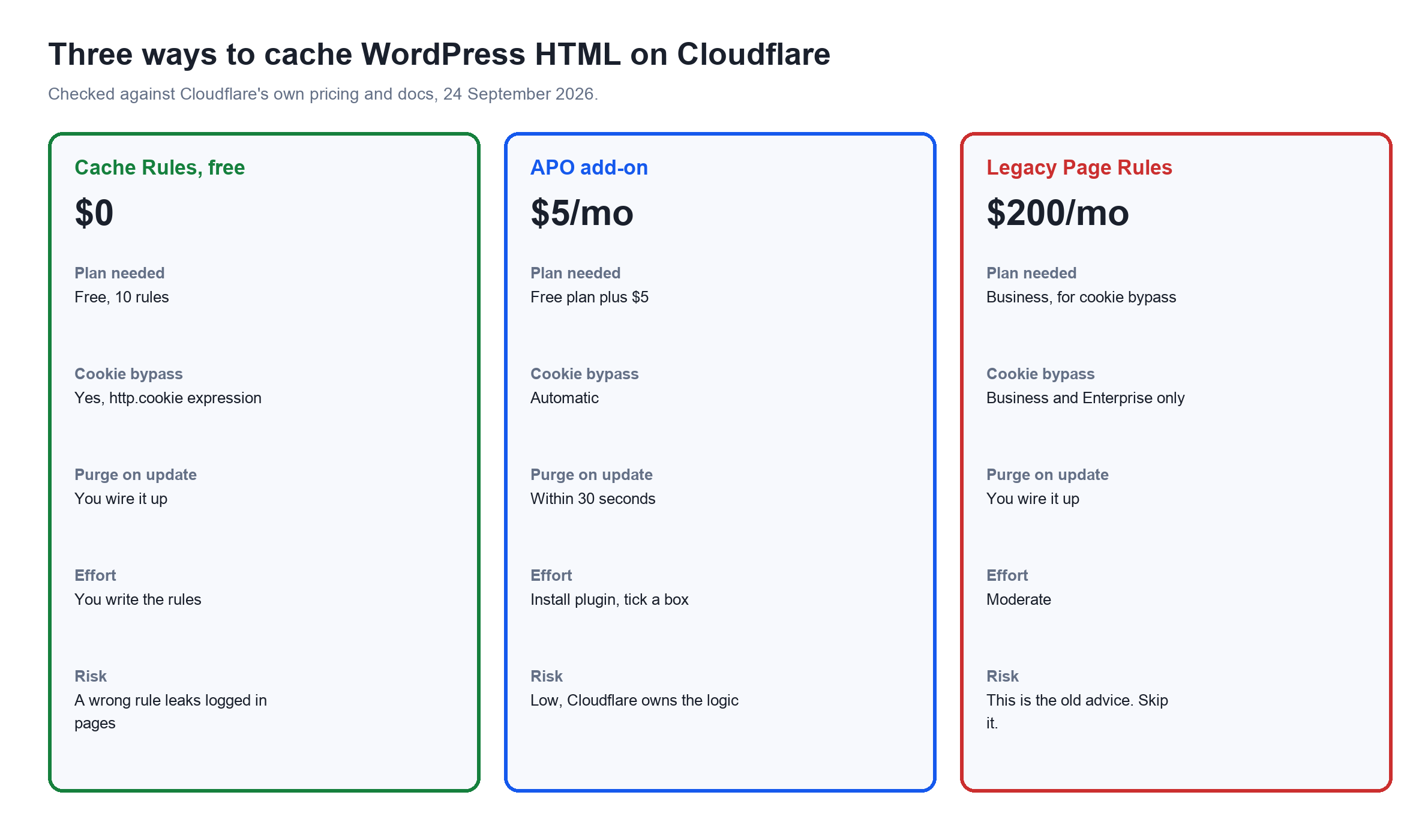
On Cloudflare you can do that three ways: write Cache Rules yourself on the free plan, pay 5 dollars a month for APO and let Cloudflare handle the logic, or follow the advice most guides still give and buy the 200 dollar a month Business plan, which you do not need.
What a CDN does for a WordPress site
A content delivery network keeps copies of your files on servers around the world and serves each visitor from the closest one. The benefit is distance. If your server is in London and your reader is in Mumbai, every request is a round trip of roughly 150 milliseconds before a single byte of content moves.
The advantages
- Latency drops for distant visitors. This is the whole point and it is real.
- Your origin serves far less traffic. Cheaper hosting survives a traffic spike it would otherwise fall over on.
- Free DDoS absorption and a free SSL certificate on Cloudflare's free plan, which on its own is worth the setup.
- Images and scripts get modern compression and correct cache headers without touching your server config.
- Your origin IP is hidden, which removes a whole category of direct attacks.
The disadvantages nobody puts in the sales copy
- It does nothing for your slowest page if that page is slow because of PHP. A CDN caches output. It does not make the database faster.
- Another layer to debug. When something breaks you now have to work out whether it is WordPress, your host, or the edge.
- Stale content. Aggressive caching plus no purge strategy means you update a post and readers see the old one.
- Analytics and country detection get confused if your server reads the wrong header and logs Cloudflare's IP instead of the visitor's.
- Real risk of leaking private pages if you cache HTML without excluding logged-in sessions. This is the dangerous one, and I cover it in detail below.
The distinction that decides everything: assets versus HTML
Turn on Cloudflare and point your nameservers at it, and by default it caches static files only: images, CSS, JavaScript, fonts. Your HTML is not cached. Every visitor still causes WordPress to boot, query the database, run every plugin, and render the page.
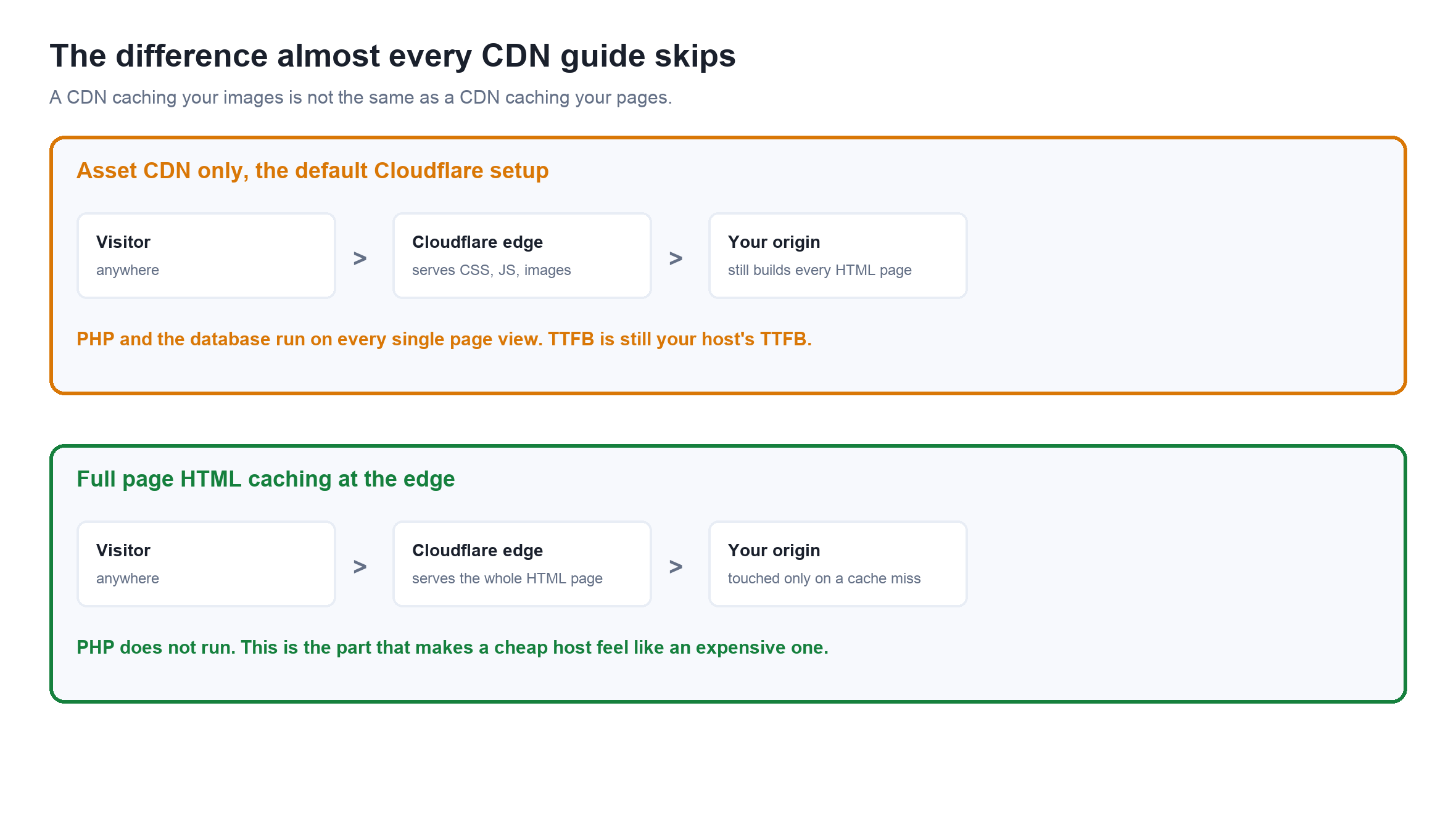
That top lane is where most sites sit. The bottom lane is what managed WordPress hosts charge a premium for, and it is available to you on Cloudflare's free plan if you set it up correctly.
Why most guides tell you to buy the 200 dollar plan
The classic instruction is to create a Page Rule with Cache Level set to Cache Everything. That does cache your HTML. It also caches the HTML of a logged-in user and can serve it to a stranger, which on a WooCommerce site means showing one shopper another shopper's cart.
The fix within Page Rules is a setting called Bypass Cache on Cookie, and it is not on every plan. Reading Cloudflare's own Page Rules settings table today, the plan requirements are:
| Page Rules setting | Plans it is available on |
|---|---|
| Cache Level, including Cache Everything | All |
| Edge Cache TTL | All |
| Bypass Cache on Cookie | Business and Enterprise |
| Cache By Device Type | Enterprise |
Business is 200 dollars a month billed annually, or 250 billed monthly. So the advice became: either accept the risk, or pay 200 a month. Neither is a great pitch for a blog. That is where the received wisdom comes from, and it was correct when it was written.
It is out of date, and that changes the whole answer
Page Rules are the legacy system. Cloudflare replaced them with Cache Rules, and per their availability table Cache Rules are available on every plan including Free, with 10 rules on Free, 25 on Pro, 50 on Business and 300 on Enterprise.
Cache Rules match on filter expressions, and Cloudflare's own documented example for bypassing cache on a cookie is a plain expression with no plan gate on it. You do not need the Business plan to safely cache WordPress HTML. You need to stop using Page Rules.
Route A: do it free with Cache Rules
Two rules, in this order. Cloudflare evaluates Cache Rules top down, so the bypass has to come first or it will never be reached.
Rule 1, bypass anything that is personal
# Expression
(http.cookie contains "wordpress_logged_in_")
or (http.cookie contains "wp-postpass_")
or (http.cookie contains "comment_author_")
or (http.cookie contains "woocommerce_items_in_cart")
or (http.cookie contains "woocommerce_cart_hash")
or (http.cookie contains "wp_woocommerce_session_")
or (http.cookie contains "edd_items_in_cart")
or (starts_with(http.request.uri.path, "/wp-admin"))
or (starts_with(http.request.uri.path, "/wp-json"))
or (http.request.uri.path eq "/wp-login.php")
or (starts_with(http.request.uri.path, "/cart"))
or (starts_with(http.request.uri.path, "/checkout"))
or (starts_with(http.request.uri.path, "/my-account"))

# Then: Cache eligibility -> Bypass cache
Rule 2, cache everything that is left
# Expression
(http.host eq "yoursite.com")

# Then
#   Cache eligibility  -> Eligible for cache
#   Edge TTL           -> Override origin, 1 month
#   Browser TTL        -> Respect origin
Test this before you trust it
Open your site in a normal window and in a private window while logged in as admin. In the private window you must see the cached page and never an admin bar. Check the cf-cache-status response header: HIT on the public page, BYPASS or DYNAMIC while logged in. If a logged-in page ever returns HIT, delete the rules immediately and fix the bypass expression.
The remaining job is purging. Nothing in the two rules above knows that you published a post, so you need a plugin or a hook to call Cloudflare's purge API on update. That is the real cost of the free route: it works, but you own the maintenance.
Route B: pay 5 dollars for APO and stop thinking about it
Automatic Platform Optimization is 5 dollars a month on the free plan and included free with Pro, Business and Enterprise. It is the same edge HTML caching, except Cloudflare wrote and maintains the rules.
Reading Cloudflare's APO documentation, it caches a page as HTML only when all of these hold:
- The
cf-edge-cacheresponse header from the WordPress plugin permits caching, for examplecache,platform=wordpressrather thanno-cache. - No bypass cookies are present, meaning logged-in, session or WooCommerce cookies.
- No cache-bypassing request headers such as
Cache-Control: no-cache, and none of the risky headersx-host,x-forwarded-host,x-original-urlorx-rewrite-url. - The path is not an excluded one such as checkout,
wp-cron.phpor feeds.
It caches for 30 days and invalidates on change within 30 seconds, which solves the purging problem the free route leaves you with. It runs on Cloudflare Workers, and with the plugin installed you do not need Edge Cache TTL page rules at all.
The weak spot is the plugin. APO needs the official Cloudflare plugin, which has 200,000 installs and a rating of 70 out of 100 from 180 reviews. That is a poor score for an official plugin, so know it before you commit. By comparison Super Page Cache, the community alternative that does edge caching without APO, sits at 96 out of 100 from 513 ratings on 70,000 installs.
Route C: let your cache plugin drive Cloudflare
If you already run a caching plugin, it may be able to manage the edge for you, which gets you correct purging without writing API calls.
| Tool | What it does with Cloudflare | Worth it when |
|---|---|---|
| FlyingPress | Connects your Cloudflare account, purges the edge when you update content, and pairs with its own CDN layer | You want one plugin owning both page cache and edge purge |
| Super Page Cache | Purpose built for exactly this: caches HTML on Cloudflare and handles the cookie exclusions and purging for you, free | You want the free route without hand writing rules |
| xCloud | Server level full page cache plus Cloudflare integration at the panel | Your host is xCloud and you would rather configure this once at the server |
| WP Rocket | Has a Cloudflare add-on for purging, but does not put your HTML on the edge by itself | You already own it and mainly want purge automation |
If you are choosing a caching plugin in the first place, I have tested these properly: the xSpeed Cache review and WP Rocket's real pricing.
Does 5 dollars of APO really replace a 200 dollar host?
Partly. The marketing on both sides gets loose about which part, so here it is line by line.
| What expensive hosting sells | Does edge HTML caching replace it? |
|---|---|
| Fast time to first byte for cached pages | Yes. This is exactly what it does, and it is the headline number people benchmark |
| Fast response for logged-in users and carts | No. Those bypass the cache by design and hit your origin |
| Fast admin dashboard | No. wp-admin is never cached |
| Handling a traffic spike on a cheap plan | Largely yes. The edge absorbs it |
| Database performance for a big WooCommerce catalogue | No. That is CPU and memory at the origin |
| Backups, staging, support, isolation | No. Different product entirely |
My take
For a content site, a blog or a brochure site, five dollars of APO on decent shared hosting will give you a time to first byte that embarrasses a lot of expensive plans. The cached page never touches your server, so your server barely matters.
For a store, a membership site, or anything where most of the valuable traffic is logged in, it changes much less than you hope, because the pages that matter are the pages the cache deliberately skips. That is when you are paying for origin performance, and you should compare real hosts: Kinsta versus Rocket.net and Cloudways against Rocket.net and WP Engine.
What to do, by situation
| Your site | Do this |
|---|---|
| Blog or content site on shared hosting | Cloudflare free plus 5 dollar APO. Best return on five dollars in WordPress |
| Blog, and you enjoy configuring things | Cloudflare free plus two Cache Rules plus Super Page Cache for purging. Costs nothing |
| WooCommerce store | Edge cache the catalogue, bypass cart, checkout and account. Do not skip the bypass testing |
| Membership site | Most traffic is logged in, so spend on the origin instead |
| Already on premium managed hosting | APO is included on any paid Cloudflare plan. Check whether your host already edge caches first, or you will have two caches to purge |
Related reading
- Speed up WordPress, everything that actually moves the needle
- xSpeed Cache review, tested for a full day
- Hosting deals ranked by four year cost
- Kinsta versus Rocket.net, measured TTFB
- Moving hosts, two methods tested on a 3.6 GB site
- What hosting actually is, in plain language
WordPress CDN and Cloudflare FAQs
Can I use Cloudflare CDN for free?
Yes. Cloudflare's free plan includes the global CDN, a free SSL certificate, unmetered DDoS protection and Cache Rules with a limit of 10 rules. The free plan caches static files by default. Caching your HTML pages at the edge takes either two Cache Rules that you write yourself or the 5 dollar a month APO add-on.
Is there a free CDN for WordPress?
Cloudflare's free plan is the obvious one, and it is free for good, not a trial. Jetpack offers free image CDN for images only. For full page HTML caching, Cloudflare free plus correctly written Cache Rules is the only route that costs nothing.
What are the downsides of using Cloudflare?
It adds a layer to debug when something breaks, it can serve stale content if you do not purge on update, it can confuse analytics and country detection if your server logs Cloudflare's IP rather than the visitor's, and a badly written cache rule can serve a logged-in page to a stranger. The free plan also has no phone support and no uptime SLA.
Who is Cloudflare's biggest competitor?
For general CDN, Akamai and Fastly at the enterprise end and Amazon CloudFront among the cloud providers. For WordPress specifically the practical alternatives are BunnyCDN, which is cheap and simple, and the edge caching built into managed hosts such as Rocket.net and Kinsta, which removes the need for a separate CDN entirely.
Do I need the Cloudflare Business plan to cache WordPress HTML?
No, and this is where most guides are out of date. The Business plan at 200 dollars a month was required for the Bypass Cache on Cookie setting in the legacy Page Rules system. Cache Rules replaced Page Rules, are available on the free plan with 10 rules, and can bypass cache on a cookie with a standard filter expression.
Is Cloudflare APO worth 5 dollars a month?
For a content site, it is the best five dollars you can spend on WordPress performance. It caches your HTML at the edge for 30 days, invalidates within 30 seconds of a change, and handles the logged-in and WooCommerce cookie exclusions for you. For a site where most traffic is logged in, it will change much less, because those requests bypass the cache by design.
Does APO work with WooCommerce?
Yes, with the understanding that it will not cache the parts that matter most to a shopper. APO bypasses the cache when WooCommerce session or cart cookies are present and excludes paths like checkout, so product listings get edge cached and the cart and checkout still hit your origin.
Will a CDN fix my slow WordPress site?
Only if the slowness is distance or static files. If your pages are slow because of heavy plugins, a bloated theme or slow database queries, an asset CDN changes nothing, because PHP still runs on every page view. Edge caching the HTML does fix that for anonymous visitors, because your server stops being involved.
What is the difference between Cache Everything and APO?
Cache Everything is a blunt instruction to cache all responses, and on its own it will happily cache a logged-in page and serve it to someone else. APO is WordPress aware: it checks for logged-in, session and WooCommerce cookies, respects a header set by the Cloudflare plugin, excludes checkout and feeds, and purges automatically when you update content.
Do I still need a caching plugin if I use Cloudflare?
Usually yes, for object caching, minification and the purge trigger that tells Cloudflare your content changed. What you should avoid is two plugins both trying to manage the Cloudflare edge at once, because they will fight over purging.
How do I check whether my HTML is actually being cached?
Look at the cf-cache-status response header in your browser's network tab. HIT means Cloudflare served it, MISS means it fetched from your origin and has now stored it, and DYNAMIC means it is not being cached at all. Test while logged out, then repeat logged in and confirm you get BYPASS or DYNAMIC rather than HIT.
Does Cloudflare slow down my site for local visitors?
It can add a millisecond or two for a visitor who is physically close to your origin server, because the request now goes through an extra hop. That is dwarfed by the saving for everyone else, and it disappears entirely once the HTML is cached at the edge, since the request never reaches your origin at all.