Webstudio is a good website builder, and for most people it is the best open source alternative to Webflow available in 2026. It gives you every CSS property in a visual canvas, hosts on Cloudflare, costs $15 a month for unlimited sites with custom domains, and can be exported and self hosted. The trade offs are real: no native content database, no built in ecommerce, a smaller template library, and an editor that still throws the occasional bug.
I have spent time inside the builder, read the full pricing and compare plans tables, checked the repository statistics on GitHub, and gone through every public Trustpilot review. Everything in this piece was checked on 27 October 2026 and the screenshots are mine, taken the same day. Where something has changed since the older reviews you will find in search, I say so.
The Verdict in One Box
| Question | Answer |
|---|---|
| Is it good? | Yes, with caveats. 4.3 out of 5 from me. |
| Who is it for? | Designers and developers who know CSS, freelancers and agencies running several client sites, and anyone who wants an exit route from a hosted platform. |
| Who is it not for? | Complete beginners who want templates and hand holding, anyone who needs an online store, and anyone who wants the content to live inside the builder. |
| What does it cost? | Free forever on a wstd.io subdomain. $15 a month billed yearly for Pro, which covers unlimited sites on custom domains. |
| Biggest strength | Unlimited sites on one flat fee, plus a real export and self host escape hatch. |
| Biggest weakness | You bring your own CMS. Webstudio renders content, it does not store it. |
Read This Before You Trust Any Webstudio Review
Search for Webstudio reviews and you will hit two completely different products with nearly identical names, and a lot of the harsh warnings you find are aimed at the wrong one.
| Product | What it is | Reputation |
|---|---|---|
| webstudio.is | The open source visual builder this review covers. German company, AGPL licensed, code on GitHub. | 4.4 out of 5 on Trustpilot |
| WebStudio Website Builder | An unrelated commercial website builder and design service with a similar name. | The source of most of the angry reviews you will find |
If a review complains about aggressive sales calls, locked in contracts or a design agency that stopped replying, it is not about webstudio.is. The product in this article is the one whose entire source code sits in a public repository under the AGPL, which is about as far from a lock in as software gets.
What Webstudio Is
Webstudio is an open source visual website builder. You lay out pages on a canvas, style them with a panel that exposes the full CSS specification rather than a curated subset, and publish either to Webstudio Cloud, which runs on Cloudflare, or to your own infrastructure by exporting the project.
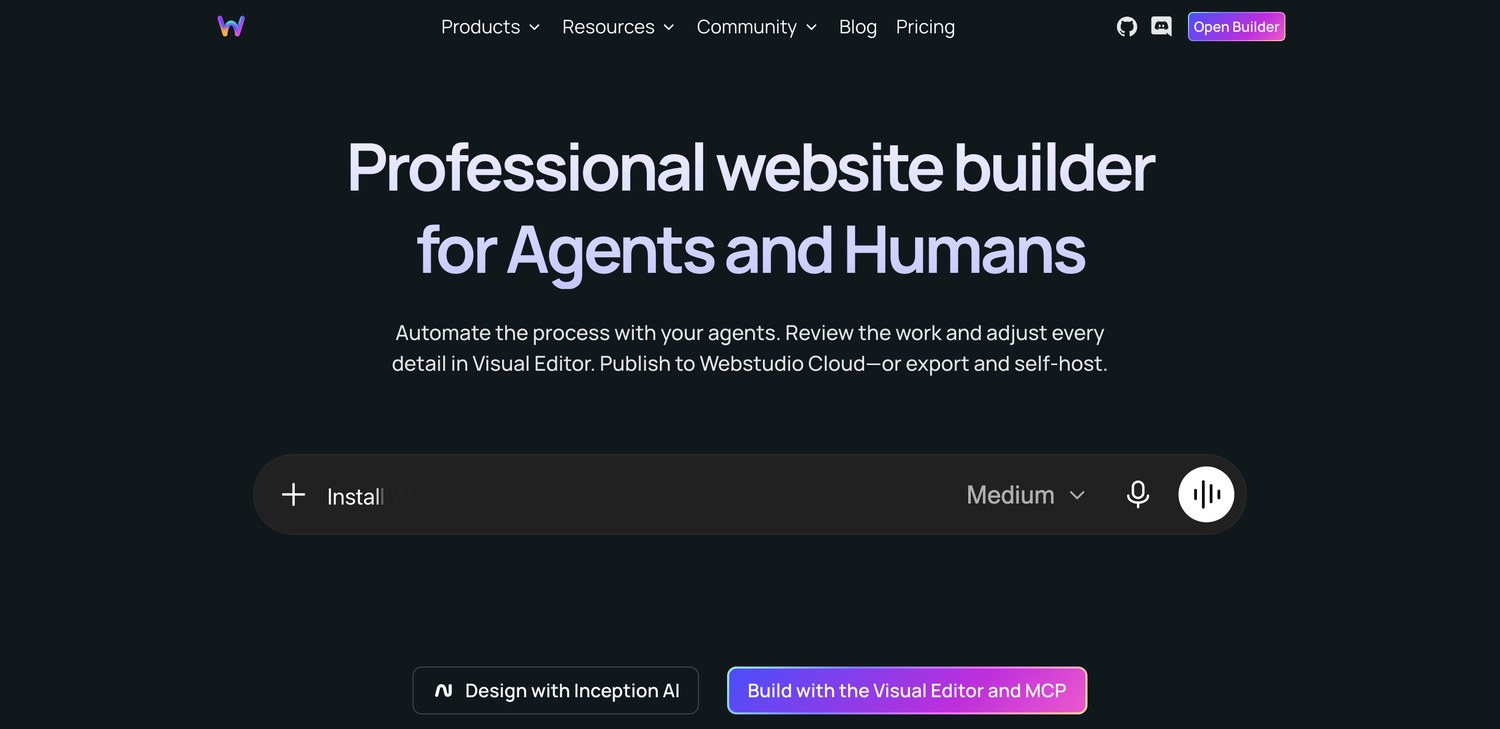
The positioning has shifted noticeably in 2026. The homepage now opens with “Professional website builder for Agents and Humans” and pushes three entry points: a CLI, an MCP server so AI agents can build alongside you, and their Inception AI design tool. A year ago that headline was about open source and CSS. The builder underneath is the same, but the company is clearly betting that the next wave of site building happens with an agent in the loop.
In practice, if you already work with AI coding tools, Webstudio is one of very few visual builders you can point an agent at through MCP and then inspect the result in a real design canvas. Webflow shipped an MCP server too, so this is not unique any more, but Webstudio made it a Pro tier headline feature rather than an add on.
How Serious Is the Open Source Claim?
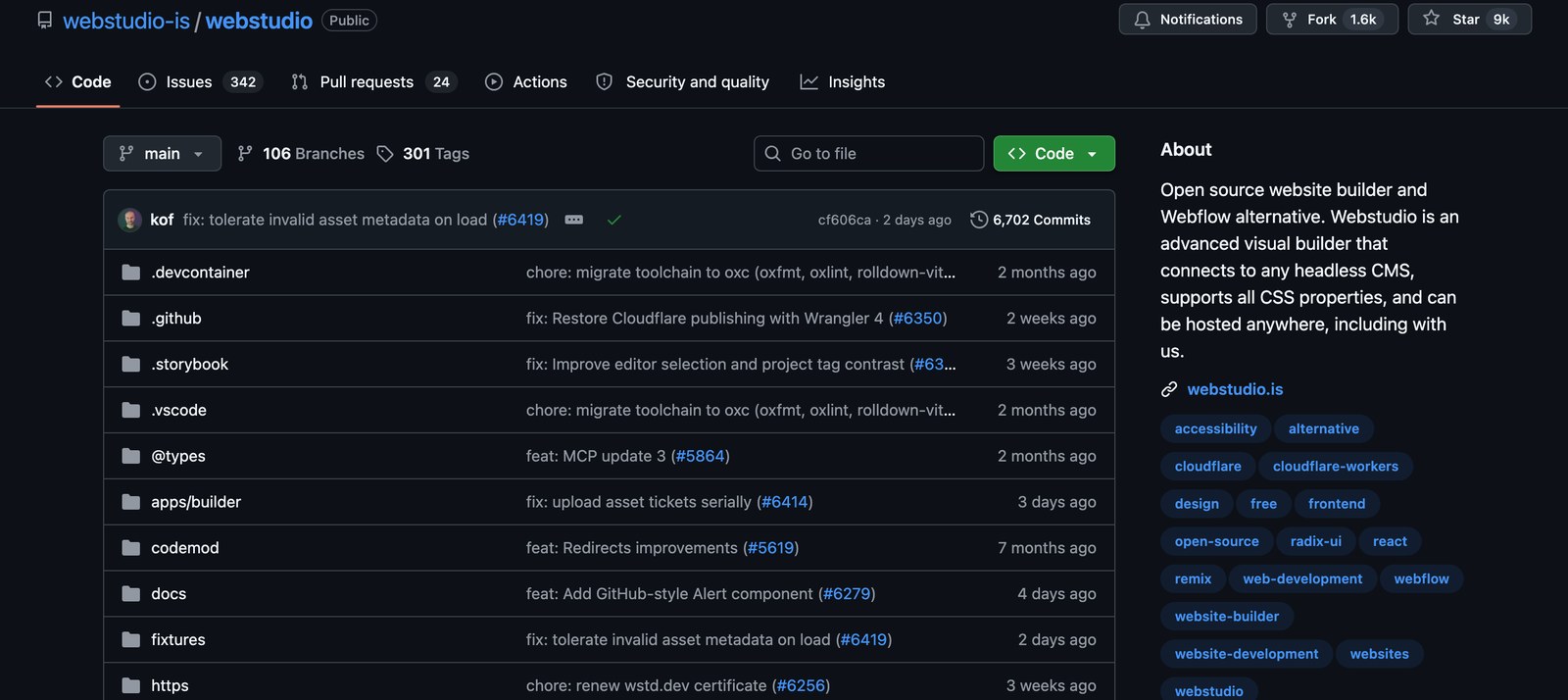
Plenty of tools call themselves open source and ship a marketing repository with three commits. Webstudio is not one of them. I took these numbers from the GitHub repository itself on 22 September 2026, not from the vendor's own page.
| Metric | Figure | Why it matters |
|---|---|---|
| Licence | AGPL 3.0 | A strong copyleft licence, not a source available marketing licence |
| Stars | 8,974 | Real community interest, not a vanity repo |
| Forks | 1,610 | People are actually taking the code and running with it |
| Commits | 6,702 | Four and a half years of continuous work |
| Contributors | 46 | Beyond a single founder, though still a small core team |
| Open issues | 366 | Honest signal: a lot is still outstanding |
| Last commit | 21 September 2026 | The day before I checked. Daily activity. |
| Releases | 8 in the last month, latest 0.299.0 on 17 September | Rapid shipping, but still on a 0.x version number |
| First commit | 13 March 2022 | Not a weekend project |
Not every number there is flattering. 366 open issues is a lot for a project this size, and the version number is still 0.299.0 after four and a half years. Read charitably that is a team refusing to slap a 1.0 on something they do not consider finished. Read cynically it is a product that has never declared itself stable. Both readings are fair, and your tolerance for that is a big part of whether Webstudio suits you.
Webstudio Pricing, and What Each Tier Gives You
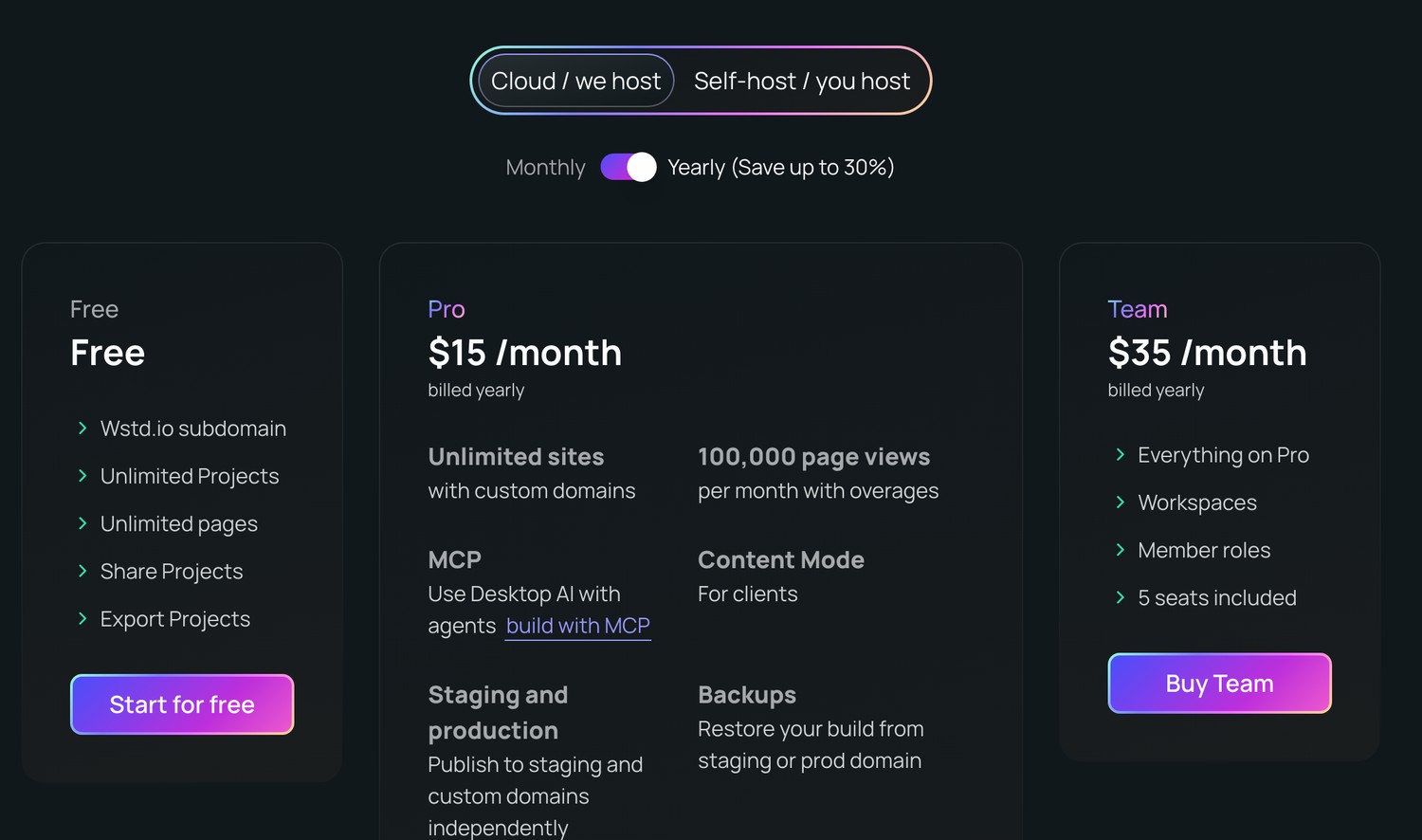
Webstudio has one of the simplest pricing pages in this category, which is refreshing after Webflow's two separate billing axes. There are three cloud tiers plus a self host option that costs nothing.
| Free | Pro | Team | |
|---|---|---|---|
| Price | $0 | $15 per month, billed yearly | $35 per month, billed yearly |
| Custom domains | None, wstd.io subdomain only | Unlimited | Unlimited |
| Projects and pages | Unlimited | Unlimited | Unlimited |
| Publishing | Staging only | Staging and production | Staging and production |
| Page views | Not applicable | 100,000 per month | 100,000 per month |
| Asset storage | 250 MB | 20 GB | 20 GB |
| Assets per project | 50 | 1,000 | 1,000 |
| Form submissions | 300 per month | Unlimited | Unlimited |
| Daily publishes | 10 | 100 | 100 |
| CMS pages and records | Staging only | Unlimited | Unlimited |
| Content Mode for clients | Shared projects only | Yes | Yes |
| Backups | No | Yes | Yes |
| Seats and roles | Collaborators only | Collaborators only | Workspaces, member roles, 5 seats |
There is no lifetime option on that page any more. Webstudio sold a lifetime deal through 2024 and discontinued it in January 2025, per their own pricing FAQ. Existing licences are honoured and they keep a list for occasional future drops, but if you land on an article still advertising a Webstudio lifetime deal as buyable, it is out of date.
The Two Numbers That Decide Everything
Unlimited sites with custom domains on a $15 plan. This is the single most important line on the page and it is why freelancers keep switching. Nearly every hosted builder charges per site. Webstudio charges per account. If you look after five client sites, that is one $15 bill rather than five.
100,000 page views a month, then $20 per additional 100,000. This is the ceiling nobody mentions. For a brochure site or a small business it is enormous headroom. For a content site with real traffic it is not, and the overage is billed per account rather than per site, so all your projects draw from the same pool. Webstudio does cap overages so a traffic spike cannot produce a shock invoice.
The free tier deserves its own note because it is unusually generous in one direction and hard capped in another. You get unlimited projects, unlimited pages, the full builder, project export, and the CMS features on staging. What you do not get is a custom domain or production publishing. For comparison, Webflow's free Starter plan caps you at two static pages. Webstudio's free tier is a real evaluation environment; Webflow's is a demo.
Both figures above are the annual billed rates, which is how Webstudio advertises them. Month to month costs more, and their own page offers up to 30% off for paying yearly, so budget above $15 if you want the flexibility of cancelling any month. On a tool you are going to keep, take the annual rate.
The CMS Question, Where Most Reviews Get It Wrong
You will read that Webstudio has no CMS. That is not quite right, and the distinction matters enough to get straight before you buy anything.
Webstudio has the entire front end half of a CMS. It has CMS pages, dynamic routing, collection components, a dynamic sitemap, bindings, an expression editor, markdown embeds and GraphQL resources. What it does not have is the database. There is no place inside Webstudio to type your blog posts.
Instead you connect an external source through Resources and bind the fields onto the canvas. The project's own GitHub description is explicit about this: it “connects to any headless CMS”. In practice people wire up Airtable, Hygraph, Notion, Sanity, Strapi or WordPress and let Webstudio render the front end.
| Webstudio approach | Typical hosted builder approach | |
|---|---|---|
| Where content lives | Whatever CMS you choose | Inside the builder |
| Setup effort | Higher. You pick, configure and connect a CMS | Lower. Create a collection and start typing |
| Ongoing cost | Builder fee plus whatever your CMS costs, often nothing | Bundled, usually on a higher tier |
| If you leave the builder | Content is untouched, it was never theirs | Content has to be exported and remapped |
| Who edits | Content Mode in Webstudio, or the CMS admin directly | The builder's own editor |
| Best for | Anyone who already has content somewhere, or expects to migrate | A single site that will never move |
Be Honest With Yourself About This One
If the phrase “connect a headless CMS through GraphQL” makes you tense up, this is the line where Webstudio stops being the right tool. Everything else about it is easier than the reputation suggests. This part is harder than clicking Collections in Webflow, and no amount of love for open source will configure GraphQL for you.
The flip side is the reason experienced people put up with it. Your content is never hostage to the builder. Swap Webstudio out and the posts do not move.
What the Builder Is Like to Use
The style panel is the thing people notice first. Most visual builders give you a curated set of properties and an escape hatch for custom code. Webstudio gives you the CSS specification: every property, every unit, CSS variables, custom breakpoints rather than fixed ones, and an expression editor for bindings.
If you know CSS, this removes a whole category of frustration, the one where you know exactly which property you need and the tool will not let you set it. If you do not know CSS, it removes your guardrails. That single design decision explains most of the polarised opinions about this product.
- Paste from Webflow. Copy elements out of Webflow and paste them straight into Webstudio. It is not a full project importer, but for rebuilding a component library it saves hours.
- Radix components. Accessible primitives for dialogs, dropdowns, tabs and accordions, built in rather than bolted on with custom code.
- Scroll driven animations. Built on the Scroll Timeline API, which runs off the main thread. This is a modern standard, not a JavaScript library taxing your page weight.
- Image handling. Upload full quality, get WebP and AVIF, responsive sizes and lazy loading generated for you.
- Content Mode. A restricted editing view for clients, so they change copy without dismantling the layout. This shipped after most of the reviews you will find, and older articles saying Webstudio has no client editor are out of date.
- Static and dynamic export. Take the project and deploy it to Vercel, Netlify or your own box.
Performance is the part the community is loudest about, and the mechanism is straightforward rather than magical. Webstudio outputs clean markup without a builder runtime, and Webstudio Cloud sits on Cloudflare's edge. Perfect Lighthouse scores come up repeatedly in user reviews. I would treat that as a strong prior rather than a guarantee, because a heavy third party script will wreck the score on any platform.
What Real Users Say, Including the Bad Reviews
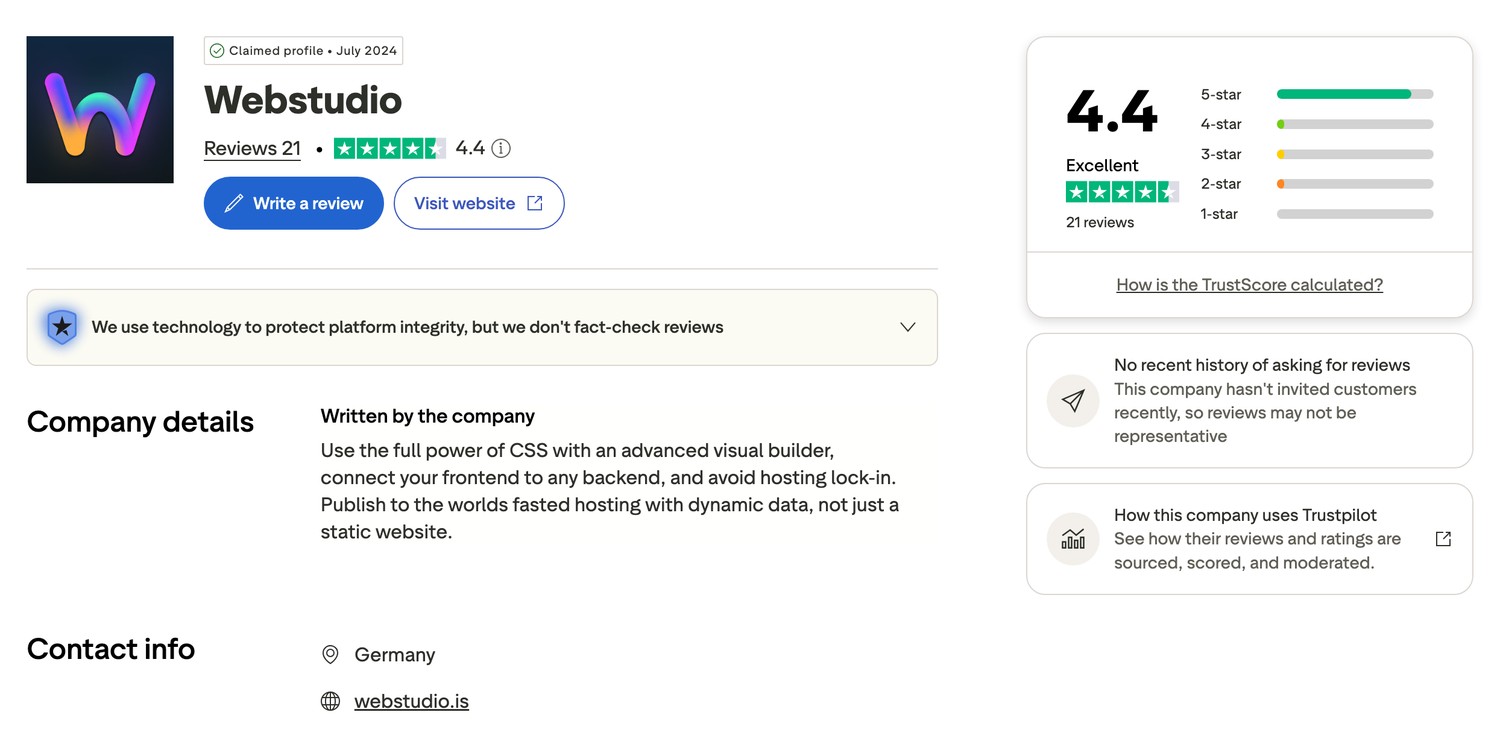
Webstudio holds 4.4 out of 5 on Trustpilot from 21 reviews, with 85% at five stars and no one star reviews at all. The profile was claimed in July 2024 and the company is based in Germany.
Two caveats before anyone leans on that number. Twenty one reviews is a small sample, and Trustpilot itself flags that there have been no reviews in the last twelve months. Most of that praise dates from mid to late 2024, which in a product shipping eight releases a month is a long time ago.
| Platform | Webstudio | Webflow |
|---|---|---|
| Trustpilot score | 4.4 out of 5 | 1.5 out of 5 |
| Reviews | 21 | 237 |
| Five star share | 85% | 13% |
| One star share | 0% | 66% |
| Reviews in last 12 months | 0 | 56 |
Do not over read that gap. Trustpilot is where frustrated customers go, so any large company with billing and support at scale collects one star reviews, while a small product reviewed mostly by enthusiasts collects five star ones. The contrast is still worth seeing, but it measures complaint volume more than product quality.
The Praise, and What Sits Behind It
- No lock in is the recurring theme. Several reviewers say the self host option was specifically their plan B, the thing that made them comfortable paying for the cloud plan at all.
- Speed of the output. One reviewer describes sites loading considerably faster than their Webflow equivalents, and another reports hitting 100 on Lighthouse repeatedly.
- The free tier keeps coming up. Reviewers building sites for friends at zero cost, and one noting that custom code embedding is not paywalled.
- Development pace. A reviewer who came from four years of Webflow describes the progress over eight months as commendable. The GitHub data backs that up.
- The CMS flexibility, for the right person. One review lists Airtable, Hygraph, Notion, Strapi and WordPress as sources they bind to.
The Complaints, Quoted Fairly
The Most Serious Negative Review Is About Support
The lowest rated review on the profile, a two star, was updated within the last few days, which makes it the freshest signal on there. The reviewer calls the platform promising and incredible, then describes the Discord community support as unwelcoming: being ignored after a misunderstanding, and getting blunt responses that referenced their level of knowledge.
Support is Discord only. There is no ticketing system and no phone number, on any tier. If you are newer to web development and you expect patient hand holding when you get stuck, take this review seriously. It is one person's experience, but it is consistent with how a small engineering led team tends to operate.
- Editor bugs. One five star reviewer still writes that they always encounter errors while in the editor. Enthusiasm and bugs coexist here.
- Publishing is slower than Webflow. Up to about a minute, per one reviewer. Minor in isolation, irritating when you are iterating.
- No built in analytics. You wire up your own.
- No automatic blog function. The same CMS point again, from a user's side.
- Missing features at the time of writing, now shipped. A three star review from July 2024 asked for a client side editor mode and CSS variables. Both are on the pricing page today as Content Mode and CSS variables. Complaints in older reviews are a moving target.
Where Webstudio Falls Short
| Limitation | How much it should worry you |
|---|---|
| No native ecommerce | A dealbreaker if you need a store. There is no products, cart and checkout system. You would front a third party service. |
| No content database | Significant. You must choose, configure and connect an external CMS before you can publish a blog. |
| Thin template library | Significant for beginners, irrelevant if you design from scratch. Webflow has thousands of templates and a marketplace economy behind them. |
| Discord only support | Depends entirely on your experience level. Fine for developers, potentially isolating for newcomers, and the newest negative review is about exactly this. |
| Editor bugs | Manageable. Reported even by people who rate it five stars, so save often. |
| 100,000 page view ceiling | Fine for brochure and client sites, a real constraint for content sites. Overage is $20 per additional 100,000. |
| Still on 0.x after four years | Mostly a signal, not a problem. But it tells you the team does not consider the product finished. |
| Small company | The real risk. AGPL and self hosting are a real mitigation, not a theoretical one, but self hosting is still work you would have to do. |
Who Should Use Webstudio, and Who Should Not
Use It If
- You know CSS, or you want to, and curated style panels frustrate you.
- You run more than one site. The unlimited custom domains line is the whole argument, and it gets stronger with every client you add.
- You care about exit options. Export plus AGPL plus self hosting is a working escape route, not a marketing line.
- Your content already lives somewhere, in WordPress, Notion, Airtable or a headless CMS.
- You want fast pages without a builder runtime weighing them down.
- You are comfortable working with an AI agent through MCP.
Do Not Use It If
- You need to sell products. There is no ecommerce. Stop here.
- You are a complete beginner who wants to pick a template and fill in the blanks.
- You want the content and the builder to be one thing.
- You need support you can escalate through a ticket rather than a Discord thread.
- You run a high traffic content site where 100,000 monthly page views is a Tuesday.
- You already have a Webflow site that works and a team who knows it. Migration cost is real and the savings rarely justify it on their own.
The Conclusion, In Full
Webstudio is the most credible open source challenger the hosted website builder market has. That is not a small claim in a category littered with abandoned projects, and the repository data supports it: four and a half years, 6,702 commits, 46 contributors, and a commit landed the day before I wrote this.
What it does better than anyone is remove the per site tax. Unlimited sites with custom domains for $15 a month is a different pricing philosophy from the hosted model, and for freelancers and small agencies it changes the arithmetic completely. Add an export button and an AGPL licence and you get something rare: a SaaS you can walk away from with your work intact.
What it does worse is everything that makes a builder easy for a beginner. No ecommerce. No content database. A thin template library. Discord only support that at least one recent reviewer found cold. An editor that still has bugs, acknowledged by people who love it. And a version number that says the team does not think it is done.
So my recommendation splits cleanly along one line: do you already understand how the web is built? If yes, Webstudio will likely feel like the tool you wanted Webflow to be, and the free tier costs nothing but an evening to find out. If no, the freedom it gives you is freedom you are not equipped to use yet, and you will be happier somewhere with more guardrails.
One thing I would not do is rip out a working Webflow site to save money. Migration is unpaid work, your team already knows the other tool, and the savings are an annual number, not an emergency. Use Webstudio on the next new project instead, decide properly with something real, and migrate the rest only if it earns the move.
My Rating, Broken Down
| Category | Score | Note |
|---|---|---|
| Value for money | 5 / 5 | Unlimited sites at $15 is unmatched in this category |
| Design control | 5 / 5 | Full CSS, custom breakpoints, variables, expressions |
| Output quality | 5 / 5 | Clean markup, no runtime, Cloudflare edge |
| Freedom from lock in | 5 / 5 | AGPL, export, self host |
| Ease for beginners | 2 / 5 | Powerful in a way that assumes you know CSS |
| Feature completeness | 3 / 5 | No ecommerce, no content database, thin templates |
| Support | 3 / 5 | Discord only, praised by some, criticised by others |
| Stability | 4 / 5 | Rapid shipping, but bugs reported and still on 0.x |
| Overall | 4.3 / 5 | Excellent for its audience, wrong tool for everyone else |
Webstudio Review, Frequently Asked Questions
Is Webstudio free?
Yes, permanently. The free plan gives you the full builder, unlimited projects, unlimited pages, project export and the CMS features on staging. What it does not include is a custom domain or publishing to production, so you can build and preview on a wstd.io subdomain but not launch a real site. For comparison, Webflow's free plan caps you at two static pages.
How much does Webstudio cost?
Pro is $15 a month billed yearly and covers unlimited sites on custom domains, 100,000 monthly page views, 20 GB of assets and Content Mode for clients. Team is $35 a month billed yearly and adds workspaces, member roles and five seats. Extra page views are $20 per 100,000, with overage capped so a traffic spike cannot produce a surprise invoice. Paying monthly costs more; their page advertises up to 30% off for annual billing.
Is Webstudio really open source?
Yes, under the AGPL 3.0, which is a strong copyleft licence rather than a source available marketing one. The repository has 8,974 stars, 1,610 forks, 6,702 commits and 46 contributors, and the most recent commit as I write this landed on 21 September 2026. You can self host the whole thing without paying Webstudio anything.
Does Webstudio have a CMS?
It has the front end half of one and not the back end half. There are CMS pages, dynamic routing, collection components, bindings and a dynamic sitemap, but no database inside Webstudio where you type your posts. You connect an external source such as WordPress, Notion, Airtable, Sanity, Strapi or Hygraph through Resources and bind the fields onto the canvas. More flexible, and more setup work.
Can you build an online store with Webstudio?
Not natively. There is no products catalogue, cart or checkout, and nothing on the pricing page suggests one is imminent. You would front a third party commerce service and treat Webstudio purely as the storefront. If ecommerce is the point of your project, this is the wrong tool.
Is Webstudio better than Webflow?
For multi site freelancers and agencies who know CSS, usually yes, because Webflow charges per site and Webstudio charges per account. For a single site that needs a built in CMS, an online store or a large template library, Webflow is still the more complete product. I have written a full head to head that works through the costs and the feature gaps in detail.
Is Webstudio good for beginners?
Not especially. It exposes every CSS property rather than a curated set, which is liberating if you know CSS and overwhelming if you do not. Support is Discord only, the template library is thin, and a recent reviewer specifically described the community as unwelcoming to less experienced users. Capable beginners who want to learn CSS properly can do well with it, but it is not a hand holding tool.
What kind of support does Webstudio offer?
Community support through Discord, on every tier including Team. There is no ticketing system, no email support line and no phone support. Several Trustpilot reviewers describe the team as responsive and the community as welcoming, while the most recent negative review describes being ignored and receiving blunt answers. Both are probably true depending on who you are and what you ask.
Can I self host Webstudio?
Yes. The pricing page has a self host tab alongside the cloud tiers, and the AGPL licence makes it a right rather than a favour. You can also export a project from the cloud builder and deploy it to Vercel, Netlify or your own server. Several reviewers name this as the specific reason they were willing to pay for the cloud plan in the first place.
How fast are Webstudio sites?
Fast, for two structural reasons rather than one clever trick. The builder outputs clean markup with no framework runtime shipped to the browser, and Webstudio Cloud runs on Cloudflare's edge network. Images are converted to WebP or AVIF and served responsively. Perfect Lighthouse scores come up repeatedly in user reviews, though a heavy third party script will still ruin the score on any platform.
Is webstudio.is the same as WebStudio Website Builder?
No, and this trips up almost everyone researching the product. webstudio.is is the open source visual builder in this review, run by a German company with all its code public on GitHub. WebStudio Website Builder is an unrelated commercial product with a confusingly similar name, and most of the harsh reviews you will find in search are about that one.
Does Webstudio still have a lifetime deal?
No. Webstudio's own pricing FAQ states that the lifetime deal was discontinued in January 2025, and the pricing page now shows only Free, Pro and Team. They do run a notification list for occasional future drops, and existing lifetime licences are still honoured, so if you bought one in 2024 you keep it. Any page still advertising a Webstudio lifetime deal as available is out of date.
Can clients edit a Webstudio site themselves?
Yes, through Content Mode, which gives a restricted editing view so clients can change copy without breaking the layout. It is available on Pro and Team, and on Free for shared projects only. This feature shipped after most of the reviews currently ranking were written, so articles claiming Webstudio has no client editor are out of date.
More Website Building Guides on Blogger Tutor
- Webstudio vs Webflow, the full head to head on pricing, CMS and what Webflow removed
- Rank Math Review, is Pro worth it for SEO?
- WPvivid Review, backup, migration and staging tested
- WordPress Black Friday deals, verified as each sale opens
Everything in this review was verified against primary sources on 27 October 2026: webstudio.is and its pricing page, the GitHub repository webstudio-is/webstudio, the Trustpilot profiles for webstudio.is and webflow.com, and webflow.com/pricing. All screenshots are my own, captured the same day. This page contains no affiliate links and I was not paid or given anything in exchange for writing it.