Calendly Alternatives for WordPress: Which One Fits a Consultant, a Clinic or a Sales Team

Tutorials & Insights
For a solo consultant, the best Calendly alternative on WordPress is FluentBooking: a Calendly style booking page for $79 a year or $249 once. A clinic or salon with several staff should use LatePoint, which takes Stripe and PayPal payments even in its free version.
A sales team gets round robin in FluentBooking Pro for one site price. Calendly Teams charges $16 per seat every month for the same feature.
I set up the same 30 minute “Intro call” in the free versions of FluentBooking, LatePoint and Simply Schedule Appointments on a fresh WordPress install, and checked every price on the vendors' own pages.
| FluentBooking | LatePoint | Amelia | Simply Schedule | Bookly | |
|---|---|---|---|---|---|
| Best for | Consultants, sales teams | Clinics, salons, studios | Service businesses with events | Simple 1:1 calendars | Multi staff on a budget |
| Free version | 1:1 events, unlimited calendars | Unlimited bookings, 1 agent | Lite, 1 employee | Unlimited appointment types | Up to 5 services |
| Google or Outlook sync | Pro | Pro | Paid plans | Plus ($129/yr) | Pro (Google), Business (Outlook) |
| Zoom or Google Meet | Pro | Pro | Paid plans | Plus | Pro |
| Online payments | Pro (Stripe, PayPal) | Free (Stripe, PayPal, Razorpay) | Free via Square; Stripe and PayPal from Standard | Professional ($249/yr) | Business ($129/yr) |
| Team or round robin | Pro | Pro (multiple agents) | Paid plans | Business ($499/yr) | Pro |
| SMS reminders | Pro (Twilio) | Pro | Paid plans | Professional | Included |
| Paid from (list) | $79/yr | $99/yr | $49/yr | $129/yr | $99/yr |
| Lifetime licence | $249 | $249 | Pro $439 | No | Pro $129 |
| WordPress.org rating | 94/100 (46) | 98/100 (106) | 92/100 (793) | 100/100 (155) | 88/100 (586) |
List prices for one site from each vendor's pricing page; ratings and review counts from WordPress.org, checked on 1 November 2026.
1FluentBooking4.6/5
Best for consultants and sales teams. The closest thing to Calendly that runs on your own site. Buy Pro once and every host on that site is covered.
What works
What does not
2LatePoint4.5/5
Best for clinics and salons. The strongest free version for service businesses that take payment at booking, and the best multi staff setup once you buy Pro.
What works
What does not
3Amelia4.3/5
Best for appointments plus events. A good fit when you sell classes or event tickets next to appointments.
What works
What does not
4Simply Schedule Appointments4.2/5
Best free calendar for one person. Clean and simple for solo booking. It gets expensive once you need payments or a team.
What works
What does not
5Bookly4/5
Cheapest lifetime licence. Pro costs $129 once. The free version stops at five services and takes no online payments.
What works
What does not
Calendly charges per seat: every person who hosts meetings needs one, invitees do not. Prices from Calendly's pricing page:
| Calendly plan | Billed yearly | Billed monthly | What it adds |
|---|---|---|---|
| Free | $0 | $0 | One event type, one connected calendar, 1:1 only |
| Standard | $10/seat/mo | $12/seat/mo | Unlimited event types, 6 calendars, reminders, Stripe and PayPal |
| Teams | $16/seat/mo | $20/seat/mo | Round robin, routing forms, Salesforce, managed event types |
| Enterprise | From $15,000/yr | n/a | 50 seats minimum, SSO, audit logs |
Calendly pricing in USD, checked on 1 November 2026.
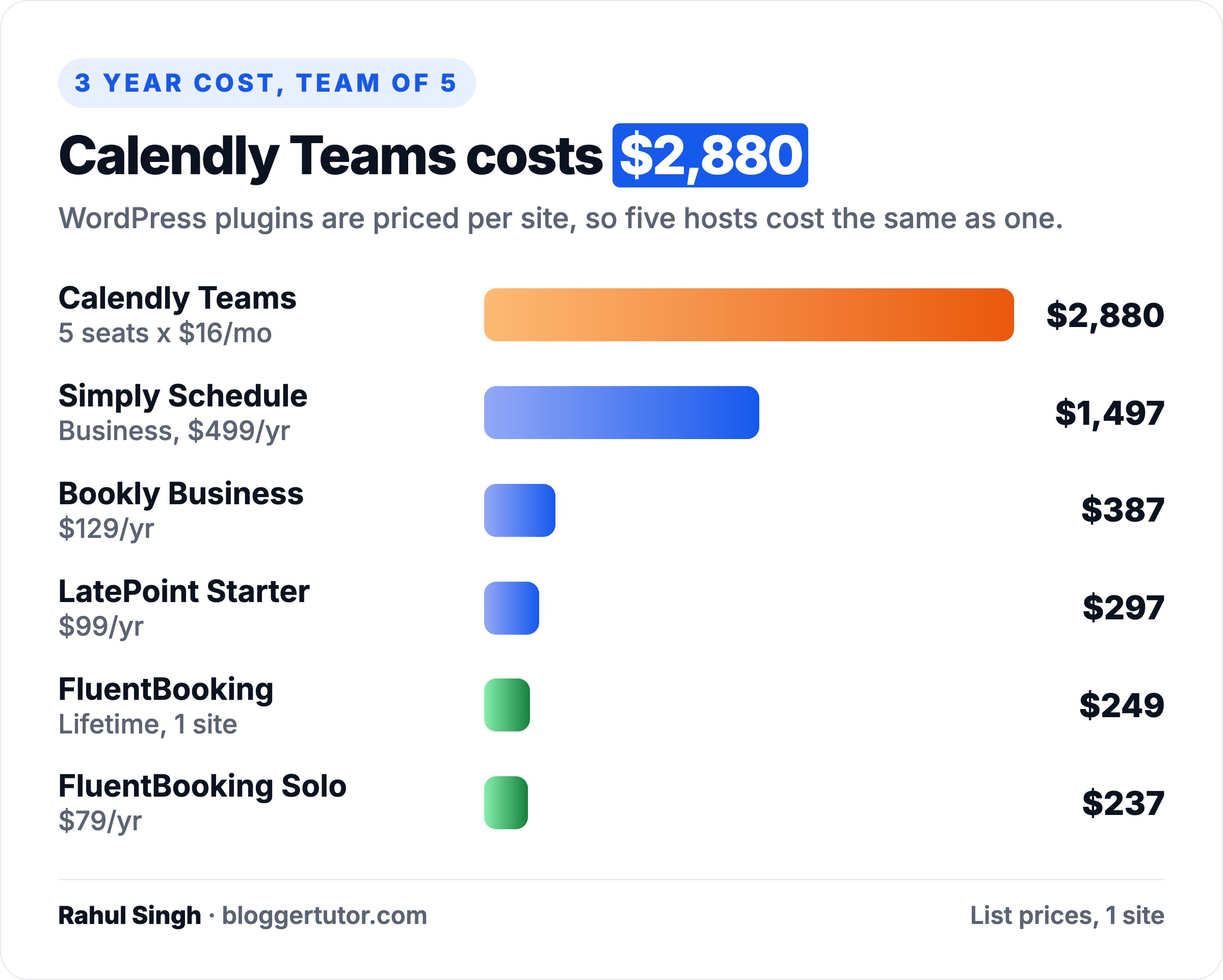
A WordPress booking plugin is priced per website instead, and you can add as many hosts as you like. Over three years a five person team on Calendly Teams pays $2,880. The same team pays $249 once for FluentBooking's lifetime licence.
The WordPress side has its own costs: hosting, SMS credits if you send text reminders, and your time. A booking plugin also needs reliable email, so set up SMTP before you go live, and a host that keeps the booking page fast, such as Cloudways.
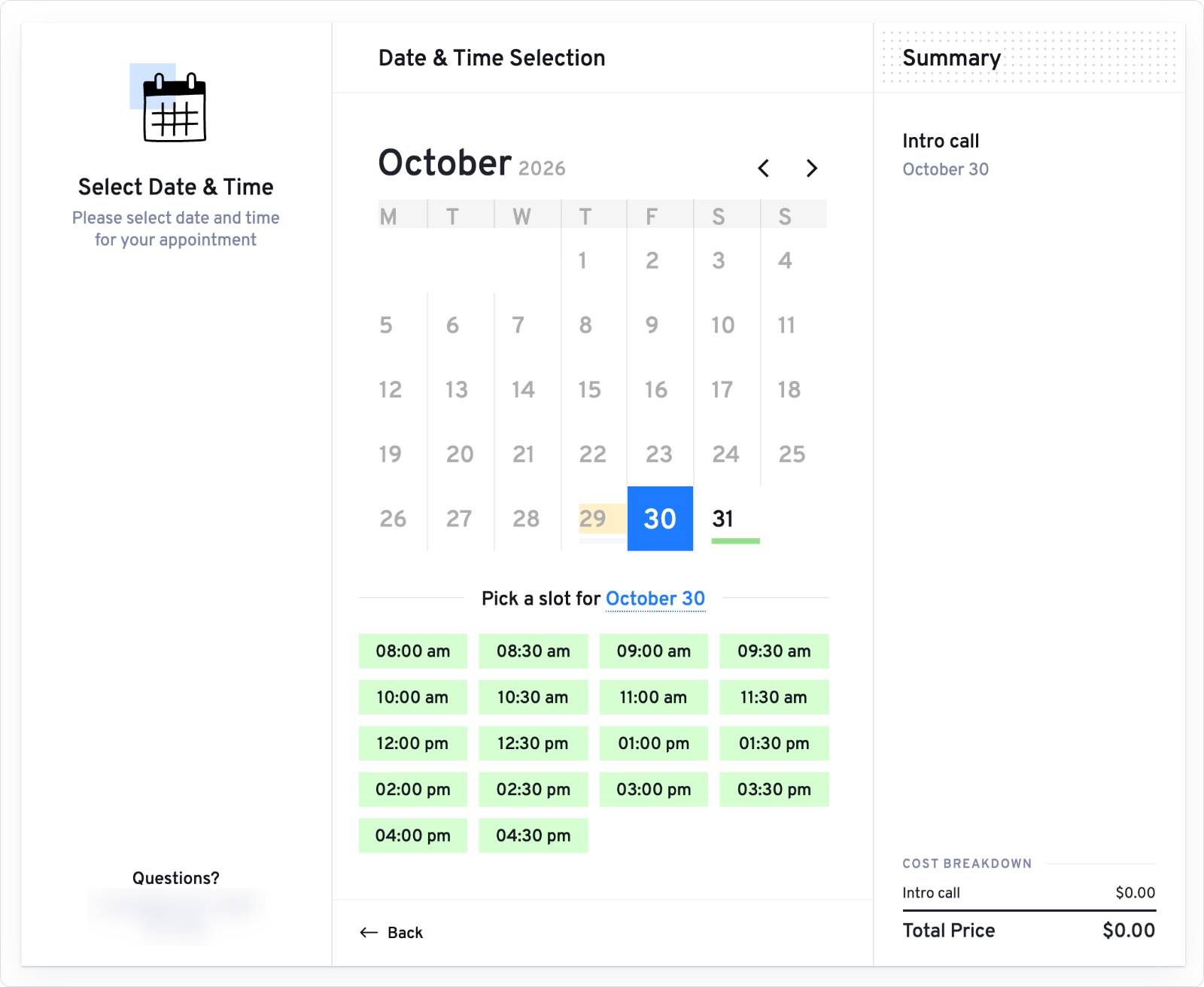
Same setup in each plugin: an event called Intro call, 30 minutes long, available weekdays, embedded on its own page with the plugin's shortcode on the default Twenty Twenty-Five theme. I used FluentBooking 2.5.0, LatePoint 5.7.6 and Simply Schedule Appointments 1.6.12.37, all free from WordPress.org.
| FluentBooking free | LatePoint free | Simply Schedule free | |
|---|---|---|---|
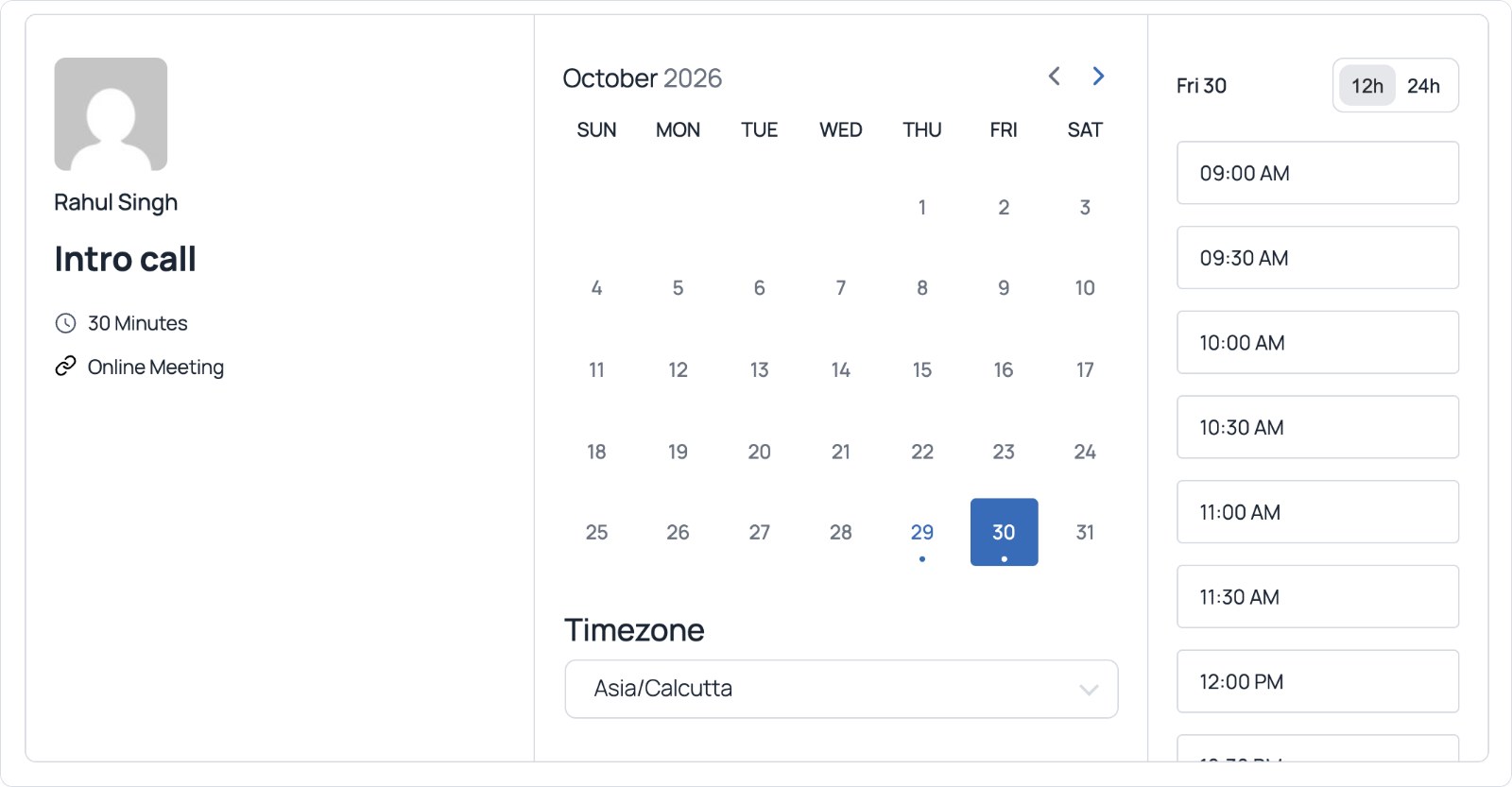
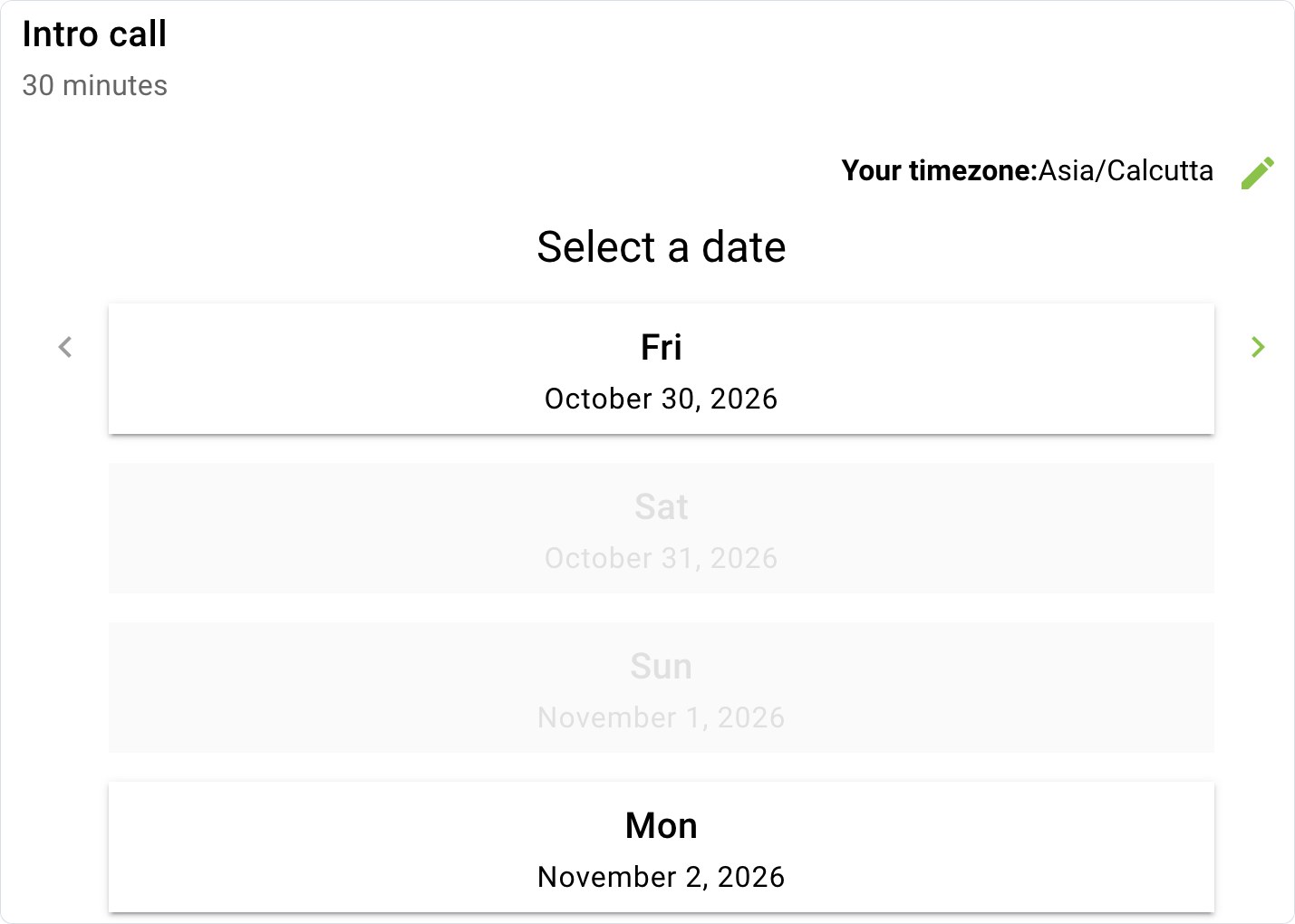
| Visitor sees | Host card, month calendar, slot list | Service step, then calendar and slot grid | Week strip of bookable days |
| Video meeting link | Your own link only; Zoom, Meet, Teams locked | Pro | Plus |
| Take payment | No | Yes, Stripe or PayPal | No |
| Timezone shown to visitor | Yes, switchable | Yes | Yes, editable |
All three gave me a working booking page in minutes. FluentBooking's setup wizard created the first event for me; LatePoint and Simply Schedule use a normal editor.
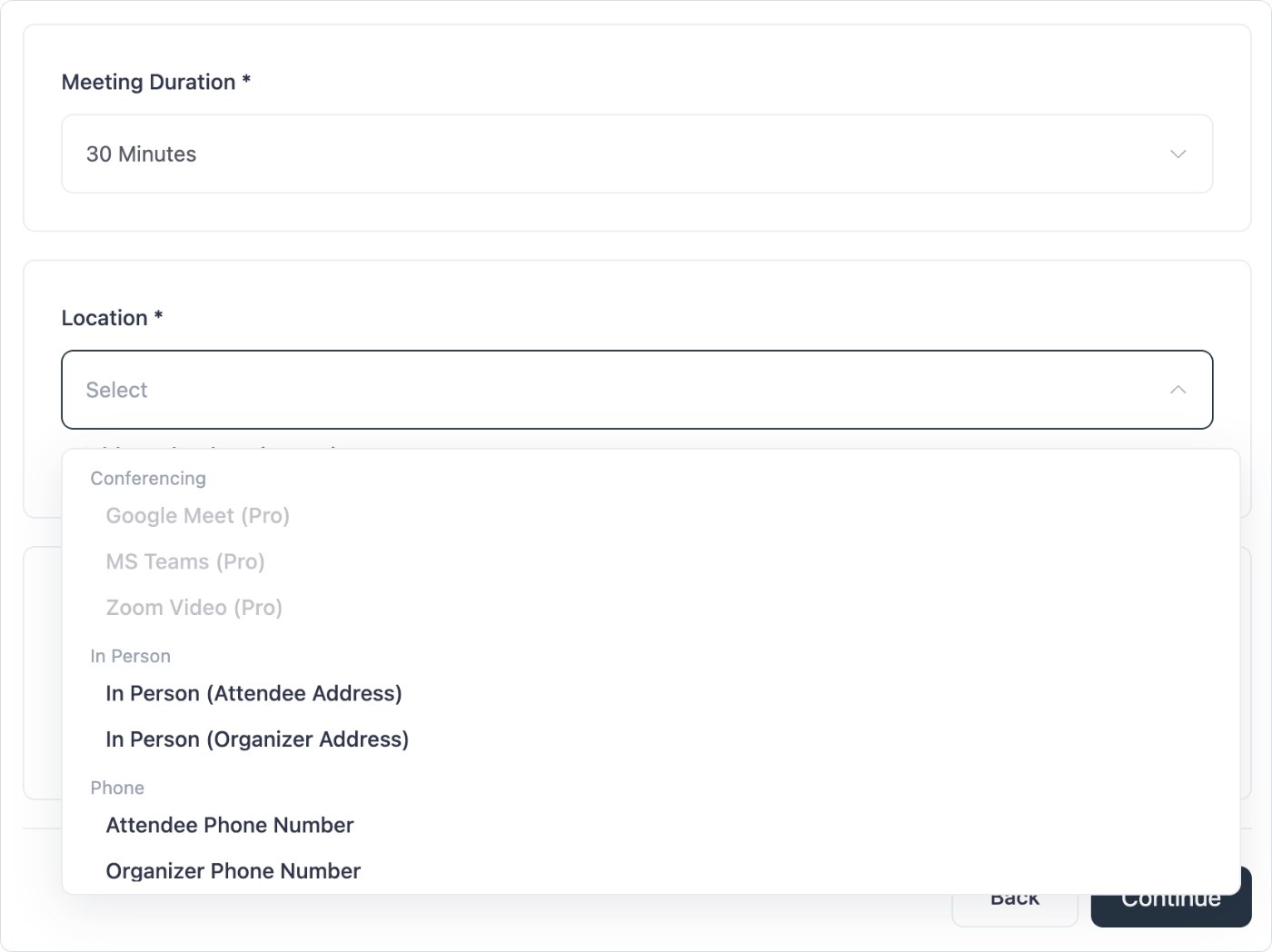
FluentBooking's free version looks the most like Calendly, but its location menu greys out Google Meet, MS Teams and Zoom. In person, phone and a fixed meeting link are free.
FluentBooking comes from WPManageNinja, the team behind FluentCRM and Fluent Forms. It has 20,000+ active installs and a 94 out of 100 rating from 46 reviews on WordPress.org. It copies Calendly's model directly: each host gets a booking page, each event type gets its own link, and visitors pick a day and a slot.
| FluentBooking plan | Sites | Yearly (list) | Lifetime (list) |
|---|---|---|---|
| Solo | 1 | $79 | $249 |
| Small Business | 5 | $199 | $436 |
| Agency | 50 | $399 | $749 |
FluentBooking pricing page, checked on 1 November 2026. Every plan includes all features, unlimited calendars and unlimited hosts. First year discounts apply to new purchases; renewals are at list price.
I run Fluent Forms Pro on this site, and FluentBooking plugs into it and into FluentCRM without extra connectors. A booking can tag the contact in your CRM and start a follow up email sequence. If you already use Fluent products, that is the main reason to pick it over the others.
Related: Fluent Black Friday Deals, FluentCommunity vs BuddyBoss, Best WordPress CRM Plugins, Best AI Tool for WordPress, FluentCart vs WooCommerce, Self-Hosted Business Suite for WordPress, Best WordPress Form Plugins
LatePoint is built around services, staff (agents) and locations. That matches how a clinic, salon or studio actually books. It has 100,000+ active installs and the best rating here, 98 out of 100 from 106 reviews on WordPress.org.
| LatePoint plan | Sites | Yearly (list) | Lifetime (list) |
|---|---|---|---|
| Starter | 1 | $99 | $249 |
| Scale | 5 | $249 | $599 |
| Agency | 100 | $499 | $1,299 |
LatePoint pricing page, checked on 1 November 2026. All features on every plan, 14 day money back.
In my test the free form walked the visitor through service, date, slot and a running price summary. It is the only free version of the three that takes card payment at the moment of booking, which cuts no shows for paid services.
Amelia handles appointments and ticketed events in one plugin, with 90,000+ installs and 92 out of 100 from 793 reviews on WordPress.org. The free Lite version takes Square payments but runs one employee.
Starter costs $49 a year for one domain and still pays through Square only. Stripe, PayPal and the other gateways start on Standard, and Pro lists at $199 a year for one domain or $439 lifetime. Google Calendar, Outlook, Zoom and Meet are paid features, and refunds run 15 days.
Bookly is the cheapest lifetime option: Pro lists at $99 a year or $129 once and unlocks unlimited staff, Google Calendar and Zoom. It has 60,000+ installs and the lowest rating of the five, 88 out of 100.
The free version on WordPress.org is limited to five services and takes no online payments. Stripe, PayPal, Outlook and group bookings need the Business plan at $129 a year.
Sales teams use Calendly for round robin: a demo request lands with whichever rep is free. FluentBooking Pro does the same with team events and rotating hosts, and checks each rep's Google or Outlook calendar for conflicts. Pricing counts sites, so ten reps cost the same $79 a year as one.
If your team only needs a shared calendar and no rotation, Simply Schedule Appointments is worth a look, but its team scheduling sits in the $499 a year Business plan.
Simply Schedule Appointments is the most polished free option for one person: unlimited appointment types, blackout dates and a clean week view. It is rated 100 out of 100 from 155 reviews on WordPress.org with 50,000+ installs.
Paid editions are yearly only, with a 30 day refund:
For one person who needs calendar sync, FluentBooking Pro does the same job for $79.
BookingPress was a popular free booking plugin, but WordPress.org closed its listing on 1 February 2025 for a guideline violation, and it is still closed. The paid version is sold on the vendor's site. I would not build a new client site on a plugin that cannot ship updates through WordPress.org.
| You are | Pick | Why |
|---|---|---|
| A consultant or coach taking discovery calls | FluentBooking Pro | Calendly style pages, sync and Zoom for $79/yr or $249 once |
| A freelancer with no budget yet | FluentBooking free or Simply Schedule free | Both cover 1:1 calls |
| A clinic, salon or studio | LatePoint Pro | Staff, locations, payments and SMS reminders |
| A studio that also sells events | Amelia | Appointments and ticketed events together |
| A sales team with round robin | FluentBooking Pro | Team events on one site licence, no seat fees |
| A Salesforce based sales org | Calendly Teams | Routing forms and native Salesforce |
For a consultant or a sales team, buy FluentBooking Pro and take the lifetime licence if the site will exist in three years. For a clinic or salon, start on LatePoint's free version, take payments from day one, and move to Pro when you add a second staff member.
Yes. FluentBooking, LatePoint, Simply Schedule Appointments, Amelia Lite and Bookly all have free versions on WordPress.org. FluentBooking and Simply Schedule cover one to one calls; LatePoint's free version also takes Stripe and PayPal payments.
FluentBooking for any team. Its Pro plan is $79 a year or $249 once for one site with unlimited hosts. Calendly Teams is $16 per seat per month billed yearly, $2,880 over three years for five people.
FluentBooking for consultants and sales calls, because it works like Calendly with per host booking pages. Amelia for service businesses that also sell classes or event tickets.
Free covers one to one events, availability rules and email notifications. Pro adds group and round robin events, calendar sync, Zoom, Meet and Teams, Stripe and PayPal, SMS reminders and WooCommerce.
Yes. Lifetime licences list at $249 for one site, $436 for five and $749 for fifty.
Yes, Calendly's embed code works on any WordPress page. You keep paying per seat and your booking data stays on Calendly's servers.
LatePoint, because its free version already takes Stripe, PayPal and Razorpay. In FluentBooking, Simply Schedule and Bookly, card payments are a paid feature.
Disclosure: I earn a commission if you buy through the affiliate links on this page, including FluentBooking, LatePoint and Cloudways, at no extra cost to you. I have no affiliate relationship with Calendly, Amelia, Simply Schedule Appointments or Bookly. Prices, ratings and install counts were checked on each vendor's site and on WordPress.org on 1 November 2026. You can read exactly how I test, verify and update everything on this site.