Webstudio is an open source visual builder that costs $15 a month for unlimited custom domain sites. Webflow is the mature incumbent that charges per site, starting at $15 a month for one. If you build more than two or three sites, that single difference decides it. If you need a built in CMS, native ecommerce or a big template ecosystem, it does not.
I have spent time in both builders and read a lot of confident nonsense about them. This is the comparison with real numbers attached, checked against both pricing pages on 27 October 2026, including the two Webflow features that no longer exist and the Webstudio weaknesses its own fans skip over.
The Short Answer
Pick Webflow if you want a built in CMS, native ecommerce, thousands of templates, and a client editing workflow your non technical customers already recognise. It has been maturing for over a decade and it shows.
Pick Webstudio if you build several sites, care about what ships to the browser, already work with a headless CMS, or want the option to self host. One $15 plan covers unlimited custom domains, and the code it outputs is leaner.
Pick neither yet if you need user logins and gated content. Webflow removed that in January 2026 and Webstudio never had it. Both now point you at Memberstack or Outseta.
Webstudio vs Webflow at a Glance
| Webstudio | Webflow | |
|---|---|---|
| Entry paid plan | $15/mo billed yearly | $15/mo billed yearly |
| Sites on that plan | Unlimited custom domains | One site, price is per site |
| Built in CMS | No, connects to any headless CMS | Yes, on Premium and above |
| Native ecommerce | No | Yes |
| Self hosting | Yes | No |
| Source code | Open source, AGPL 3.0 | Proprietary |
| Second billing axis | None | Workspace plan on top of site plans |
| Templates | Small library | Thousands, large marketplace |
| Client editing | Content Mode, included on Pro | Editor, legacy version retiring |
| Code export | Yes, on all plans | Yes, workspace plan required |
| Maturity | Public since 2022 | Since 2013 |
Pricing, and the Part Webflow Does Not Put on the Sticker
Both headline at $15 a month, which makes them look equivalent. They are not, for two reasons.
First, Webflow charges per site. Its own pricing page says it plainly at the bottom: “All prices in USD, per site.” Webstudio Pro covers unlimited sites with custom domains on one subscription.
Second, Webflow has two billing axes. Site plans pay for hosting a particular site. Workspace plans pay for the seats and features you build with. You need both, and most comparison posts quote only the first.
| Webflow plan type | Tier | Price | What it covers |
|---|---|---|---|
| Site plan | Starter | Free | webflow.io domain, 2 static pages |
| Site plan | Basic | $15/mo | Custom domain, 300 pages, no CMS |
| Site plan | Premium | $25/mo | Adds the CMS, site search, code components |
| Workspace | Freelancer | $16/mo | Freelancer track |
| Workspace | Agency | $35/mo | Agency track |
| Workspace | Core | $19/mo | In house track, 10 staging sites |
| Workspace | Growth | $49/mo | Unlimited staging, roles, 301 redirects |
| Platform | Team | $2,500/mo | Annual contract, 10 seats |
What Five Client Sites Actually Cost
A freelancer running five client sites, each needing a CMS, on yearly billing:
| Webflow | Webstudio | |
|---|---|---|
| Site plans | 5 x Premium at $25 = $125/mo | Included |
| Workspace or seat | Freelancer at $16/mo | Included |
| Monthly total | $141 | $15 |
| Yearly total | $1,692 | $180 |
That is roughly nine times the cost. This gap is the single strongest argument for Webstudio and it is the reason agencies are the ones switching first.
In fairness to Webflow, the $25 Premium plan is new as of May 2026 and replaced the older CMS and Business tiers, which simplified a confusing lineup. Workspace prices have not moved since 2022.
The Builder, Side by Side
If you know Webflow, Webstudio will feel familiar within about ten minutes. Same mental model: a canvas, a tree of elements, a style panel on the right, breakpoints across the top, classes driving everything. That is deliberate, Webstudio is openly aimed at people who already think in Webflow's terms.
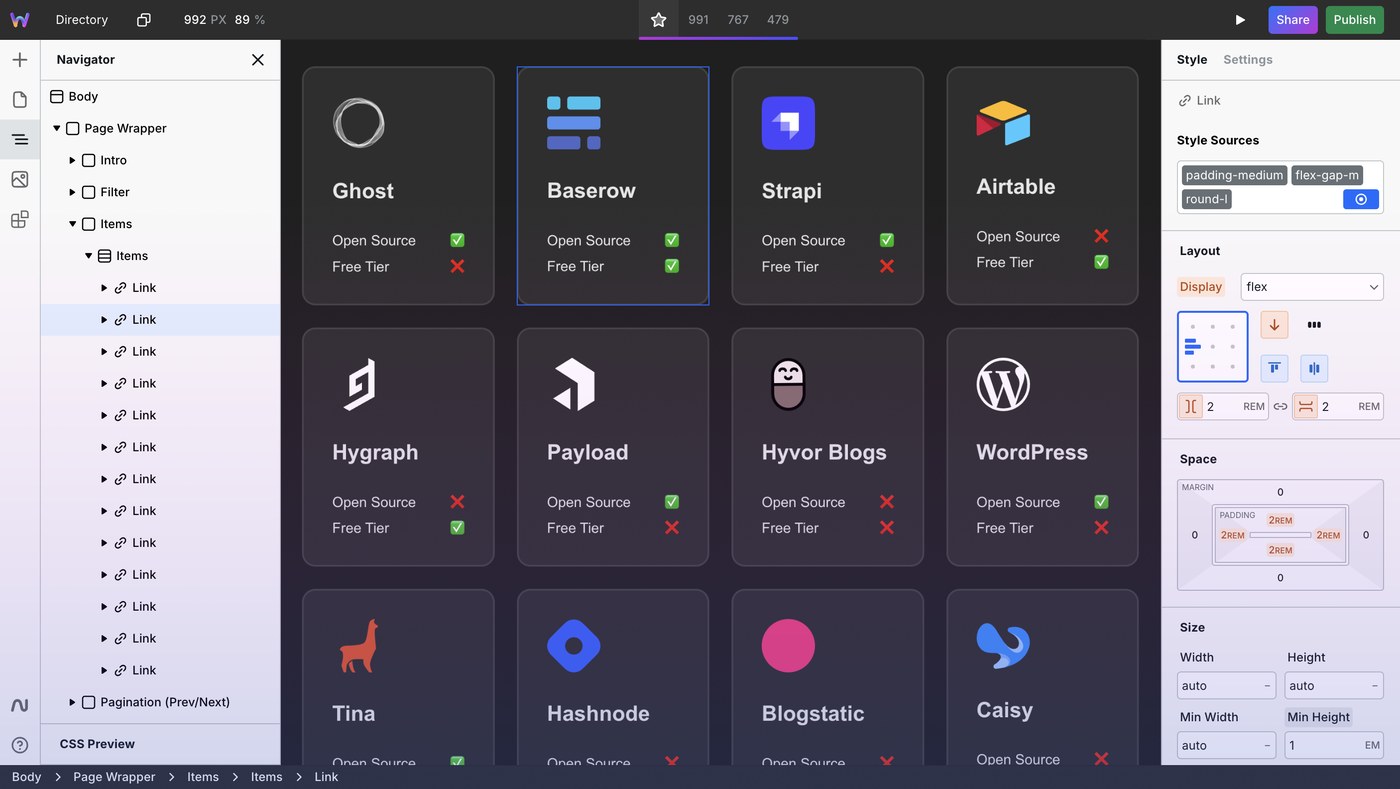
Where they part company is how close the tool lets you sit to the underlying CSS. Webstudio exposes every CSS property and supports CSS variables and custom breakpoints natively. Webflow abstracts more, which is friendlier on day one and occasionally frustrating on day one hundred when you want something the panel does not expose.
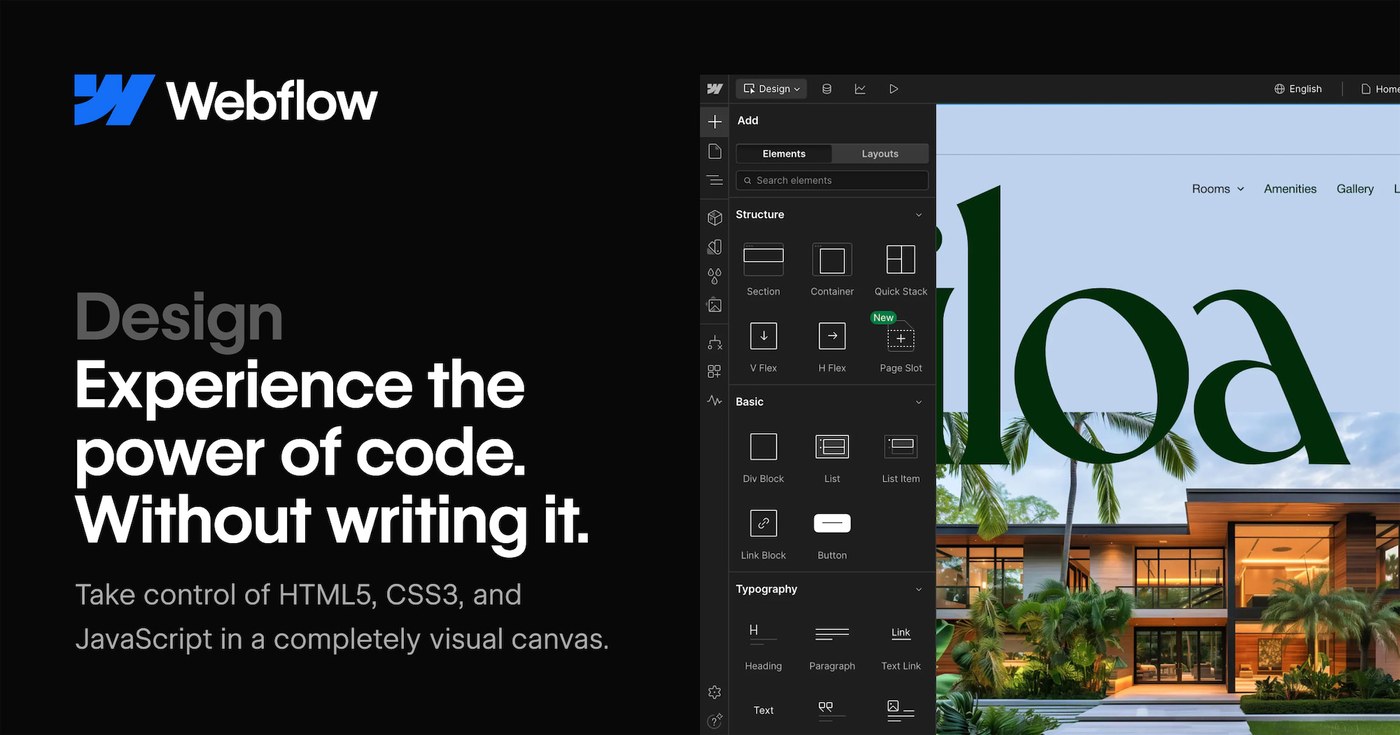
Webflow's Designer is more polished. The interactions panel, the asset manager, the way it handles symbols and components, all of it has had a decade of sanding. Webstudio is faster and more direct, but you will hit rough edges. Speed for splinters, basically.
What Actually Ships to the Browser
Here Webstudio has a real technical edge. It generates clean markup and ships only the CSS and JavaScript the page actually uses. Webflow loads its own runtime regardless of whether a page needs it.
- Webstudio outputs a static site you can host anywhere, including on your own infrastructure. No vendor runtime is required for a page to render.
- Webflow ships webflow.js and its associated CSS on every page. For a brochure site that is a rounding error. For a performance budget measured against Core Web Vitals it is not nothing.
- Both will let you write ugly CSS if you are careless with classes. Neither tool saves you from yourself.
Do Not Switch For Speed Alone
Webstudio's output is leaner, but your hosting, your images and your third party scripts will move Core Web Vitals far more than the builder does. If your Webflow site is slow, check your image sizes and your analytics stack before you blame the platform.
The CMS Question, Which Is Where Most People Should Stop Reading
This is the deciding factor for the majority of projects, and it is not close.
Webflow has a built in CMS. You define collections, you bind fields to the page, your client logs in and edits. It works, it is well understood, and it needs no external service.
Webstudio has no CMS at all. It is deliberately backend-less. You connect a headless CMS through its Resources and GraphQL features, bind the data, and render it. That is more flexible and more powerful, and it is also a genuine extra step that assumes you are comfortable configuring an external service and reading API docs.
If the phrase “connect a headless CMS via GraphQL” made you tense, pick Webflow. No shame in that. Webstudio is a marketing site builder for people who already have a content backend or are happy to choose one.
Two Things Webflow Removed That You Should Know About
No feature table tells you what you can rely on staying put. Webflow shut down two native features rather than maintain them.
| Feature | What it did | Shut down |
|---|---|---|
| Webflow Logic | Native automation, form routing, CMS updates | Flows disabled 27 June 2025 |
| User Accounts | Native logins, gated content, memberships | Fully disabled 29 January 2026 |
| Legacy Editor and whitelabeling | Client editing, agency branding | Unavailable from 4 August 2026 |
What That Meant in Practice
Sites using User Accounts did not get an automatic migration. Account data was not moved into the CMS, pages built as User Accounts pages reverted to plain static pages, and the gating simply stopped. Ecommerce subscriptions kept billing in Stripe while the access control behind them broke.
Webflow pointed people at Memberstack and Outseta for memberships, and at Zapier or Make for automation, with discounts from those vendors. That is a reasonable ecosystem-first strategy. It is also a reminder that a native feature on a closed platform is only guaranteed for as long as the vendor wants to maintain it.
Webstudio does not win this by having the features. It never had them. It wins slightly on the structural point: the code is AGPL licensed and you can host it yourself, so a product decision cannot switch your site off.
Where Webstudio Falls Short
Most Webstudio coverage is written by people who just switched and are enjoying themselves. These are the things that will cost you time.
- No native ecommerce. Nothing comparable to Webflow Ecommerce. If you are selling products from the site itself, this is a full stop.
- No built in CMS. Covered above, but worth repeating as a limitation and not just a design choice.
- Small template library. Webflow has thousands and a real marketplace. Webstudio expects you to build from scratch or from a handful of starters.
- Fewer tutorials when you get stuck. Search a Webflow problem and you get a decade of forum answers. Search a Webstudio problem and you get GitHub issues and Discord.
- Reported rough edges. Public reviews mention work lost on refresh, publishes producing a blank page, and incomplete Radix components. I have not hit these, but enough people report them that you should test a real project before committing a client.
- A higher technical bar. Familiar concepts, but you sit closer to the code. If Webflow already felt technical, Webstudio will feel more so.
- No full Webflow import. There is a Paste from Webflow feature that carries styles across on copied elements, which is useful. It is not a site migration.
One Correction, Because the Internet Has This Wrong
Search for Webstudio reviews and you will find harsh ones saying to avoid it, citing an outdated feature set and templates that look decades old. Those reviews are about a different product, a separate builder called WebStudio Website Builder. They are not about webstudio.is, the open source Webflow alternative in this comparison. Check which product a review is discussing before you let it decide anything.
A second correction, this one in Webstudio's favour. Older reviews complain there is no client editing mode. There is now: Content Mode is listed on the Pro plan and is built for handing a site to a client. That gap closed.
Where Webflow Frustrates People
- Per site pricing compounds. Every project is a new subscription, forever.
- Two billing axes. Site plan plus workspace plan plus seats. Working out your real monthly cost takes effort, which is not an accident.
- Features can disappear. Logic and User Accounts are the proof.
- The jump to Team is brutal. Self serve tops out at Premium, then the next tier is $2,500 a month on an annual contract. There is nothing in between.
- Code export needs a workspace plan. Your markup is portable, but only if you are paying at the right tier.
- Vendor lock in is real. The CMS, the hosting and the builder are one product. Leaving means rebuilding.
Which One Should You Use?
| If you are | Pick | Why |
|---|---|---|
| A beginner building your first site | Webflow | Templates, tutorials and a CMS that needs no external service |
| Selling products directly from the site | Webflow | Webstudio has no native ecommerce at all |
| A freelancer with 3 or more client sites | Webstudio | $15 total against $141 a month, and the gap grows |
| Already running a headless CMS | Webstudio | Connecting Sanity, Contentful or Storyblok is the native workflow |
| Chasing Core Web Vitals on a content site | Webstudio | Leaner output, no mandatory vendor runtime |
| Needing logins or gated content | Neither, add Memberstack | Webflow removed User Accounts in January 2026 |
| Handing sites to non technical clients | Webflow, narrowly | Webstudio Content Mode is good, Webflow's is more familiar |
| Worried about platform risk | Webstudio | AGPL licensed and self hostable, so you keep the exit |
The Conclusion, In Full
These tools are not competing for the same job yet, and most comparisons go wrong by pretending they are.
Webflow is a platform. Builder, CMS, hosting, ecommerce and client editing in one product, mature, well documented, and priced accordingly. You pay per site, forever, and you accept that the vendor decides which features survive. For a single flagship site with a CMS and a non technical owner, it remains the sensible default, and nothing in this post should talk you out of that.
Webstudio is a builder. A very good visual front end that outputs clean code and deliberately leaves the backend to you. It is cheaper by roughly an order of magnitude at any realistic site count, it is open source under AGPL 3.0 with close to 9,000 GitHub stars and commits landing daily, and it can run on infrastructure you own. In exchange you give up the CMS, ecommerce, the template library and the safety net of a large community.
My take: if you are a beginner, use Webflow and do not overthink it. If you build sites for a living and your projects are marketing sites rather than stores, Webstudio deserves a real trial on one live project, not a demo. The economics are too different to ignore, and the gap that used to disqualify it for client work, the missing client editor, has been closed.
What I would not do is migrate a working Webflow site to Webstudio purely to save money. There is no full import path, Paste from Webflow only carries styles on copied elements, and a rebuild costs more in hours than the subscription saves in a year. Start your next project in Webstudio instead and judge it on that.
Webstudio vs Webflow, Frequently Asked Questions
Is Webstudio better than Webflow?
For cost and code output, yes. Webstudio Pro is $15 a month for unlimited custom domain sites where Webflow charges per site, and it ships leaner markup. On features, Webflow is still ahead: it has a built in CMS, native ecommerce, thousands of templates and a much larger community. Which is better depends entirely on whether you need those.
Is Webstudio really free?
There is a genuine free tier with unlimited projects and pages, 100,000 monthly page views and 300 form submissions, but it publishes to a wstd.io subdomain. Custom domains require the Pro plan at $15 a month billed yearly. The builder itself is open source under AGPL 3.0 and can be self hosted.
How much does Webflow actually cost?
More than the headline. Site plans are Basic at $15 a month and Premium at $25, charged per site, and you also need a workspace plan, from $16 a month for Freelancer up to $49 for Growth. Five client sites with a CMS works out at roughly $141 a month, or $1,692 a year.
Does Webstudio have a CMS?
No, and that is deliberate. Webstudio is backend-less and connects to any headless CMS through its Resources, GraphQL and dynamic routing features. It is more flexible than a built in CMS and it is also more work, since you have to choose and configure an external service.
Can I move my Webflow site to Webstudio?
Not in one step. Webstudio has a Paste from Webflow feature that preserves styles on elements you copy across, which saves real time, but there is no full project import. Moving an existing site means rebuilding it, so it usually makes more sense to start your next project in Webstudio than to migrate an old one.
Did Webflow remove memberships and automation?
Yes. Webflow Logic had its flows disabled on 27 June 2025 and User Accounts was fully disabled on 29 January 2026. Sites using User Accounts lost their gating, and account data was not migrated into the CMS automatically. Webflow now points users to Memberstack or Outseta for memberships and Zapier or Make for automation.
Is Webstudio open source?
Yes, under the AGPL 3.0 licence, with roughly 9,000 stars and 1,600 forks on GitHub and active daily development. You can self host it, which is the main structural argument for choosing it over a closed platform.
Which is faster, Webstudio or Webflow?
Webstudio's output is leaner because it only ships the CSS and JavaScript a page actually uses, where Webflow loads its own runtime on every page. In practice your images, hosting and third party scripts will affect Core Web Vitals far more than the builder, so this is a tiebreaker rather than a reason to switch.
Is Webstudio good for beginners?
Less so than Webflow. The concepts are the same, elements, classes and breakpoints, but Webstudio sits closer to the underlying CSS and expects you to bring your own CMS. There are also far fewer tutorials when you get stuck. Beginners are better served by Webflow.
Does Webstudio support ecommerce?
Not natively. There is no equivalent to Webflow Ecommerce, so selling products directly from the site means integrating an external service. If ecommerce is central to the project, Webflow is the straightforward choice.
Are the bad Webstudio reviews accurate?
Check which product they are reviewing. Several harsh reviews that appear in search are about a different builder called WebStudio Website Builder, not webstudio.is, the open source Webflow alternative. Fair criticism of webstudio.is centres on the small template library, thin documentation and occasional bugs, not on outdated design.
Can Webstudio handle client projects?
Yes, more comfortably than it could a year ago. Content Mode on the Pro plan gives clients a restricted editing view, which was the gap that used to rule it out for agency work. Staging and production publishing and restorable backups are also on Pro.
More Web Building Guides on Blogger Tutor
- Webstudio Builder Review, Is It Really Better Than Webflow?
- Elementor Cloud Review, Features and Pricing
- Rank Math Review, the SEO Plugin I Use on Every Site
- WPvivid vs UpdraftPlus, Backup Plugin Comparison
Pricing, plan limits and feature availability were checked directly against webstudio.is/pricing and webflow.com/pricing on 22 September 2026, and the sunset dates come from Webflow's own notices. Builder screenshots are the vendors' own product images. Prices change often on both platforms, so confirm before you buy.