Best AI Tool for WordPress in 2026, the Agent That Rebuilt My Live Blog (Novamira Guide)

Tutorials & Insights
If you want an AI to do real work on your WordPress site, the best tool in 2026 is Novamira. It is a free, open source plugin that lets the AI you already pay for (Claude, ChatGPT, Codex, Cursor and others) work inside your WordPress install.
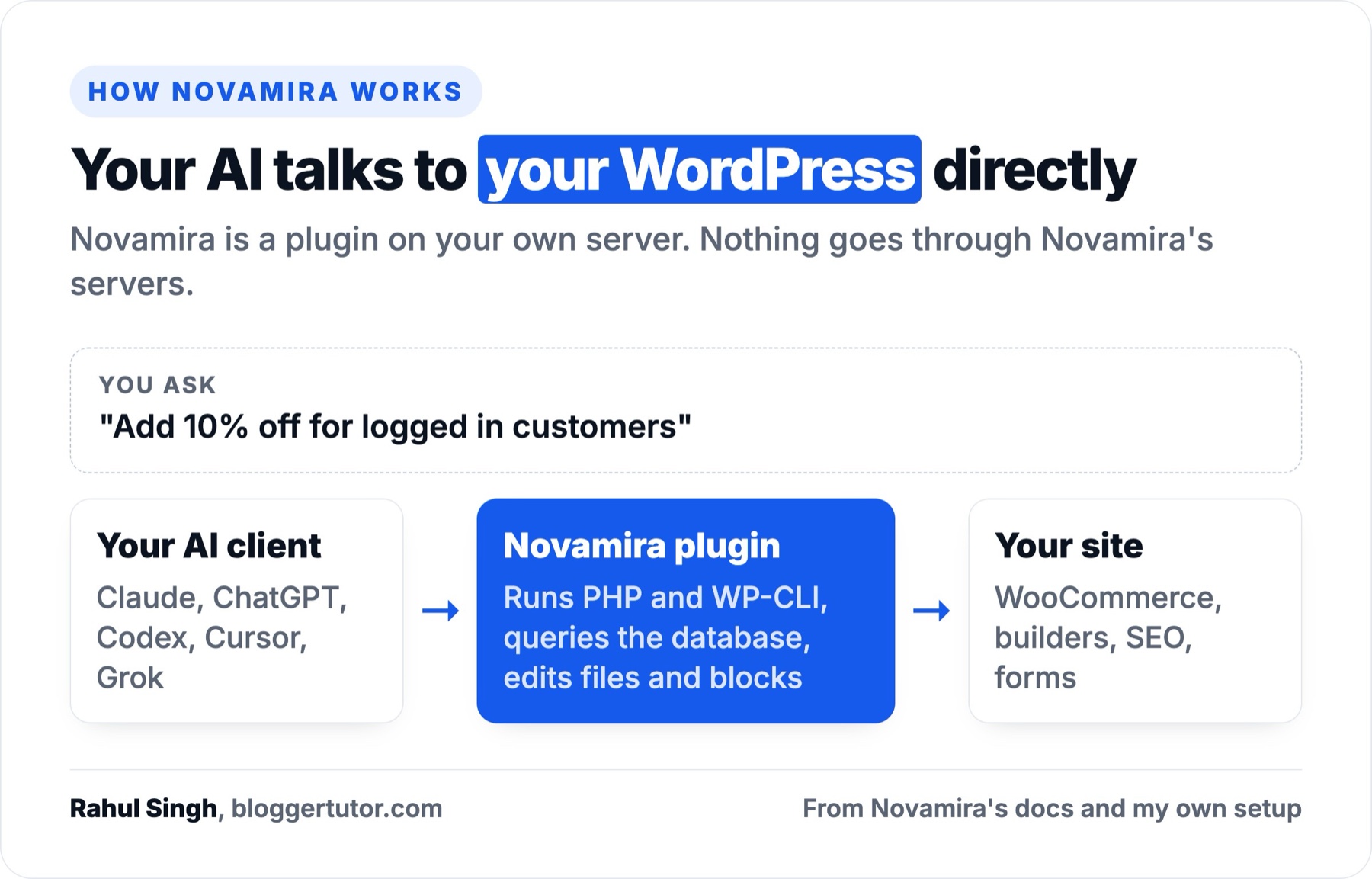
The agent runs PHP and WP-CLI, queries the database and edits files. You describe the job, and it builds it against your real plugins and theme.
For the last few weeks I have run bloggertutor.com through Novamira: 92 posts rewritten, a broken redirect table fixed, schema and excerpts backfilled, a custom deals plugin built and deployed. I also installed the free version on a clean test site and had an agent build a WooCommerce discount from one sentence.
| Novamira | |
|---|---|
| What it is | MCP server plugin that gives your AI agent full access to WordPress |
| Works with | Claude, ChatGPT, Codex, Cursor, Gemini CLI, Grok, VS Code Copilot and any MCP client |
| Free version | Yes, open source (AGPL), unlimited sites, from novamira.ai or GitHub |
| Pro | €69/yr for 3 sites, €149/yr for 1,000 sites, €299 once for 1,000 sites |
| Usage limits | None from Novamira, you pay your own AI provider |
| Best for | Site owners, freelancers and agencies who want an AI to do the work |
| The catch | Vendor says use it on dev and staging, with backups |
Novamira4.5/5
The most useful AI tool I have put on a WordPress site. Most AI plugins write a paragraph or answer a visitor. This one lets a capable model fix, build and audit the site itself, across any builder. Start with the free plugin on a staging copy; buy Pro when you want memory and builder expertise.
What works
What does not
Novamira turns your WordPress site into an MCP server. MCP (Model Context Protocol) is the standard AI apps use to call tools.
Once connected, your AI client can execute PHP, run WP-CLI, read and write files, query the database, edit Gutenberg blocks and run built in skills on your site. Nothing goes through Novamira's servers; your AI client talks to your WordPress directly over HTTPS.
It is made by Ovation S.r.l., the Italian team behind Dynamic.ooo (Dynamic Content for Elementor). The free plugin is open source on GitHub under AGPL 3.0, first released in February 2026.
Version 1.12.13 shipped on 27 October 2026, and the changelog moves weekly. It is not on WordPress.org, so you download the zip from Novamira's site and update it from there.
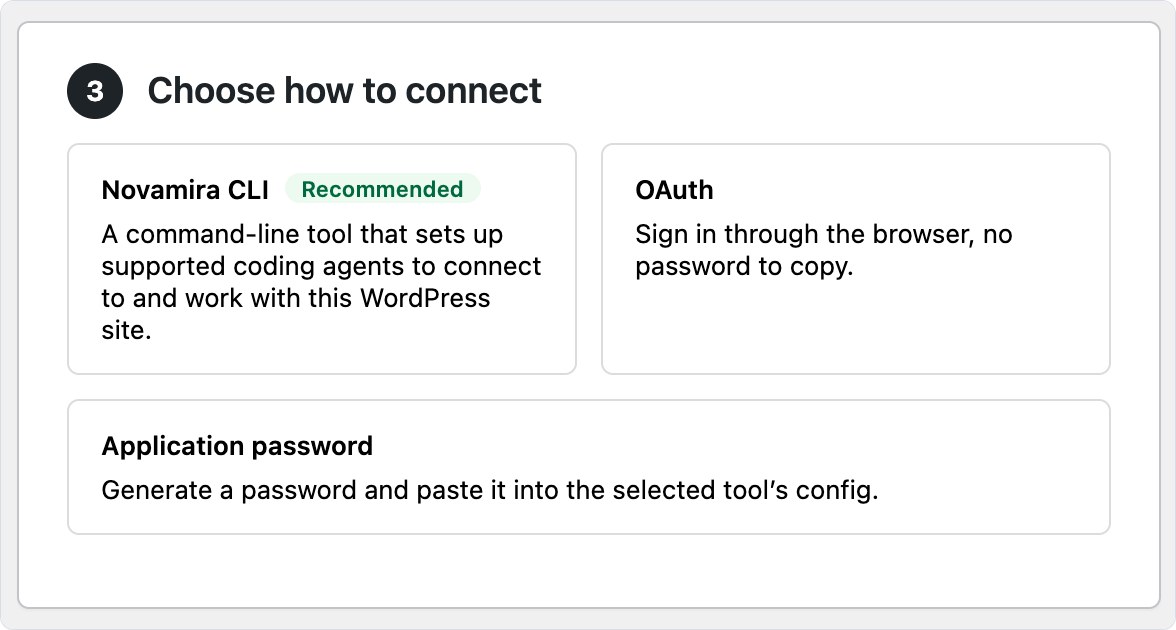
On a clean WordPress install the menu adds Configuration, Abilities Hub, Skills, Design, Sandbox, Chat, Read Mode and a few more. Configuration is a four step page: tick Enable AI Abilities, choose your AI tool from a list that includes Claude Code, ChatGPT, Codex, Cursor and Grok, then pick how it connects.
When I connected an agent to my test site, it saw three tools (discover, describe and execute an ability) and 41 of 43 Novamira abilities enabled in the Abilities Hub. WP-CLI was missing there, because Novamira only offers it when the server can run WP-CLI.
bloggertutor.com runs Novamira 1.12.13 with Novamira Pro. I connect Claude to it and treat it like a developer who can read my database. These are real jobs it did here, with a backup before each one:
Novamira itself says to keep AI Abilities for dev and staging. I run it on my live blog because I take a backup first, read every plan before approving it, and I know what the SQL does. If that does not describe you, follow the vendor's advice.
These are the jobs site owners most often want help with, with what to ask and whether the free plugin is enough.
Ask “why is the homepage slow?”. The agent can list active plugins, measure query counts, find autoloaded options bloating every request and check which scripts load on which pages. It reads your actual setup, so the answer is about your site and its plugins.
Free covers this. Pair it with a proper cache; my xSpeed Cache test shows what a cache plugin changes.
Updating a price in 80 posts, adding FAQ blocks, filling ACF fields from a brief or regenerating every thumbnail is where an agent saves days. On my test site one call wrote excerpts for every post that lacked one.
The free plugin handles core content and Gutenberg blocks. Pro adds field plugin expertise (ACF, JetEngine, Meta Box, Pods) so it gets nested fields right the first time.
This was my favourite test. On a fresh store I asked for a 10% discount for logged in customers, and the agent installed WooCommerce, created two products and wrote the rule as a small PHP file in Novamira's sandbox.
In that sandbox a crash switches to safe mode instead of taking the site down. With a $16 and a $38 product in the cart, the $54.00 subtotal showed a member discount of $5.40 and a total of $48.60.

Custom checkout rules, shipping logic, bulk price changes and “why does this coupon not apply” questions all work the same way. Pro's WooCommerce specialization covers products, variations, categories, attributes and shipping classes. Test anything that touches orders or payments on a staging copy first.
Novamira's own examples include converting a page to Elementor v4 atomic widgets and rewriting a homepage in clean block editor blocks.
Pro has specializations for Elementor, Bricks, Divi 5, Oxygen 6, Beaver Builder, Breakdance, WPBakery, Etch and more, plus themes like Blocksy, Kadence, Astra and GeneratePress.
Without Pro the agent can still do it, but it has to explore each builder's data format from scratch, which costs tokens and retries.
With Pro's WPML specialization (added in Pro 1.13.0) the agent translates pages, posts and strings itself or sends jobs to translators. Weglot is covered too, including languages, the switcher and URL rules.
The agent can read every post's title, description, schema and internal links and report gaps. Pro adds specializations for Rank Math, Yoast, All in One SEO and SEOPress, so it edits SEO fields and schema through each plugin's own data.
On this site it found that only 18 of 94 published posts carried any schema beyond video. If you use Rank Math, my Rank Math review covers what it does on its own.
After two critical PHP vulnerabilities were patched on 21 October 2026, Novamira shipped a free Site Integrity Check skill.
It checks plugins, themes and core for known vulnerabilities, and looks for unknown administrators, modified or injected files, malicious code in the database and forms that send data elsewhere. It reports how confident it is and changes nothing without your approval.
It also flags PHP versions that missed that security release. It is a strong first pass; for a confirmed infection, read my WordPress malware removal guide.
The Agency licence covers 1,000 sites for €149 a year. Novamira HQ puts every site in one desktop app with one AI connection.
Ghost Mode hides Novamira's menu, notices and plugin row from client administrators you choose. Novamira is clear that Ghost Mode changes what clients see, not what they can do, so it is not a security control.
Novamira Chat is an AI agent inside wp-admin. You type the change in plain words, it shows what it will do and waits for your OK. It runs on your own AI provider API key, so there is no subscription, and every message is billed to that key.
It needs WordPress 7. For bigger jobs, the Chat screen itself points you to an MCP client, where your existing AI subscription covers the work.
| Job | Free | Pro adds |
|---|---|---|
| Speed and plugin diagnosis | Yes | Memory of your stack between sessions |
| Bulk content and Gutenberg edits | Yes | ACF, JetEngine, Meta Box and Pods expertise |
| WooCommerce rules and fixes | Yes, through PHP | WooCommerce specialization |
| Builder migration | Slower, explores from scratch | Elementor, Bricks, Divi 5, Oxygen and more |
| Translation | Manual through PHP | WPML and Weglot |
| SEO and schema audit | Yes | Rank Math, Yoast, AIOSEO, SEOPress |
| Security check | Site Integrity Check skill | Read Mode for production |
| Client sites | Unlimited sites | Ghost Mode, Agency licence |
Novamira grew from one plugin into a small suite of tools in 2026.
| Piece | What it does | Price |
|---|---|---|
| Novamira | MCP server plugin: PHP, WP-CLI, database, files, Gutenberg, skills | Free |
| Novamira Pro | Memory, 57 builder and plugin specializations, Read Mode, Ghost Mode | From €69/yr |
| Novamira Design | One design direction your AI follows on every page it builds | Free, in the plugin |
| Novamira Chat | Agent inside wp-admin with approve then apply | Free, your API key |
| Novamira CLI | Connects terminal coding agents to any of your sites | Free |
| Novamira HQ | Desktop app for all your sites and hosting accounts | Free, beta |
| Novamira Visual | Watch the agent build inside your editors live | Free, experimental |
HQ is a free, open source desktop app for macOS, Windows and Linux, in beta since September 2026. Connect a hosting account and every site in it appears with its environments and backups where the host provides them, or add single sites by hand.
Your AI then reaches all of them through one connection. Supported hosting includes Kinsta, Hostinger, Cloudways, Rocket.net, Pantheon, xCloud, cPanel, WHM, Plesk, InstaWP and more, and since October it can spin up disposable SandyWP sandboxes with Novamira already installed.
There is no account and no Novamira server involved, so your hosting credentials stay on your computer.
On this blog, Pro detected my stack by itself: the Abilities Hub lists 122 Novamira abilities, including 37 for Fluent Forms, 24 for Blocksy, 8 for Rank Math and 4 for memory, all switched on because those plugins are active.
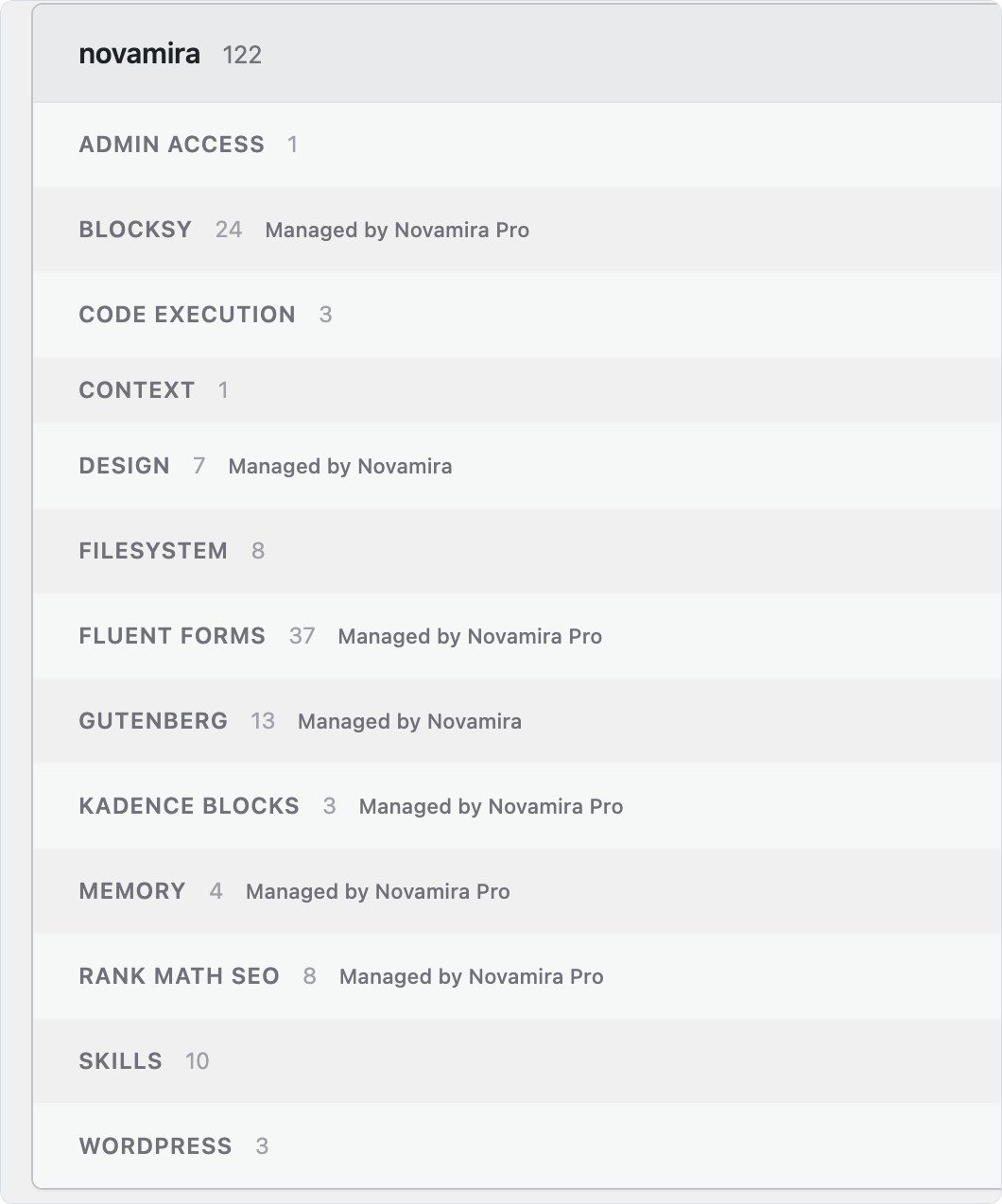
Pro means fewer wrong guesses. Without it, the agent rediscovers how Blocksy stores its header or how Fluent Forms saves a field on every request. With Pro it already knows, and memory keeps your conventions (colours, fonts, naming) between sessions.
My Pro version on this site is behind, and Read Mode and Ghost Mode both ask for a newer Pro release before they switch on. Keep Pro updated if you bought it for those.
| Plan | Price | Sites | Notes |
|---|---|---|---|
| Novamira | €0 | Unlimited | Core abilities, community support |
| Pro Personal | €69/yr | 3 | All Pro features, 1 year of updates and support |
| Pro Agency | €149/yr | 1,000 | All Pro features, 1 year of updates and support |
| Pro Agency Lifetime | €299 once | 1,000 | Updates and support for the product's lifetime |
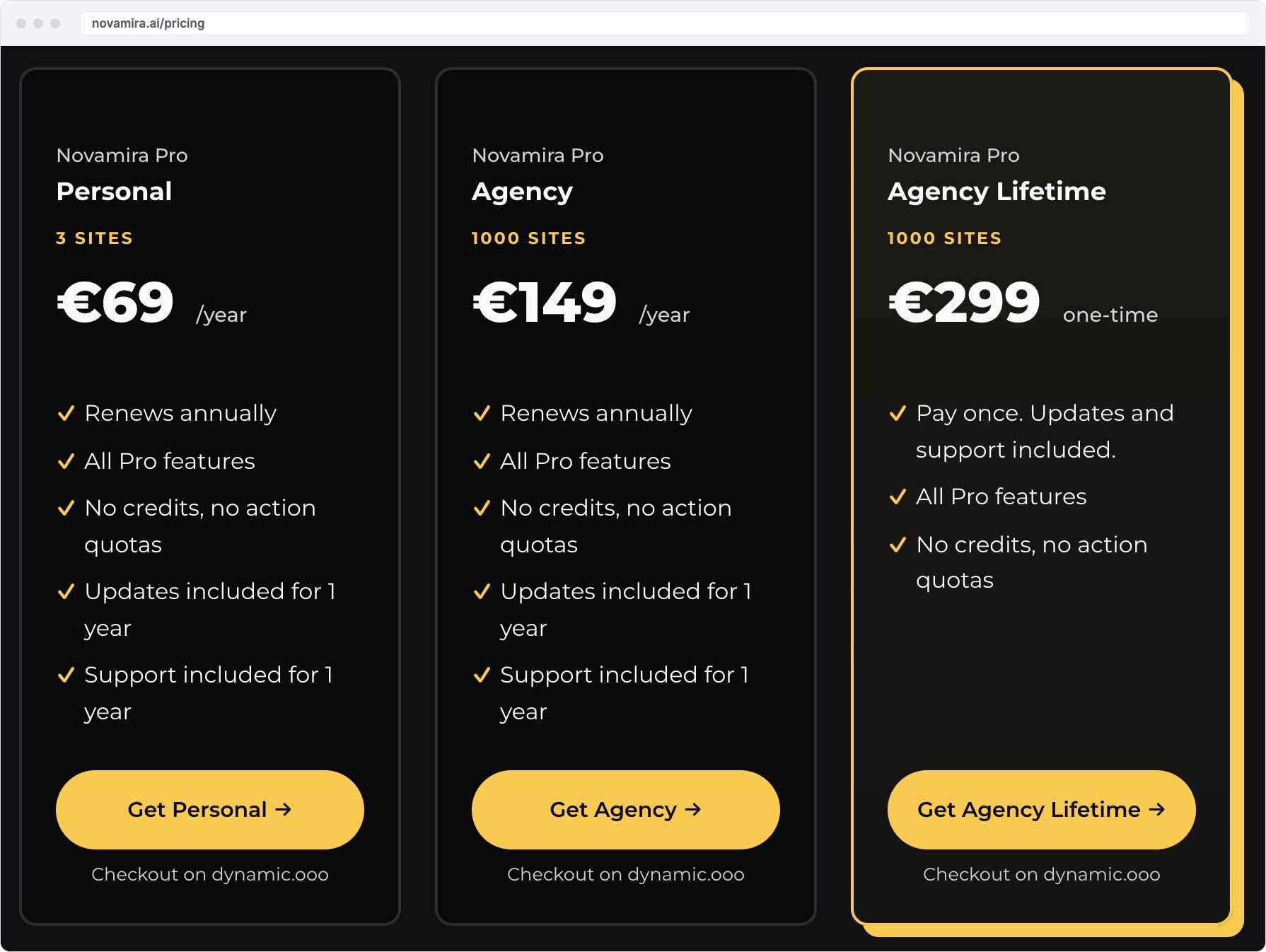
From the pricing FAQ:
My take: Personal at €69 is enough for one site plus its staging copy. If you manage client sites, the €299 lifetime plan pays for itself in the second year. The Novamira pricing page has the current checkout.
Treat it like handing a developer your admin password, because that is the level of access it has. The vendor's own line is “for dev and staging environments, with backups, always”, and its Pro FAQ says to let the agent work on staging, check the result, then deploy. What keeps it manageable:
Everything the agent builds is normal WordPress, so if you remove Novamira your pages, settings and code keep working. The one exception is code left in its sandbox, which the agent can move into your theme or a small plugin first.
Most AI plugins for WordPress are content writers or chatbots, which is a different job from running the site.
| Tool | Main job | Free | Paid from |
|---|---|---|---|
| Novamira | AI agent builds and fixes inside your site | Yes, unlimited sites | €69/yr |
| AI Engine | Chatbots, content tools and an MCP server | Yes, 90,000+ installs | $59/yr, 1 site |
| Cowboy MCP | Typed MCP tools with undo, no PHP execution | Yes, fully free | Free |
| MCP Adapter | Official framework that exposes abilities to MCP | Yes, 50,000+ installs | Free |
| Elementor AI and Angie | Generates Elementor pages and runs site tasks | Free plan, daily credits | Credits |
| Divi AI | Writes copy, images and layouts inside Divi | No | $193/yr |
If the question is which AI plugin writes better blog posts, Novamira is the wrong answer. If it is which tool lets AI run and improve a WordPress site, nothing else on this list comes close.
| Use it if you | Skip it if you |
|---|---|
| Run a WordPress or WooCommerce site and pay for Claude, ChatGPT or Codex | Only want AI to write posts or answer visitors |
| Freelance or run an agency with many client sites | Have no backups and no staging copy |
| Keep putting off fixes because a developer costs too much | Will approve whatever the agent proposes without reading it |
| Want to migrate builders or bulk edit content | Need a tool with one click undo for every change |
Install the free plugin on a staging copy of your site, connect the AI client you already use, and give it one annoying job you have been putting off. If it saves you an afternoon, Pro Personal at €69 a year is cheap developer time. Agencies should go straight to the €299 lifetime plan.
For doing real work on a site, Novamira: it lets your AI client run PHP, WP-CLI, database queries and file edits inside WordPress. For chatbots and AI writing, AI Engine is the stronger pick.
Yes. With an MCP plugin like Novamira, an AI agent can create pages, edit Gutenberg and builder layouts, write custom code and change settings on your site. You still need to review its work and keep backups.
Install Novamira, enable AI Abilities under Novamira, Configuration, pick your AI tool and connect with the Novamira CLI, OAuth or an application password. Claude.ai and ChatGPT connect through OAuth.
A plugin that exposes your site's actions as tools an AI app can call through the Model Context Protocol. Novamira, AI Engine, Cowboy MCP and the official MCP Adapter all do this at different levels of access.
Yes. The core plugin is free and open source for unlimited sites. Novamira Pro costs €69 a year for 3 sites, €149 a year for 1,000 sites or €299 once, and there are no per action charges.
The vendor recommends dev and staging with backups. On production, take a backup first, approve every action, and use Pro's Read Mode when you only need an audit.
For changing how a store works, such as discounts, checkout rules and bulk product edits, Novamira with its WooCommerce specialization. For a shopping assistant chatbot, a chatbot plugin such as AI Engine fits better.
A free, open source desktop app in beta that lists all your WordPress sites and hosting accounts in one place and connects your AI to all of them through a single connection. It runs on your computer, with no account.
Disclosure: I earn a commission if you buy Novamira Pro through the links on this page, at no extra cost to you. Rank Math links are affiliate links too; I have no affiliate relationship with AI Engine, Cowboy MCP or Elegant Themes.
Prices were checked on each vendor's site on 31 October 2026. Here is how I test, verify and update everything on this site.