Best WordPress Form Plugin? I Built the Same Form in 7 and Picked Fluent Forms

Tutorials & Insights
The best WordPress form plugin for most sites is Fluent Forms. I built the same small enquiry form in seven free form plugins.
Fluent Forms was one of only three whose free version could show a field based on an answer and save the entries in WordPress. It loaded half the code of Forminator, one Pro license unlocks everything with a lifetime option, and it has run every form on this site since 2020.
Forminator's free version does the most, with file uploads, multi-step forms and PayPal at no cost, so it is my pick if you will never pay. Bit Form, the third plugin that passed, loaded the least code of any drag and drop builder I tested.
WS Form PRO is built for complex logic and calculations, but its free LITE version could not do my conditional field. Neither could WPForms, the most installed drag and drop builder, which also does not save entries.
Below: what each free version allows, what Pro costs, the page weight I measured for each, and how Fluent Forms compares with WPForms, Gravity Forms, Bit Form and WS Form once you pay.
| Rank | Plugin | Best for | Free version does | Paid from | WordPress.org |
|---|---|---|---|---|---|
| 1 | Fluent Forms | Most sites, my pick | Logic, entries, Stripe (1.9% fee) | $79/yr, lifetime option | 96/100, 800,000+ sites |
| 2 | Forminator | Never paying | Logic, uploads, multi-step, Stripe and PayPal | $50/yr | 96/100, 600,000+ sites |
| 3 | Bit Form | Free logic on a light page | Logic, entries, uploads, multi-step | $25/yr, $99 lifetime | 100/100, 10,000+ sites |
| 4 | WS Form | Complex logic and calculations | Entries, strong spam tools | $59/yr | 100/100, 10,000+ sites |
| 5 | SureForms | Block editor sites | Entries, Stripe (2.9% fee) | $99/yr, 5 sites | 98/100, 500,000+ sites |
| 6 | WPForms | Beginners who will upgrade | Basic forms, Stripe (3% fee) | $49.50/yr | 96/100, 5,000,000+ sites |
| 7 | Contact Form 7 | One plain contact form | Basic fields, file uploads | Free only | 80/100, 10,000,000+ sites |
Ratings and installs from WordPress.org, prices from each vendor's pricing page, checked 16 November 2026.
My pick
1
Fluent Forms
4.6/5
My pick. Conditional logic and saved entries are free, the front end is light, it is the best value once you pay, and it runs every form on this site.
What works
What does not
2
Forminator
4.5/5
The biggest free version I tested. If you will never pay for a form plugin, install this one.
What works
What does not
3
Bit Form
4.3/5
The underrated one. Free conditional logic, uploads and multi-step forms on the lightest page of any builder I tested.
What works
What does not
4
WS Form
4.1/5
A developer's builder. LITE is basic, but PRO handles logic and calculations the others need add-ons for.
What works
What does not
4/5
The nicest builder if you live in the block editor, but logic and uploads are paid.
What works
What does not
6
WPForms
3.9/5
Easy to learn, but the free version works as a trial for Pro.
What works
What does not
7
Contact Form 7
3.5/5
Fine for one plain contact form on a site you rarely touch.
What works
What does not
I installed the free versions of all seven from WordPress.org on a fresh WordPress 7.1.4 site and built the same form in each: name, email, a dropdown asking what you need help with, and a message box.
The form also has a “What is it?” field that should appear only when someone picks “Something else”. That one conditional field is the fastest way to see how much a free version gives you.
I then checked six more things against each plugin's documentation: saved entries, payments, file uploads, multi-step forms, spam protection and free integrations. Finally I measured the CSS and JavaScript each plugin adds to the form page and to a page without a form.
| Free version | Fluent Forms | Forminator | Bit Form | WS Form LITE | SureForms | WPForms Lite | Contact Form 7 |
|---|---|---|---|---|---|---|---|
| Conditional logic | Yes | Yes | Yes | Paid | Paid | Paid | No |
| Entries saved in WordPress | Yes | Yes | Yes | Yes | Yes | No | Extra plugin |
| Stripe payments | 1.9% fee | No fee | Paid | Paid | 2.9% fee | 3% fee | Basic |
| PayPal | Paid | Yes | Paid | Paid | Paid | Paid | No |
| File uploads | Paid | Yes | Yes | Paid | Paid | Paid | Yes |
| Multi-step forms | Paid | Yes | Yes | Tabs only | Paid | Paid | No |
| Spam protection | Yes | Yes | Yes | Yes | Yes | Yes | Yes |
| WordPress.org rating | 96/100 | 96/100 | 100/100 | 100/100 | 98/100 | 96/100 | 80/100 |
I ranked them on four things, in this order:
Bit Form beat Fluent Forms on page weight and on free uploads and multi-step forms. Fluent Forms still ranks first for me because its free version takes Stripe payments, its Pro has more payment gateways, and I have trusted it with real orders for years.
Gravity Forms is not in the ranking because it has no free version. I compare it with Fluent Forms and WPForms further down, where the question is which one to pay for.
Fluent Forms is made by WPManageNinja and runs on 800,000+ sites, rated 96 out of 100 from 807 reviews on WordPress.org. My test form worked in the free version: the conditional field is a Yes and No switch with a rule under it.

Forminator's free version does more, but Fluent Forms covers what most contact and lead forms need and is the better plugin to grow into.
| Fluent Forms free | |
|---|---|
| Included | Conditional logic, saved entries with CSV and Excel export, 25+ field types, conversational forms, email notifications |
| Payments | Stripe, with a 1.9% fee that Pro removes |
| Spam protection | reCAPTCHA, hCaptcha, Cloudflare Turnstile |
| Free integrations | 12, including Mailchimp, Slack, MailPoet and FluentCRM |
| Needs Pro | File uploads, multi-step forms, PayPal, quizzes, save and resume |
Pro adds 55+ fields, multi-step forms, file uploads, quizzes and surveys, conditional email routing, user registration and 60+ integrations, including PayPal, Razorpay, Mollie, Square and Authorize.net. Every Pro license includes every feature.
I have run Fluent Forms Pro on bloggertutor.com since 2020. My most used form helps readers in India buy hosting when their card is declined: they request an order and pay me by UPI or RuPay instead.
It sits on five pages and has collected 53 order requests. A “Mention Hosting Provider” field only shows when someone picks Other, and Cloudflare Turnstile keeps spam out.

The contact form uses the same setup. On my live site Fluent Forms loads nothing on the home page and about 22 KB of compressed CSS and JavaScript on the contact page.
The phone field pulls in a 74 KB country code library on top of that, so leave it out if you do not need phone numbers.
Pro costs $79 a year for one site, $159 for five and $299 for unlimited. A Halloween sale had the first year at $55, $111 and $209 when I checked.

Lifetime licenses were $279, $479 and $719, and there is a 14 day refund window.
Use it for contact, lead and order forms on sites that want low page weight, Indian businesses that need Razorpay, and anyone who wants one license that unlocks everything.
Forminator is made by WPMU DEV and runs on 600,000+ sites, rated 96 out of 100 from 2,142 reviews on WordPress.org. My test form worked in the free version, and Forminator has the most in the free box of the seven.
| Forminator free | |
|---|---|
| Included | Conditional logic, saved entries, file uploads, multi-step forms, calculations, quizzes, polls |
| Payments | Stripe and PayPal with no extra fee from Forminator (Stripe's own processing fee still applies) |
| Spam protection | reCAPTCHA, hCaptcha, Cloudflare Turnstile, honeypot |
| Free integrations | Mailchimp, HubSpot, ActiveCampaign, Google Sheets, Slack, Trello, webhooks for Zapier or Make |
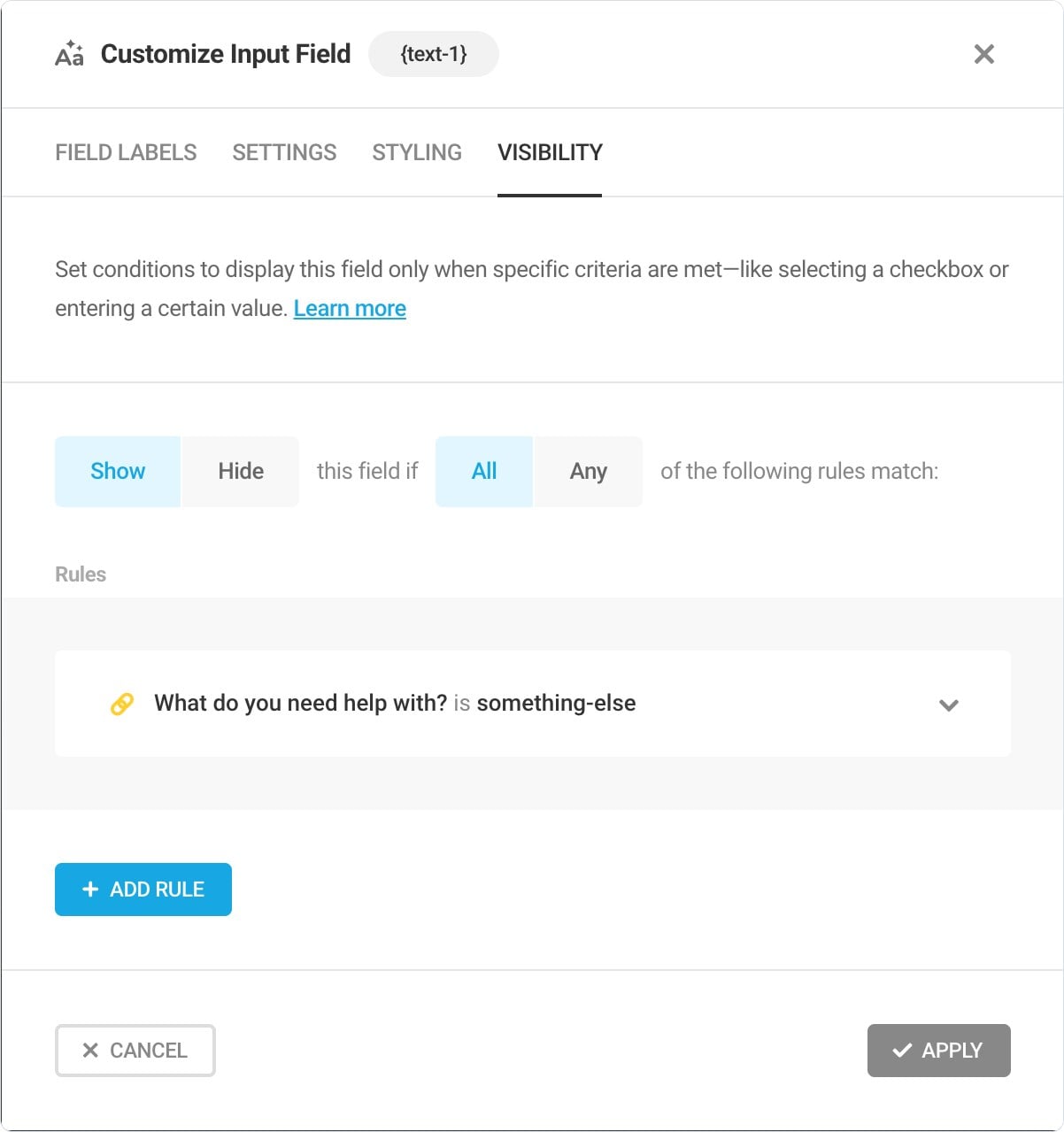
The visibility rule took one tab in the field settings: show this field if “What do you need help with?” is “Something else”.
Pro adds Stripe subscriptions, PDF generation, geolocation and an e-signature field. Forminator Pro costs $50 a year for one site, $75 for three and $100 for ten, with a 30 day money back guarantee.
The catch is weight. Forminator added 109.6 KB of compressed CSS and JavaScript to my form page, nearly double Fluent Forms.
That is why it ranks second for me. It wins on the free version; Fluent Forms wins on weight, upgrade value and the lifetime option.
Use it for payment or order forms on a budget, quizzes and polls, and any site that will never buy a form license.
Bit Form is made by Bit Apps and runs on 10,000+ sites, rated 100 out of 100 from 259 reviews on WordPress.org. It is the most underrated plugin in this test: my form worked in the free version, and it loaded less code than any other drag and drop builder.
I started from its Contact Form template and added the dropdown and the “What is it?” field with the Add Field button that appears under each field. The rule sits in a Conditional Logic tab: show this field if the dropdown equals Something else.
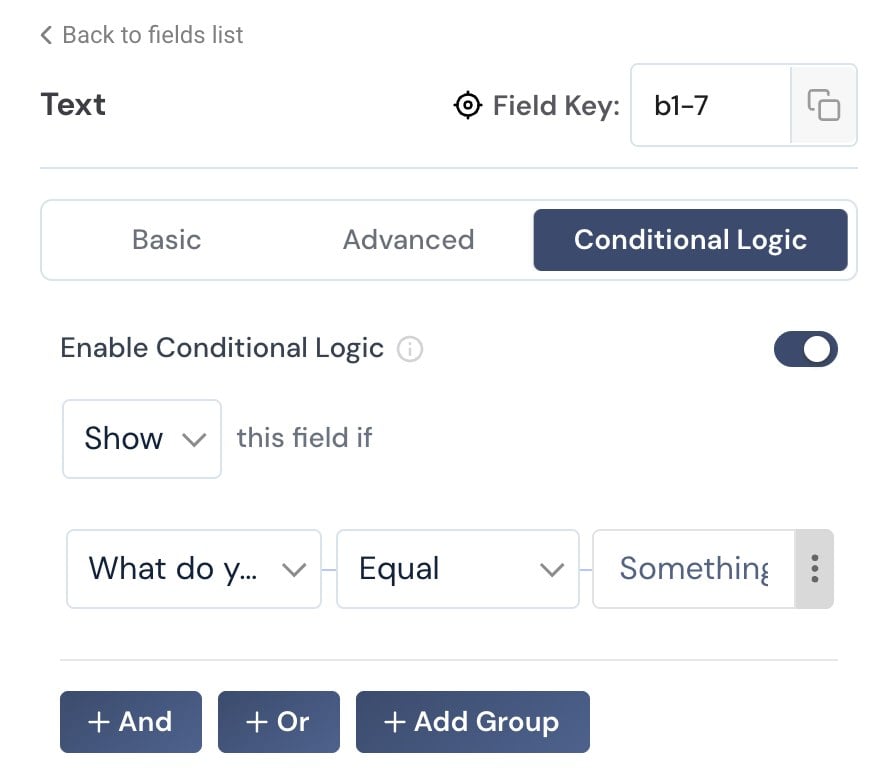
You type the option text into the rule yourself, so it has to match the choice exactly. On the live page the field stayed hidden until I picked Something else, and my test entry was saved in WordPress with all five answers.
| Bit Form free | |
|---|---|
| Included | Show and hide conditional logic, saved entries, multi-step forms, file uploads, repeater field, 38+ field types, email notifications |
| Payments | None free. PayPal, Stripe, Razorpay and Mollie fields need Pro |
| Spam protection | reCAPTCHA v2 and v3, hCaptcha, Cloudflare Turnstile |
| Free integrations | 50+, including Google Sheets, Mailchimp, FluentCRM, MailPoet and webhooks |
| Needs Pro | Payments, signature field, PDF generation, partial entries, honeypot, advanced logic |
Its form page added 14.9 KB of compressed CSS and JavaScript, about a quarter of Fluent Forms, and nothing loaded on the page without a form. Bit Form writes each form's styles to its own small file instead of loading one big stylesheet.
Pro is cheap. Starter is $25 a year for one site, listed at $39, or $99 once for a lifetime license. Agency covers unlimited sites for $79 a year or $169 lifetime.

Every plan has every feature, with a 14 day money back guarantee. Version 3.4.0, released on 22 October, rebuilt the plugin core, now needs PHP 8.0 or newer and fixed an entry editing flaw, so keep it updated.
The catch is reach. With 10,000+ installs, you will find fewer tutorials and fewer developers who know it than for Fluent Forms or Forminator.
Use it for lead and contact forms where page weight matters, multi-step or upload forms on a zero budget, and sites that want a lifetime license for under $100.
WS Form is made by Westguard Solutions and runs on 10,000+ sites, rated 100 out of 100 from 322 reviews on WordPress.org. The free edition is called WS Form LITE; the paid one is WS Form PRO.
Building my form in LITE was easy: name, email, the dropdown, “What is it?” and message. The conditional field stopped it. Opening the Conditions tab showed “Conditional Logic Is a PRO Feature”.
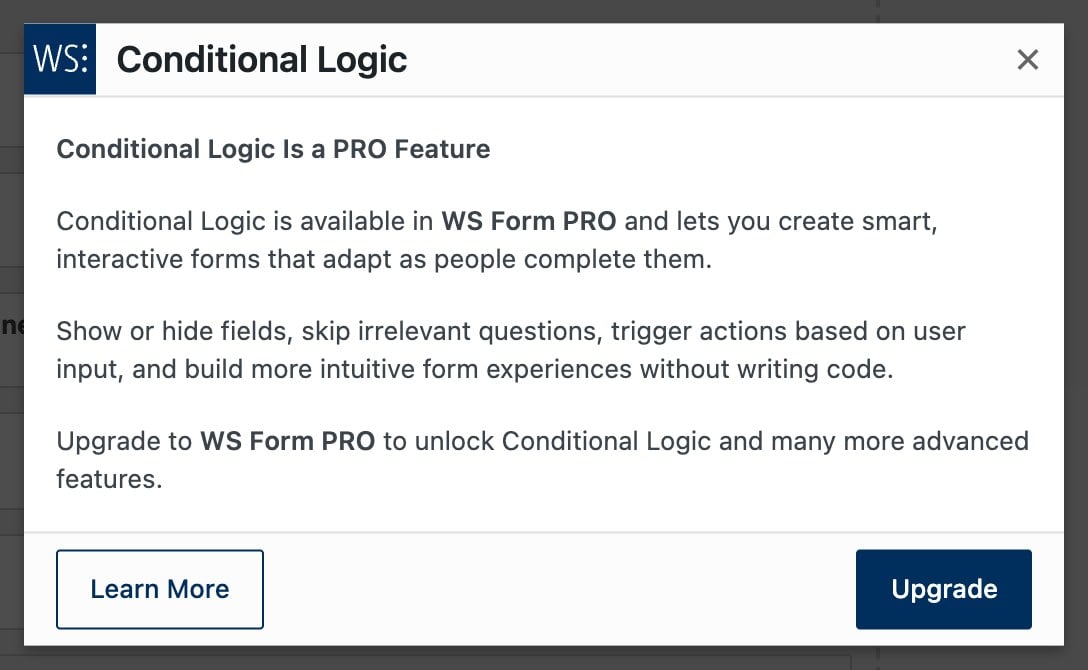
So “What is it?” stayed visible for everyone. The submission was still saved in WordPress, and LITE lets you export submissions.
| WS Form LITE | |
|---|---|
| Included | Unlimited forms and saved submissions with export, drag and drop editor, form styler, tabbed forms, text, choice and content fields |
| Payments | None free. PayPal Checkout and Stripe Elements are PRO add-ons |
| Spam protection | Honeypot, Akismet, reCAPTCHA, hCaptcha, Cloudflare Turnstile, IP rate limits and keyword blocking |
| Needs PRO | Conditional logic, file uploads, calculated fields, repeatable sections, save and resume, signatures, 65+ field types |
LITE added 48.3 KB of compressed CSS and JavaScript to my form page, lighter than Fluent Forms, and nothing on the page without a form.
PRO is where WS Form earns its reputation: calculated fields, cascading dropdowns, repeatable sections and a debug console for developers. Personal is $59 a year for one site with all of that.
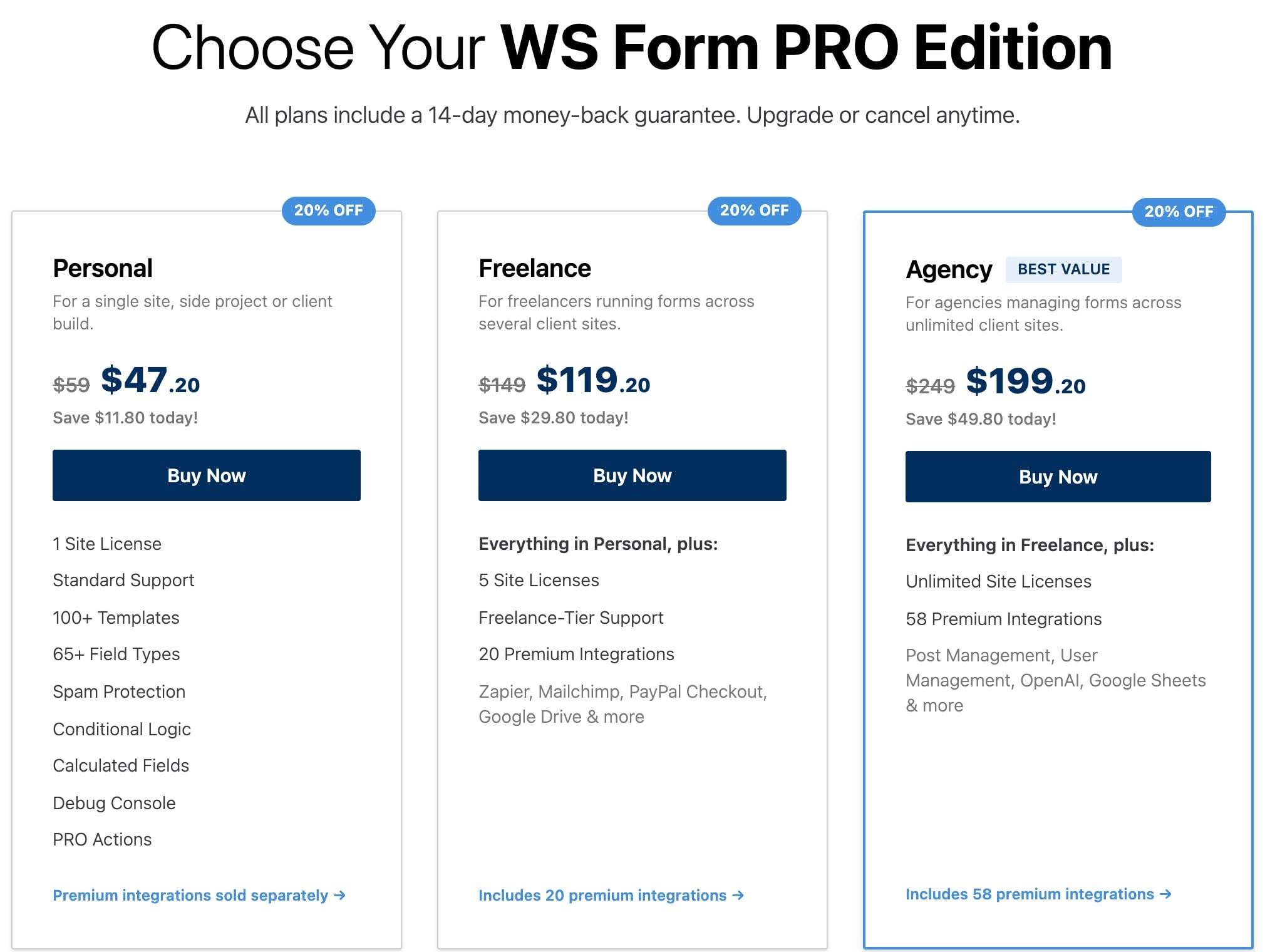
Freelance is $149 for five sites and adds 20 premium integrations, including Zapier, Mailchimp and PayPal Checkout. Agency is $249 for unlimited sites with 58 integrations, and it is the plan that includes Stripe.
A Halloween sale took 20% off every edition at checkout with the code SPOOKY20 when I checked. Renewals are at the regular price, with a 14 day money back guarantee.
Use it for quote calculators, multi-part applications and agency builds where you would otherwise stack add-ons, and only if you plan to buy PRO.
SureForms comes from Brainstorm Force, the company behind Astra. It runs on 500,000+ sites and has the best rating here, 98 out of 100, but from only 101 reviews.
Many of those installs arrive through Astra and its starter templates, so trust the rating more than the install count.
| SureForms free | |
|---|---|
| Included | 16 field blocks, saved entries you can search and export, AI form generation, instant forms |
| Payments | One time Stripe payments, with a 2.9% fee on the free plan |
| Needs a paid plan | Conditional logic, multi-step forms, file uploads, PayPal, integrations |
Each field is a real block in the editor, the nicest building experience of the seven. My conditional field was not possible free: Conditional Logic sits in the Advanced tab with a Premium badge.

So “What is it?” stayed visible for everyone. Every paid plan has every feature: Team is $99 for the first year on 5 sites and renews at $149.
Agency is $179 for 100 sites, renewing at $229. Lifetime starts at $349, and there is a 14 day money back guarantee.
Use it for block editor sites, Astra sites, and agencies that want one plan with no feature tiers.
WPForms is the most installed drag and drop form builder, on 5,000,000+ sites and rated 96 out of 100 from 14,386 reviews. Its builder is the easiest of the seven to learn.
WPForms Lite stopped my test at the conditional field. Clicking Smart Logic opened a “Smart Conditional Logic is a Pro Feature” window.
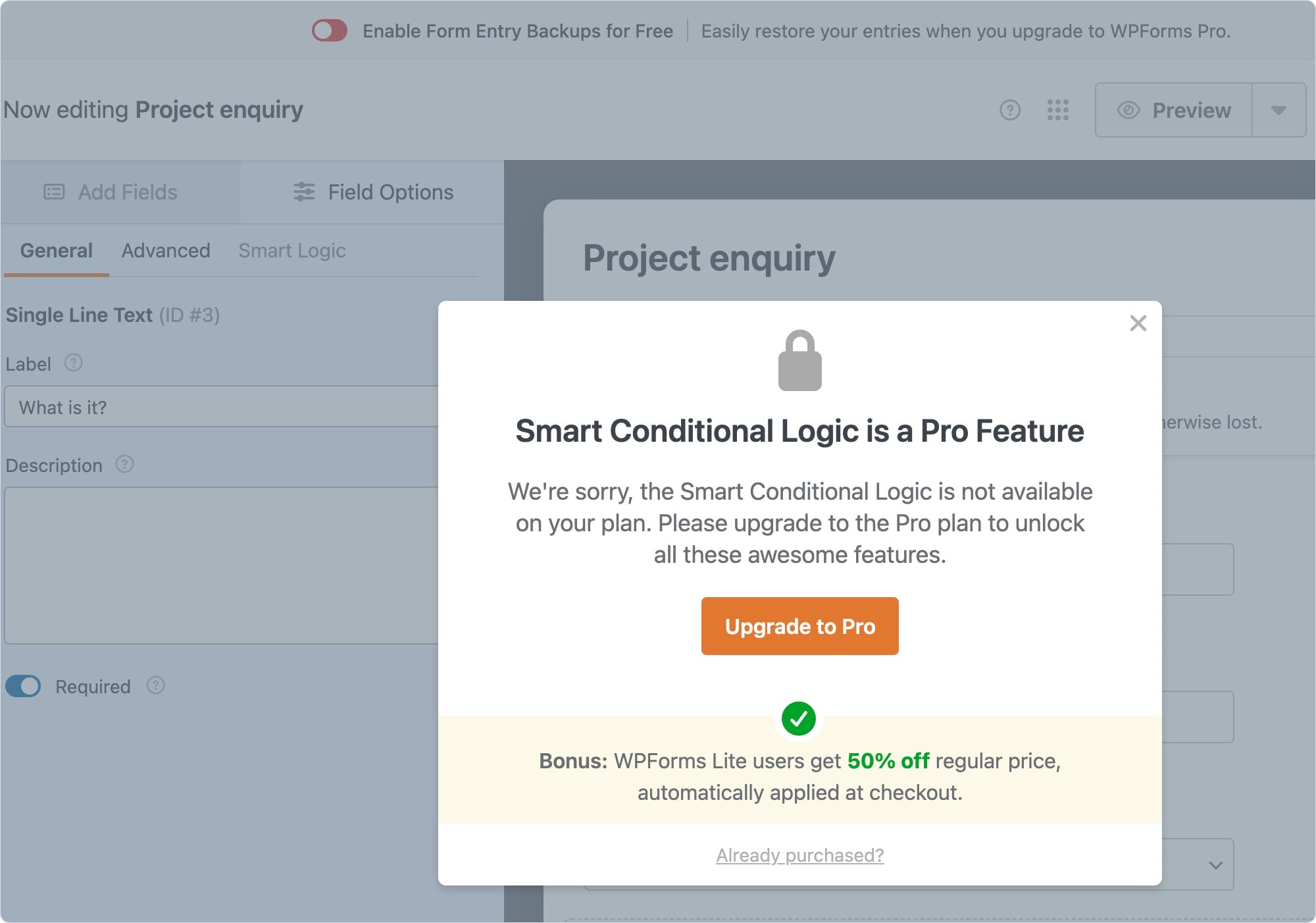
The builder also shows a banner to turn on entry backups that you can only restore after upgrading. Lite does not save entries in WordPress, so submissions only reach you by email.
| WPForms Lite | |
|---|---|
| Included | Standard fields, spam protection with reCAPTCHA, hCaptcha or Turnstile, email notifications |
| Payments | Stripe, with a 3% fee on every transaction that WPForms removes on Pro or higher |
| Needs a paid plan | Conditional logic, saved entries, file uploads, multi-page forms |
Basic is $49.50 for one site, Plus $99.50 for three, Pro $199.50 for five and Elite $299.50 for unlimited sites. Those are half the listed normal prices, and Lite users get the same 50% off at checkout.
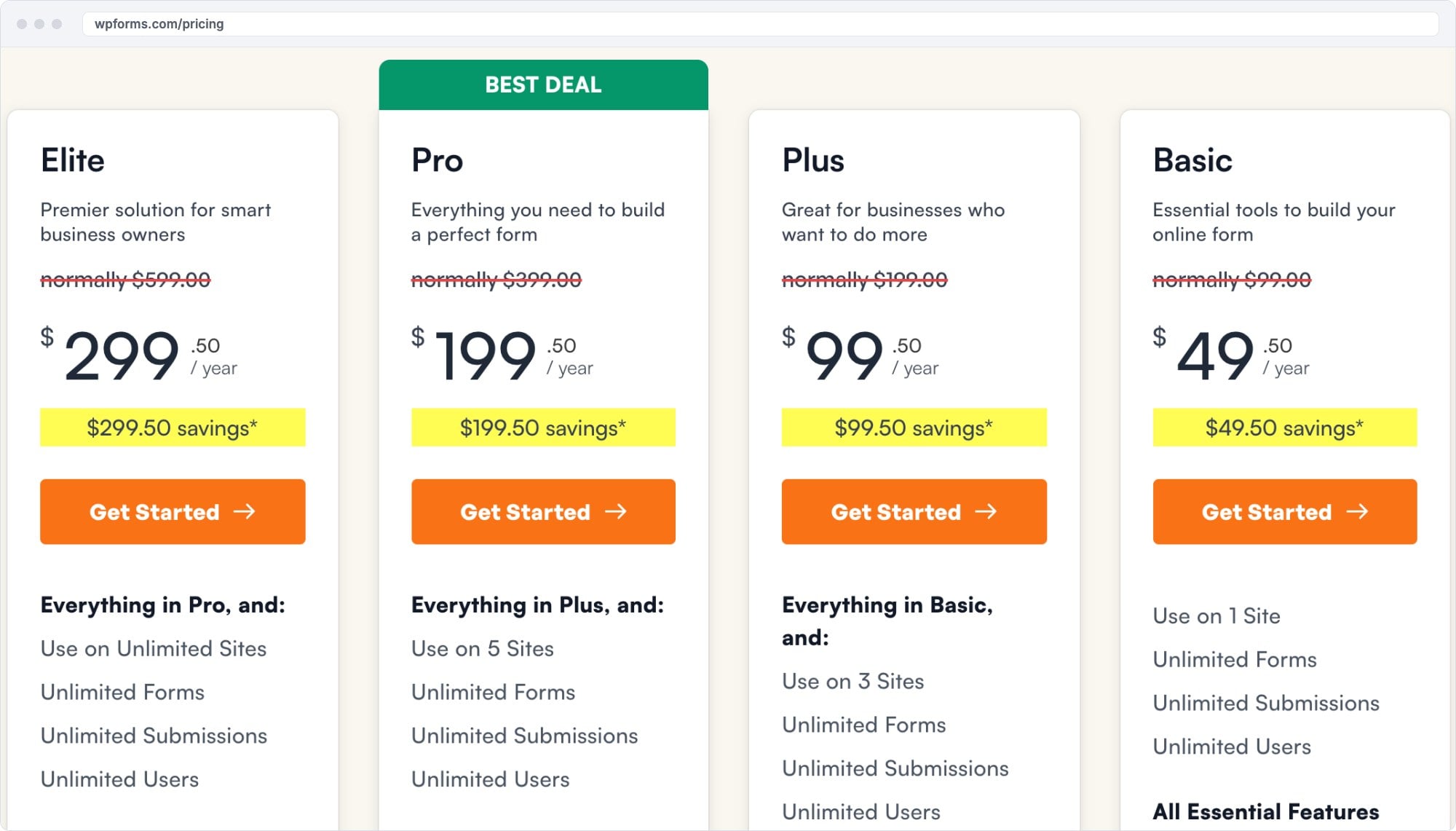
Payments without the 3% fee start at Pro. Use WPForms if you are a beginner who wants the simplest builder and plans to buy Pro.
Contact Form 7 runs on 10,000,000+ sites but is rated only 80 out of 100 from 2,184 reviews. There is no visual builder: you write the form with tags.
It has no option for a field that depends on another answer, so my test field always showed.
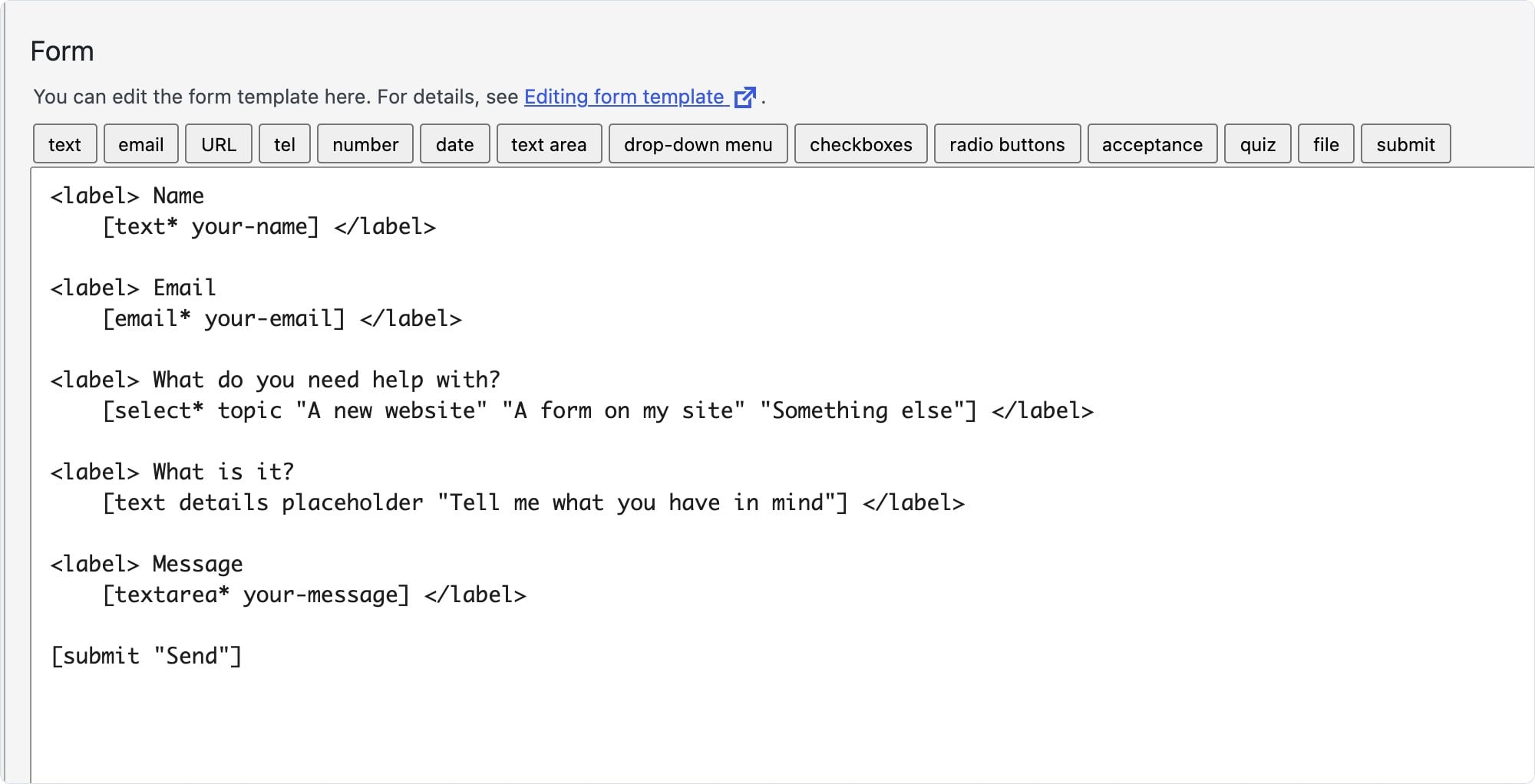
The free plugin has file uploads, a quiz field, reCAPTCHA, Turnstile and Akismet, plus modules for Stripe, Brevo and Constant Contact. Entries are not saved unless you add Flamingo, a separate plugin from the same author.
It is the lightest form page of the seven at 9.5 KB, but it loads that on every page of your site. Use it for one simple contact form on a site you rarely touch.
A form loads on the page where you ask for an email or a card number, the worst page on a site to be slow. I measured each plugin's own CSS and JavaScript on the page with my test form, plus a page without a form.
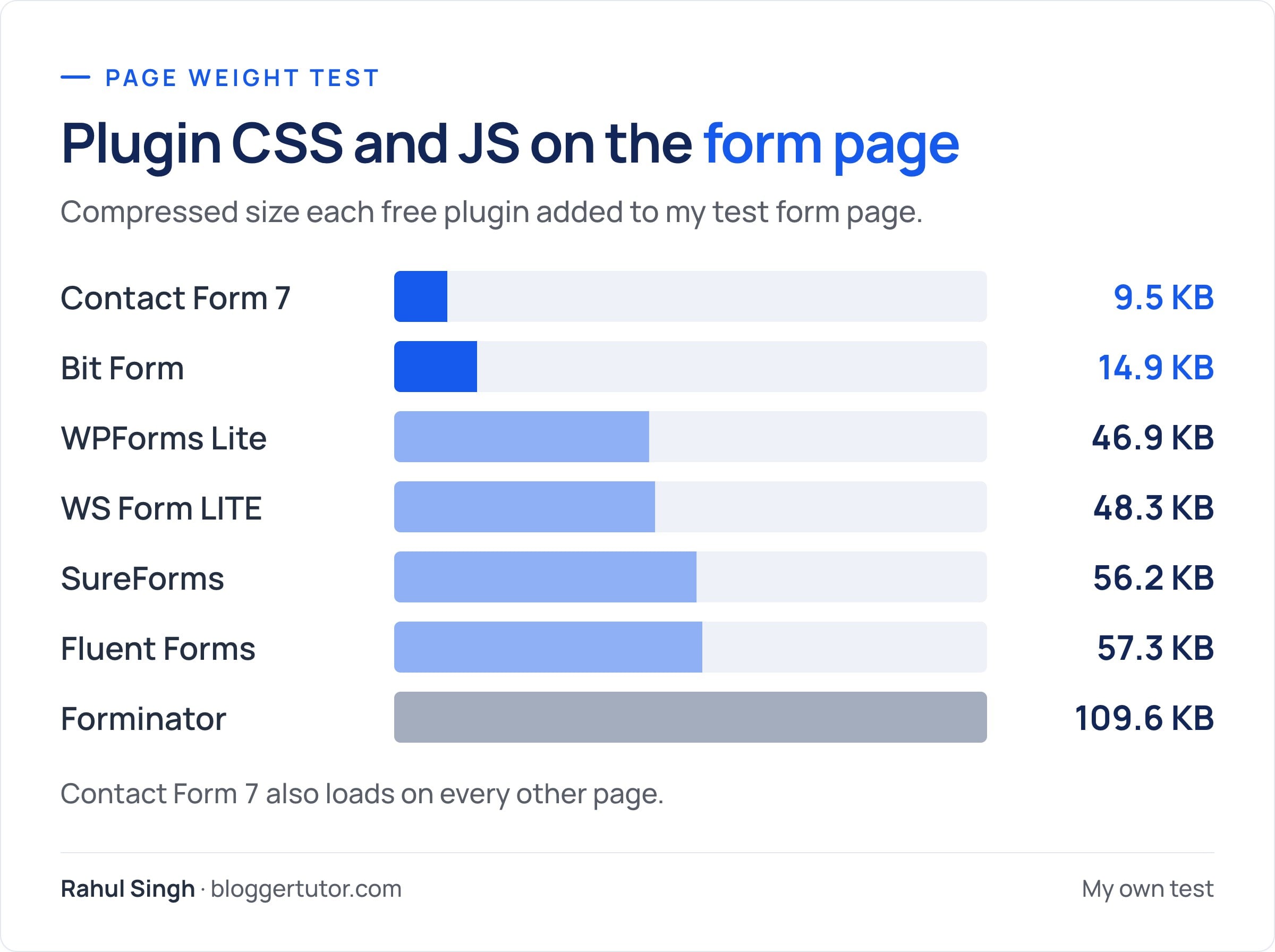
For more on stopping plugins loading where they are not needed, see my guide to speeding up WordPress.
If you are ready to buy, here is how the three best known paid form plugins compare, plus the two underrated ones, Bit Form and WS Form, at the prices on each pricing page.
| Fluent Forms Pro | WPForms | Gravity Forms | Bit Form Pro | WS Form PRO | |
|---|---|---|---|---|---|
| Free version | Yes, with logic and entries | Yes, no logic or entries | No | Yes, with logic and entries | Yes, entries but no logic |
| 1 site | $79/yr | $49.50/yr Basic | $59/yr Basic | $25/yr Starter | $59/yr Personal |
| Stripe payments | $79/yr, no plugin fee | $199.50/yr Pro, 5 sites | $159/yr Pro, 3 sites | $25/yr Starter | $249/yr Agency |
| Unlimited sites | $299/yr | $299.50/yr Elite | $259/yr Elite | $79/yr Agency | $249/yr Agency |
| Lifetime license | Yes, from $279 | No | No | Yes, from $99 | No |
| Features by tier | All features in every plan | Tiered | Add-ons tiered | All features in every plan | Integrations tiered |
| Refund window | 14 days | 14 days | 30 days | 14 days | 14 days |
Prices from each vendor's pricing page, checked 16 November 2026. WPForms, Fluent Forms and Bit Form prices can be first year sale prices.
Taking card payments costs this much for one site in the first year. Stripe's own processing fee applies to all of them; free plans that add a plugin fee on top are left out.
| Cheapest way to take Stripe payments | First year | Note |
|---|---|---|
| Forminator free | $0 | No plugin fee |
| Bit Form Pro Starter | $25 | Stripe field is Pro only, listed at $39 |
| Fluent Forms Pro | $79 | $55 in the Halloween sale |
| SureForms Team | $99 | 5 sites, renews at $149 |
| Gravity Forms Pro | $159 | Basic ($59) has no Stripe add-on |
| WPForms Pro | $199.50 | 5 sites, normally $399 |
| WS Form Agency | $249 | Stripe is sold separately on cheaper plans |
Fluent Forms gives you conditional logic and saved entries free; WPForms Lite gives you neither. Paid, one Fluent Forms license unlocks every feature for $79, while the WPForms plan that removes the 3% Stripe fee is Pro at $199.50.
I would pick WPForms only if its builder is the one you find easiest and the price does not matter.
Gravity Forms has no free version and no trial. Basic is $59 for one site, Pro $159 for three and Elite $259 for unlimited.
Stripe, PayPal and Square start at Pro, and user registration, surveys, signatures and partial entries are Elite only. Its strength is a large add-on ecosystem for complex workflows such as Gravity Flow approvals.
Fluent Forms does the same jobs for less on most sites. I would choose Gravity Forms only when a client already depends on one of its add-ons.
Forminator gives more free. Fluent Forms is lighter, about 57 KB against 110 KB on my form page, and its Pro has more integrations and payment gateways.
If you will stay free, choose Forminator. If you expect to buy a license, Fluent Forms is the better long term pick.
Both passed my conditional test free and both save entries. Bit Form gives more free, with uploads, multi-step forms and 50+ integrations, and its form page was a quarter of the weight.
Fluent Forms takes Stripe payments free, has more gateways in Pro and runs on 80 times as many sites. Bit Form is far cheaper paid, $99 lifetime against $279. On a budget site with no payments, Bit Form is the smarter install.
Fluent Forms wins free: WS Form LITE has no conditional logic or file uploads. Paid, both cost about the same for one site, $79 against $59.
WS Form PRO goes further on calculations, repeatable sections and developer tools, but Stripe needs its $249 Agency plan. Fluent Forms includes Stripe, PayPal and Razorpay in its $79 license.
SureForms has the better editor if you build everything in blocks. Fluent Forms gives conditional logic free and costs less for one site, $79 against SureForms' $99 entry plan for five sites.
These were in this guide before or come up as alternatives. None beat the seven above for most sites.
| Plugin | WordPress.org | Active installs | Paid from | Why it is not in the seven |
|---|---|---|---|---|
| Formidable Forms | 96/100 (1,385) | 300,000+ | Pricing page | Best for calculators and data views, heavier to learn |
| Ninja Forms | 88/100 (1,397) | 500,000+ | Pricing page | Lower rating, logic and payments are paid |
| Everest Forms | 98/100 (375) | 90,000+ | $49/yr | Strong for surveys, smaller community |
WordPress.org data and vendor pricing checked 16 November 2026.
| Your situation | Pick |
|---|---|
| Most sites: one plugin to grow with and pay for once | Fluent Forms |
| You will never pay for a form plugin | Forminator |
| Free conditional logic on the lightest page, or a lifetime license under $100 | Bit Form |
| Calculators, repeatable sections and complex logic, and you will buy PRO | WS Form |
| Payments in India through Razorpay or UPI style order forms | Fluent Forms Pro |
| You build everything in the block editor | SureForms |
| You want the easiest builder and will buy Pro | WPForms |
| Complex client workflows built on add-ons | Gravity Forms |
| One plain contact form | Contact Form 7 |
Taking payments is its own decision. I compare gateways and fees in the best WordPress form plugins for payments.
Fluent Forms for most sites. In my test its free version handled conditional logic and saved entries, it loaded half the code of Forminator, and one Pro license unlocks every feature for $79 a year, with a lifetime option. If you will never pay, Forminator gives you more free.
Forminator, if you will never upgrade. Its free version includes conditional logic, file uploads, multi-step forms, saved entries and Stripe and PayPal payments with no extra plugin fee. Fluent Forms free is the better start if you may buy Pro later, and Bit Form free is the lightest option with free conditional logic.
For most sites, yes. Fluent Forms gives conditional logic and saved entries free, which WPForms Lite does not, and one Fluent Forms Pro license unlocks every feature for $79 a year.
Fluent Forms for most sites. It has a free version, costs $79 for one site with every feature and offers lifetime licenses. Gravity Forms has no free version and puts Stripe in its $159 Pro plan.
Free includes conditional logic, saved entries, Stripe with a 1.9% fee and 12 integrations. Pro adds file uploads, multi-step forms, quizzes, PayPal and other gateways, 60+ integrations and removes the Stripe fee.
No. WPForms Lite emails submissions to you but does not store them in WordPress. You can back them up to WPForms and restore them only after upgrading.
Fluent Forms if you want to pay less for more, Forminator if you want the most free features, Bit Form if page weight matters, and SureForms if you build in the block editor.
For one simple contact form, yes. It has no visual builder, no conditional logic and no saved entries without the Flamingo add-on, and it loads its scripts on every page.
Yes, it is underrated. In my test its free version handled conditional logic, saved entries and loaded only 14.9 KB on the form page. Payments need Pro, which starts at $25 a year or $99 lifetime for one site.
WS Form LITE is free and saves submissions, but conditional logic, file uploads and payments need WS Form PRO, from $59 a year for one site. Stripe comes with the $249 Agency plan.
Disclosure: I earn a commission if you buy Fluent Forms, SureForms or WPForms through the links on this page, at no extra cost to you. I have no affiliate relationship with Forminator, Bit Form, WS Form, Gravity Forms or Contact Form 7.
Prices and ratings were checked on each vendor's site and on WordPress.org on 16 November 2026. You can read exactly how I test, verify and update everything on this site.