Complete Blogging Guide for Beginners in 2027, With a Free PDF

Tutorials & Insights
I started Bloggertutor in 2020 with a cheap shared host, a free theme and no idea what a focus keyword was. The first version of this guide was written in that same year, and reading it again in 2026 was humbling: it told you to install AMP, buy hosting for 99 cents and chase a nine thousand word word count. None of that is good advice any more.
So I have rewritten it from scratch for 2027. It covers everything a beginner needs, in the order you will need it, with the prices checked against each vendor's own page in September 2026 and every statistic linked to where it came from. It also covers the part most blogging guides skip: Google's AI answers now take a real share of the clicks, and a new blog has to be built for that.
To start a blog in 2027, pick a topic you know from real experience, register a domain, put WordPress on inexpensive hosting, publish 15 to 20 genuinely useful posts around two or three connected subjects, connect Google Search Console, then add affiliate links and ads once people arrive. Budget about a year before the blog earns anything meaningful.
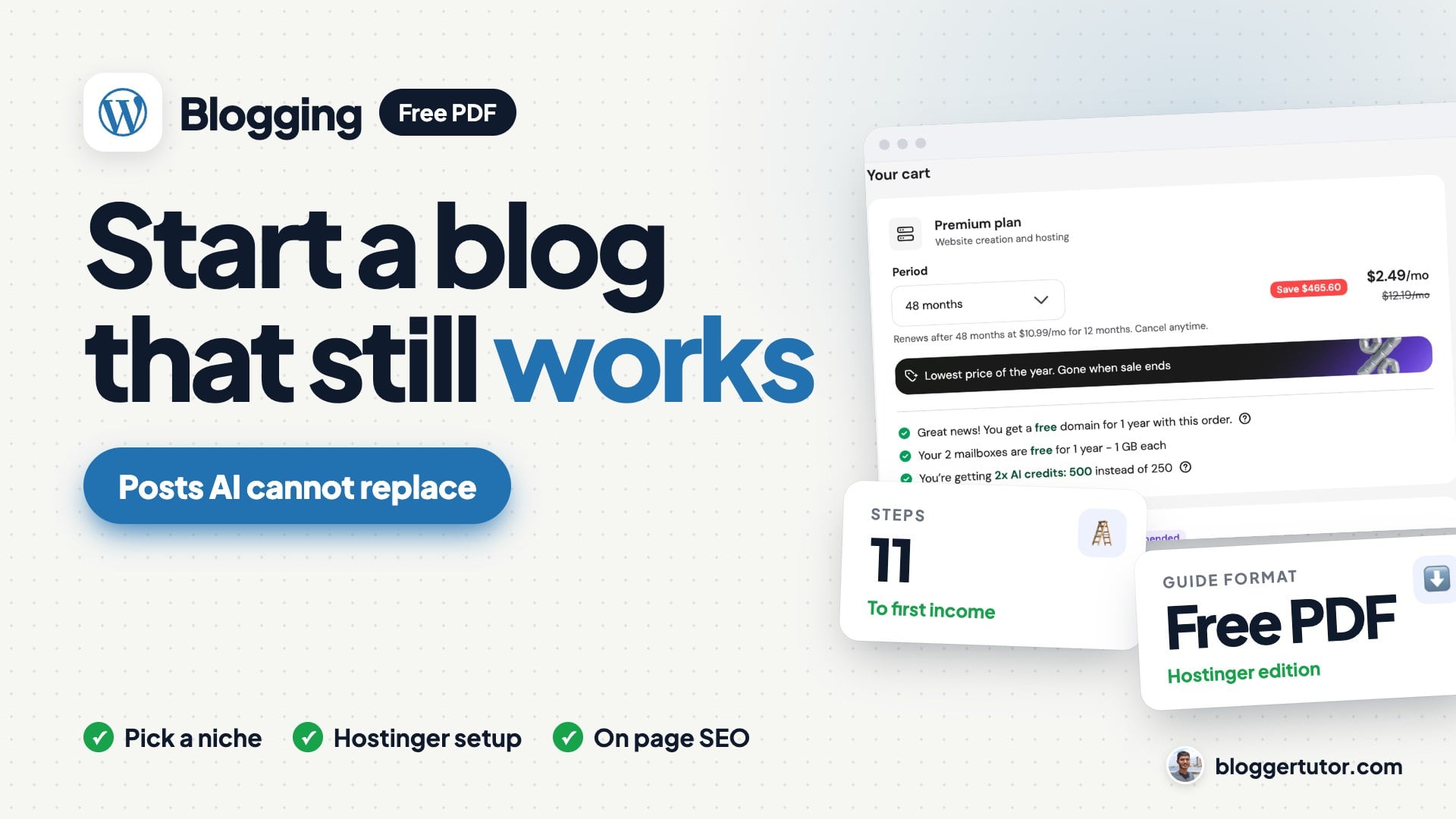
16 designed, printable pages with real Hostinger screenshots and a clickable chapter bar: the niche test, the Hostinger setup, the five plugins, the free topic research funnel, the on page SEO table, the monetisation ladder and the 12 month plan. No email required.
This guide walks through every step in full: why each one matters, what I would do differently, and how the money side works.
The eleven steps to start a blog in 2027 and grow it to its first income, from choosing a niche to monetising.
Pick a subject you have first hand knowledge of, check people search for it, and make sure there is something to sell or recommend in it.
Self hosted WordPress for most people. Blogger or Substack only if you never want to deal with hosting.
A .com or .in domain and entry level shared hosting are enough for the first year. Always read the renewal price.
Title and tagline, permalinks, search engine visibility, timezone, discussion and your author profile.
One lightweight theme and four or five plugins: SEO, backups, spam protection and caching.
Verify the site, submit the sitemap and learn the Performance report.
Use Google autocomplete, People Also Ask, Reddit threads and later your own Search Console queries.
Answer first, prove it with your own photos, numbers or tests, then go deeper than anyone else on the page.
One clear title, descriptive headings, internal links, compressed images and a fast mobile page.
Start an email list on day one and share where your readers already spend time.
Affiliate links first, then AdSense, then a premium ad network or your own product once traffic justifies it.
Yes, but not the way it was in 2020. A blog is still the only audience you own outright, and Google still sends it traffic. What changed is that Google now answers many simple questions itself, so a blog that only repeats what everyone else says gets far fewer clicks than it used to.
Three sets of numbers show how large that shift is:
That is the bad news, and I would rather you hear it from me than find out in month six. The good news is in the same data. Seer Interactive found that pages cited inside an AI Overview earned 120% more organic clicks per impression than pages that were not cited. And Google's own guide to its AI search features, published in May 2026, says the thing that will influence your presence there most is creating content people find unique, compelling and useful.
In other words, the kind of blog that suffers is the one built from rewritten facts. The kind that still works is the one only you could have written: your tests, your numbers, your mistakes, your local knowledge. That is what the rest of this guide is built around.
| What still works in 2027 | What stopped working |
|---|---|
| Posts built on first hand experience, tests and original numbers | Rewriting the top three results in different words |
| Two or three tightly connected topics | Writing about anything that has traffic |
| An email list you own | Relying on Google for every visitor |
| Updating your best posts every year | Publishing and never touching a post again |
| Affiliate links to products you have used | Ads on every page from day one |
| Term | What it means |
|---|---|
| Niche | The subject your blog covers, narrow enough that you can be the best answer for it. |
| CMS | Content management system, the software you write in. WordPress is the most used one. |
| Self hosted | You rent a server (hosting) and install the software yourself, so you own everything. |
| Hosted platform | Blogger, WordPress.com, Substack or Medium run the server for you, under their rules. |
| E-E-A-T | Experience, expertise, authoritativeness and trust, the qualities Google's raters look for. |
| AI Overview | The AI written summary Google shows above normal results for many searches. |
| SERP | Search engine results page, what Google shows for a query. |
| Affiliate link | A tracked link that pays you a commission when a reader buys through it. |
| RPM | Revenue per thousand pageviews, the standard way to compare ad income. |
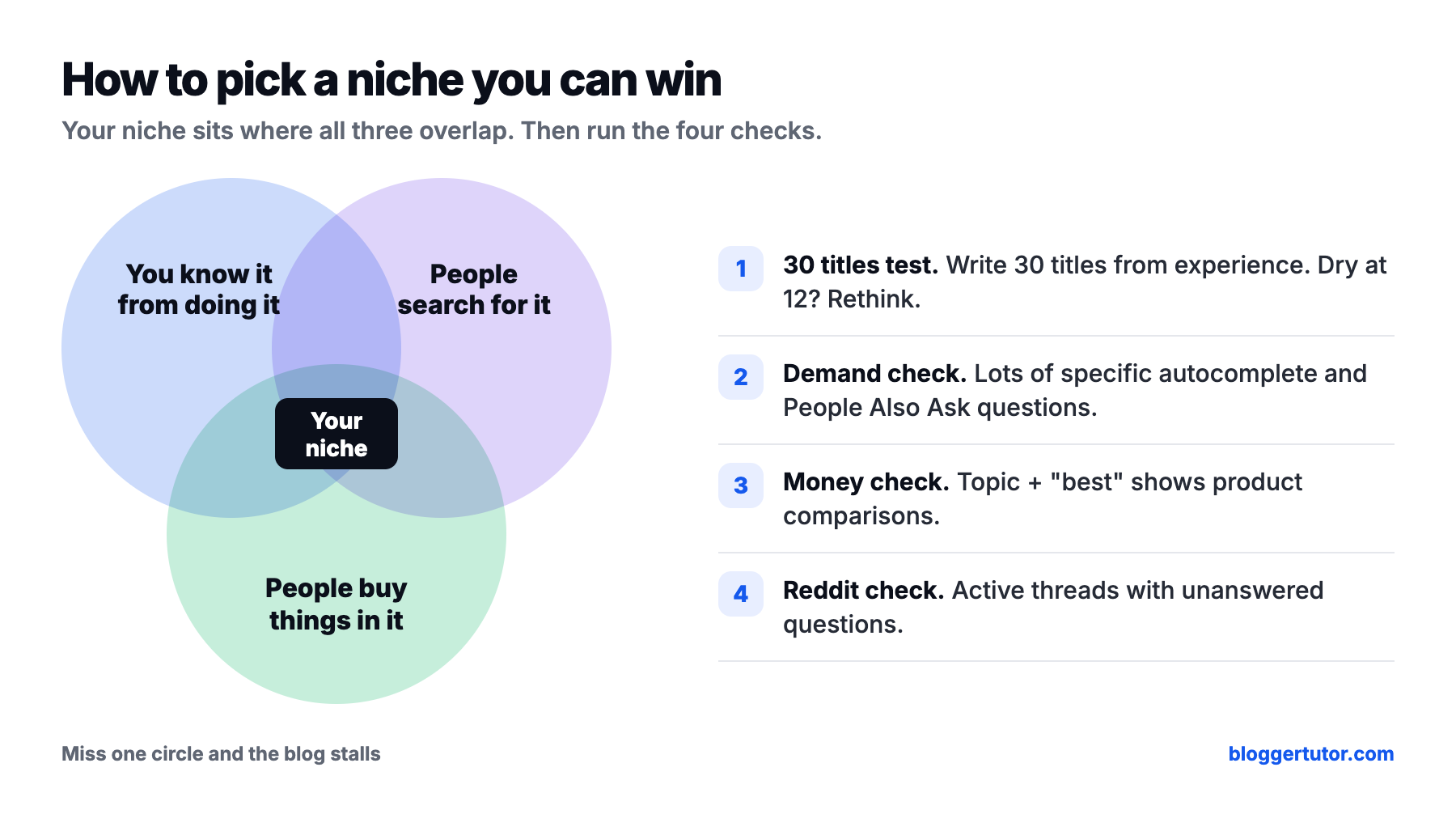
A good niche sits where three things overlap: something you know from doing it, something people search for, and something people spend money on. Miss the first and your posts read like everyone else's. Miss the second and nobody finds them. Miss the third and you have a hobby, which is fine, but it is not what most people reading this want.
The experience part matters more in 2027 than it ever has. Google's guidance on helpful content asks whether a page shows first hand experience, such as having actually used a product or visited a place, and says that trust is the most important part of E-E-A-T. Google's Danny Sullivan has also said, as Search Engine Journal reported, that commodity content, meaning widely available information with no unique perspective, is not a good foundation any more, because AI systems present that kind of information perfectly well on their own.
Niches I see beginners do well with right now are the ones built on a skill or a situation: a specific software tool you use at work, cooking for a particular diet, exam preparation for a specific test, a hobby with gear to buy, personal finance for a specific country. Broad subjects like “health” or “technology” are dominated by big brands, and the December 2025 core update pushed even more “best of” searches towards brands.
Avoid these, even though they look tempting
For almost everyone who wants to earn from a blog, the answer is self hosted WordPress. It runs 40.2% of all websites, according to W3Techs, it is free, you own every file, and there is a plugin for everything. The hosted platforms are simpler, but you are building on somebody else's land and living with their limits.
| Platform | Cost to start | Own domain | Best for | Main limit |
|---|---|---|---|---|
| WordPress.org (self hosted) | Free software, you pay for hosting and a domain | Yes | Blogs you want to earn from | You handle updates and backups |
| WordPress.com | Free plan $0, Personal $4 a month billed yearly | Paid plans | Writers who want zero maintenance | Free plan shows WordPress.com ads and cannot install plugins |
| Blogger | Free | Yes, via DNS | Finding out if you enjoy writing | Dated themes, basic SEO controls |
| Substack | Free, then 10% of paid subscriptions plus Stripe fees | Yes | Newsletter first writers | Little SEO or design control |
| Ghost(Pro) | Starter $15 a month billed yearly | Yes | Membership publications | Paid subscriptions need the $29 Publisher plan |
| Medium | Free to write | No | Reaching Medium's own readers | Partner Program needs a paid membership; you never own the audience |
Prices from each platform's own pricing page, checked 16 November 2026. If you have read older guides, note one change: WordPress.com's pricing page now lists plugin installs on its $4 Personal plan, not only on Business. It is a reasonable option now, but you are still renting, and moving away later is harder than never moving at all.
Blogger is the one people in India ask me about most, because it is free and Google owned. I understand the appeal, and it is a fine way to find out whether you enjoy writing. But its themes are dated, its SEO controls are basic, and moving a Blogger blog to WordPress later means redirecting every old URL by hand. If you are serious, start on WordPress and skip that job entirely.
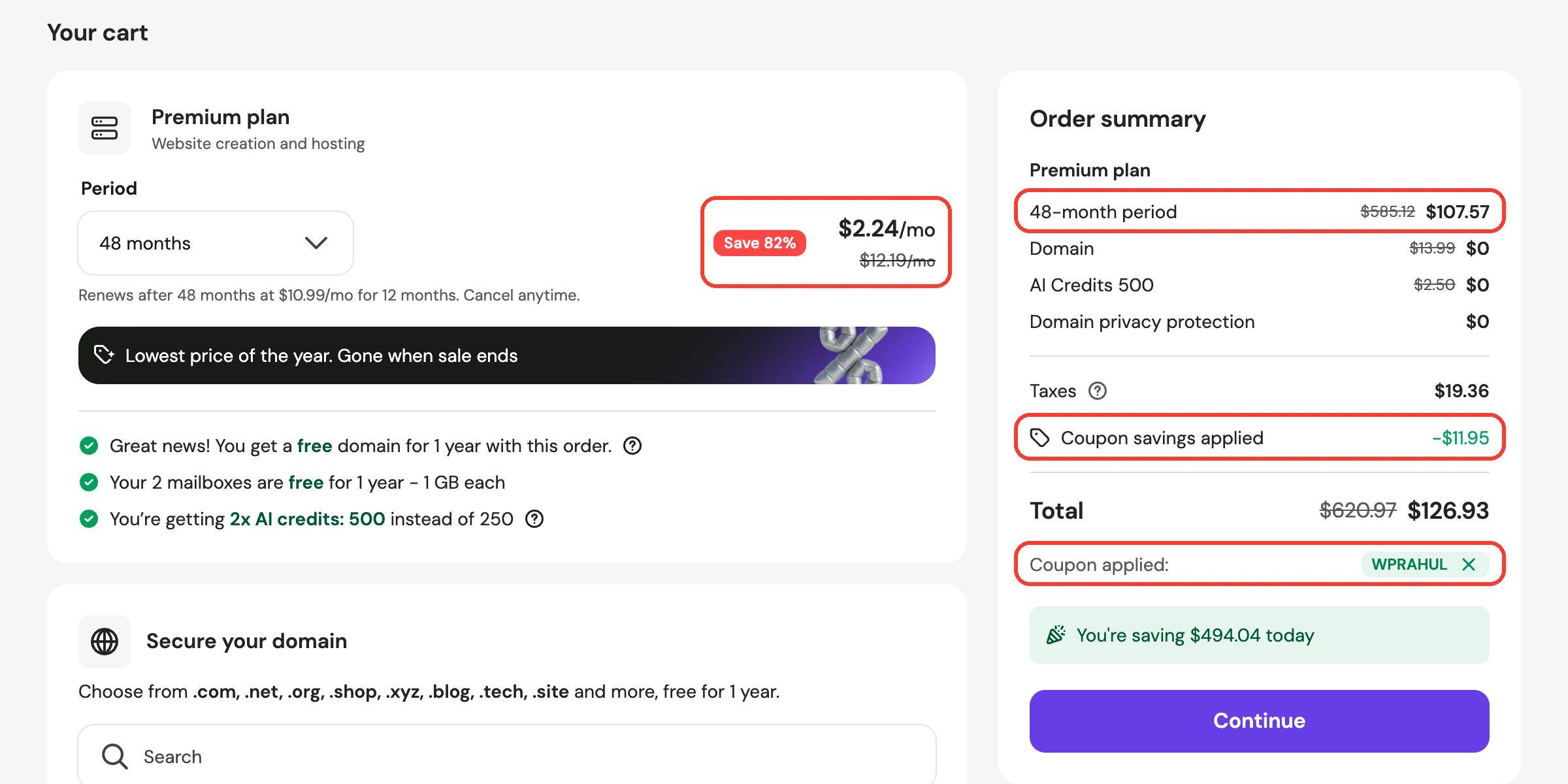
A blog needs a domain name (your address) and hosting (the server that stores it). For the first year you need nothing fancy: a .com domain and entry level shared hosting will comfortably handle a new blog. Hostinger's Premium plan is $107.57 for four years of hosting with my code WPRAHUL ($119.52 without it), with the domain free for the first year, and WordPress itself costs nothing. That is the realistic entry price for a blog you own.
| Registrar | .com first year | .com renewal | Notes |
|---|---|---|---|
| Porkbun | $11.08 | $11.08 | No renewal jump; .in is $7.83 |
| Cloudflare Registrar | At cost | At cost | No markup at all; does not sell .in |
The headline price on a hosting page is almost always a promotional rate that needs several years paid up front, and it renews higher. Read the renewal price, not the headline price. I recommend Hostinger Premium to new bloggers: $2.49 a month on the 48 month term, a free domain for the first year and LiteSpeed servers that make the free LiteSpeed Cache plugin work out of the box. Use my code WPRAHUL at checkout for another 10% off, which brings Premium down to $2.24 a month.
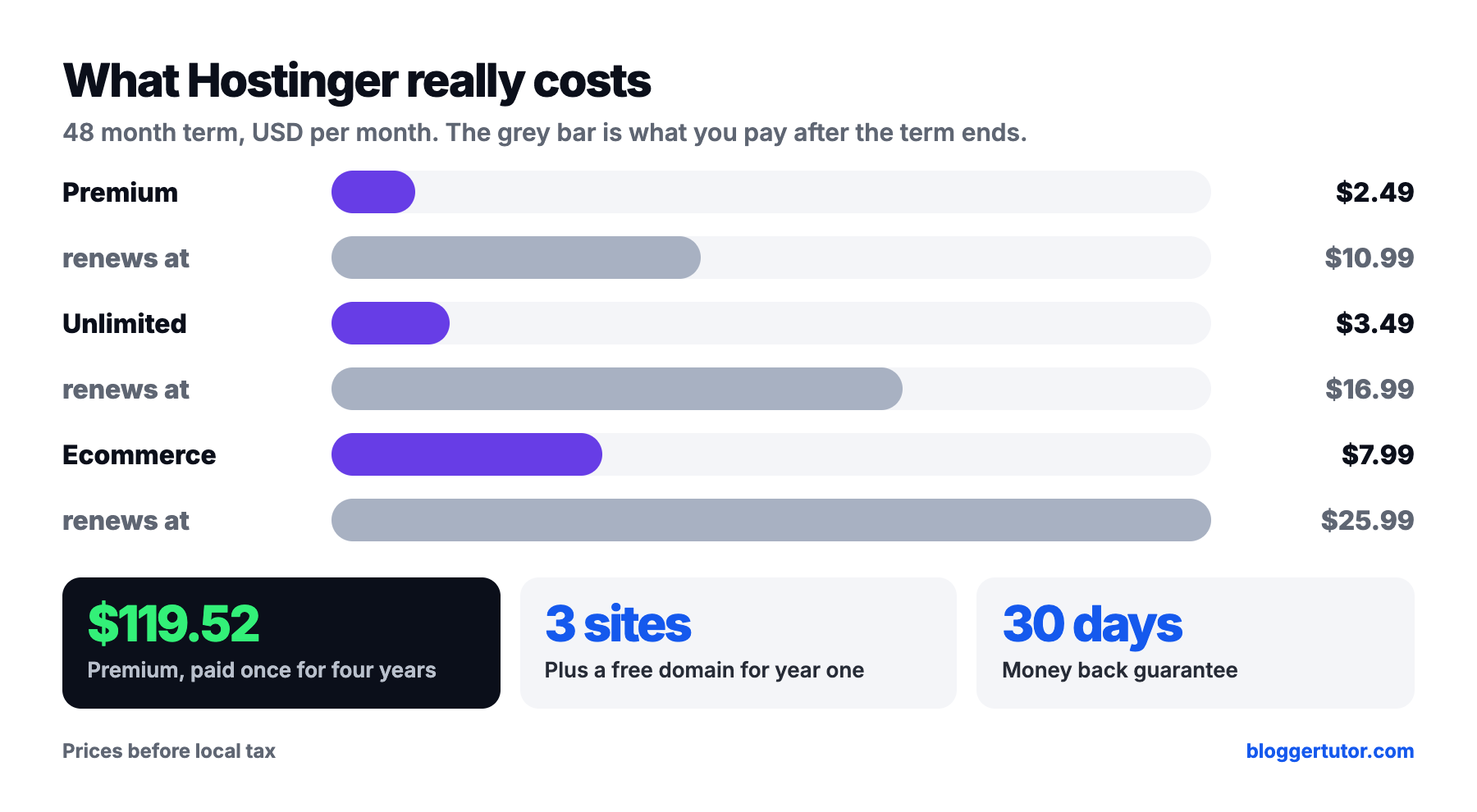
| Hostinger plan | Per month with WPRAHUL | Paid today (48 months) | Renews at | Websites | Backups |
|---|---|---|---|---|---|
| Premium | $2.24 | $10.99 a month | 3 | Weekly | |
| Unlimited | $3.14 | $16.99 a month | Unlimited | Daily | |
| Ecommerce Startup | $7.19 | $25.99 a month | Unlimited | Daily and on demand |
My Hostinger code: WPRAHUL (10% off)
In the Hostinger cart, click Have a coupon code?, type WPRAHUL and click Apply. It takes another 10% off any plan and stacks on the Black Friday price, so Premium for 48 months drops from $119.52 to $107.57, which works out to $2.24 a month. The screenshot below is my own cart with the code applied.
If you are paying from India, Hostinger bills in rupees and takes UPI, but not every host does, and a declined card is the most common reason beginners stall at this step. I keep a list of hosts that accept UPI and RuPay for exactly that reason. And once the blog grows, moving to a better host is a two hour job, so do not overthink the first choice.
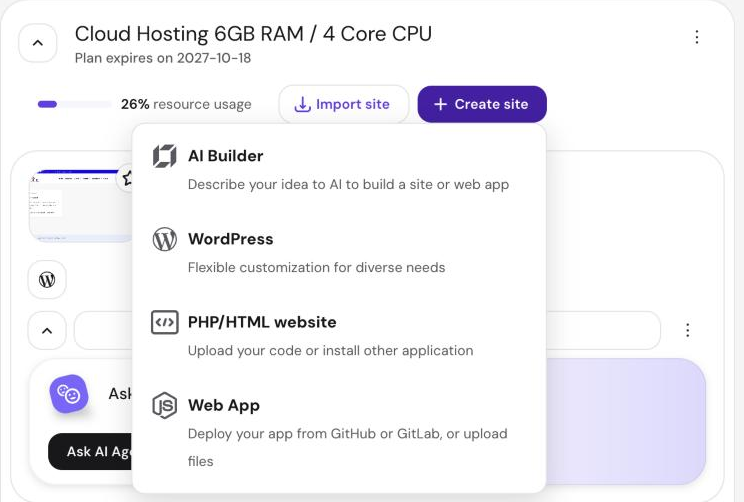
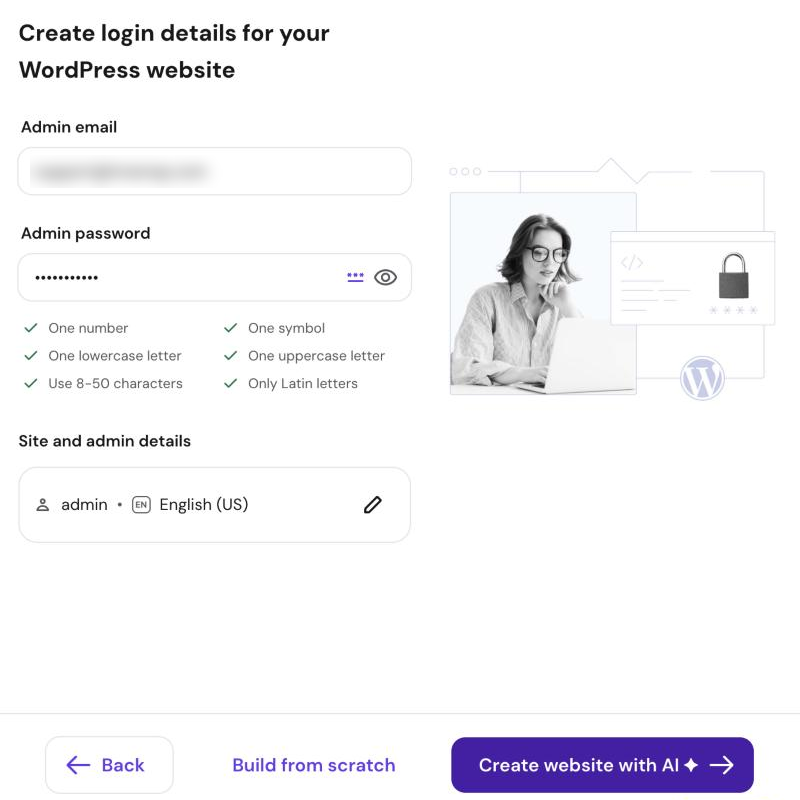
On Hostinger, WordPress installs from hPanel in about five minutes. Go to Websites, click Create site, choose WordPress, pick your free domain, then set the login details and change the username from “admin”. The current version is WordPress 7.1.2, released on 22 September 2026.
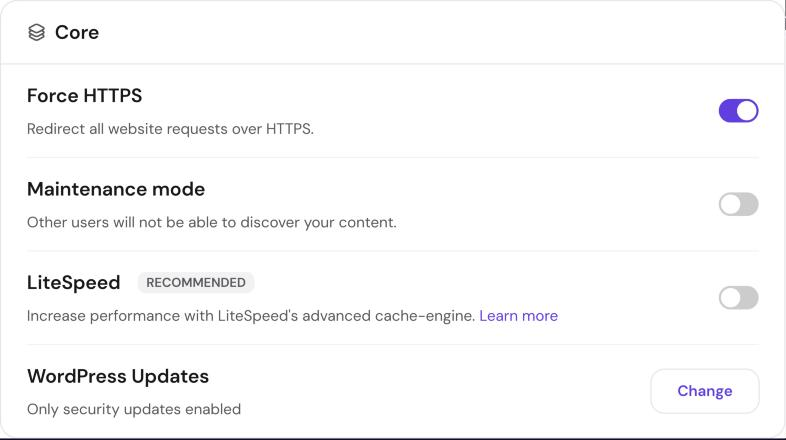
Before anything else, open WordPress, Overview in hPanel and set Force HTTPS on, LiteSpeed on and updates to Smart auto-updates. My WordPress tutorial walks through every one of these screens.
If your host has no installer, the manual route takes about ten minutes. I recorded this walkthrough in Hindi a while back; the screens have changed slightly, but the steps are the same:
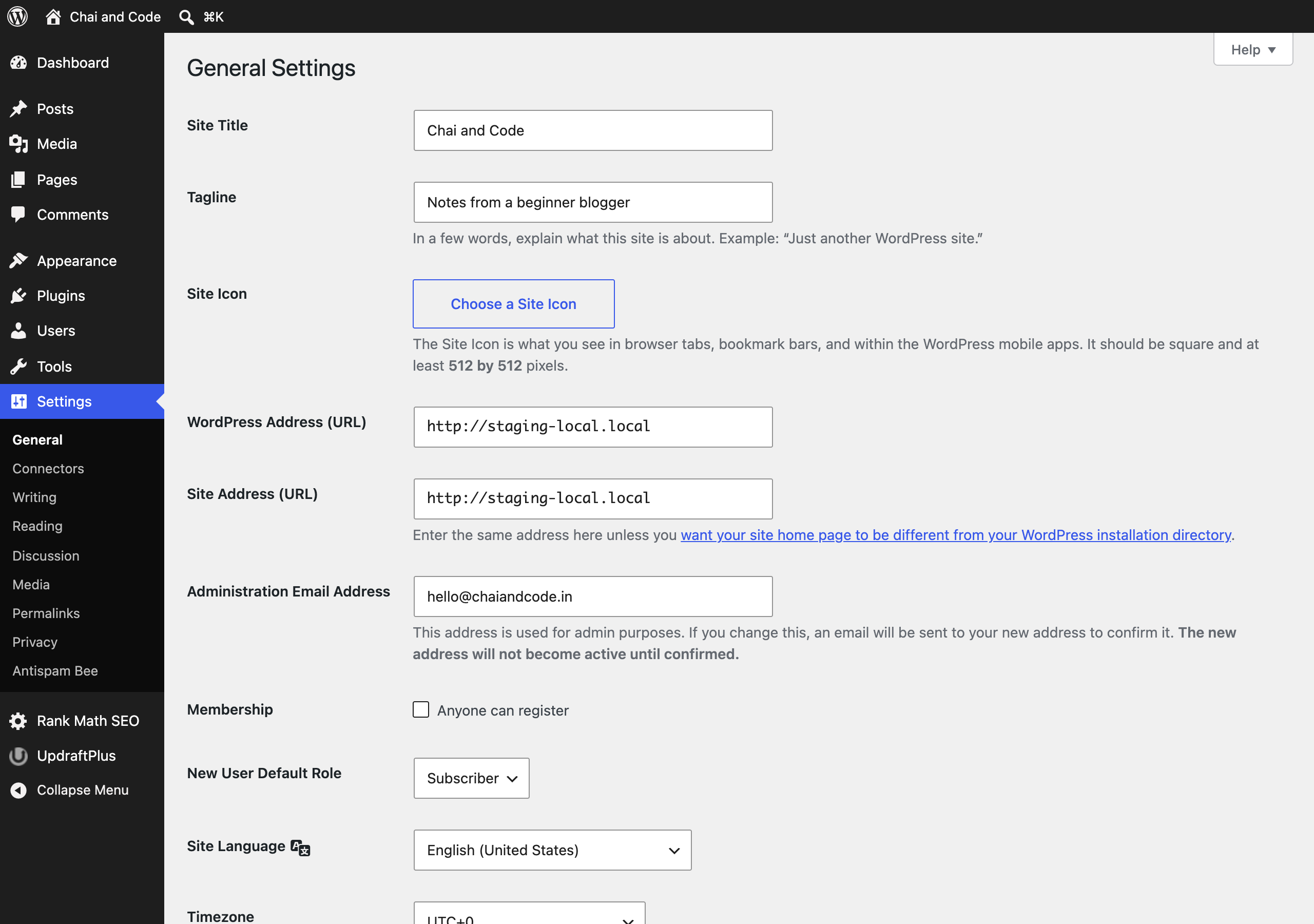
Once you are logged in, change these six settings before you write a single post. I did the screenshots below on a fresh WordPress 7.1.2 install so you can see exactly where each one lives. If you have never used WordPress before, my WordPress tutorial for beginners walks through the whole dashboard lesson by lesson.
Settings, General. The title is your blog's name, the tagline is one line about what it covers. Both show in search results and browser tabs, so replace WordPress's defaults. Set your timezone on the same screen so scheduled posts go out when you expect.
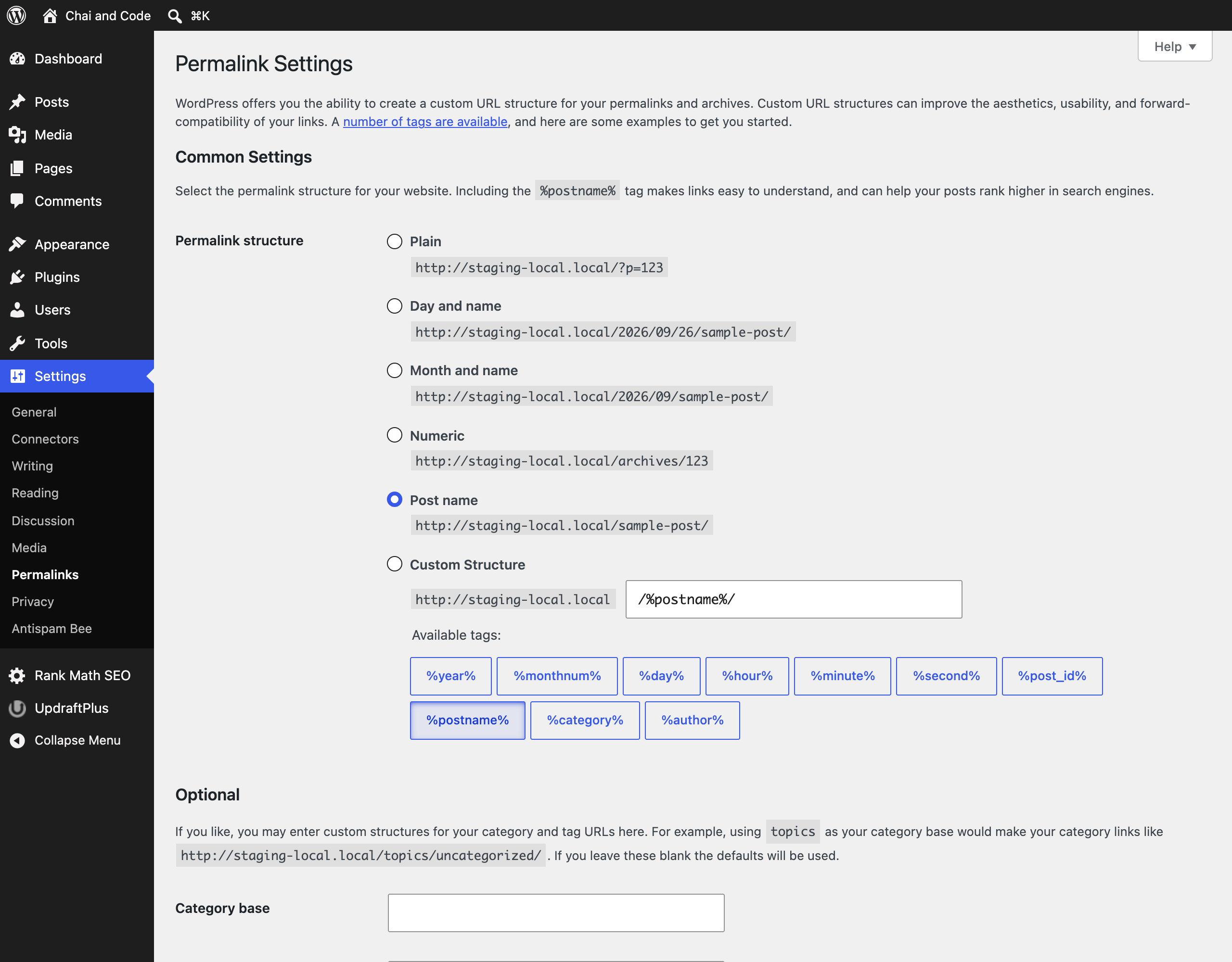
Settings, Permalinks. Choose Post name. It gives clean URLs like yourblog.com/instant-pot-review/ instead of ?p=123. Do this now, because changing it after posts are indexed breaks every link to them.
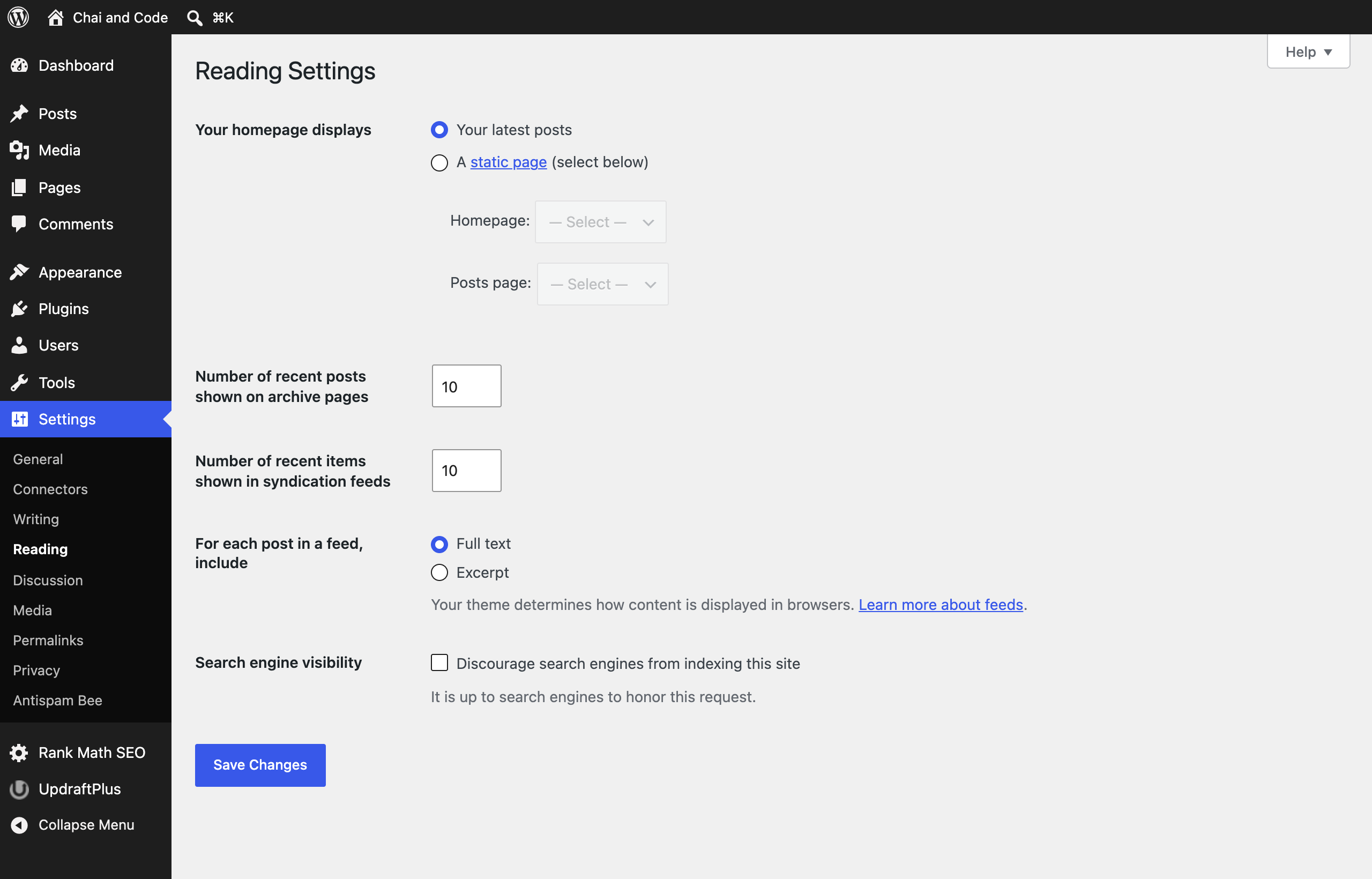
Settings, Reading. Make sure Discourage search engines from indexing this site is unticked. Some installers tick it during setup, and while it stays ticked Google can ignore your blog no matter how good the posts are. It is the first thing I check when someone tells me their new blog is invisible.
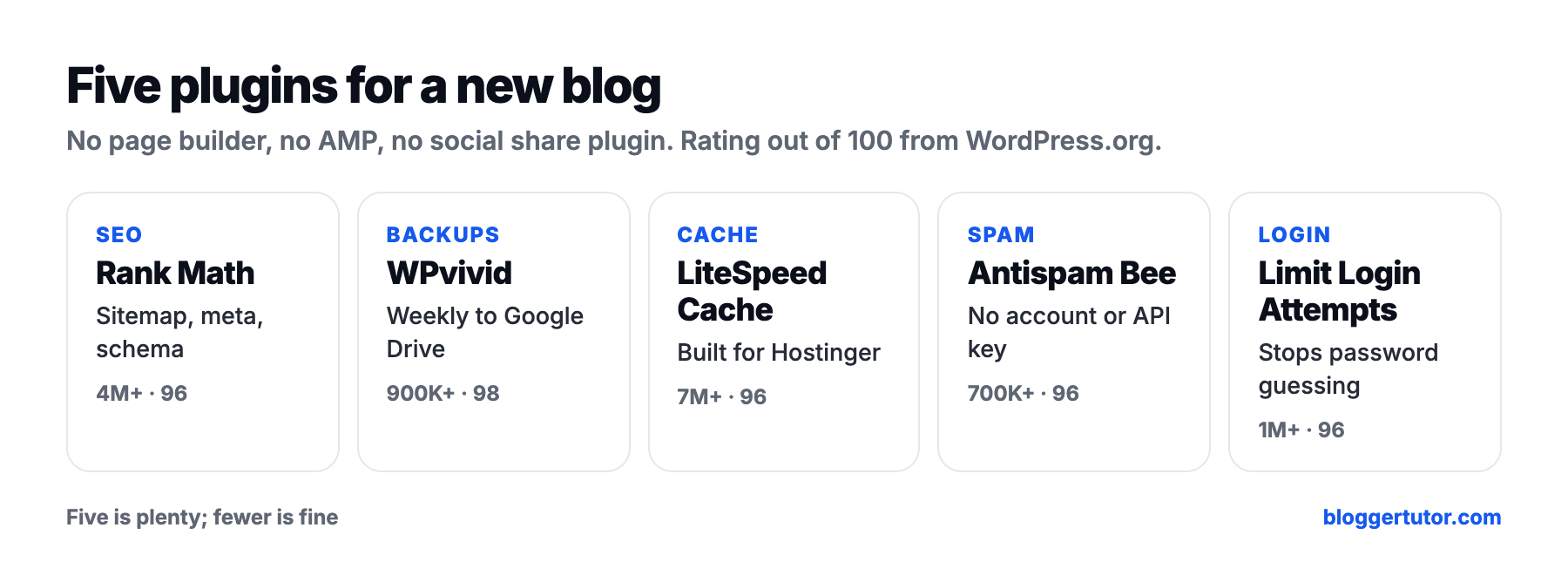
Pick one lightweight theme and install no more than five plugins to begin with. Every plugin is code that loads on your site and needs updating, and on a new blog, plugins rather than hosting are usually what makes it slow.
For a blog, I recommend Kadence or Blocksy, both free with optional paid versions, both fast, both built for the block editor. I compared them in detail in Kadence vs Blocksy, and Bloggertutor itself runs on Blocksy. If you like Astra, my Astra review covers whether it is still worth it.
| Theme | Active installs | Rating on WordPress.org |
|---|---|---|
| Kadence | 500,000+ | 98 out of 100 from 455 ratings |
| Blocksy | 300,000+ | 100 out of 100 from 872 ratings |
| Astra | 1,000,000+ | 98 out of 100 from 6,531 ratings |
| GeneratePress | 500,000+ | 98 out of 100 from 1,427 ratings |
| Job | Plugin | Active installs | Rating | Why |
|---|---|---|---|---|
| SEO | Rank Math SEO | 4,000,000+ | 96 out of 100 | Sitemaps, meta tags, schema and Search Console data in one plugin |
| Backups | WPvivid Backup | 900,000+ | 98 out of 100 | Free scheduled backups to Google Drive, Dropbox or OneDrive, plus a free staging site |
| Spam | Antispam Bee | 700,000+ | 96 out of 100 | Blocks comment spam with no account or API key |
| Caching | LiteSpeed Cache | 7,000,000+ | 96 out of 100 | Free full page caching on LiteSpeed hosting such as Hostinger |
| Login security | Limit Login Attempts Reloaded | 1,000,000+ | 96 out of 100 | Stops bots guessing your password |
That is it. No page builder, no social sharing plugin, no AMP (Google stopped requiring AMP for Top Stories years ago, and I no longer recommend it). If you are choosing between SEO plugins, my Rank Math vs Yoast comparison explains why I use Rank Math, and WPvivid vs UpdraftPlus covers backups in depth.
A backup lesson I learned the hard way
A backup plugin that says “succeeded” is not proof that a backup exists. Once a month, download your latest backup and check it actually contains your database and uploads folder. It takes five minutes, and it is the only way to know you could recover from a bad update or a hacked site.
Google Search Console is the free tool that tells you which searches show your blog, how often people click, and what is broken. Verify your site, submit your sitemap (Rank Math creates it at yourdomain.com/sitemap_index.xml) and then leave it alone for a few weeks while data builds up.
My step by step guide to verifying a site in Search Console covers every method, and here is the short video version in Hindi:

Two newer additions belong on your list. First, Search Console now has Generative AI performance reports, rolled out to every site by 31 August 2026, which show how often your pages appear in AI Overviews and AI Mode. Second, add your site to Bing Webmaster Tools as well. It takes two minutes, it can import your Search Console setup, and Bing supports IndexNow, which tells it about new posts instantly. I explain how to switch that on in my Rank Math instant indexing guide.
You do not need a paid keyword tool in your first six months. Google shows you what people search for, for free, on every results page:
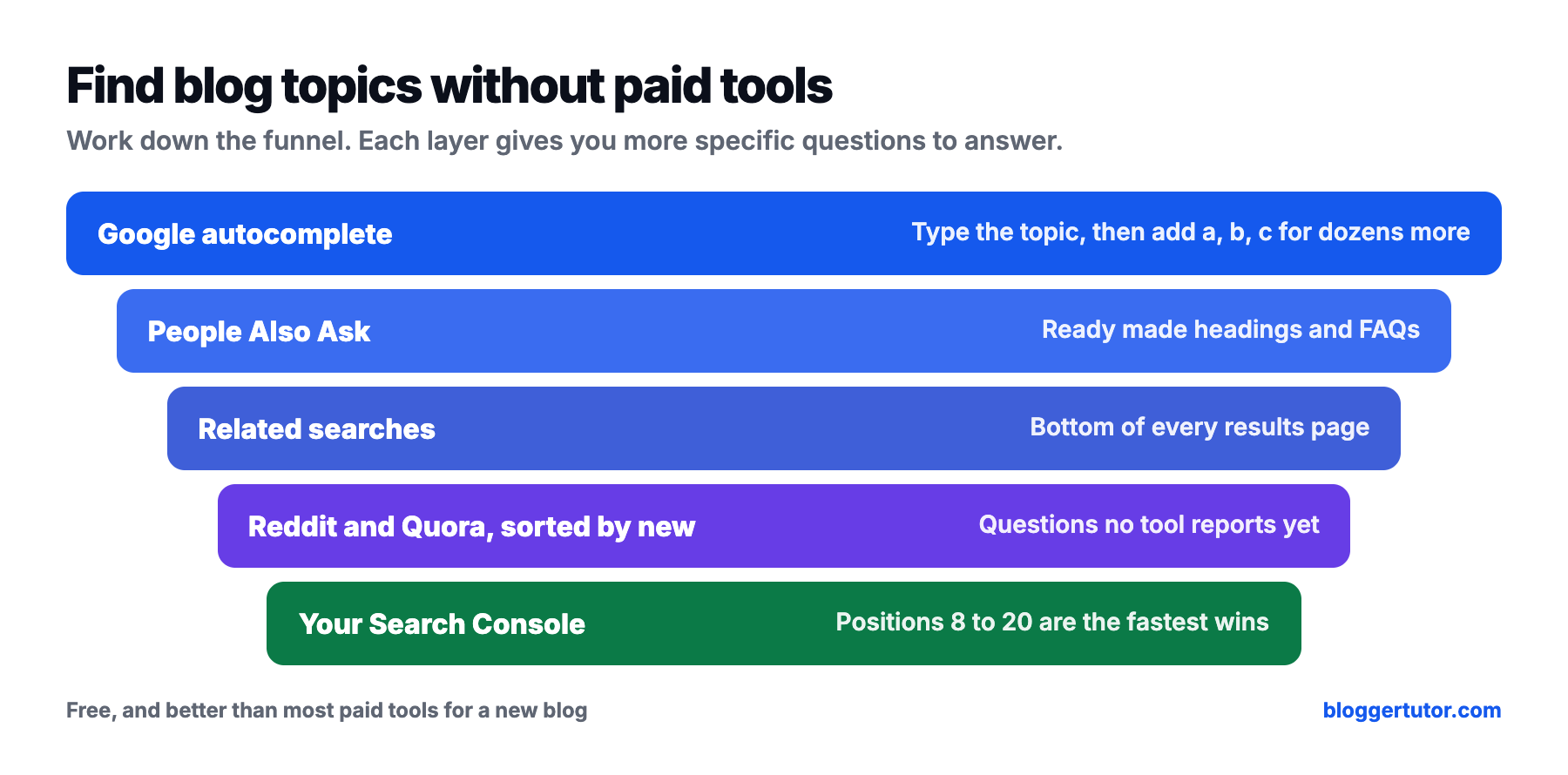
Longer, conversational questions are worth more attention than they used to be. Pew found that searches of ten words or more trigger an AI summary about half the time, which sounds like bad news, but it also means Google is actively looking for pages that answer specific questions clearly. When you are ready for a paid tool, my notes on SEO tools cover what each is good for.
The posts that win in 2027 answer the question immediately, prove the answer with something only you have, and then go deeper than any other page. Here is what each part looks like in practice.
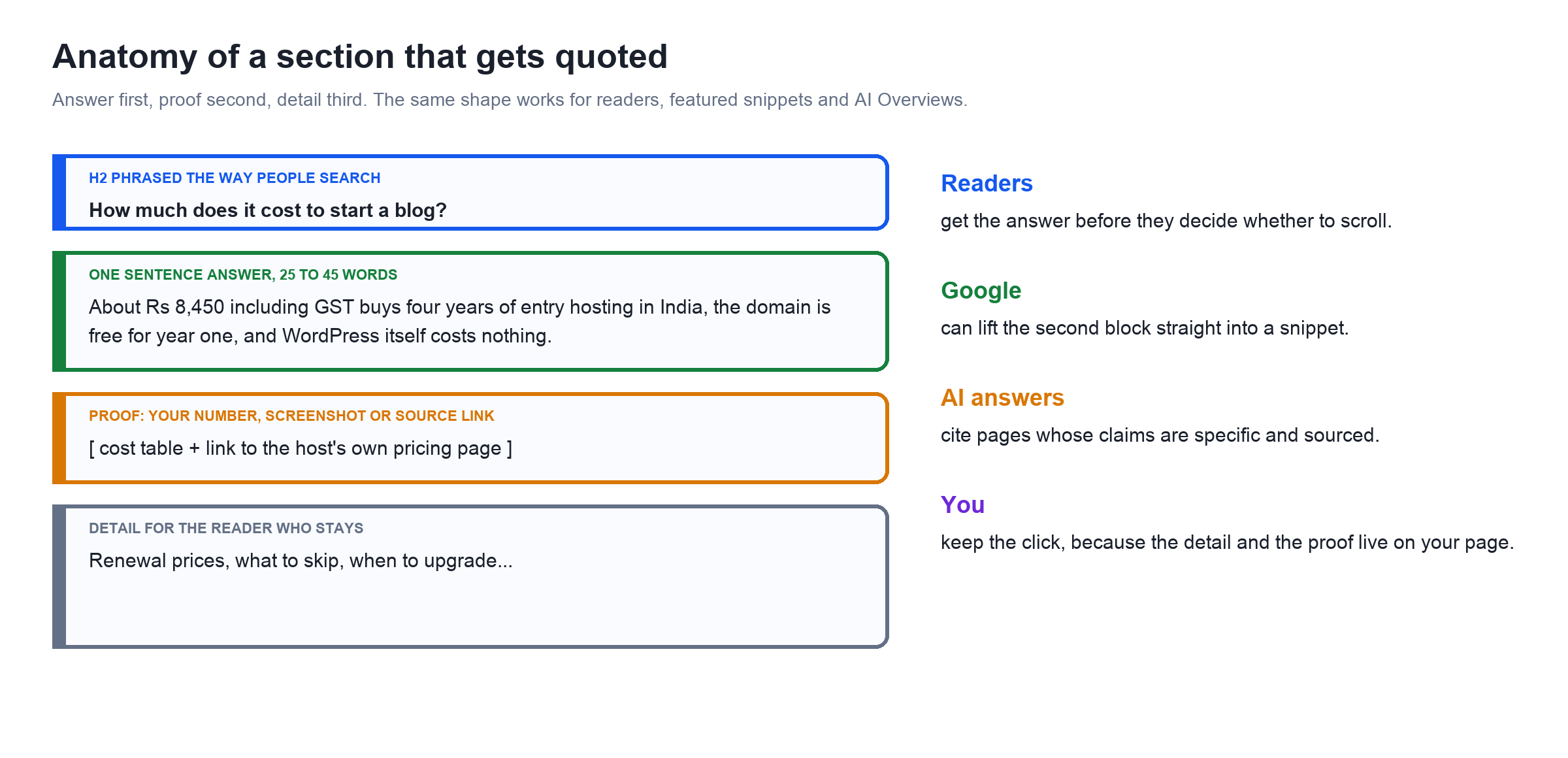
Put the direct answer in the first one or two sentences under each heading. Readers decide in seconds whether a page is worth their time, and Google can lift a clear sentence straight into a featured snippet. Phrase your headings the way people search: “How much does it cost to start a blog?” rather than “Costs”.
Your own photos, screenshots, measurements, prices you paid, mistakes you made, results you tracked. Google's helpful content questions ask directly whether content provides original information, reporting, research or analysis. The 2026 Orbit Media blogging survey of 1,042 content marketers found that original research improves the odds of strong results by 50%, and that bloggers who use six or more proven practices are nearly three times as likely to report strong results.
The average blog post in that same survey is 1,312 words and takes 3 hours 20 minutes to write. Length is not the goal, but a post that covers the follow up questions too, with a table, a checklist or a worked example, is the one readers bookmark and other sites link to.
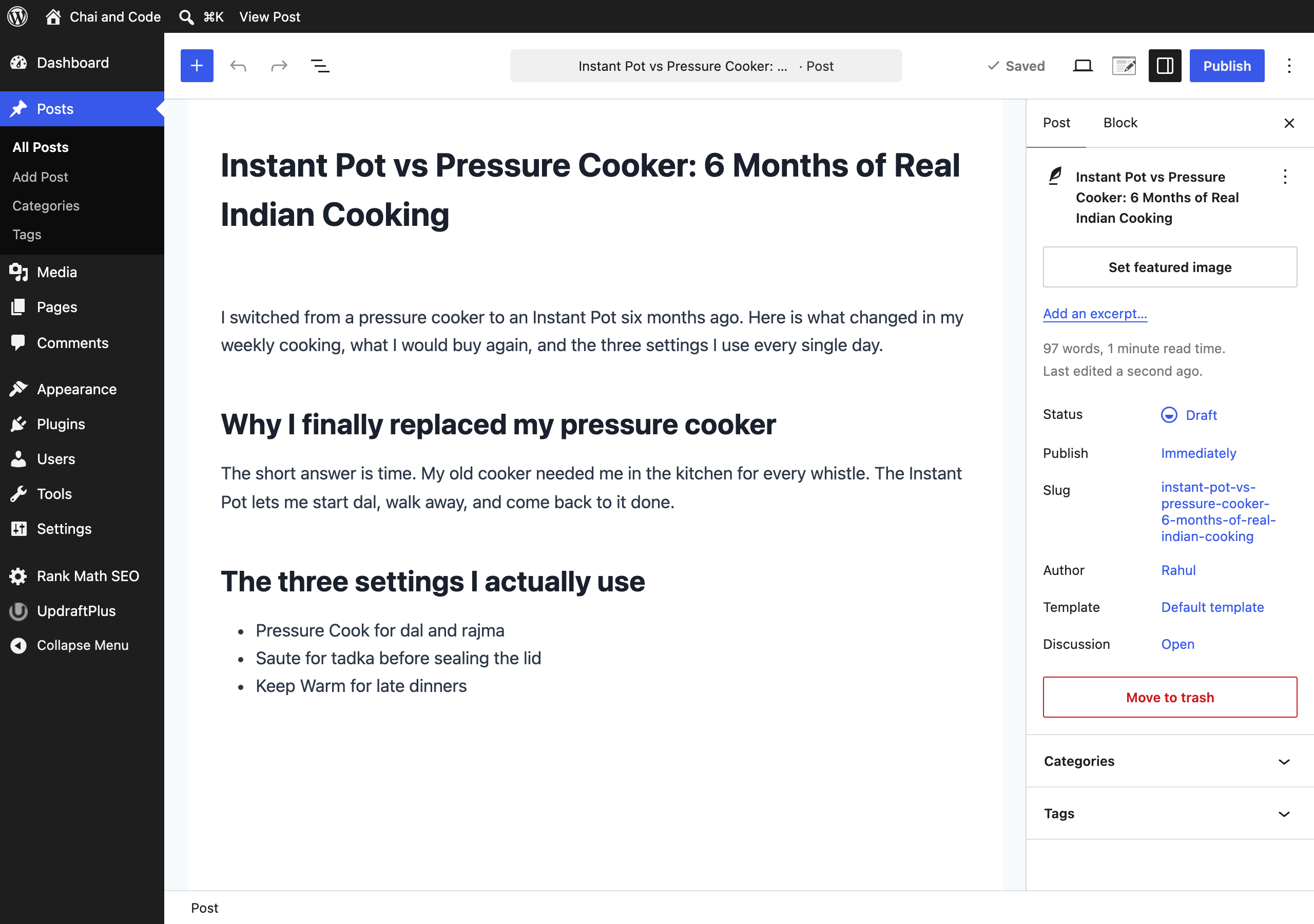
Using AI is not against Google's rules. Its guidance on generative AI content says AI can help with research and structure, as long as you focus on accuracy and quality. What its spam policies forbid is scaled content abuse: publishing many pages generated to manipulate rankings without adding value. Search Engine Journal has reported manual actions against sites doing exactly that since June 2025.
Orbit found 92.4% of bloggers now use AI, and that AI use on its own correlates with nothing: it neither makes results strong nor weak. My rule is simple. Use it to outline, to check what you missed, to tidy grammar. Never publish a sentence you would not put your name to, and never let it invent a number.
On page SEO is making it easy for Google to understand what a page is about and easy for readers to use it. It is not tricks. For a new blog with no backlinks, it is most of what you control.
| Element | What to do |
|---|---|
| Title (H1) | Include the main phrase naturally, near the start, under 60 characters for the SEO title. |
| URL slug | Short and descriptive: /instant-pot-review/. Never change it once the post ranks. |
| Meta description | Under 160 characters, a reason to click rather than a summary. |
| Headings | One H1, then H2s that match real questions, H3s for sub points. |
| Internal links | Two or three to related posts, with descriptive anchor text. |
| Images | Compressed, descriptive file names, alt text that describes what the image shows. |
| Schema | An SEO plugin adds article schema automatically. Add FAQ or review schema only when the page has that content. |
| Speed | Good Core Web Vitals: LCP within 2.5 s, INP under 200 ms, CLS under 0.1. |
Those speed thresholds come from Google's web.dev documentation, measured at the 75th percentile of real visits. My WordPress speed guide and free Cloudflare setup get most blogs there. For the rest of the on page list, see my on page SEO guide.
Internal links deserve special attention because beginners neglect them. As Helen Pollitt explained in Search Engine Journal, backlinks bring authority into a site and internal links spread it around. Links between closely related posts strengthen each other, which is one more reason to keep your blog to a few connected topics.
You also do not need special tricks for AI search. Google's AI features guide says optimising for them is still SEO, and Search Engine Journal's summary notes it calls llms.txt files and content “chunking” unnecessary. Write clear, specific, well sourced pages and you are doing AI optimisation already.
Start building an audience you own from the first week, because search traffic takes months to arrive and can change overnight. Search Engine Journal's Shelley Walsh put it well in July 2026: owned distribution, meaning newsletters, followers and members, is the only kind that cannot be taken away.
Bloggers make money mainly from affiliate commissions, display ads, their own products and sponsorships, roughly in that order of how early they start working. Bloggertutor has always earned mainly through affiliate programs for tools I actually use, with AdSense as a small extra, and I would take the same route again.
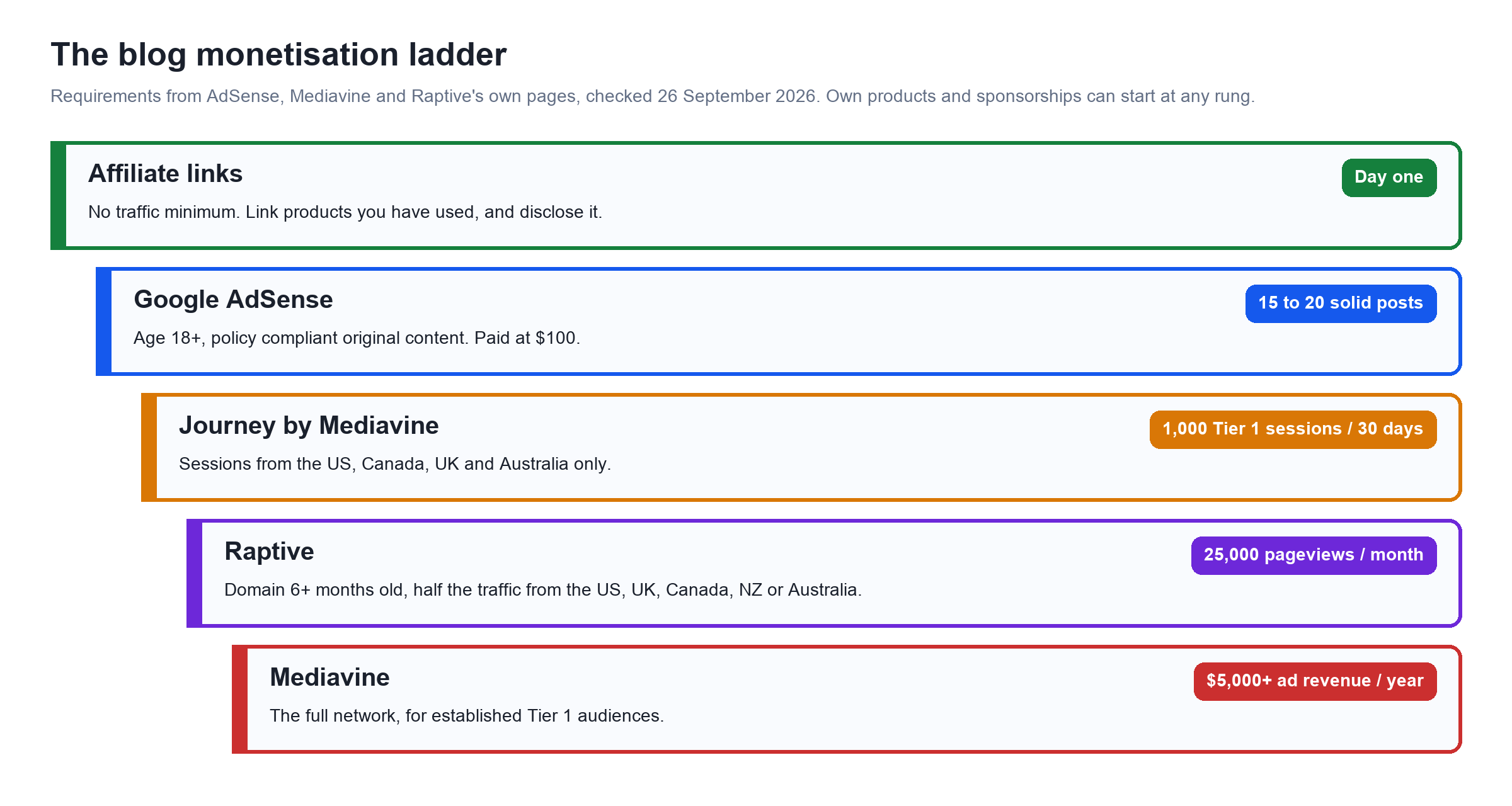
| Method | When it makes sense | Entry requirement (checked September 2026) |
|---|---|---|
| Affiliate links | From your first buying guide or review | Varies by program. Amazon India pays by category, from 1% on phones to 10% on apparel and beauty; Hostinger starts at 40% |
| Google AdSense | Once you have 15 to 20 solid posts and steady visitors | Age 18+, original content that meets policies; paid at $100, by wire transfer in India |
| Journey by Mediavine | When US, UK, Canadian or Australian readers arrive | 1,000 sessions from Tier 1 countries in 30 days |
| Mediavine | An established, mostly Tier 1 audience | $5,000+ in annual ad revenue |
| Raptive | About 25,000 pageviews a month | 25,000 monthly pageviews, domain 6+ months old, 50% traffic from the US, UK, Canada, NZ or Australia |
| Your own product | When readers keep asking you the same question | None. An ebook, template, course or consulting |
| Sponsored posts | When brands in your niche notice you | None, but always disclose |
If most of your readers are in India, read this part twice. Journey by Mediavine counts only sessions from Tier 1 countries (the US, Canada, the UK and Australia), and Raptive wants at least half of your traffic from the US, UK, Canada, New Zealand or Australia on smaller sites. An Indian audience blog will usually start with AdSense and affiliates, which is exactly why Raptive cutting its threshold to 25,000 pageviews helps global niches more than local ones.
This is the lesson from the original version of this guide that still holds. On a post about ranking on Google, the reader wants SEO tools. A banner for an unrelated sale gets ignored and makes the page look like an ad farm. Match every affiliate link and every ad placement to the intent of that specific post, and disclose affiliate relationships clearly, as I do on my affiliate disclosure page.
I learned the flip side of this myself. For years Bloggertutor used an auto linking feature that turned every mention of a brand into an affiliate link. It looked efficient until I audited the site and found hundreds of links nobody had asked for, some inside table headings. I cut every brand to one automatic link per page. If you use link cloaking or auto linking, cap it from day one.
For the complete breakdown of each income stream, read how to monetise your audience properly, and if affiliate income is your main goal, how to create an affiliate website that earns. Already on AdSense? My guide to increasing AdSense RPM covers the settings that matter.
Plan on 9 to 18 months before a new blog earns meaningful money, and treat anything sooner as a bonus. That is not pessimism, it is what the data says about new pages in Google.
Ahrefs' 2025 study of over a million pages found that only 1.74% of newly published pages reached the top 10 within a year, and the average page ranking first was five years old. New pages do rank, but most rankings are earned slowly, by pages that are kept up to date. Google has also confirmed smaller core updates happen continuously, so improving a post can lift it without waiting for a big named update.
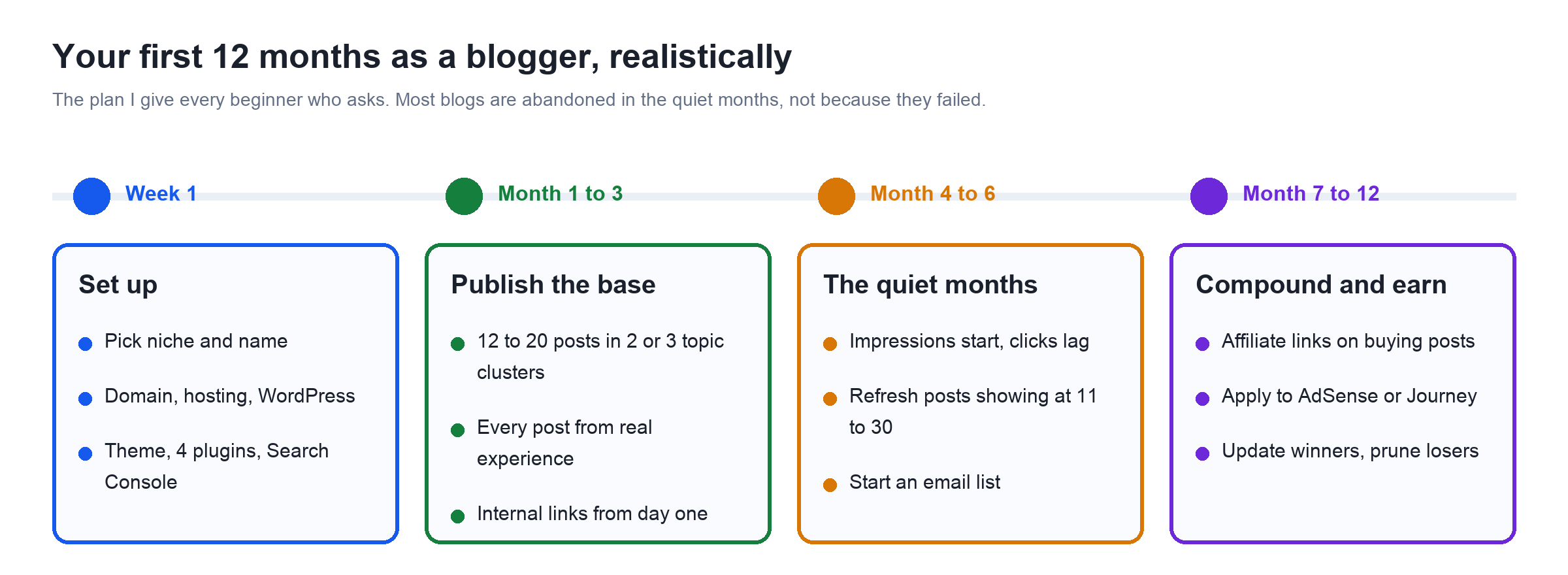
The months that kill most blogs are four to six. Search Console shows impressions, the clicks barely move, and it feels like nothing works. It is working. That is when you refresh the posts sitting on page two, which Search Engine Journal's Adam Riemer recommends whenever new data, new reader questions or a better format appear, and keep publishing.
Updating a guide properly means admitting what it told people that I would not tell them now. These were all in the original, and all have been removed:
The biggest thing I would change about how I started, though, is focus. My early posts covered hosting, earning money, SEO and random tech. The ones that grew were the subjects I kept writing about in depth, WordPress themes and plugins. Pick your two or three topics and stay with them.
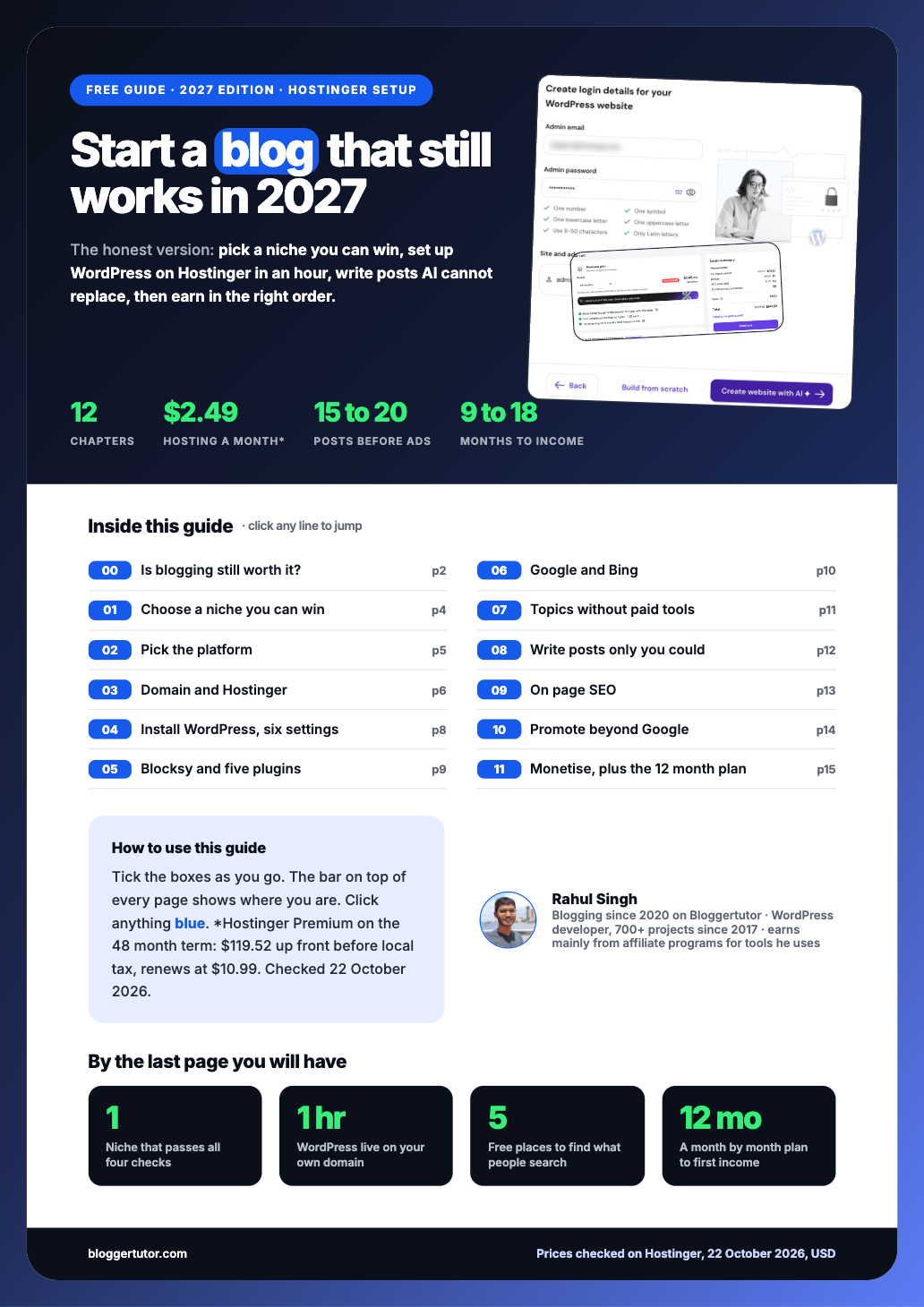
Everything above in 16 designed, printable pages with a chapter progress bar on every page, Hostinger edition: is blogging still worth it, the niche Venn test, the platform choice, buying and installing on Hostinger, the five plugin stack, the topic research funnel, the post anatomy and quality checklist, on page SEO, the monetisation ladder and your first 12 months.
If you get stuck on any step, leave a comment below. I read and answer them, and the best questions end up in the next update of this guide.
It usually means spending 20% of your time creating content and 80% promoting it. It is a useful correction for people who publish and wait, but on a brand new blog I would flip it for the first three months, because you need 15 to 20 strong posts before there is much worth promoting. After that, split your time far more towards promotion, updating and email.
The easiest free way is Blogger or the free WordPress.com plan, where you can publish within ten minutes. The easiest way to start a blog you can properly earn from is WordPress on a host with a one click installer, which takes under an hour including buying the domain.
Yes. WordPress.com alone reports about 70 million new posts and 409 million readers every month. What changed is how people find blogs: Google now answers simple questions itself, so blogs with original experience and opinions do well and generic ones struggle.
Nothing has replaced it, but short video and newsletters have grown alongside it, and AI summaries now answer basic questions directly. HubSpot's 2026 State of Marketing report still found websites, blogs and SEO to be the most popular and impactful channels. The smartest bloggers now use all three: a blog as the home base, email to own the audience, and short video to reach new people.
There is no single rate. Ad income per 1,000 views, called RPM, depends heavily on your niche and on where your readers live, and Indian traffic usually earns much less per view from ads than US traffic. Affiliate posts that help people choose a product can earn far more per 1,000 views than ads. Work out your own RPM as earnings divided by pageviews, multiplied by 1,000.
Not by the blogging platform, with a few exceptions such as Medium's Partner Program and paid Substack subscriptions. Most bloggers get paid through affiliate commissions, display ads, their own products and sponsored posts, which the monetisation section of this guide covers in order.
Yes, on Blogger, the free WordPress.com plan, Medium or Substack. A self hosted WordPress blog you fully own costs a domain, about $11 a year at Porkbun, plus hosting from $2.24 a month on Hostinger's 48 month term with my code WPRAHUL. The WordPress software itself is free.
Focused blogs are. The entry bar for premium ad networks has dropped: Raptive cut its minimum to 25,000 monthly pageviews and Journey by Mediavine now starts at 1,000 Tier 1 sessions a month. Generic blogs built on rewritten information are the ones losing money.
Pick a subject you know from experience, register a domain, install WordPress on entry level hosting, change the six basic settings, add a light theme and five plugins, connect Google Search Console, and publish 15 to 20 genuinely useful posts. The steps above walk through each one.
For a blog you want to earn from, self hosted WordPress. It is free software, it runs about 40% of all websites, and nothing limits what you can add later. If you only want to try writing first, Blogger is the simplest free option.
Mainly through affiliate links, display ads like AdSense and later Mediavine or Raptive, selling their own products such as ebooks and courses, and sponsored posts. Affiliate income usually starts first because it needs no traffic threshold.
Blogger if you want free with a custom domain and AdSense built in. Substack if you mainly want a newsletter. The free WordPress.com plan is also fine for practice, but it shows WordPress.com ads and does not allow plugins.
The most profitable niche is the one where you have real experience and readers buy things: software and tools, personal finance for a specific country, hobbies with gear, home and kitchen, career skills. A high paying niche you know nothing about will lose to one you have lived.
Plan on 9 to 18 months before meaningful income. Ahrefs found only 1.74% of new pages reached Google's top 10 within a year, so the first months are about building a base of posts, not earning.
Yes. Many software and hosting affiliate programs pay in dollars or euros, and AdSense pays Indian publishers by wire transfer. The snag: ad rates and premium ad networks both favour readers from the US, UK, Canada and Australia, so to earn dollar level income you need to write for a global audience, not only an Indian one.
Google does not publish a minimum post count. It wants original content that follows its policies and an applicant aged 18 or over. In practice, 15 to 20 substantial, original posts and an about page, contact page and privacy policy give you the best chance.
Use it as an assistant, not as the author. Google's guidance allows AI for research and structure but treats mass produced pages without added value as spam. The parts that make a post worth ranking, your experience, photos, tests and opinions, are exactly the parts AI cannot supply.